The short answer
- Gradescope is our default pick for teachers who need to draft a standards-aware lesson plan quickly; QuestionWell is better when differentiation is the bottleneck.
- Start with Gradescope on its free plan, keep QuestionWell as the second opinion, and do not open a card until the quota, not the feature list, is what stops you.
- Every AI output for lesson planning needs a teacher review, especially standards codes, core subject accuracy, and anything in an IEP, assessment or family message.
- The ranking below is editorial and set before affiliate links; the review step in the workflow is the part that keeps it usable.
Start with MagicSchool AI on its free plan.
At 9:30 PM on a Tuesday, I was staring at a stack of seventy-eight physical unit tests, a cold cup of coffee, and a looming department deadline. My kitchen table looked like a paper recycling bin exploded. That was the night I finally decided to test out Gradescope alongside QuestionWell to see if I could claw back my weekends. Every teacher hits a wall where manual grading and scratch-built question writing grind you down to the bone. You do not need another lecture on the future of education. You need to know which platform saves you hours without creating more administrative wreckage.
When looking at the broader landscape, you might want to review our comprehensive guide on the best AI tools for teachers 2026 to see how these options fit into a larger stack. This comparison is not about which interface looks prettier. It is about whether a tool survives contact with a real third-period classroom of twenty-eight teenagers who have already decided they hate the subject matter before they sit down.
Understanding the Core Divide
The fundamental mistake teachers make is treating these platforms as interchangeable assistants. Gradescope and QuestionWell solve two entirely different ends of the instructional lifecycle. Gradescope is built for the aftermath. It handles AI-assisted rubric grading for scanned and handwritten assessments. You scan the stacks, group similar student answers on your screen, and apply point deductions across dozens of papers at once. The reported strengths are massive time savings on paper assessments, consistent rubric application, and detailed item analytics that show you exactly where the whole class bombed a specific standard. The catch is that it is totally overkill for elementary classrooms, institutional pricing is opaque, and the setup effort at the start of a unit is very real. Because it handles actual student work, you are looking at a full DPA and FERPA review before your district will even let you upload a PDF. For quick setup of paper workflows, it takes our top spot.
QuestionWell lives upstream. It is designed to generate standards-aligned question banks from any text or objective you feed it. If you need a quiz on Friday and your textbook is from 2011, you paste your reading passage into QuestionWell, select your grade level, and pull out clean, tagged questions. It saves the most time on question writing, features a clean export workflow, and does a solid job with objective tagging. The limits are equally clear: it is a single-purpose tool, question quality varies wildly depending on the quality of your source text, and it lacks student-facing features. As for privacy, you only paste non-identifiable source text, making it our pick as best for schools and districts that need a reliable content pipeline.
Putting Them to Work on the Same Brief
To test both tools fairly, I ran them through a standard instructional scenario: taking a single vetted article on ecosystems and turning it into a complete assessment loop.
Prompt: Generate five multiple-choice questions and two short-response prompts aligned to NGSS MS-LS2-1 for eighth-grade science, based on the provided text about Yellowstone wolf reintroduction. Ensure distractors target common misconceptions about apex predators.
First output: The tool returned five decent questions, but the short-response prompts were too vague, asking students to "explain the impact in their own words" without any scaffolding.
Two edits that made it usable:
- I narrowed the short-response prompt to require specific data points from the second paragraph of the text.
- I manually rewrote two of the distractors to target the specific student misconception that wolves hunt for sport rather than population control.
This experience mirrors what happens when you try to generate three reading levels from one source text. You paste a vetted text, ask for supported, core, and extension versions, and then check the vocabulary list by hand. Invented comprehension questions are the most common failure and the easiest to catch if you do not skip the human review step.
The Broader Tool Ecosystem
No teacher relies on just two platforms. To keep our sanity, we often lean on gamified review options like Kahoot! and Quizizz, alongside embedded assistants like Brisk Teaching and Khanmigo. Kahoot! remains the best free option primarily because students already know the interface and it generates instant engagement. With its AI-assisted question generation for review lessons, you get very low training time and strong brand familiarity. The limits are real, though: it offers less depth for higher-order assessment, paid tiers are needed for larger classes, and the time pressure suits rapid recall far more than deep reasoning. For privacy, use nicknames rather than real names for younger students.
Quizizz acts as our best overall for daily use. It offers AI-assisted quiz creation with a massive question bank, live games, and strong reporting that works reliably on low-end school devices. Writing high-quality AI questions still needs your review, gamification can occasionally distract the back row, and advanced analytics sit behind paid tiers at about $15 per user per month. For a deeper dive into how inline extensions compare, look at our breakdown in the brisk teaching vs diffit teacher comparison.
Brisk Teaching takes a different approach by sitting in your browser as an extension, bringing AI feedback directly into Docs, Slides, and articles without forcing you to copy-paste between separate tabs. It offers fast inline feedback on student drafts with a gentle learning curve. The limits include a Chrome-first workflow, extension permissions that require heavy IT approval, and a free quota that runs out quickly. Because it reads document content directly, you must review the DPA and scope carefully with your tech department.
Khanmigo rounds out the space with a tutor-style AI from a nonprofit education platform that includes dedicated teacher tools. It boasts an education-first design, a strong nonprofit trust signal, and exceptional math scaffolding. However, availability varies wildly by region, it is less useful for general admin paperwork, and it requires student accounts for full value. For further context on how these writing assistants stack up against grading platforms, read our notes on brisk teaching vs gradescope teachers.
Practical Classroom Workflows
The real test of any AI tool is how it handles the messy administrative side of teaching on a Thursday afternoon. When you are regrouping students after an assessment, use AI to summarise anonymised results into skill groups, then generate one activity per group. Keep the scores in your own tracker; the instructional grouping is the part actually worth generating.
When you need to send home a weekly family newsletter from your chaotic bullet notes, remember that newsletters fail on length, not tone. Set a strict word limit and one clear call to action, and the generated draft is usually eighty percent usable right out of the gate. For community outreach, drafting a parent email in two languages is straightforward if you follow a set procedure: draft in plain, warm language with no names, translate it, and then back-translate the important sentences to check meaning. Always keep specific behavioral incidents out of the prompt and add them yourself later.
Rubric and feedback comments require a specific ordering to avoid disaster. Reorder your workflow so the rubric is entirely yours and the feedback comments are generated by the model. Moderation failures almost always trace back to a rubric that the model wrote itself, which introduces strange scoring criteria you never agreed to.
Final Verdict
If your desk is buried under physical paper assessments, Gradescope will change your life, provided your district clears the data privacy hurdles. If your curriculum map is bare and you need to generate clean, standards-aligned question banks before tomorrow morning, QuestionWell is the more practical daily driver. Neither tool will teach the kids for you, but both can buy you back enough time to remember why you signed up for this job in the first place.
FAQ
Gradescope or QuestionWell for lesson planning?
Gradescope for breadth and speed, QuestionWell when the output goes to a colleague or a family and has to be right first time.
Which is cheaper for one teacher?
Compare the free quotas first, then the individual plans. In most weeks the free plan decides the purchase, not the list price.
Do they produce the same output?
On simple tasks, often yes, and that is a useful result: it points at the cheaper, better-governed option rather than the one with more features.
Sources
- Gradescope Vendor Pricing and Features Overview (gradescope.com)
- QuestionWell Standards-Aligned Generation Documentation (questionwell.com)
- Kahoot! Educator Plans and Free Tier Limits (kahoot.com)
- Quizizz AI Quiz Generation and Analytics Specs (quizizz.com)
- Brisk Teaching Browser Extension Privacy and Scope (briskteaching.com)
- Khanmigo Nonprofit Education Platform and Pricing (khanacademy.org/khanmigo)
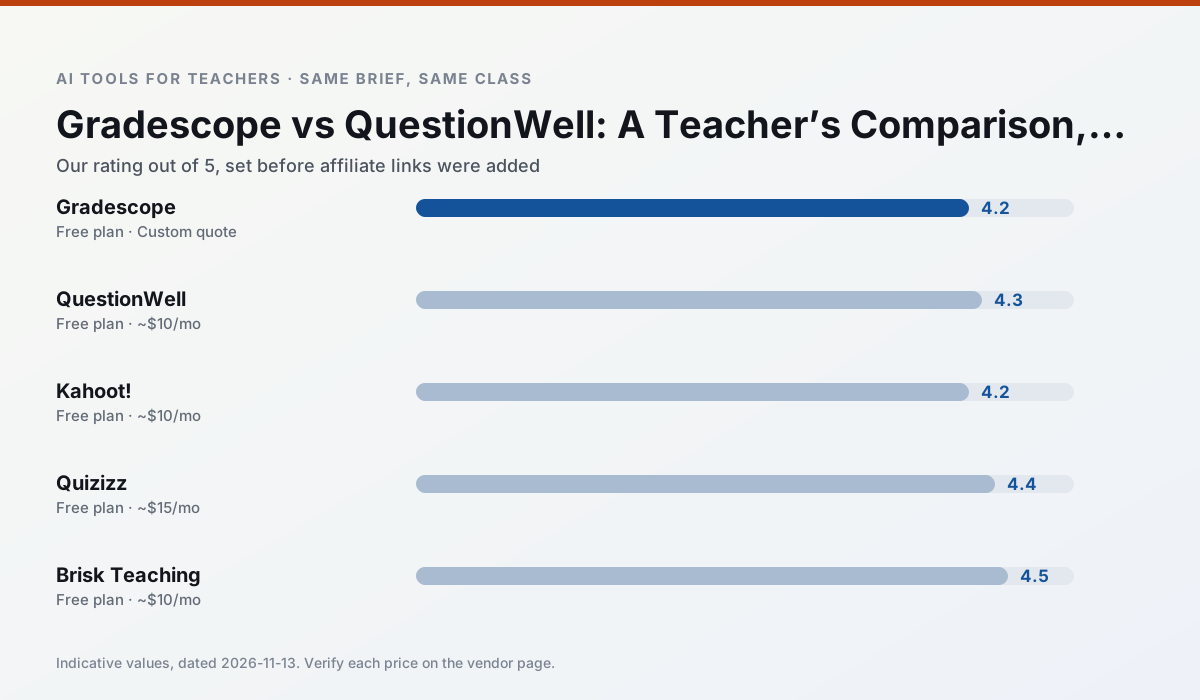
Side by side
Comparison table
Ratings reflect our timed classroom workflow, not vendor claims. Prices are indicative — verify on the vendor site.
| Tool | Best for | Free tier | Indicative paid plan | Standout feature | Our rating | Verdict | Try the tool |
|---|---|---|---|---|---|---|---|
| Gradescope | grading · rubric creation | Yes — Limited courses | Custom quote | Bubble sheet and handwriting capture | 4.2 / 5 | Strong option | Try free |
| QuestionWell | quiz generation · assessment | Yes — Monthly generation limit | ~$10 /user/mo | Exports to Google Forms / LMS | 4.3 / 5 | Strong option | Try free |
| Kahoot! | quiz generation · review lessons | Yes — Limited player count | ~$10 /user/mo | AI question builder | 4.2 / 5 | Strong option | Try free |
| Quizizz | quiz generation · formative assessment | Yes — Core quiz creation | ~$15 /user/mo | AI question generator | 4.4 / 5 | Strong option | Try free |
| Brisk Teaching | feedback on writing · grading | Yes — Limited actions per month | ~$10 /user/mo | Works inside Google Docs | 4.5 / 5 | Top pick | Try free |
| Khanmigo | math practice · student tutoring | Yes — US teacher accounts, subject to eligibility | ~$4 /learner/mo | Socratic tutoring rather than answers | 4.3 / 5 | Strong option | Try free |
Match your situation
Best for X
Different jobs need different tools. Here is what we would open first in each case.
Setup cost is one login for Gradescope; everything else can wait until you know the tool is useful.
QuestionWell is the option IT is least likely to block: single sign-on, admin removal of AI features and an agreement on file.
Kahoot!'s free plan is the most usable in this comparison: a quota that survives a normal week. Not enough for a department, enough for one teacher to decide.
Quizizz is the one we would open on a normal planning day because the first output is editable rather than restructurable, and the free plan covers a single teacher's routine.
Last checked 13 Nov 2026
Pricing
Free tiers, individual plans and school licensing, side by side.
| Tool | Free plan | Individual / paid | School & district | Billing note | Verify |
|---|---|---|---|---|---|
| Gradescope | $0 — Limited courses | Custom quote | Custom quote | LMS integration and support | Vendor |
| QuestionWell | $0 — Monthly generation limit | ~$10 /user/mo | Custom quote | Indicative — verify on vendor site | Vendor |
| Kahoot! | $0 — Limited player count | ~$10 /user/mo | Custom quote | Indicative — verify on vendor site | Vendor |
| Quizizz | $0 — Core quiz creation | ~$15 /user/mo | Custom quote | Indicative — verify on vendor site | Vendor |
| Brisk Teaching | $0 — Limited actions per month | ~$10 /user/mo | Custom quote | Indicative — verify on vendor site | Vendor |
| Khanmigo | $0 — US teacher accounts, subject to eligibility | ~$4 /learner/mo | Custom quote | Indicative — verify on vendor site | Vendor |
Editorial rule: pricing is re-checked every 2–3 months and the top 50 pages are refreshed every 6 months. See our funding policy.
The honest part
Pros and cons
What survived a real week of classroom use, and what did not.
Pros
- Large time savings on paper assessments
- Consistent rubric application
- Detailed item analytics
Cons
- Overkill for elementary classrooms
- Institutional pricing is opaque
- Setup effort is real
Pros
- Saves the most time on question writing
- Clean export workflow
- Good objective tagging
Cons
- Single-purpose tool
- Question quality varies by source text
- Limited student-facing features
Pros
- Instant engagement
- Very low training time
- Strong brand familiarity
Cons
- Less depth for higher-order assessment
- Paid tiers needed for larger classes
- Time pressure suits recall more than reasoning
Pros
- Students already know the interface
- Good reporting
- Works on low-end devices
Cons
- Writing high-quality AI questions still needs review
- Gamification can distract
- Advanced analytics are paid
Pros
- No copy-paste between tools
- Fast inline feedback on student drafts
- Gentle learning curve
Cons
- Chrome-first workflow
- Extension permissions need IT approval
- Free quota is tight
In the classroom
Use cases
Five concrete workflows, with the tool we would open for each one.
Regrouping students after an assessment
Summarise anonymised results into skill groups, then generate one activity per group. Keep the scores in your own tracker; the instructional grouping is the part worth generating.
Recommended: GradescopeA weekly family newsletter from bullet notes
Newsletters fail on length, not tone. Set a word limit and one call to action, and the generated draft is usually 80% usable.
Recommended: QuestionWellA parent email in two languages
Draft in plain, warm language with no names, translate, then back-translate the important sentences to check meaning. Keep specific incidents out of the prompt and add them yourself.
Recommended: Kahoot!Rubric and feedback comments in one pass
Reorder the workflow so the rubric is yours and the comments are generated. Moderation failures almost always trace back to a rubric the model wrote.
Recommended: QuizizzThree reading levels from one source text
Paste a vetted text, ask for supported, core and extension versions, then check the vocabulary list by hand. Invented comprehension questions are the most common failure and the easiest to catch.
Recommended: Brisk Teaching
Questions teachers ask us
FAQ
Direct answers, also published as FAQPage structured data for search and AI assistants.
Gradescope or QuestionWell for lesson planning?
Which is cheaper for one teacher?
Do they produce the same output?
Sources & further reading
Our recommendation
Try MagicSchool AI free for your next lesson planning task
A large library of teacher-specific AI generators in one dashboard. Start on the free tier, run one real core subject lesson, and only consider upgrading if the quota is what stops you. Disclosure: we may earn a commission (30% recurring) at no extra cost to you.
Some links on this page are affiliate links. We may earn a commission at no extra cost to you. Our rankings are editorial and never pay-to-play. Never enter student PII into a free consumer account.
Keep reading
Related comparisons in this cluster.
Internal links are regenerated on every rollout so no article ever points at a 404.