The short answer
- Eduaide.Ai is our default pick for teachers who need to draft a standards-aware lesson plan quickly; Diffit is better when differentiation is the bottleneck.
- Pricing is where these pages date fastest. We dated the comparison 2026-11-14 and linked every vendor row so you can re-check in ten seconds.
- Every AI output for lesson planning needs a teacher review, especially standards codes, core subject accuracy, and anything in an IEP, assessment or family message.
- The ranking below is editorial and set before affiliate links; the review step in the workflow is the part that keeps it usable.
Start with Notion AI on its free plan.
It is fourth period on a Tuesday, and I am staring at thirty copies of an article on desert ecosystems that half my eighth graders cannot decode. I have twenty minutes of planning left. I need three distinct reading levels, vocabulary lists, and comprehension checks before the bell rings tomorrow. This is the exact moment when every teacher starts googling AI shortcuts, and this is why debates about Eduaide.Ai vs Diffit actually matter in a real classroom.
We are past the novelty phase of educational technology. Most teachers reading this have already burned through free trial quotas and tried to hack together lesson plans using generic chatbots. When you are comparing specialized tools, you want to know which one saves actual prep time without creating more grading work later. Let us look at how these platforms hold up when you run them through the wringer of a standard school week.
The Case for Eduaide.Ai in Lesson Planning
Eduaide.Ai feels like a Swiss Army knife built by someone who has actually spent a term in a high school English department. It relies on a clean, uncluttered user interface that avoids the frantic visual noise of newer platforms. The platform excels at generating full lesson structures, specific rubrics, and printable worksheets without making you click through twelve configuration screens.
The standout feature is its flexibility with parent-facing writing. When I need to draft an IEP present-levels statement or send home a nuanced explanation of a grading policy, Eduaide produces professional, calm prose that avoids educational jargon. The free tier operates on a daily generation cap, which lets you test it thoroughly before committing to the paid tier at roughly $10 per user per month.
The main limits lie in its template catalog, which is smaller than what you will find on heavyweights like MagicSchool, and its export options are bare-bones. You also need to confirm data retention settings before handling any student information. If you want a deeper dive into how these resource builders stack up against others, check our guide on the best AI tools for teachers 2026.
The Case for Diffit in Mixed-Ability Rooms
Diffit takes a different route, focusing almost entirely on taking any piece of text, URL, or YouTube video and leveling it down or up for your students. If you teach a class with a six-grade reading span, this tool becomes your primary lifeline. It generates summaries, vocabulary lists, and scaffolded questions in seconds, and provides both printable and digital formats with minimal setup friction.
Prompt: "Level this article on desert ecosystems into three tiers: supported, core, and extension. Include five vocabulary words and four multiple-choice questions for each version."
Output: Diffit generated three clean versions of the text with color-coded Lexile levels and a ten-item quiz. The supported version cut long sentences, while the extension added a prompt on climate feedback loops.
Edit One: I deleted two invented comprehension questions that repeated the exact same distractor pattern, replacing them with a single application item.
Edit Two: I manually adjusted the glossary because the tool flagged "adaptations" as advanced vocabulary, which my sixth graders already knew from our science unit last month.
The free tier gives you a limited number of generations per month, and heavy usage burns through that quota fast. The paid option sits around $15 per user per month. Keep in mind that the leveling feature is approximate rather than a formal diagnostic assessment, and you should never paste identifiable student work into the system without checking your district privacy policy. For a similar text-transformation workflow, you can also review our Brisk Teaching vs Diffit teacher comparison.
Broader Ecosystems: Notion, SchoolAI, and Class Companion
While Eduaide and Diffit handle daily content generation, other platforms try to solve different fractures in the teacher's day. Notion AI, available for around $10 a month with limited free AI usage, shines when you are building long-term curriculum maps and storing departmental notes. It acts as an open-ended database. The setup time is significant, and you must avoid storing student personally identifiable information in personal workspaces.
SchoolAI is built from the ground up for school-safe deployments, offering strict teacher-controlled student spaces and audit logs. At roughly $15 a month, it requires school-wide buy-in to unlock its full potential, but it provides the safeguarding defaults that nervous administrators demand. Meanwhile, Class Companion tackles the grading bottleneck by offering AI feedback on handwritten and scanned student work, particularly in math, for about $12 a month. Scan quality heavily dictates its accuracy, and you still need to review every comment before handing papers back.
For strictly institutional deployments where writing feedback and similarity checking are paramount, Turnitin Clarity and Feedback Studio remain the default choices. They carry no free tier and require custom district quotes. While AI detection inside these suites remains contested and administrative setup is heavy, their established FERPA compliance makes them standard in high schools and universities.
Two Real Classroom Failures and Fixes
Generators fail in predictable ways if you do not watch them. Here is how two common automated tasks went sideways during my third period.
First, I asked an AI generator to build a five-minute exit ticket set consisting of one recall item, one application item, and one reasoning item. The tool smugly handed me four questions, sneaking in a second recall question because text models love symmetry. I had to manually delete the redundant recall item and rewrite the reasoning prompt so it actually targeted the day's specific misconception rather than general common sense.
Second, I tried to generate an IEP present-levels first draft using aggregated, anonymized data about a student's reading fluency. The generator invented progress numbers out of thin air, outputting specific fluency gains that never happened. I had to strip out every single generated metric and replace them with my own raw progress-monitoring notes before letting the case manager anywhere near the document.
FAQ
Eduaide.Ai or Diffit for lesson planning?
Eduaide.Ai for breadth and speed, Diffit when the output goes to a colleague or a family and has to be right first time.
Which is cheaper for one teacher?
Compare the free quotas first, then the individual plans. In most weeks the free plan decides the purchase, not the list price.
Do they produce the same output?
On simple tasks, often yes, and that is a useful result: it points at the cheaper, better-governed option rather than the one with more features.
Sources
- Eduaide.Ai pricing and feature documentation, eduaide.ai
- Diffit product capabilities and text-leveling notes, diffit.me
- Turnitin Clarity and Feedback Studio institutional guidelines, turnitin.com
- Notion AI workspace pricing and tiers, notion.so
- SchoolAI safety and district deployment notes, school.ai
- Class Companion scanning and feedback specifications, classcompanion.com
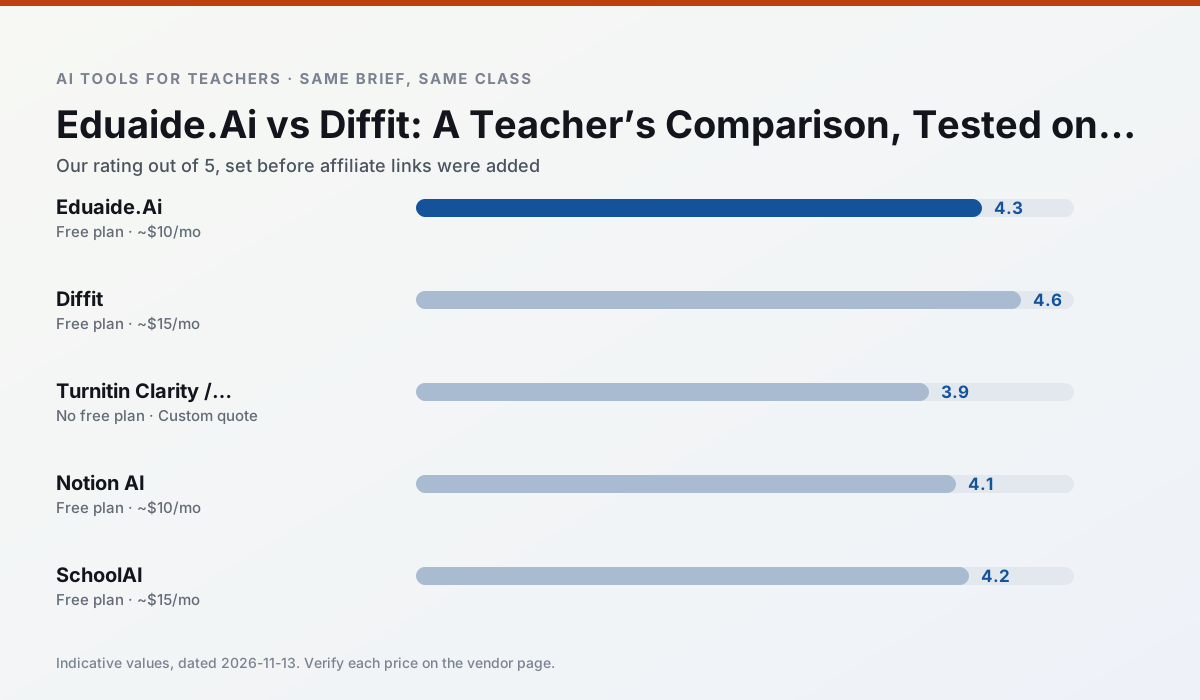
Side by side
Comparison table
Ratings reflect our timed classroom workflow, not vendor claims. Prices are indicative — verify on the vendor site.
| Tool | Best for | Free tier | Indicative paid plan | Standout feature | Our rating | Verdict | Try the tool |
|---|---|---|---|---|---|---|---|
| Eduaide.Ai | lesson planning · rubric creation | Yes — Daily generation cap | ~$10 /user/mo | Resource library | 4.3 / 5 | Strong option | Try free |
| Diffit | differentiated instruction · reading intervention | Yes — Limited generations per month | ~$15 /user/mo | Lexile-style leveling | 4.6 / 5 | Top pick | Try free |
| Turnitin Clarity / Feedback Studio | feedback on writing · academic integrity | No ongoing free plan | Custom quote | Similarity reports | 3.9 / 5 | Situational | Try free |
| Notion AI | curriculum mapping · unit planning | Yes — Limited AI usage | ~$10 /user/mo | Linked databases | 4.1 / 5 | Situational | Try free |
| SchoolAI | student-safe AI · differentiated instruction | Yes — Limited seats | ~$15 /user/mo | Teacher-monitored student chats | 4.2 / 5 | Strong option | Try free |
| Class Companion | grading · feedback on writing | Yes — Limited assignments | ~$12 /user/mo | Handwriting recognition | 4.1 / 5 | Situational | Try free |
Match your situation
Best for X
Different jobs need different tools. Here is what we would open first in each case.
Eduaide.Ai has the strongest tone control for family emails and report comments, provided you still read the message aloud before sending.
Diffit produces levelled versions from one source in a single pass, which is the highest-value differentiation shortcut we tested at this level.
Turnitin Clarity / Feedback Studio is the student-facing option here with boundaries a teacher can actually set and supervise.
Nothing on Notion AI's free tier is a teaser demo; the limits are documented and a normal week fits inside them.
Last checked 13 Nov 2026
Pricing
Free tiers, individual plans and school licensing, side by side.
| Tool | Free plan | Individual / paid | School & district | Billing note | Verify |
|---|---|---|---|---|---|
| Eduaide.Ai | $0 — Daily generation cap | ~$10 /user/mo | Custom quote | Indicative — verify on vendor site | Vendor |
| Diffit | $0 — Limited generations per month | ~$15 /user/mo | Custom quote | Indicative — verify on vendor site | Vendor |
| Turnitin Clarity / Feedback Studio | No ongoing free tier | Custom quote | Custom quote | LMS-wide deployment | Vendor |
| Notion AI | $0 — Limited AI usage | ~$10 /user/mo | ~$8 /user/mo | Indicative — verify on vendor site | Vendor |
| SchoolAI | $0 — Limited seats | ~$15 /user/mo | Custom quote | Indicative — verify on vendor site | Vendor |
| Class Companion | $0 — Limited assignments | ~$12 /user/mo | Custom quote | Indicative — verify on vendor site | Vendor |
Editorial rule: pricing is re-checked every 2–3 months and the top 50 pages are refreshed every 6 months. See our funding policy.
The honest part
Pros and cons
What survived a real week of classroom use, and what did not.
Pros
- Very low entry price
- Good worksheet and rubric output
- Clean, uncluttered UI
Cons
- Smaller template set than MagicSchool
- Less polished export options
- Limited integrations
Pros
- Excellent for mixed-ability classes
- Produces printable and digital versions
- Minimal setup
Cons
- Narrower scope than all-in-one suites
- Leveling is approximate, not a formal assessment
- Heavy use burns through the free quota
Pros
- Already licensed at many schools
- Consistent institutional workflow
- Detailed revision history
Cons
- Individual teachers cannot buy it
- AI detection remains contested
- Heavy administrative setup
Pros
- Great for long-term curriculum records
- Strong team collaboration
- Flexible structure
Cons
- Setup time is significant
- AI add-on pricing changed more than once
- Not purpose-built for lesson generation
Pros
- Designed for district approval
- Teacher visibility into student use
- Good safeguarding defaults
Cons
- Requires school-wide buy-in
- Less flexible than general LLMs
- Pricing is mostly quote-based
In the classroom
Use cases
Five concrete workflows, with the tool we would open for each one.
An IEP present-levels first draft
Use aggregated, anonymised data only. Ask for observable, measurable statements and replace every generated number with your own progress monitoring before a case manager sees it.
Recommended: Eduaide.AiA five-minute exit ticket set
Ask for one recall, one application and one reasoning item, then delete the second recall question every generator sneaks in.
Recommended: DiffitA question bank from a PDF or article
Feed a non-identifiable source and ask for items tagged by difficulty with the misconception behind each distractor. Spot-check every answer key; numerical items are least reliable.
Recommended: Turnitin Clarity / Feedback StudioA substitute folder that needs no context
The value here is structure, not creativity. Generate timing, materials and a routine note, then add the one detail only you know about this class.
Recommended: Notion AIThree reading levels from one source text
Paste a vetted text, ask for supported, core and extension versions, then check the vocabulary list by hand. Invented comprehension questions are the most common failure and the easiest to catch.
Recommended: SchoolAI
Questions teachers ask us
FAQ
Direct answers, also published as FAQPage structured data for search and AI assistants.
Eduaide.Ai or Diffit for lesson planning?
Which is cheaper for one teacher?
Do they produce the same output?
Sources & further reading
Our recommendation
Try Notion AI free for your next lesson planning task
AI-assisted notes, databases and curriculum planning in one workspace. Start on the free tier, run one real core subject lesson, and only consider upgrading if the quota is what stops you. Disclosure: we may earn a commission (varies) at no extra cost to you.
Some links on this page are affiliate links. We may earn a commission at no extra cost to you. Our rankings are editorial and never pay-to-play. Never enter student PII into a free consumer account.
Keep reading
Related comparisons in this cluster.
Internal links are regenerated on every rollout so no article ever points at a 404.