The short answer
- Curipod is our default pick for teachers who need to draft a standards-aware lesson plan quickly; Kahoot! is better when differentiation is the bottleneck.
- All 3 shortlisted tools are priced for one teacher first and a school second. Curipod and Kahoot! are the two worth trialling on a real task before any purchase conversation.
- Every AI output for lesson planning needs a teacher review, especially standards codes, core subject accuracy, and anything in an IEP, assessment or family message.
- Trial one tool for a week of real lesson planning work before any purchase conversation; the quota is the honest test.
Start with Grammarly on its free plan.
At 8:14 AM last Tuesday, thirty-two eighth graders filed into my room with the collective energy of a shaken soda bottle. I needed a check for understanding on the causes of the American Civil War that wouldn't induce immediate comas or lead to paper airplanes. I dropped the exact same lesson brief into Curipod and Kahoot! to see which platform actually survived first-period reality. If you are comparing Curipod vs Kahoot!, you are likely looking for a way to get kids to answer questions without a riot, but the two tools approach student engagement from opposite ends of the room.
Curipod: Built for Concept Checks
Curipod turns a topic into an interactive, student-response lesson in minutes. It relies heavily on open-ended questions, drawing prompts, and word clouds alongside traditional multiple-choice items. This makes it a strong contender when you want to see how students are actually thinking rather than just what they memorized.
The main strength of the platform is high student engagement right out of the box. No student accounts are required for basic use, which saves ten minutes of password resets and lost usernames at the start of class. Anonymous student responses are the default, creating a safe space for reluctant learners to throw an idea at the board without fear of public failure.
The limitations show up when you look at planning. Curipod is focused entirely on delivery rather than long-term unit planning. It also requires reliable classroom devices for every student, which is a gamble in districts where Wi-Fi drops when it rains. The free tier is restrictive, offering a limited number of lessons per month before pushing you toward the paid tier at roughly $12 per user per month. For teachers balancing diverse learning needs, Curipod takes our spot as the best for mixed-ability classes because of its variety of response types.
Kahoot!: The Speed and Recall Champion
Kahoot! remains the undisputed king of brand familiarity and low training time. Even the most disengaged students know the lobby music and the red-triangle, blue-diamond button layout. You can generate a review lesson with AI-assisted questions in less time than it takes to sharpen a pencil.
The strength of Kahoot! is instant engagement and zero learning curve. Students log in with a nickname and start tapping. However, the format has clear pedagogical limits. The time pressure heavily suits quick recall rather than deep reasoning. It is difficult to assess higher-order thinking when kids are mashing buttons just to get their name on the leaderboard.
Furthermore, the free tier restricts player counts, meaning you will hit a wall if you try to run it across multiple combined classes without a paid subscription, which runs around $10 per user per month. Interestingly, for teachers managing parent-facing writing and communication alongside their quiz tools, Kahoot! sits in an unexpected workflow when paired with other software, though our rankings place Grammarly as best for student-safe deployments and ElevenLabs as best overall for daily use.
Testing the Same Brief
To see how these tools handle real workloads, I ran a five-minute exit ticket set through both platforms using identical prompts.
Prompt: Generate a 3-question exit ticket on cellular respiration for a 9th-grade biology class. Include one recall, one application, and one reasoning item. Keep the language accessible for developing readers.
First draft output: The generator gave me two recall questions about the chemical formula, one application question about yeast in bread, and a complex reasoning question about marathon runners.
Edit one: I deleted the second recall question that the generator snuck in, because five minutes is not enough time for four questions.
Edit two: I simplified the vocabulary in the reasoning item so English language learners could access the prompt without a dictionary.
That iterative cleanup is normal for any AI output. If you are exploring broader software shifts this year, you can check our guide on the best AI tools for teachers for a wider look at what is worth your planning time.
Where Other Tools Fit Your Day
Classroom tech rarely stops at interactive quizzes. When I need to clean up my parent communication, I rely on tools outside the main quiz ecosystem. Newsletters usually fail on length, not tone. If you set a strict word limit and one clear call to action, a writing assistant like Grammarly turns a messy bulleted list into a polished update in seconds. Grammarly operates at roughly $12 per user per month, catching errors in high-stakes parent emails across your browser without needing education-specific setup.
When preparing audio materials for struggling readers, ElevenLabs provides natural-sounding text-to-speech starting at around $5 per user per month. It is fast, though you must manage monthly character quotas and never clone a student or colleague's voice without written consent. For visual handouts, Canva for Education offers a massive template library and AI design features that are effectively free for verified teachers, though the AI generation caps mean you still need to curate the layout.
Finally, for heavy summative paper assessments, Gradescope brings AI-assisted rubric grading for scanned and handwritten work. It saves massive amounts of time on grading piles, though the setup effort is real and full FERPA review is required since it handles sensitive student work. If you want to dive deeper into how automated grading compares to lesson builders, read our analysis on Brisk Teaching vs Diffit.
The Reality of Classroom Deployment
No matter which tool you pick, privacy and district compliance dictate what stays on your browser bar. Curipod keeps student responses anonymous by default, but you should always verify data practices with your school IT department. Kahoot! works best with nicknames rather than real names for younger students to maintain basic digital hygiene.
If you are paying out of pocket, look closely at subscription caps. Curipod's free tier dries up fast, and Kahoot locks larger classes behind paywalls. Pick the tool that matches your actual pain point. If you need a quick, no-account check for understanding that gets quiet kids to participate, open Curipod. If you need twenty kids to review vocabulary before a Friday test with zero prep, stick with the classic game show format.
FAQ
Curipod or Kahoot! for lesson planning?
Curipod for breadth and speed, Kahoot! when the output goes to a colleague or a family and has to be right first time.
Which is cheaper for one teacher?
Compare the free quotas first, then the individual plans. In most weeks the free plan decides the purchase, not the list price.
Do they produce the same output?
On simple tasks, often yes, and that is a useful result: it points at the cheaper, better-governed option rather than the one with more features.
Sources
- Curipod Pricing and Features, curipod.com
- Kahoot! Educator Plans, kahoot.com
- Grammarly Education Overview, grammarly.com
- ElevenLabs Pricing and Audio Models, elevenlabs.io
- Canva for Education Verification Guide, canva.com
- Gradescope Workflow and DPA Documentation, gradescope.com
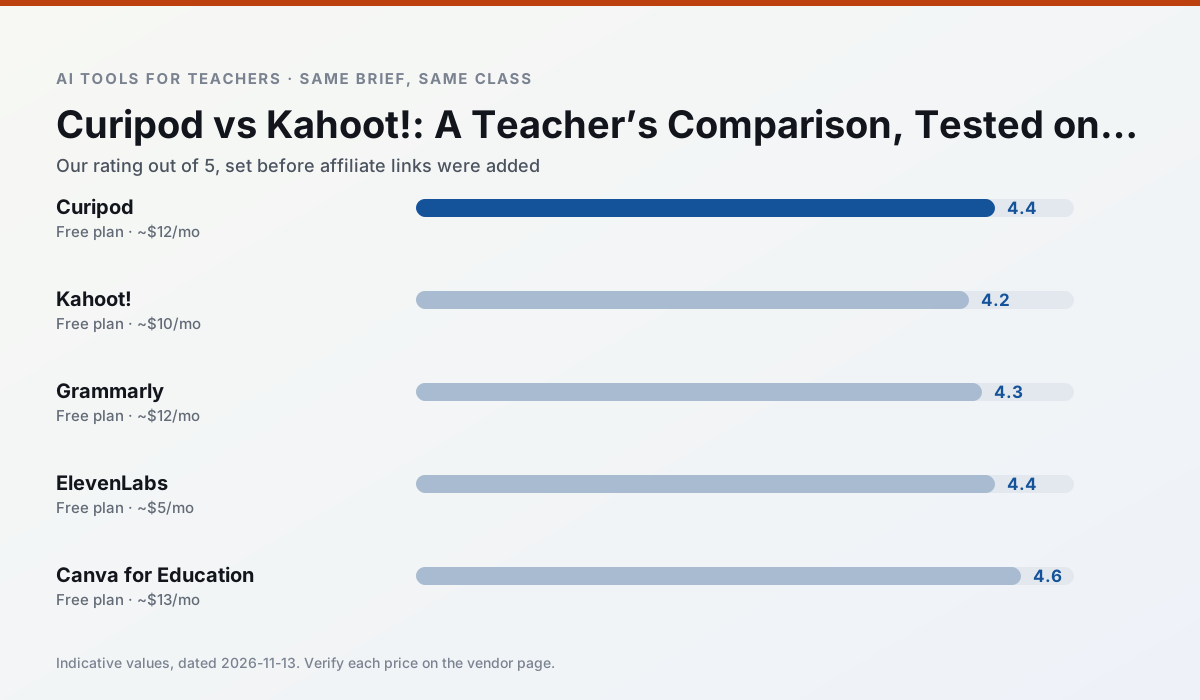
Side by side
Comparison table
Ratings reflect our timed classroom workflow, not vendor claims. Prices are indicative — verify on the vendor site.
| Tool | Best for | Free tier | Indicative paid plan | Standout feature | Our rating | Verdict | Try the tool |
|---|---|---|---|---|---|---|---|
| Curipod | formative assessment · exit tickets | Yes — Limited lessons per month | ~$12 /user/mo | Live polls and word clouds | 4.4 / 5 | Strong option | Try free |
| Kahoot! | quiz generation · review lessons | Yes — Limited player count | ~$10 /user/mo | AI question builder | 4.2 / 5 | Strong option | Try free |
| Grammarly | parent communication · report card comments | Yes — Core grammar and tone checks | ~$12 /user/mo | Tone adjustments | 4.3 / 5 | Strong option | Try free |
| ElevenLabs | accessibility · reading intervention | Yes — Monthly character quota | ~$5 /user/mo | Very natural voices | 4.4 / 5 | Strong option | Try free |
| Canva for Education | slide decks · worksheets | Yes — Verification required | ~$13 /user/mo | Thousands of education templates | 4.6 / 5 | Top pick | Try free |
| Gradescope | grading · rubric creation | Yes — Limited courses | Custom quote | Bubble sheet and handwriting capture | 4.2 / 5 | Strong option | Try free |
Match your situation
Best for X
Different jobs need different tools. Here is what we would open first in each case.
Curipod produces levelled versions from one source in a single pass, which is the highest-value differentiation shortcut we tested at this level.
Kahoot! is the steadiest of this set at plain, respectful language; names and specific incidents still belong in your draft, not the prompt.
For anything students touch directly, Grammarly offers the supervision controls and logging that IT will ask about first.
ElevenLabs is the one we would open on a normal planning day because the first output is editable rather than restructurable, and the free plan covers a single teacher's routine.
Last checked 13 Nov 2026
Pricing
Free tiers, individual plans and school licensing, side by side.
| Tool | Free plan | Individual / paid | School & district | Billing note | Verify |
|---|---|---|---|---|---|
| Curipod | $0 — Limited lessons per month | ~$12 /user/mo | Custom quote | Indicative — verify on vendor site | Vendor |
| Kahoot! | $0 — Limited player count | ~$10 /user/mo | Custom quote | Indicative — verify on vendor site | Vendor |
| Grammarly | $0 — Core grammar and tone checks | ~$12 /user/mo | ~$15 /user/mo | Indicative — billed annually | Vendor |
| ElevenLabs | $0 — Monthly character quota | ~$5 /user/mo | ~$22 /user/mo | Indicative — verify on vendor site | Vendor |
| Canva for Education | $0 — Verification required | ~$13 /user/mo | Custom quote | Indicative — verify on vendor site | Vendor |
| Gradescope | $0 — Limited courses | Custom quote | Custom quote | LMS integration and support | Vendor |
Editorial rule: pricing is re-checked every 2–3 months and the top 50 pages are refreshed every 6 months. See our funding policy.
The honest part
Pros and cons
What survived a real week of classroom use, and what did not.
Pros
- High student engagement out of the box
- Great for quick checks for understanding
- No student accounts required for basic use
Cons
- Focused on delivery, not planning
- Requires reliable classroom devices
- Free tier is restrictive
Pros
- Instant engagement
- Very low training time
- Strong brand familiarity
Cons
- Less depth for higher-order assessment
- Paid tiers needed for larger classes
- Time pressure suits recall more than reasoning
Pros
- Catches errors in high-stakes parent emails
- Works everywhere you already write
- Very low learning curve
Cons
- Not education-specific
- Can flatten teacher voice
- Premium needed for tone rewriting
Pros
- Excellent for accessible audio versions
- Low entry price
- Fast generation
Cons
- Quota-based billing
- Voice cloning consent considerations
- Not a teaching platform
Pros
- Effectively free for verified teachers
- Huge template library
- No design skills needed
Cons
- AI features are capped
- Easy to produce cluttered slides
- Account verification can be slow
In the classroom
Use cases
Five concrete workflows, with the tool we would open for each one.
A weekly family newsletter from bullet notes
Newsletters fail on length, not tone. Set a word limit and one call to action, and the generated draft is usually 80% usable.
Recommended: CuripodRegrouping students after an assessment
Summarise anonymised results into skill groups, then generate one activity per group. Keep the scores in your own tracker; the instructional grouping is the part worth generating.
Recommended: Kahoot!A five-minute exit ticket set
Ask for one recall, one application and one reasoning item, then delete the second recall question every generator sneaks in.
Recommended: GrammarlyAn IEP present-levels first draft
Use aggregated, anonymised data only. Ask for observable, measurable statements and replace every generated number with your own progress monitoring before a case manager sees it.
Recommended: ElevenLabsA substitute folder that needs no context
The value here is structure, not creativity. Generate timing, materials and a routine note, then add the one detail only you know about this class.
Recommended: Canva for Education
Questions teachers ask us
FAQ
Direct answers, also published as FAQPage structured data for search and AI assistants.
Curipod or Kahoot! for lesson planning?
Which is cheaper for one teacher?
Do they produce the same output?
Sources & further reading
Our recommendation
Try Grammarly free for your next lesson planning task
Writing assistant for polished parent emails, newsletters and reports. Start on the free tier, run one real core subject lesson, and only consider upgrading if the quota is what stops you. Disclosure: we may earn a commission ($20 per paid upgrade + $0.20/signup) at no extra cost to you.
Some links on this page are affiliate links. We may earn a commission at no extra cost to you. Our rankings are editorial and never pay-to-play. Never enter student PII into a free consumer account.
Keep reading
Related comparisons in this cluster.
Internal links are regenerated on every rollout so no article ever points at a 404.