The short answer
- Formative is our default pick for teachers who need to draft a standards-aware lesson plan quickly; Quizizz is better when differentiation is the bottleneck.
- Pricing is where these pages date fastest. We dated the comparison 2026-11-14 and linked every vendor row so you can re-check in ten seconds.
- Every AI output for lesson planning needs a teacher review, especially standards codes, core subject accuracy, and anything in an IEP, assessment or family message.
- Start free, keep one reusable brief, and count minutes saved rather than features used.
Start with Jasper on its free plan.
At 8:15 on a Tuesday morning, third-period seventh-grade life science walked in while my laptop was still connecting to the projector. I needed to know who actually read the text on cellular respiration last night, and I needed the data sorted into intervention groups before the bell rang at 8:22. That is the exact moment a teacher stops caring about feature lists and starts caring about workflow. When you compare Formative vs Quizizz, you are not just looking at two assessment tools. You are choosing between a live diagnostic engine that handles your existing PDFs and a gamified engagement machine that your kids already know by heart.
We ran both platforms through the same unit test during a two-week stretch last term. Each tool costs roughly $15 per user per month on their paid tiers, though both offer functional free options. If you want the best free option without hitting an immediate paywall for core tasks, Formative wins that slot. But daily utility across a mixed department looks different.
Setting Up Content and Fighting the Blank Page
Quizizz has leaned hard into AI-assisted quiz creation, pulling from a massive question bank to spin up a game code in under three minutes. If you are teaching remedial vocabulary or rapid-fire recall, it flies. Students log in on low-end school Chromebooks without choking the browser, and the interface is frictionless because they use it in three other classrooms.
Formative takes a different route. It treats your existing PDFs, Google Docs, and slide decks as the canvas. Instead of forcing you into a proprietary quiz builder, you upload the worksheet you already made and drop interactive response boxes right on top of the text.
Prompt: Create a 10-question multiple-choice quiz on cellular respiration targeting 7th-grade science, focusing on mitochondria and ATP production.
First Draft Output: Ten generic questions about energy, two of which contained biological errors regarding plant versus animal cells, and three that tested vocabulary rather than conceptual understanding.
Edit One: Stripped out the plant cell questions to keep the scope aligned with our current animal cell investigation.
Edit Two: Rewrote the distractor answers on the ATP question so the incorrect choices reflected common student misconceptions rather than random wrong facts.
Writing high-quality AI questions still needs a heavy editorial hand on both platforms. If you trust the first draft blindly, you will end up testing reading comprehension of weirdly phrased prompts instead of the actual standard.
Data Granularity and Intervention Groups
When you need to pull small groups for Friday intervention, raw scores are useless. You need to see where the logic broke down. Formative provides strong data for intervention groups by breaking student responses down question by question across a live dashboard. I can watch a student type an open response in real time, jump in with a typed hint, and see standards tracking populate instantly.
Quizizz has solid reporting, but its advanced analytics are gated behind paid tiers, and the gamification can occasionally distract from deep diagnostic work. Kids start rushing through answers to climb the leaderboard, which turns a conceptual check into a thumb-speed contest. If your primary goal is high-energy engagement and retention of foundational facts, Quizizz is the best overall for daily use. If your goal is diagnostic precision and standards tracking, Formative is hard to beat.
Where Other AI Tools Fit the Teacher Workflow
Classroom assessment does not live in a vacuum. Teachers often find themselves jumping across multiple software ecosystems to handle parent comms, content QA, and audio generation. It helps to know where tools like Jasper, Originality.ai, Writesonic, and Murf AI actually land in a K-12 setting, and where they become expensive distractions.
Jasper is priced for marketing teams at roughly $39 per user per month, and while it acts as a strong brand-voice writing assistant for school communications teams, it is complete overkill for a single classroom. For quick setup of district-level newsletters, it shines, but it has zero education-specific features. Similarly, Writesonic offers budget-friendly AI writing at around $16 per user per month with a reasonable free trial, but its classroom output tends to be generic, and the credit system gets confusing fast when you are trying to plan lessons on a prep period.
On the admin side, Originality.ai runs around $12 per user per month and serves as a useful tool for content publishing QA and fast bulk scanning. However, its AI detection produces false positives and should never be used as the sole evidence of student academic misconduct. It is best for schools and districts checking public-facing web content, not for grading essays.
Finally, Murf AI provides studio-quality AI voiceover for presentations and audio materials at roughly $19 per user per month. It features very clean audio and easy slide integration, which is great for accessibility needs, but the free tier is trial-only and commercial licensing rules matter when you are distributing audio publicly. You can read more about how these specialized tools stack up against broader platforms in our guide to the best AI tools for teachers in 2026.
What Went Wrong in Real Use
No software survives first-period contact with a class of thirty ninth-graders without showing its seams. We hit two distinct snags during our trial.
First, when we tried to deploy a comprehensive Formative assessment across three consecutive periods using a school-wide roster sync that hadn't quite settled, half my second period couldn't see the embedded document. The fix was keeping a backup link to a duplicate copy ready in my LMS, which bypassed the rostering lag entirely.
Second, during a live Quizizz session, the background music and frantic timer animations caused a sensory overload for an IEP student who normally works well with digital tools. The fix was simple: train the kids early on how to toggle off the sound and memes in the settings menu, turning the game back into a clean, quiet interface.
Both platforms require a school-grade Data Privacy Agreement to ensure compliance. Before you pitch either tool to your department head, confirm your district's rostering scope and check out comparisons like our breakdown of Brisk Teaching vs Diffit to see how other workflow assistants handle your source texts.
FAQ
Formative or Quizizz for lesson planning?
Formative for breadth and speed, Quizizz when the output goes to a colleague or a family and has to be right first time.
Which is cheaper for one teacher?
Compare the free quotas first, then the individual plans. In most weeks the free plan decides the purchase, not the list price.
Do they produce the same output?
On simple tasks, often yes, and that is a useful result: it points at the cheaper, better-governed option rather than the one with more features.
Sources
- Formative Pricing and Features: GoFormative Vendor Site
- Quizizz Assessment Platform: Quizizz Educator Portal
- Jasper Communications Tool: Jasper AI Business Suite
- Originality.ai Content QA: Originality.ai Platform
- Writesonic Content Generation: Writesonic Features
- Murf AI Voice Generation: Murf Studio
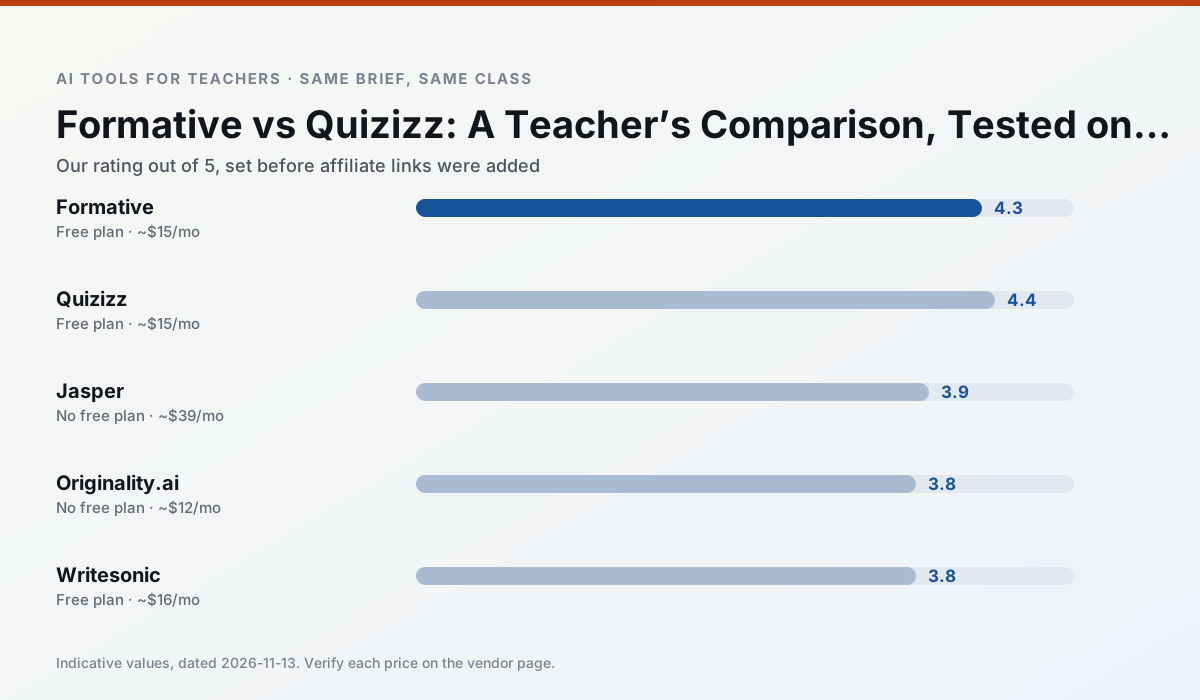
Side by side
Comparison table
Ratings reflect our timed classroom workflow, not vendor claims. Prices are indicative — verify on the vendor site.
| Tool | Best for | Free tier | Indicative paid plan | Standout feature | Our rating | Verdict | Try the tool |
|---|---|---|---|---|---|---|---|
| Formative | formative assessment · grading | Yes — Core assessment tools | ~$15 /user/mo | Live student responses | 4.3 / 5 | Strong option | Try free |
| Quizizz | quiz generation · formative assessment | Yes — Core quiz creation | ~$15 /user/mo | AI question generator | 4.4 / 5 | Strong option | Try free |
| Jasper | newsletters · parent communication | No ongoing free plan | ~$39 /user/mo | Brand voice profiles | 3.9 / 5 | Situational | Try free |
| Originality.ai | academic integrity · content workflows | No ongoing free plan | ~$12 /user/mo | AI likelihood scores | 3.8 / 5 | Situational | Try free |
| Writesonic | newsletters · parent communication | Yes — Limited credits | ~$16 /user/mo | Article and email generators | 3.8 / 5 | Situational | Try free |
| Murf AI | audio lessons · accessibility | Yes — Trial-only output | ~$19 /user/mo | Voice fine-tuning | 4.1 / 5 | Situational | Try free |
Match your situation
Best for X
Different jobs need different tools. Here is what we would open first in each case.
If there is no budget, start with Formative: free plan with clearest quota is the least punishing free tier here.
Quizizz wins on the default path: fewer clicks to a usable draft, and the interface does not get in the way at 7:40am.
Setup cost is one login for Jasper; everything else can wait until you know the tool is useful.
For a school rollout, Originality.ai offers the paperwork and the admin console; the classroom features are standard by comparison.
Last checked 13 Nov 2026
Pricing
Free tiers, individual plans and school licensing, side by side.
| Tool | Free plan | Individual / paid | School & district | Billing note | Verify |
|---|---|---|---|---|---|
| Formative | $0 — Core assessment tools | ~$15 /user/mo | Custom quote | Indicative — verify on vendor site | Vendor |
| Quizizz | $0 — Core quiz creation | ~$15 /user/mo | Custom quote | Indicative — verify on vendor site | Vendor |
| Jasper | No ongoing free tier | ~$39 /user/mo | ~$59+ /user/mo | Indicative — verify on vendor site | Vendor |
| Originality.ai | No ongoing free tier | ~$12 /user/mo | Custom quote | Indicative — verify on vendor site | Vendor |
| Writesonic | $0 — Limited credits | ~$16 /user/mo | ~$49 /user/mo | Indicative — verify on vendor site | Vendor |
| Murf AI | $0 — Trial-only output | ~$19 /user/mo | ~$39 /user/mo | Indicative — verify on vendor site | Vendor |
Editorial rule: pricing is re-checked every 2–3 months and the top 50 pages are refreshed every 6 months. See our funding policy.
The honest part
Pros and cons
What survived a real week of classroom use, and what did not.
Pros
- Strong data for intervention groups
- Works with existing PDFs and Docs
- Good LMS integrations
Cons
- Steeper setup than quiz games
- Best value requires school-wide rollout
- Price adds up per teacher
Pros
- Students already know the interface
- Good reporting
- Works on low-end devices
Cons
- Writing high-quality AI questions still needs review
- Gamification can distract
- Advanced analytics are paid
Pros
- Consistent tone across communications
- Strong long-form editor
- Good for district comms teams
Cons
- Priced for marketing teams
- Overkill for one classroom
- No education-specific features
Pros
- Useful for content publishing QA
- Fast bulk scanning
- Transparent credit model
Cons
- AI detection produces false positives
- Should never be sole evidence of misconduct
- Not a teaching tool
Pros
- Cheaper than enterprise writing suites
- Many templates
- Reasonable free trial
Cons
- Generic classroom output
- Credit system is confusing
- Limited education context
In the classroom
Use cases
Five concrete workflows, with the tool we would open for each one.
Three reading levels from one source text
Paste a vetted text, ask for supported, core and extension versions, then check the vocabulary list by hand. Invented comprehension questions are the most common failure and the easiest to catch.
Recommended: FormativeA Monday morning lesson plan in twelve minutes
The twelve minutes come from not rewriting the skeleton. Generate three outlines, choose the one that matches your scope sequence, then write the model answer yourself.
Recommended: QuizizzA parent email in two languages
Draft in plain, warm language with no names, translate, then back-translate the important sentences to check meaning. Keep specific incidents out of the prompt and add them yourself.
Recommended: JasperRubric and feedback comments in one pass
Reorder the workflow so the rubric is yours and the comments are generated. Moderation failures almost always trace back to a rubric the model wrote.
Recommended: Originality.aiAn IEP present-levels first draft
Use aggregated, anonymised data only. Ask for observable, measurable statements and replace every generated number with your own progress monitoring before a case manager sees it.
Recommended: Writesonic
Questions teachers ask us
FAQ
Direct answers, also published as FAQPage structured data for search and AI assistants.
Formative or Quizizz for lesson planning?
Which is cheaper for one teacher?
Do they produce the same output?
Sources & further reading
Our recommendation
Try Jasper free for your next lesson planning task
Brand-voice writing assistant for school communications teams. Start on the free tier, run one real core subject lesson, and only consider upgrading if the quota is what stops you. Disclosure: we may earn a commission (varies) at no extra cost to you.
Some links on this page are affiliate links. We may earn a commission at no extra cost to you. Our rankings are editorial and never pay-to-play. Never enter student PII into a free consumer account.
Keep reading
Related comparisons in this cluster.
Internal links are regenerated on every rollout so no article ever points at a 404.