The short answer
- Notion AI is our default pick for teachers who need to sequence a three-week unit quickly; ChatGPT is better when differentiation is the bottleneck.
- Free-tier reality for this shortlist: Notion AI: Yes — Limited AI usage; ChatGPT: Yes — Usage-limited model access; Claude: Yes — Usage-limited. Treat every paid figure as indicative until you have read the vendor page; only the free quota is something you can test yourself this week.
- Every AI output for unit planning needs a teacher review, especially standards codes, science accuracy, and anything in an IEP, assessment or family message.
- Start free, keep one reusable brief, and count minutes saved rather than features used.
Start with Notion AI on its free plan.
It was a Tuesday evening in late October when I realized my ecosystems unit for seventh grade was completely disconnected from the district pacing guide. I had twenty-two pages of disjointed lab ideas, three printed worksheets I found in a filing cabinet from 2011, and zero alignment to our state science standards. The clock read 8:45 PM. Ten years ago, I would have spent three hours cutting and pasting standards codes into a blank template and calling it a night. Instead, I opened a browser tab to see if an LLM could build a coherent three-week scope and sequence before my coffee went cold.
Using AI unit planning for science teachers is less about clicking a button to generate a term's worth of miracles and more about treating the machine as an exhausting, fast, but deeply literal curriculum intern. If you give it vague prompts, you get generic word soup about the scientific method. If you feed it your actual constraints, your lab inventory, and your strict pacing requirements, it can save you an entire weekend of administrative busywork.
Where Notion AI Shits and Shines for Curriculum Maps
Notion AI operates right inside your notes and databases, which makes it our pick for the best free option for long-term document organization. The free tier gives you limited AI usage, while paid plans run around $10 per user per month. Its biggest strength is keeping your scope, sequence, and lab inventory in a single workspace. You can link pages together so that a change in your physical science standards updates your weekly breakdown automatically.
The downside is setup time. You have to build the database structure yourself before the AI can help you fill it. It is not purpose-built for instant lesson generation out of the box, meaning you need patience to configure your tables. Remember never to store student PII in these personal workspaces, especially if you are using a free account.
ChatGPT for Daily Adaptability and Lesson Generation
When you need to draft lab handouts, check your phenomena ideas, or quickly spin up a differentiated reading passage, ChatGPT remains the best overall for daily use. With a free tier offering usage-limited model access and paid tiers around $20 per user per month, its greatest asset is raw flexibility. You can feed it a messy paragraph about your students struggling with thermal energy transfer and get back three distinct engagement hooks in seconds.
Prompt:
"Act as a veteran middle school science teacher. Create a 3-day inquiry-based mini-unit on conduction, convection, and radiation for 7th grade physical science. Include a low-cost lab for each day using household items. Constraint: No open flames."

What came back:
A clean, well-formatted three-day sequence with labs using hot water, ice, and foil. The conduction lab used a metal spoon in warm water, convection used food coloring in a divided clear bin, and radiation used a desk lamp on black and white paper.

Two edits that made it usable:
1. I swapped the desk lamp radiation lab for a hands-on soil and water temperature comparison under a sunny window because our classroom lamps lack extension cords.
2. I added explicit safety warnings about water temperature to prevent spills at crowded lab stations.
The catch is that ChatGPT has no built-in standards alignment, meaning you have to paste your specific state codes into the prompt every time. It also requires some prompt engineering skill to avoid getting responses that sound like an overly enthusiastic textbook salesman.
Claude for Document-Heavy Planning and Rubrics
If you are trying to digest a sixty-page NGSS appendix or need to map out a massive semester project with complex rubrics, Claude is the tool to reach for. It handles full unit plans and long documents better than almost any competitor. The free tier is usage-limited, while the paid tier sits around $20 per user per month, earning our badge for the best for quick setup.
The prose it generates feels less robotic and more human, which matters when you are writing parent-facing project guides. However, it lacks teacher-specific templates. You will not find a magical "generate a 5E lesson plan" button here; you have to talk to the chat interface like a human colleague.
Khanmigo and District-Level Science Frameworks
Khanmigo brings an education-first design from a nonprofit platform, making it our top recommendation for schools and districts. While US teacher accounts have access subject to eligibility, paid student-facing plans run roughly $4 per learner per month. Its primary advantage is trust and safety, built specifically for educational environments rather than retrofitted from consumer tech.
The limitations are clear when you are planning units alone at your kitchen table. It is less useful for general admin paperwork and requires student accounts for full value. If your district has not vetted it through an official data privacy agreement, you will have to wait for IT approval before using it with classes.
Brisk Teaching and MagicSchool for Instant Classroom Artifacts
Brisk Teaching acts as a browser extension that brings AI feedback directly into Google Docs, Slides, and web articles for about $10 per user per month. It lets you generate three reading levels from one source text without copying and pasting text back and forth across tabs. You paste your vetted article, select your target Lexile levels, and the extension builds supported, core, and extension versions right in your document. You still have to check the vocabulary lists by hand, because invented comprehension questions remain the most common failure point.
MagicSchool AI takes a different route, offering a vast library of teacher-specific generators in a single dashboard for about $12 per user per month. Its strength lies in a gentle learning curve; you do not need prompting skills to use its specialized templates for exit tickets, lab rubrics, or science stations. The trap is that outputs still require careful standards review, and the best features sit behind the paywall. For a broader look at how these workflows compare to other subjects, check out our guide on AI tools for teachers.
Two Real Failures and How to Fix Them
Things go sideways fast when you rely blindly on these systems. Last month, I asked an assistant to group my students after a formative assessment on cellular respiration. I pasted anonymised quiz scores into the prompt and asked for four skill groups with targeted activities. The AI generated a wonderful four-tier rotation, but it hallucinated two students who had dropped out in September and assigned them to a remediation station. I learned to keep my official roster in my own gradebook and only use the AI for the structural activity prompts, never the raw data sorting.
The second disaster happened when I tried to generate a weekly family newsletter from a bulleted list of our science field trip details. The AI took my four bullet points and turned them into a four-page manifesto about the history of local watersheds. Parents stopped reading after paragraph two. Now, I enforce a strict word limit and explicitly demand a single call to action in the prompt. For more classroom workflow ideas, take a look at our tips on AI exit tickets for ELA teachers. AI unit planning for science teachers works best when you keep the reins tight and treat every generated draft as a rough first pancake.
FAQ
Can AI do unit planning at mixed-grade level?
It can produce a first draft and a structure. The level judgement, the standards check and the tone are teacher decisions.
Which tool is best for unit planning?
Notion AI on the evidence in this article, with ChatGPT as the second opinion. Neither replaces the review step.
What is the biggest risk?
A confident, plausible output that nobody checked. The five checks below exist for that reason.
Sources
- Notion AI Documentation and Pricing (2026): notion.so/product/ai
- OpenAI ChatGPT Educator Resources: openai.com/chatgpt/use-cases/education
- Anthropic Claude Pricing and Use Cases: anthropic.com/claude
- Khan Academy and Khanmigo for Educators: khanacademy.org/khanmigo
- Brisk Teaching Extension Overview: briskteaching.com
- MagicSchool AI Platform Features: magicschool.ai
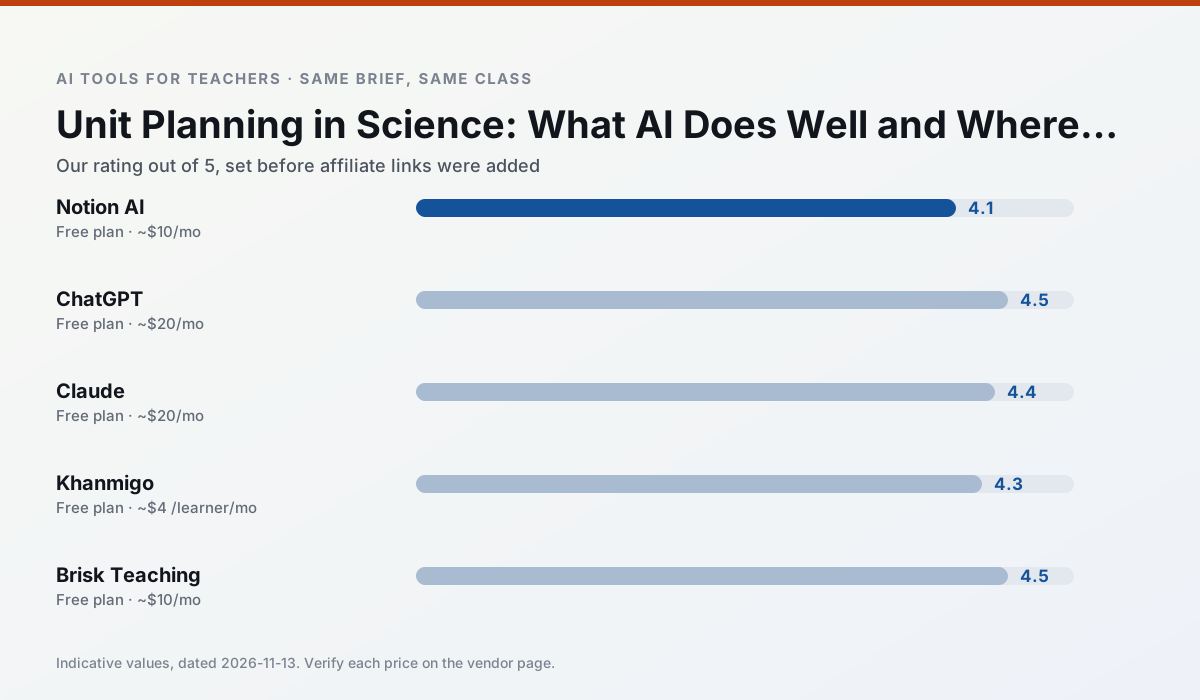
Side by side
Comparison table
Ratings reflect our timed classroom workflow, not vendor claims. Prices are indicative — verify on the vendor site.
| Tool | Best for | Free tier | Indicative paid plan | Standout feature | Our rating | Verdict | Try the tool |
|---|---|---|---|---|---|---|---|
| Notion AI | curriculum mapping · unit planning | Yes — Limited AI usage | ~$10 /user/mo | Linked databases | 4.1 / 5 | Situational | Try free |
| ChatGPT | lesson planning · parent communication | Yes — Usage-limited model access | ~$20 /user/mo | Custom GPTs and Projects | 4.5 / 5 | Top pick | Try free |
| Claude | rubric creation · feedback on writing | Yes — Usage-limited | ~$20 /user/mo | Very large context window | 4.4 / 5 | Strong option | Try free |
| Khanmigo | math practice · student tutoring | Yes — US teacher accounts, subject to eligibility | ~$4 /learner/mo | Socratic tutoring rather than answers | 4.3 / 5 | Strong option | Try free |
| Brisk Teaching | feedback on writing · grading | Yes — Limited actions per month | ~$10 /user/mo | Works inside Google Docs | 4.5 / 5 | Top pick | Try free |
| MagicSchool AI | lesson planning · differentiation | Yes — Core generators with monthly usage limits | ~$12 /user/mo | 80+ teacher-specific tools | 4.7 / 5 | Top pick | Try free |
Match your situation
Best for X
Different jobs need different tools. Here is what we would open first in each case.
Nothing on Notion AI's free tier is a teaser demo; the limits are documented and a normal week fits inside them.
On the daily cycle, ChatGPT saves the most edit time per task; the paid tier mostly buys more runs rather than better ones.
Claude runs in a browser tab with no extension, no student accounts and no onboarding call, so you can test it in a free period.
Khanmigo answers the three questions a district actually asks: rostering, admin controls and a data-processing agreement. That is usually what decides a school purchase.
Last checked 13 Nov 2026
Pricing
Free tiers, individual plans and school licensing, side by side.
| Tool | Free plan | Individual / paid | School & district | Billing note | Verify |
|---|---|---|---|---|---|
| Notion AI | $0 — Limited AI usage | ~$10 /user/mo | ~$8 /user/mo | Indicative — verify on vendor site | Vendor |
| ChatGPT | $0 — Usage-limited model access | ~$20 /user/mo | ~$25+ /user/mo | Indicative — verify on vendor site | Vendor |
| Claude | $0 — Usage-limited | ~$20 /user/mo | ~$25+ /user/mo | Indicative — verify on vendor site | Vendor |
| Khanmigo | $0 — US teacher accounts, subject to eligibility | ~$4 /learner/mo | Custom quote | Indicative — verify on vendor site | Vendor |
| Brisk Teaching | $0 — Limited actions per month | ~$10 /user/mo | Custom quote | Indicative — verify on vendor site | Vendor |
| MagicSchool AI | $0 — Core generators with monthly usage limits | ~$12 /user/mo | Custom quote | Indicative — verify on vendor site | Vendor |
Editorial rule: pricing is re-checked every 2–3 months and the top 50 pages are refreshed every 6 months. See our funding policy.
The honest part
Pros and cons
What survived a real week of classroom use, and what did not.
Pros
- Great for long-term curriculum records
- Strong team collaboration
- Flexible structure
Cons
- Setup time is significant
- AI add-on pricing changed more than once
- Not purpose-built for lesson generation
Pros
- Most flexible option available
- Huge community of teacher prompt libraries
- Strong multilingual support
Cons
- Requires prompt skills for consistent results
- No built-in standards alignment
- District privacy review usually required
Pros
- Handles full unit plans and long rubrics
- Nuanced, less generic prose
- Good at structured document output
Cons
- No teacher-specific templates
- Fewer classroom integrations
- Consumer plan not suitable for student data
Pros
- Education-first design
- Strong nonprofit trust signal
- Good math scaffolding
Cons
- Availability varies by region
- Less useful for admin paperwork
- Requires student accounts for full value
Pros
- No copy-paste between tools
- Fast inline feedback on student drafts
- Gentle learning curve
Cons
- Chrome-first workflow
- Extension permissions need IT approval
- Free quota is tight
In the classroom
Use cases
Five concrete workflows, with the tool we would open for each one.
Regrouping students after an assessment
Summarise anonymised results into skill groups, then generate one activity per group. Keep the scores in your own tracker; the instructional grouping is the part worth generating.
Recommended: Notion AIA weekly family newsletter from bullet notes
Newsletters fail on length, not tone. Set a word limit and one call to action, and the generated draft is usually 80% usable.
Recommended: ChatGPTThree reading levels from one source text
Paste a vetted text, ask for supported, core and extension versions, then check the vocabulary list by hand. Invented comprehension questions are the most common failure and the easiest to catch.
Recommended: ClaudeA Monday morning lesson plan in twelve minutes
The twelve minutes come from not rewriting the skeleton. Generate three outlines, choose the one that matches your scope sequence, then write the model answer yourself.
Recommended: KhanmigoA parent email in two languages
Draft in plain, warm language with no names, translate, then back-translate the important sentences to check meaning. Keep specific incidents out of the prompt and add them yourself.
Recommended: Brisk Teaching
Questions teachers ask us
FAQ
Direct answers, also published as FAQPage structured data for search and AI assistants.
Can AI do unit planning at mixed-grade level?
Which tool is best for unit planning?
What is the biggest risk?
Sources & further reading
Our recommendation
Try Notion AI free for your next unit planning task
AI-assisted notes, databases and curriculum planning in one workspace. Start on the free tier, run one real science lesson, and only consider upgrading if the quota is what stops you. Disclosure: we may earn a commission (varies) at no extra cost to you.
Some links on this page are affiliate links. We may earn a commission at no extra cost to you. Our rankings are editorial and never pay-to-play. Never enter student PII into a free consumer account.
Keep reading
Related comparisons in this cluster.
Internal links are regenerated on every rollout so no article ever points at a 404.