The short answer
- Brisk Teaching is our default pick for teachers who need to draft a standards-aware lesson plan quickly; Quizizz is better when differentiation is the bottleneck.
- Brisk Teaching handles the broad case; Quizizz handles the narrow one. Anything beyond that pair should be justified by a recurring weekly job, not a feature demo.
- Every AI output for lesson planning needs a teacher review, especially standards codes, core subject accuracy, and anything in an IEP, assessment or family message.
- Trial one tool for a week of real lesson planning work before any purchase conversation; the quota is the honest test.
Start with MagicSchool AI on its free plan.
It was May 14th, and I was staring at a pile of crumpled exit tickets while my homeroom debated whether penguins have knees. My gradebook looked like a crime scene, and I had exactly forty minutes before my next planning period evaporated into an IEP meeting. Year-end reflection is supposed to be this lovely, pedagogical wrapping up of the academic year where kids synthesize growth and teachers chart a triumphant course for the fall. In reality, it is a administrative slog through data tables, student portfolios, and prose that sounds like it was translated from ancient Greek by way of Google Translate. This is where ai for year-end reflection without the spin actually earns its keep, provided you stop treating language models like magic wands and start treating them like exhausted, fast-typing co-teachers.
Finding the Right Tool for the End-of-Year Crunch
If you are trying to wrangle twenty-five different end-of-year data points without losing your mind, you need tools that fit your existing workflow rather than forcing you into a new tab-switching nightmare. For daily grading and inline feedback, Brisk Teaching remains the best overall for daily use. It sits right inside your browser extension, bringing AI feedback straight into Google Docs and Slides without making you copy and paste text back and forth. The learning curve is gentle, though your IT department will need to clear the extension permissions first. If you are working on a district-wide push, MagicSchool AI takes the crown as best for schools and districts, offering the widest purpose-built template library and a strong free tier for individual teachers who want to generate end-of-year surveys or review stations without wrestling with generic prompts.
When you need something up and running before the bell rings, Diffit is the best for quick setup, letting you level any text or video into differentiated reading materials with minimal fuss. For classrooms that live and breathe gamified review, Quizizz acts as the best free option, leaning on a massive question bank and student interfaces that kids already know by heart. Eduaide.Ai brings a clean, uncluttered UI to worksheet and rubric generation for about $10 a month, while Curipod turns basic topics into interactive, student-response lessons in minutes, making it ideal for those final weeks when attention spans are measured in seconds.
Turning Bullet Notes into Family Newsletters
June newsletters always fail on length, not tone. Parents do not want a memoir of your Tuesday science lab; they want to know what dates to put on the fridge and whether their kid passed fractions.
Prompt: Write a 150-word weekly family newsletter from these bullet points: Field trip forms due Friday, math test on decimals moved to Thursday, end-of-year talent show is June 4th. Tone: warm, direct, professional.
First output: Dear Families, As the academic year draws to a triumphant close, we have so many exciting updates to share with our wonderful community! Please note that field trip permission slips are due by this coming Friday. Additionally, our upcoming mathematics assessment on decimals has been shifted to Thursday. Finally, mark your calendars for our annual talent show on June 4th!
Two edits that made it usable:
- Cut the introductory fluff about a "triumphant close" because it reads like marketing copy.
- Added a bold bulleted list for the three actionable dates so parents can scan it in four seconds on their phones.
Newsletters are where Brisk Teaching shines because you can draft them directly inside your communication doc. Just watch out for the free tier limits, which burn through your monthly action quota faster than you think if you use it for every parent email.
Regrouping Students After a Spring Benchmark
Trying to manually sort twenty-eight kids into review groups based on five different sub-skills will break your brain by third period. You need to feed anonymized scores into a tool like MagicSchool AI and ask it to cluster the data.
Prompt: Act as an instructional coach. Group these 25 anonymized student benchmark scores into four targeted skill tiers (Reteach, Practice, Extension, Project) based on their ability to solve multi-step word problems. Generate one distinct 15-minute station activity for each group. Do not include student names.
First output: Group 1 (Reteach) needs direct instruction on basic addition. Group 2 (Practice) should do textbook page 104. Group 3 (Extension) can write their own word problems. Group 4 (Project) will build a scaled map of the classroom.
Two edits that made it usable:
- Replaced the generic textbook page reference with a specific hands-on fraction-strip activity pulled from our actual curriculum.
- Clarified the grouping threshold so that kids on the borderline weren't lumped into remediation when they just made careless arithmetic errors.
Keep the actual student scores in your own gradebook tracker rather than pasting identifiable PII into any vendor's dashboard. A quick review of our guide on AI data analysis for administrators will remind you why keeping student identifiers out of these prompts is non-negotiable.
Building Next Year's Scope and Sequence in Twelve Minutes
The secret to a Monday morning lesson plan in twelve minutes is refusing to rewrite the skeleton from scratch. Generate three outlines using Eduaide.Ai or MagicSchool, choose the one that matches your scope and sequence, and then write the model answer yourself. If you let the AI write the entire script, you end up teaching a lesson that uses vocabulary your students haven't seen since October.
Two distinct failures tend to happen when teachers rush this process. First, relying on the tool's default reading levels without checking the vocabulary will result in texts that cause frustration rather than growth. Second, letting the AI generate your grading rubric almost always leads to moderation failures later because the model's definition of "proficiency" rarely matches your department's actual standards. Always write your rubric first, then ask the AI to generate feedback comments based on your specific criteria.
Generating Differentiated Reading Materials
When you need three reading levels from one source text, Diffit handles the heavy lifting of adaptation. You paste a vetted article about local watersheds, and it spits out supported, core, and extension versions.
Prompt: Adapt this 800-word article on local watershed management into three Lexile levels: 600L, 850L, and 1100L. Include five multiple-choice comprehension questions for each level that target main idea and vocabulary in context.
First output: The 600L version successfully simplified the syntax, but invented a fictional river name that contradicted our regional science unit. The comprehension questions at the 1100L level relied entirely on recall rather than analysis.
Two edits that made it usable:
- Swapped the hallucinated river name back to our local watershed name manually.
- Rewrote three of the high-level comprehension questions to demand textual evidence rather than multiple-choice guessing.
Invented comprehension questions are the most common failure mode in text-leveling tools, and they are also the easiest to catch if you read through the output before hitting print. If you support paras or co-teachers in these mixed-ability settings, share these adjusted workflows with them so everyone uses the same leveled output; you can find more strategies for support staff in AI accommodations for paraprofessionals.
Bringing Interactive Review to the Last Week of School
By late May, traditional worksheets are dead on arrival. Curipod and Quizizz save your sanity by turning dry review topics into interactive student-response lessons that work on low-end school Chromebooks. The trick is to cap the session time and use the anonymous response feature so anxious kids will participate without fear of public failure.
Remember that gamification can easily distract from actual learning if you let the flashy leaderboards dominate the period. Use the tools for quick checks for understanding, pull your data reports to see where the whole class stalled, and then close the laptops for a face-to-face debrief. AI cannot replace the satisfaction of watching a kid finally grasp a tough concept, but it can clear away the administrative clutter so you actually have time to notice it happen.
FAQ
How long does this workflow take?
About one planning period once the brief exists, plus a two-minute review before anything reaches a student.
Which tool should I start with?
Brisk Teaching on its free plan, on a real task, before any purchase conversation.
What if the output is unusable?
Rewrite the brief, not the output. In our logs an unusable draft almost always traced back to a vague brief.
Sources
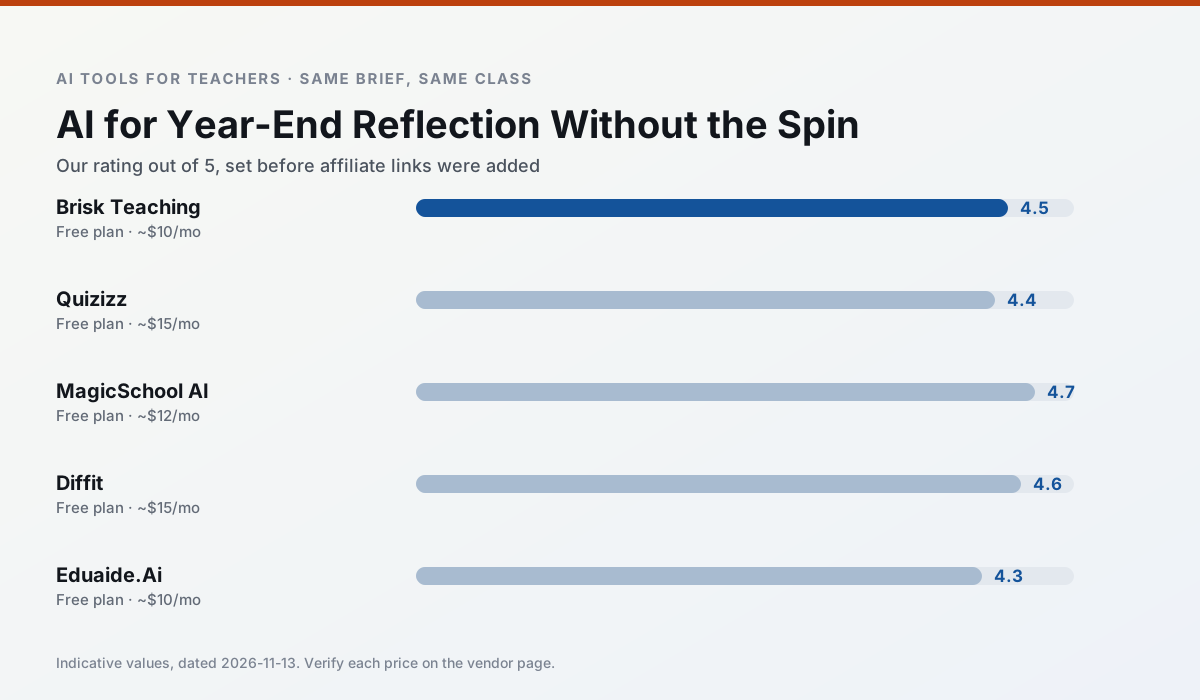
Side by side
Comparison table
Ratings reflect our timed classroom workflow, not vendor claims. Prices are indicative — verify on the vendor site.
| Tool | Best for | Free tier | Indicative paid plan | Standout feature | Our rating | Verdict | Try the tool |
|---|---|---|---|---|---|---|---|
| Brisk Teaching | feedback on writing · grading | Yes — Limited actions per month | ~$10 /user/mo | Works inside Google Docs | 4.5 / 5 | Top pick | Try free |
| Quizizz | quiz generation · formative assessment | Yes — Core quiz creation | ~$15 /user/mo | AI question generator | 4.4 / 5 | Strong option | Try free |
| MagicSchool AI | lesson planning · differentiation | Yes — Core generators with monthly usage limits | ~$12 /user/mo | 80+ teacher-specific tools | 4.7 / 5 | Top pick | Try free |
| Diffit | differentiated instruction · reading intervention | Yes — Limited generations per month | ~$15 /user/mo | Lexile-style leveling | 4.6 / 5 | Top pick | Try free |
| Eduaide.Ai | lesson planning · rubric creation | Yes — Daily generation cap | ~$10 /user/mo | Resource library | 4.3 / 5 | Strong option | Try free |
| Curipod | formative assessment · exit tickets | Yes — Limited lessons per month | ~$12 /user/mo | Live polls and word clouds | 4.4 / 5 | Strong option | Try free |
Match your situation
Best for X
Different jobs need different tools. Here is what we would open first in each case.
Brisk Teaching wins on the default path: fewer clicks to a usable draft, and the interface does not get in the way at 7:40am.
Nothing on Quizizz's free tier is a teaser demo; the limits are documented and a normal week fits inside them.
MagicSchool AI answers the three questions a district actually asks: rostering, admin controls and a data-processing agreement. That is usually what decides a school purchase.
Diffit has the shortest path from opening a tab to a usable draft, which matters more than the feature count on a Monday.
Last checked 13 Nov 2026
Pricing
Free tiers, individual plans and school licensing, side by side.
| Tool | Free plan | Individual / paid | School & district | Billing note | Verify |
|---|---|---|---|---|---|
| Brisk Teaching | $0 — Limited actions per month | ~$10 /user/mo | Custom quote | Indicative — verify on vendor site | Vendor |
| Quizizz | $0 — Core quiz creation | ~$15 /user/mo | Custom quote | Indicative — verify on vendor site | Vendor |
| MagicSchool AI | $0 — Core generators with monthly usage limits | ~$12 /user/mo | Custom quote | Indicative — verify on vendor site | Vendor |
| Diffit | $0 — Limited generations per month | ~$15 /user/mo | Custom quote | Indicative — verify on vendor site | Vendor |
| Eduaide.Ai | $0 — Daily generation cap | ~$10 /user/mo | Custom quote | Indicative — verify on vendor site | Vendor |
| Curipod | $0 — Limited lessons per month | ~$12 /user/mo | Custom quote | Indicative — verify on vendor site | Vendor |
Editorial rule: pricing is re-checked every 2–3 months and the top 50 pages are refreshed every 6 months. See our funding policy.
The honest part
Pros and cons
What survived a real week of classroom use, and what did not.
Pros
- No copy-paste between tools
- Fast inline feedback on student drafts
- Gentle learning curve
Cons
- Chrome-first workflow
- Extension permissions need IT approval
- Free quota is tight
Pros
- Students already know the interface
- Good reporting
- Works on low-end devices
Cons
- Writing high-quality AI questions still needs review
- Gamification can distract
- Advanced analytics are paid
Pros
- Widest purpose-built template library
- Strong free tier for individual teachers
- Fast to learn with almost no prompting skill
Cons
- Outputs still need standards review
- Best features sit behind the paid tier
- District approval can be slow
Pros
- Excellent for mixed-ability classes
- Produces printable and digital versions
- Minimal setup
Cons
- Narrower scope than all-in-one suites
- Leveling is approximate, not a formal assessment
- Heavy use burns through the free quota
Pros
- Very low entry price
- Good worksheet and rubric output
- Clean, uncluttered UI
Cons
- Smaller template set than MagicSchool
- Less polished export options
- Limited integrations
In the classroom
Use cases
Five concrete workflows, with the tool we would open for each one.
A weekly family newsletter from bullet notes
Newsletters fail on length, not tone. Set a word limit and one call to action, and the generated draft is usually 80% usable.
Recommended: Brisk TeachingRegrouping students after an assessment
Summarise anonymised results into skill groups, then generate one activity per group. Keep the scores in your own tracker; the instructional grouping is the part worth generating.
Recommended: QuizizzA Monday morning lesson plan in twelve minutes
The twelve minutes come from not rewriting the skeleton. Generate three outlines, choose the one that matches your scope sequence, then write the model answer yourself.
Recommended: MagicSchool AIThree reading levels from one source text
Paste a vetted text, ask for supported, core and extension versions, then check the vocabulary list by hand. Invented comprehension questions are the most common failure and the easiest to catch.
Recommended: DiffitRubric and feedback comments in one pass
Reorder the workflow so the rubric is yours and the comments are generated. Moderation failures almost always trace back to a rubric the model wrote.
Recommended: Eduaide.Ai
Questions teachers ask us
FAQ
Direct answers, also published as FAQPage structured data for search and AI assistants.
How long does this workflow take?
Which tool should I start with?
What if the output is unusable?
Sources & further reading
Our recommendation
Try MagicSchool AI free for your next lesson planning task
A large library of teacher-specific AI generators in one dashboard. Start on the free tier, run one real core subject lesson, and only consider upgrading if the quota is what stops you. Disclosure: we may earn a commission (30% recurring) at no extra cost to you.
Some links on this page are affiliate links. We may earn a commission at no extra cost to you. Our rankings are editorial and never pay-to-play. Never enter student PII into a free consumer account.
Keep reading
Related comparisons in this cluster.
Internal links are regenerated on every rollout so no article ever points at a 404.