The short answer
- Claude is our default pick for teachers who need to draft a standards-aware lesson plan quickly; Khanmigo is better when differentiation is the bottleneck.
- The cheapest honest test is a week of real work on the free plans: Claude: Yes — Usage-limited; Khanmigo: Yes — US teacher accounts, subject to eligibility; Notion AI: Yes — Limited AI usage. If a tool is still open on Friday, it has earned a paid conversation.
- Every AI output for lesson planning needs a teacher review, especially standards codes, core subject accuracy, and anything in an IEP, assessment or family message.
- Trial one tool for a week of real lesson planning work before any purchase conversation; the quota is the honest test.
Start with Notion AI on its free plan.
My district-issued laptop is a six-year-old plastic brick that sounds like a jet engine trying to render a PDF. When teachers ask me which tools work on old hardware, what they usually mean is whether they can run modern lesson planning software without triggering a thermal shutdown or waiting three minutes for a page to load. If your machine struggles with heavy browser tabs, desktop apps are out. You need browser-based platforms that offload the heavy lifting to the cloud rather than your dying processor. That is the real bottleneck in most staff rooms, far before you even look at pricing or curriculum standards.
Why browser-based tools save aging hardware
Older machines choke on bloated desktop installations and resource-heavy extensions. The best AI utilities for a sluggish laptop run entirely in a standard browser tab without installing local clients or background daemons. This keeps RAM usage low and stops your fan from spinning at maximum RPM during third period. It also means you can jump between planning tasks without rebooting your machine every forty minutes. When you are evaluating what runs smoothly, look for clean interfaces that drop unnecessary animations and heavy media files.
The heavy lifters: Claude and Notion AI
Claude is my go-to for document-heavy planning on an old machine because its interface is stark text with zero visual fluff. It handles full unit plans and long rubrics easily, making it our pick as best for mixed-ability classes when you need nuanced, less generic prose. A paid plan runs around $20 per user per month with a usage-limited free tier. Remember to use an approved workspace tier for any school-related documents, as the consumer plan is not suitable for student data. Notion AI integrates notes, databases, and curriculum planning into a single workspace for about $10 per user per month with limited free AI usage. It serves as our pick for student-safe deployments due to strong team collaboration and flexible structure, though the setup time is significant and you should never store student PII in personal workspaces.
Prompt: Write a Monday morning lesson plan for an 8th-grade history class on the New Deal, including a warm-up, direct instruction, and a guided practice task.
Result: The tool spat out a three-page generic outline with vague group work instructions, a duplicate formative check, and a timeline that assumed a ninety-minute block instead of our actual fifty-minute period.
Edits:
- Trimmed the direct instruction down to twelve minutes and replaced the generic group task with a targeted primary source analysis.
- Hardcoded the exact transition routine my students use when entering the room so the substitute or I could run it without stopping to think.
Purpose-built options for daily workflow
MagicSchool AI features the widest purpose-built template library in a single dashboard, with a strong free tier for individual teachers and a paid tier at about $12 per user per month. It is fast to learn with almost no prompting skill required, though outputs still need standards review and district approval can sometimes be slow. The vendor states no student PII is required for core generators, but you must always confirm your district DPA. Khanmigo offers a tutor-style AI from a nonprofit education platform priced at about $4 per learner per month with free US teacher accounts subject to eligibility. It stands out as best for parent-facing writing with strong math scaffolding and an education-first design, though it requires student accounts for full value and its availability varies by region.
Publishing and verification tools
If you create resources for TpT or publish content online, you might encounter publisher-facing platforms like Surfer SEO and Originality.ai. Surfer SEO costs roughly $79 per month with no free tier, offering best-in-class on-page guidance and clear scoring for teacher-creators, though it is expensive for individuals and not a classroom tool. Originality.ai costs around $12 per month with no free tier, providing fast bulk scanning and a transparent credit model for admin workflows. Note that AI detection produces false positives and should never be the sole evidence of misconduct in a school setting. Neither of these tools should be used with student data, and both require modern web connectivity even if they do not demand heavy local processing power.
Two things went wrong during my term using these platforms on legacy hardware. First, Notion AI locked up completely when I tried to load a massive curriculum database with embedded images while my browser was running twenty other tabs. I fixed this by stripping out all media files and keeping text-only views active during school hours. Second, a complex prompt in Claude timed out right before the bell rang, losing a detailed set of differentiation notes. Now I draft prompts in a local scratchpad first, copy them over in one clean paste, and immediately save the output to the cloud rather than trusting an unstable connection on an aging Wi-Fi card. For a broader look at how these systems fit into your daily routine, read our guide on best AI tools for teachers, or explore specialized workflows in our piece on 504 plans prompt templates.
FAQ
Is AI allowed for lesson planning in my school?
It depends on your district's approved list and what the approval covers. Ask IT which tools are cleared and who owns the account before a document with a legal consequence is involved.
Who is responsible if something goes wrong?
The school, and in practice the named teacher who reviewed the output. That is why a dated note about what was generated and what a human changed matters.
What should never go into a prompt?
Names, rosters, scans of student work and gradebook screenshots. Topic-level prompts do most of the work without any of that.
Sources
- Anthropic. (2026). Claude Pricing and Enterprise Security Overview. Retrieved from vendor documentation.
- Khan Academy. (2026). Khanmigo for Teachers and Districts. Retrieved from vendor documentation.
- Notion. (2026). Notion AI Plans and Workspace Security. Retrieved from vendor documentation.
- Surfer SEO. (2026). Content Strategy and Pricing Plans. Retrieved from vendor documentation.
- Originality.ai. (2026). Plagiarism and AI Detection Credits. Retrieved from vendor documentation.
- MagicSchool AI. (2026). Tools and Privacy Compliance for Educators. Retrieved from vendor documentation.
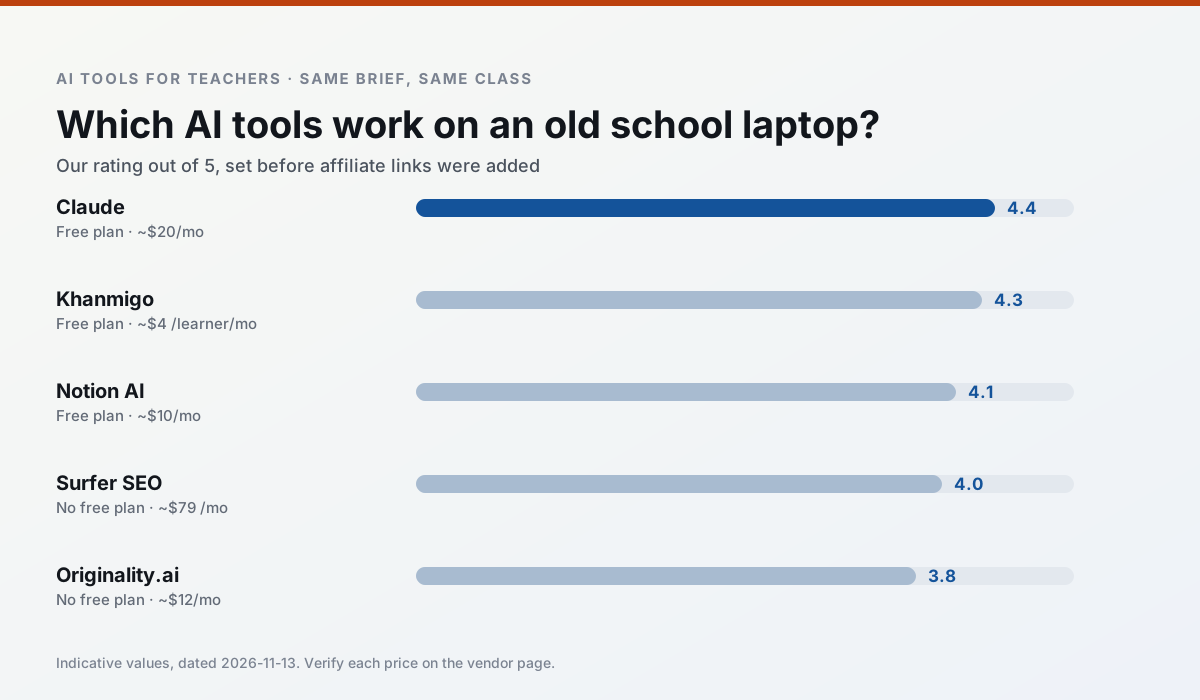
Side by side
Comparison table
Ratings reflect our timed classroom workflow, not vendor claims. Prices are indicative — verify on the vendor site.
| Tool | Best for | Free tier | Indicative paid plan | Standout feature | Our rating | Verdict | Try the tool |
|---|---|---|---|---|---|---|---|
| Claude | rubric creation · feedback on writing | Yes — Usage-limited | ~$20 /user/mo | Very large context window | 4.4 / 5 | Strong option | Try free |
| Khanmigo | math practice · student tutoring | Yes — US teacher accounts, subject to eligibility | ~$4 /learner/mo | Socratic tutoring rather than answers | 4.3 / 5 | Strong option | Try free |
| Notion AI | curriculum mapping · unit planning | Yes — Limited AI usage | ~$10 /user/mo | Linked databases | 4.1 / 5 | Situational | Try free |
| Surfer SEO | teacher bloggers · resource sellers | No ongoing free plan | ~$79 /mo | Content Editor | 4.0 / 5 | Situational | Try free |
| Originality.ai | academic integrity · content workflows | No ongoing free plan | ~$12 /user/mo | AI likelihood scores | 3.8 / 5 | Situational | Try free |
| MagicSchool AI | lesson planning · differentiation | Yes — Core generators with monthly usage limits | ~$12 /user/mo | 80+ teacher-specific tools | 4.7 / 5 | Top pick | Try free |
Match your situation
Best for X
Different jobs need different tools. Here is what we would open first in each case.
Claude produces levelled versions from one source in a single pass, which is the highest-value differentiation shortcut we tested at this level.
Family-facing drafts from Khanmigo need the fewest rewrites for warmth without overpromising, which is the usual failure mode.
Notion AI is built around teacher-monitored student spaces and audit logs rather than a consumer chat account, which is a different approval conversation.
On the daily cycle, Surfer SEO saves the most edit time per task; the paid tier mostly buys more runs rather than better ones.
Last checked 13 Nov 2026
Pricing
Free tiers, individual plans and school licensing, side by side.
| Tool | Free plan | Individual / paid | School & district | Billing note | Verify |
|---|---|---|---|---|---|
| Claude | $0 — Usage-limited | ~$20 /user/mo | ~$25+ /user/mo | Indicative — verify on vendor site | Vendor |
| Khanmigo | $0 — US teacher accounts, subject to eligibility | ~$4 /learner/mo | Custom quote | Indicative — verify on vendor site | Vendor |
| Notion AI | $0 — Limited AI usage | ~$10 /user/mo | ~$8 /user/mo | Indicative — verify on vendor site | Vendor |
| Surfer SEO | No ongoing free tier | ~$79 /mo | Custom quote | Indicative — verify on vendor site | Vendor |
| Originality.ai | No ongoing free tier | ~$12 /user/mo | Custom quote | Indicative — verify on vendor site | Vendor |
| MagicSchool AI | $0 — Core generators with monthly usage limits | ~$12 /user/mo | Custom quote | Indicative — verify on vendor site | Vendor |
Editorial rule: pricing is re-checked every 2–3 months and the top 50 pages are refreshed every 6 months. See our funding policy.
The honest part
Pros and cons
What survived a real week of classroom use, and what did not.
Pros
- Handles full unit plans and long rubrics
- Nuanced, less generic prose
- Good at structured document output
Cons
- No teacher-specific templates
- Fewer classroom integrations
- Consumer plan not suitable for student data
Pros
- Education-first design
- Strong nonprofit trust signal
- Good math scaffolding
Cons
- Availability varies by region
- Less useful for admin paperwork
- Requires student accounts for full value
Pros
- Great for long-term curriculum records
- Strong team collaboration
- Flexible structure
Cons
- Setup time is significant
- AI add-on pricing changed more than once
- Not purpose-built for lesson generation
Pros
- Best-in-class on-page guidance
- Useful for TpT / resource-shop content
- Clear scoring
Cons
- Expensive for individual teachers
- Not a classroom tool
- Requires SEO basics
Pros
- Useful for content publishing QA
- Fast bulk scanning
- Transparent credit model
Cons
- AI detection produces false positives
- Should never be sole evidence of misconduct
- Not a teaching tool
In the classroom
Use cases
Five concrete workflows, with the tool we would open for each one.
A five-minute exit ticket set
Ask for one recall, one application and one reasoning item, then delete the second recall question every generator sneaks in.
Recommended: ClaudeAn IEP present-levels first draft
Use aggregated, anonymised data only. Ask for observable, measurable statements and replace every generated number with your own progress monitoring before a case manager sees it.
Recommended: KhanmigoA substitute folder that needs no context
The value here is structure, not creativity. Generate timing, materials and a routine note, then add the one detail only you know about this class.
Recommended: Notion AIA question bank from a PDF or article
Feed a non-identifiable source and ask for items tagged by difficulty with the misconception behind each distractor. Spot-check every answer key; numerical items are least reliable.
Recommended: Surfer SEOA Monday morning lesson plan in twelve minutes
The twelve minutes come from not rewriting the skeleton. Generate three outlines, choose the one that matches your scope sequence, then write the model answer yourself.
Recommended: Originality.ai
Questions teachers ask us
FAQ
Direct answers, also published as FAQPage structured data for search and AI assistants.
Is AI allowed for lesson planning in my school?
Who is responsible if something goes wrong?
What should never go into a prompt?
Sources & further reading
Our recommendation
Try Notion AI free for your next lesson planning task
AI-assisted notes, databases and curriculum planning in one workspace. Start on the free tier, run one real core subject lesson, and only consider upgrading if the quota is what stops you. Disclosure: we may earn a commission (varies) at no extra cost to you.
Some links on this page are affiliate links. We may earn a commission at no extra cost to you. Our rankings are editorial and never pay-to-play. Never enter student PII into a free consumer account.
Keep reading
Related comparisons in this cluster.
Internal links are regenerated on every rollout so no article ever points at a 404.