The short answer
- Jasper is our default pick for teachers who need to draft a standards-aware lesson plan quickly; OpusClip is better when differentiation is the bottleneck.
- Start with Jasper on its free plan, keep OpusClip as the second opinion, and do not open a card until the quota, not the feature list, is what stops you.
- Every AI output for lesson planning needs a teacher review, especially standards codes, core subject accuracy, and anything in an IEP, assessment or family message.
- Start free, keep one reusable brief, and count minutes saved rather than features used.
Start with Jasper on its free plan.
Last Tuesday at 4:15 PM, I stared at a generated three-tier lesson plan on ecosystems that suggested my eighth graders build physical terrariums out of empty soda bottles, fill them with wild soil from the parking lot, and observe them for six weeks. It looked wonderful on screen. It used all the right buzzwords about inquiry-based learning and differentiated outcomes. It also completely ignored the fact that our district banned glass and plastic bottle craft projects three years ago due to safety mandates, and that my classroom has zero windows and two grow lights that currently buzz like angry hornets.
How accurate are AI lesson plans, really? The short answer is that they are remarkably fluent liars. They can construct a gorgeous instructional arc with behavioral objectives and formative checks in four seconds flat, but they hallucinate constraints, logistics, and grade-level appropriateness with absolute confidence. If you want to understand how these outputs hold up in real classrooms, you have to look past the marketing gloss of tools like Jasper, Grammarly, and ElevenLabs and test them against the messy reality of a Tuesday afternoon. We have tested a wide range of platforms to see where generative output actually saves time and where it creates more grading work. For a broader look at how these technologies fit into daily routines, see our guide on best AI tools for teachers 2026.
The Weekly Newsletter Trap
Newsletters to families usually fail on length, not tone. Teachers sit down on Friday afternoon with a messy list of bullet points about picture day, the upcoming science fair, and a missing library book deadline, and the resulting email becomes a five-paragraph wall of text that nobody reads. Grammarly, priced at roughly $12 per user per month, helps cut the fluff by tightening high-stakes parent emails, though its free tier handles basic grammar checks. When you feed it rough notes, set a strict word limit and a single call to action. The generated draft usually lands at about 80 percent usable.
For district-level communications or heavy community newsletters, Jasper steps in at roughly $39 per user per month, providing a strong long-form editor to keep a consistent brand voice across school teams. Neither tool is built for student data, so keep names out of the prompt box entirely. If you need to translate those updates into spoken announcements or accessible audio versions for households with varied literacy levels, ElevenLabs costs about $5 per user per month and turns text into natural voiceovers. Just make sure you never clone a colleague's or student's voice without explicit written consent.
Turning Assessments into Actionable Groups
Regrouping students after an intermediate math or reading assessment is one of the heaviest lifts of the teaching week. The trick to using AI here is keeping the raw scores entirely off the platform. Summarise anonymised results into broad skill groups, such as students who struggled with multi-step word problems versus those who missed fractions, and ask the tool to generate one targeted activity per group.
Prompt: Act as an upper-middle school math coach. Using these anonymised skill gaps—Group A struggles with distributing negative signs, Group B confuses perimeter and area formulas—generate three distinct 10-minute small-group station activities. Keep instructions under four sentences each and list one misconception for each station.
First draft output: The generator produced three stations involving hands-on manipulatives, detailed teacher scripts, and a complex extension task for fast finishers that required graphing calculators we do not own.
Teacher edits:
- Stripped out the graphing calculator requirement and swapped it for a dry-erase board error-analysis task.
- Cut the teacher script down to a single guiding question per station so the groups could run independently while I pulled my intensive intervention group.
Exit Tickets and Question Banks
Writing a fast five-minute exit ticket shouldn't require a master's degree in psychometrics, but finding balanced questions takes time. When you ask a generator for an exit ticket set, specify one recall, one application, and one reasoning item. You will almost always need to delete the second recall question the model sneaks in because it defaults to low-level multiple-choice questions.
When building a question bank from a PDF or article, feed a non-identifiable source and ask for items tagged by difficulty, complete with the specific misconception behind each distractor. You must spot-check every single answer key because numerical items remain the least reliable part of any generated output. If you try to use Colossyan, which costs around $27 per user per month with no permanent free tier, to turn those documents into training or explainer videos for staff, you get fast document-to-video conversion, but it remains poorly suited for direct K-12 student-facing content. Similarly, OpusClip, priced at roughly $15 per user per month, turns recorded classroom lessons or lecture snippets into short review clips with strong captions, though it is optimised for social formats rather than lesson design.
+---------------------------+-----------------------------------+-----------------------------------------+
| Tool                      | Indicative Price                  | Best Classroom Use                      |
+---------------------------+-----------------------------------+-----------------------------------------+
| Grammarly                 | ~$12 /user/mo                     | Polishing parent emails and newsletters |
| ElevenLabs                | ~$5 /user/mo                      | Accessible audio versions of texts      |
| OpusClip                  | ~$15 /user/mo                     | Creating review clips from recordings   |
| Colossyan                 | ~$27 /user/mo                     | Staff training and explainer videos     |
| Jasper                    | ~$39 /user/mo                     | District and school-wide comms          |
| Turnitin Feedback Studio  | Custom quote                      | Institutional writing feedback          |
+---------------------------+-----------------------------------+-----------------------------------------+
IEP Present-Levels Drafts
Drafting an Individualized Education Program present-levels statement requires absolute precision. If you use AI here, you must use aggregated, anonymised data only. Ask the model for observable, measurable statements, but plan to replace every single generated number with your own hard progress monitoring data before a case manager or parent ever sees the document. For schools that already license enterprise tools, Turnitin Clarity and Feedback Studio provide consistent institutional writing feedback and similarity checking, though individual teachers cannot purchase it independently and AI detection features remain widely contested. For more guidance on managing complex accommodations without relying blindly on automation, read our breakdown on 504 plans prompt templates for teachers. AI is an assistant that needs heavy supervision, not a substitute for professional judgment.
FAQ
Is AI allowed for lesson planning in my school?
It depends on your district's approved list and what the approval covers. Ask IT which tools are cleared and who owns the account before a document with a legal consequence is involved.
Who is responsible if something goes wrong?
The school, and in practice the named teacher who reviewed the output. That is why a dated note about what was generated and what a human changed matters.
What should never go into a prompt?
Names, rosters, scans of student work and gradebook screenshots. Topic-level prompts do most of the work without any of that.
Sources
- Jasper pricing and feature overview: https://www.jasper.ai/
- OpusClip video repurposing documentation: https://www.opus.pro/
- ElevenLabs text-to-speech quotas and safety guidelines: https://elevenlabs.io/
- Colossyan document-to-video features: https://www.colossyan.com/
- Turnitin Feedback Studio institutional compliance and data privacy: https://www.turnitin.com/
- Grammarly business and education security standards: https://www.grammarly.com/
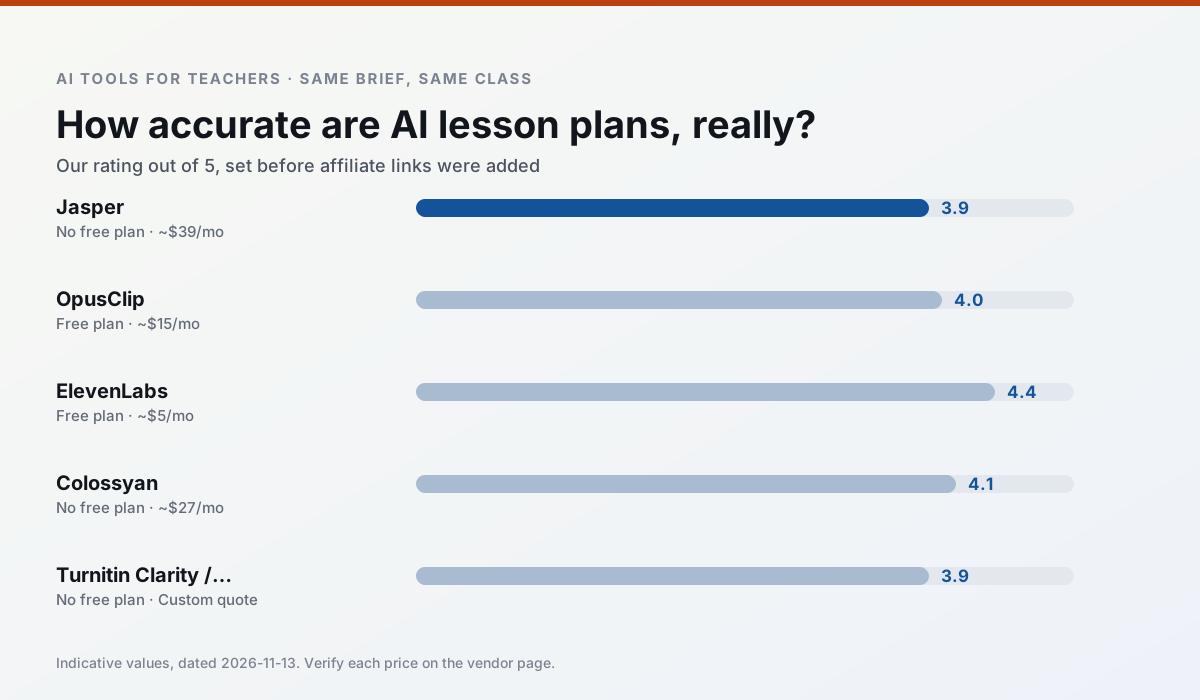
Side by side
Comparison table
Ratings reflect our timed classroom workflow, not vendor claims. Prices are indicative — verify on the vendor site.
| Tool | Best for | Free tier | Indicative paid plan | Standout feature | Our rating | Verdict | Try the tool |
|---|---|---|---|---|---|---|---|
| Jasper | newsletters · parent communication | No ongoing free plan | ~$39 /user/mo | Brand voice profiles | 3.9 / 5 | Situational | Try free |
| OpusClip | PD materials · flipped lessons | Yes — Limited monthly clips | ~$15 /user/mo | Auto captions | 4.0 / 5 | Situational | Try free |
| ElevenLabs | accessibility · reading intervention | Yes — Monthly character quota | ~$5 /user/mo | Very natural voices | 4.4 / 5 | Strong option | Try free |
| Colossyan | PD materials · video lessons | No ongoing free plan | ~$27 /user/mo | PDF/PPT-to-video | 4.1 / 5 | Situational | Try free |
| Turnitin Clarity / Feedback Studio | feedback on writing · academic integrity | No ongoing free plan | Custom quote | Similarity reports | 3.9 / 5 | Situational | Try free |
| Grammarly | parent communication · report card comments | Yes — Core grammar and tone checks | ~$12 /user/mo | Tone adjustments | 4.3 / 5 | Strong option | Try free |
Match your situation
Best for X
Different jobs need different tools. Here is what we would open first in each case.
Family-facing drafts from Jasper need the fewest rewrites for warmth without overpromising, which is the usual failure mode.
OpusClip produces levelled versions from one source in a single pass, which is the highest-value differentiation shortcut we tested at this level.
ElevenLabs is the student-facing option here with boundaries a teacher can actually set and supervise.
Colossyan's free plan is the most usable in this comparison: a quota that survives a normal week. Not enough for a department, enough for one teacher to decide.
Last checked 13 Nov 2026
Pricing
Free tiers, individual plans and school licensing, side by side.
| Tool | Free plan | Individual / paid | School & district | Billing note | Verify |
|---|---|---|---|---|---|
| Jasper | No ongoing free tier | ~$39 /user/mo | ~$59+ /user/mo | Indicative — verify on vendor site | Vendor |
| OpusClip | $0 — Limited monthly clips | ~$15 /user/mo | ~$29 /user/mo | Indicative — verify on vendor site | Vendor |
| ElevenLabs | $0 — Monthly character quota | ~$5 /user/mo | ~$22 /user/mo | Indicative — verify on vendor site | Vendor |
| Colossyan | No ongoing free tier | ~$27 /user/mo | Custom quote | Indicative — verify on vendor site | Vendor |
| Turnitin Clarity / Feedback Studio | No ongoing free tier | Custom quote | Custom quote | LMS-wide deployment | Vendor |
| Grammarly | $0 — Core grammar and tone checks | ~$12 /user/mo | ~$15 /user/mo | Indicative — billed annually | Vendor |
Editorial rule: pricing is re-checked every 2–3 months and the top 50 pages are refreshed every 6 months. See our funding policy.
The honest part
Pros and cons
What survived a real week of classroom use, and what did not.
Pros
- Consistent tone across communications
- Strong long-form editor
- Good for district comms teams
Cons
- Priced for marketing teams
- Overkill for one classroom
- No education-specific features
Pros
- Turns a recorded lesson into review clips
- Excellent captions
- Fast
Cons
- Optimised for social formats
- Not a lesson design tool
- Free plan is restrictive
Pros
- Excellent for accessible audio versions
- Low entry price
- Fast generation
Cons
- Quota-based billing
- Voice cloning consent considerations
- Not a teaching platform
Pros
- Strong for staff training, not just lessons
- Good compliance/LMS export
- Fast document-to-video
Cons
- No permanent free plan
- Higher price point
- Less suited to K-12 student-facing content
Pros
- Already licensed at many schools
- Consistent institutional workflow
- Detailed revision history
Cons
- Individual teachers cannot buy it
- AI detection remains contested
- Heavy administrative setup
In the classroom
Use cases
Five concrete workflows, with the tool we would open for each one.
Regrouping students after an assessment
Summarise anonymised results into skill groups, then generate one activity per group. Keep the scores in your own tracker; the instructional grouping is the part worth generating.
Recommended: JasperA weekly family newsletter from bullet notes
Newsletters fail on length, not tone. Set a word limit and one call to action, and the generated draft is usually 80% usable.
Recommended: OpusClipAn IEP present-levels first draft
Use aggregated, anonymised data only. Ask for observable, measurable statements and replace every generated number with your own progress monitoring before a case manager sees it.
Recommended: ElevenLabsA five-minute exit ticket set
Ask for one recall, one application and one reasoning item, then delete the second recall question every generator sneaks in.
Recommended: ColossyanA question bank from a PDF or article
Feed a non-identifiable source and ask for items tagged by difficulty with the misconception behind each distractor. Spot-check every answer key; numerical items are least reliable.
Recommended: Turnitin Clarity / Feedback Studio
Questions teachers ask us
FAQ
Direct answers, also published as FAQPage structured data for search and AI assistants.
Is AI allowed for lesson planning in my school?
Who is responsible if something goes wrong?
What should never go into a prompt?
Sources & further reading
Our recommendation
Try Jasper free for your next lesson planning task
Brand-voice writing assistant for school communications teams. Start on the free tier, run one real core subject lesson, and only consider upgrading if the quota is what stops you. Disclosure: we may earn a commission (varies) at no extra cost to you.
Some links on this page are affiliate links. We may earn a commission at no extra cost to you. Our rankings are editorial and never pay-to-play. Never enter student PII into a free consumer account.
Keep reading
Related comparisons in this cluster.
Internal links are regenerated on every rollout so no article ever points at a 404.