The short answer
- Diffit is our default pick for teachers who need to generate practice sets with answer keys quickly; ChatGPT is better when differentiation is the bottleneck.
- Diffit handles the broad case; ChatGPT handles the narrow one. Anything beyond that pair should be justified by a recurring weekly job, not a feature demo.
- Every AI output for worksheet creation needs a teacher review, especially standards codes, math accuracy, and anything in an IEP, assessment or family message.
- Trial one tool for a week of real worksheet creation work before any purchase conversation; the quota is the honest test.
Start with MagicSchool AI on its free plan.
It was 7:45 on a Tuesday morning, and I was staring at a stack of thirty folded tests from my second-period algebra class. Twelve kids had completely bombed the factoring section. I needed an intervention worksheet by third period that targeted the exact gap between what I taught and what they actually wrote on the page, but my textbook only offered twenty more problems of the exact same flavor they had just failed to digest. That is the exact moment most math teachers turn to AI worksheet creation for math teachers, hoping for a miracle and usually getting a messy sheet of equations with missing minus signs or unsimplifiable fractions.
Building math materials with artificial intelligence is different from drafting reading passages or social studies questions. Math has rigid syntax, and a misplaced parentheses or a badly formatted radical will derail a whole room of sophomores in under two minutes. Over the past year, I have tested dozens of platforms to see which ones actually survive a morning prep period. If you are looking at the wider landscape of options, our comprehensive guide to AI tools for teachers in 2026 covers the ecosystem, but math requires its own specific filtering when it comes to layout, notation, and accuracy.
The Reality of Generating Math Problems
If you ask a general-purpose model like ChatGPT to make a worksheet, you will get a wall of plain text that completely ignores how a math page needs to look. ChatGPT is priced at around $20 per user per month on its paid tier, with usage-limited free models available, and it remains the most flexible option for quick text generation. Yet it lacks built-in math rendering or native standards alignment. You will spend twenty minutes fighting markdown tables and fixing fractions that look like text slop. The trick is treating the generator as a rough-draft engine rather than a finished typesetter.
Prompt: Create 5 algebra 1 word problems about linear equations for 9th graders. Make sure the numbers work out to clean integers.
First response: A messy list of word problems where problem two resulted in a decimal of 3.42 items sold, which is impossible for physical objects.
Two edits that saved it: First, I added a strict constraint to the prompt: "Ensure all final answers are whole numbers between negative twelve and positive twelve." Second, I copied the text into a LaTeX-friendly template rather than trying to let the AI handle the final document layout.
When Text-Based Generators Fall Short on Equations
Diffit is widely known for leveling text and video, coming in at roughly $15 per user per month with a limited free tier, and our rankings place it as best for schools and districts. While it shines in mixed-ability humanities classes, pushing math problems through a text-leveling engine usually strips away the necessary structural scaffolding. Math teachers do not need a reading passage about a slope; they need the step-by-step numeric progression. When I tried using Diffit for a remediation sequence last spring, the generated practice problems jumped from single-step equations to complex systems without any intermediate bridge.
For specific math workflows where students are actually writing on paper, tools like Class Companion fill a very different gap. Priced at roughly $12 per user per month with a limited free tier, it provides AI feedback on handwritten and scanned student work. This is a massive shift for math classrooms because most of our assessment still happens on loose-leaf paper rather than screens. Scan quality heavily dictates accuracy, and you still have to review the feedback before it goes back to the kid, but it catches sign errors faster than I can do it at four o'clock in the afternoon.
Interactive Delivery Versus Static Practice
Sometimes the goal is not a printed worksheet at all, but an interactive check for understanding that keeps every student accountable. Curipod costs around $12 per user per month with a limited lessons tier, and our rankings name it best overall for daily use. It turns a quick math topic into an interactive, student-response lesson in minutes.
Prompt: Generate a 5-slide Curipod check for understanding on identifying the slope-intercept form from a graph, for 8th-grade math.
First response: A generic slide deck with open-ended drawing prompts that were too vague for a quick formative check.
Two edits that saved it: I restricted the slide types to multiple-choice and coordinate-grid spotting, and I added a specific misconception warning: "Include one distractor option where the slope and y-intercept are intentionally reversed."
The limitation here is that Curipod focuses entirely on delivery and presentation rather than long-term curriculum planning, and it demands reliable classroom devices for every single seat. Still, for a middle-of-the-class pulse check, it beats waiting around for thirty kids to finish flipping a paper worksheet. For another subject-specific look at how fast formative checks can be built, check out our guide on AI exit tickets for ELA teachers.
Institutional Tools and District Compliance
When you move past individual classroom experiments, district licensing changes the equation entirely. Turnitin Clarity and Feedback Studio offer institutional writing feedback and similarity checking with no free tier and custom enterprise pricing. While our rankings designate it as the best free option only in the context of existing institutional licenses, it is fundamentally built for essay revision and plagiarism detection rather than raw mathematical computation. Math teachers rarely touch it for daily problem sets, leaving it to the English department down the hall.
For a safer walled garden, SchoolAI provides a school-safe workspace with teacher-controlled student zones, sitting at roughly $15 per user per month with a limited seat free tier. It is designed specifically for district approval and features robust safeguarding defaults.
[Math Teacher's Desk]
       │
       ├──> ChatGPT (~$20/mo) ──> Fast text drafts, needs strict constraints
       ├──> Class Companion (~$12/mo) ──> Scans handwritten paper work
       └──> Curipod (~$12/mo) ──> Interactive whole-class checks
The drawback is that SchoolAI requires school-wide buy-in to function properly, and it feels far more rigid than an open LLM. Yet when you are dealing with district data privacy requirements and the constant anxiety over student Personally Identifiable Information, having an audit-logged workspace matters far more than having the cleverest prompt library on the internet. Never paste identifiable student work into consumer-grade AI models, and always double-check your local data privacy agreements before uploading student problem sets to any unverified platform.
FAQ
Can AI do worksheet creation at mixed-grade level?
It can produce a first draft and a structure. The level judgement, the standards check and the tone are teacher decisions.
Which tool is best for worksheet creation?
Diffit on the evidence in this article, with ChatGPT as the second opinion. Neither replaces the review step.
What is the biggest risk?
A confident, plausible output that nobody checked. The five checks below exist for that reason.
Sources
- Diffit vendor overview and feature limitations retrieved from Diffit Pricing and Features (Accessed 2026-11-13).
- ChatGPT subscription details and enterprise privacy policies retrieved from OpenAI Pricing (Accessed 2026-11-13).
- Curipod lesson generation tools retrieved from Curipod Educator Guide (Accessed 2026-11-13).
- Class Companion scanning capabilities retrieved from Class Companion Features (Accessed 2026-11-13).
- SchoolAI safety and compliance standards retrieved from SchoolAI Safety Center (Accessed 2026-11-13).
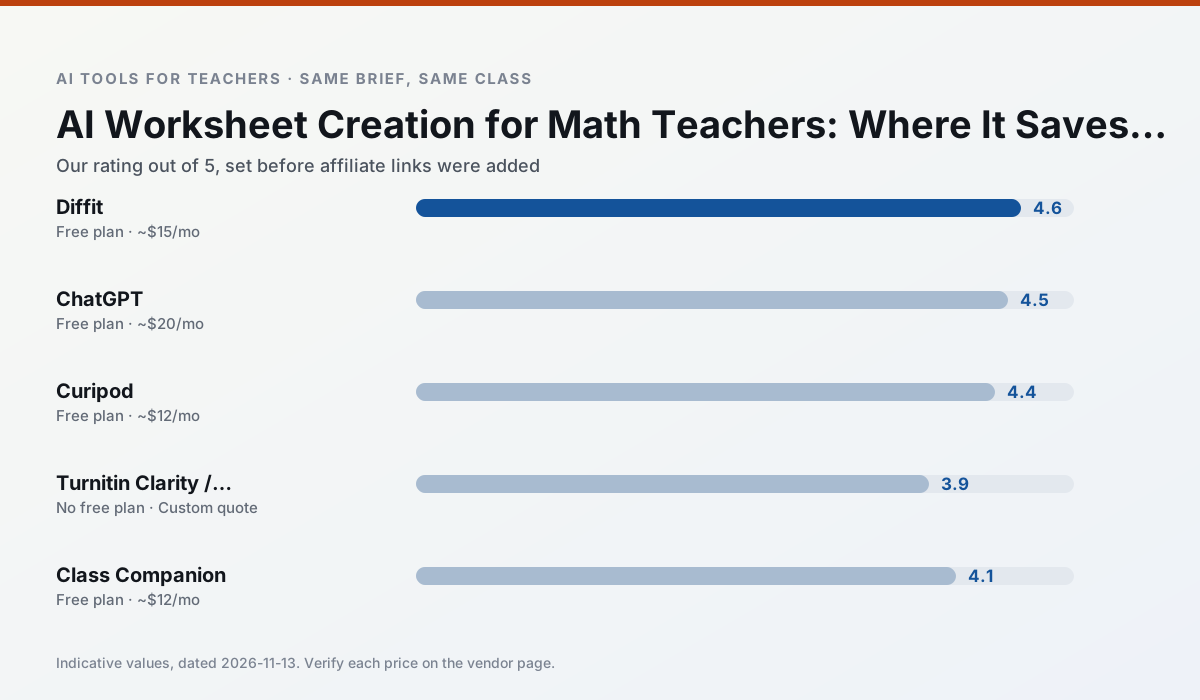
Side by side
Comparison table
Ratings reflect our timed classroom workflow, not vendor claims. Prices are indicative — verify on the vendor site.
| Tool | Best for | Free tier | Indicative paid plan | Standout feature | Our rating | Verdict | Try the tool |
|---|---|---|---|---|---|---|---|
| Diffit | differentiated instruction · reading intervention | Yes — Limited generations per month | ~$15 /user/mo | Lexile-style leveling | 4.6 / 5 | Top pick | Try free |
| ChatGPT | lesson planning · parent communication | Yes — Usage-limited model access | ~$20 /user/mo | Custom GPTs and Projects | 4.5 / 5 | Top pick | Try free |
| Curipod | formative assessment · exit tickets | Yes — Limited lessons per month | ~$12 /user/mo | Live polls and word clouds | 4.4 / 5 | Strong option | Try free |
| Turnitin Clarity / Feedback Studio | feedback on writing · academic integrity | No ongoing free plan | Custom quote | Similarity reports | 3.9 / 5 | Situational | Try free |
| Class Companion | grading · feedback on writing | Yes — Limited assignments | ~$12 /user/mo | Handwriting recognition | 4.1 / 5 | Situational | Try free |
| SchoolAI | student-safe AI · differentiated instruction | Yes — Limited seats | ~$15 /user/mo | Teacher-monitored student chats | 4.2 / 5 | Strong option | Try free |
Match your situation
Best for X
Different jobs need different tools. Here is what we would open first in each case.
Diffit is the option IT is least likely to block: single sign-on, admin removal of AI features and an agreement on file.
ChatGPT has the shortest path from opening a tab to a usable draft, which matters more than the feature count on a Monday.
Curipod is the one we would open on a normal planning day because the first output is editable rather than restructurable, and the free plan covers a single teacher's routine.
If there is no budget, start with Turnitin Clarity / Feedback Studio: free plan with clearest quota is the least punishing free tier here.
Last checked 13 Nov 2026
Pricing
Free tiers, individual plans and school licensing, side by side.
| Tool | Free plan | Individual / paid | School & district | Billing note | Verify |
|---|---|---|---|---|---|
| Diffit | $0 — Limited generations per month | ~$15 /user/mo | Custom quote | Indicative — verify on vendor site | Vendor |
| ChatGPT | $0 — Usage-limited model access | ~$20 /user/mo | ~$25+ /user/mo | Indicative — verify on vendor site | Vendor |
| Curipod | $0 — Limited lessons per month | ~$12 /user/mo | Custom quote | Indicative — verify on vendor site | Vendor |
| Turnitin Clarity / Feedback Studio | No ongoing free tier | Custom quote | Custom quote | LMS-wide deployment | Vendor |
| Class Companion | $0 — Limited assignments | ~$12 /user/mo | Custom quote | Indicative — verify on vendor site | Vendor |
| SchoolAI | $0 — Limited seats | ~$15 /user/mo | Custom quote | Indicative — verify on vendor site | Vendor |
Editorial rule: pricing is re-checked every 2–3 months and the top 50 pages are refreshed every 6 months. See our funding policy.
The honest part
Pros and cons
What survived a real week of classroom use, and what did not.
Pros
- Excellent for mixed-ability classes
- Produces printable and digital versions
- Minimal setup
Cons
- Narrower scope than all-in-one suites
- Leveling is approximate, not a formal assessment
- Heavy use burns through the free quota
Pros
- Most flexible option available
- Huge community of teacher prompt libraries
- Strong multilingual support
Cons
- Requires prompt skills for consistent results
- No built-in standards alignment
- District privacy review usually required
Pros
- High student engagement out of the box
- Great for quick checks for understanding
- No student accounts required for basic use
Cons
- Focused on delivery, not planning
- Requires reliable classroom devices
- Free tier is restrictive
Pros
- Already licensed at many schools
- Consistent institutional workflow
- Detailed revision history
Cons
- Individual teachers cannot buy it
- AI detection remains contested
- Heavy administrative setup
Pros
- Useful where work is done on paper
- Fast, specific comments
- Good math support
Cons
- Scan quality affects accuracy
- Narrow use case
- Feedback still needs teacher review
In the classroom
Use cases
Five concrete workflows, with the tool we would open for each one.
A weekly family newsletter from bullet notes
Newsletters fail on length, not tone. Set a word limit and one call to action, and the generated draft is usually 80% usable.
Recommended: DiffitRegrouping students after an assessment
Summarise anonymised results into skill groups, then generate one activity per group. Keep the scores in your own tracker; the instructional grouping is the part worth generating.
Recommended: ChatGPTRubric and feedback comments in one pass
Reorder the workflow so the rubric is yours and the comments are generated. Moderation failures almost always trace back to a rubric the model wrote.
Recommended: CuripodA parent email in two languages
Draft in plain, warm language with no names, translate, then back-translate the important sentences to check meaning. Keep specific incidents out of the prompt and add them yourself.
Recommended: Turnitin Clarity / Feedback StudioA Monday morning lesson plan in twelve minutes
The twelve minutes come from not rewriting the skeleton. Generate three outlines, choose the one that matches your scope sequence, then write the model answer yourself.
Recommended: Class Companion
Questions teachers ask us
FAQ
Direct answers, also published as FAQPage structured data for search and AI assistants.
Can AI do worksheet creation at mixed-grade level?
Which tool is best for worksheet creation?
What is the biggest risk?
Sources & further reading
Our recommendation
Try MagicSchool AI free for your next worksheet creation task
A large library of teacher-specific AI generators in one dashboard. Start on the free tier, run one real math lesson, and only consider upgrading if the quota is what stops you. Disclosure: we may earn a commission (30% recurring) at no extra cost to you.
Some links on this page are affiliate links. We may earn a commission at no extra cost to you. Our rankings are editorial and never pay-to-play. Never enter student PII into a free consumer account.
Keep reading
Related comparisons in this cluster.
Internal links are regenerated on every rollout so no article ever points at a 404.