The short answer
- Claude is our default pick for teachers who need to give actionable draft feedback quickly; Brisk Teaching is better when differentiation is the bottleneck.
- Pricing is where these pages date fastest. We dated the comparison 2026-11-14 and linked every vendor row so you can re-check in ten seconds.
- Every AI output for feedback on student writing needs a teacher review, especially standards codes, Foreign language accuracy, and anything in an IEP, assessment or family message.
- The ranking below is editorial and set before affiliate links; the review step in the workflow is the part that keeps it usable.
Start with ElevenLabs on its free plan.
It is four hours past dismissal, and my desk holds thirty-four Spanish three paragraphs on what students did over the weekend. Half of them are variations of "I went to the store with my friend and we bought apples." By essay number twelve, my red pen has stopped correcting subjunctive moods and has begun merely circling the period at the end of the sentence like a tiny, frustrated clock. World language teachers live in a specific kind of writing feedback purgatory. We are expected to correct grammar, syntax, register, and cultural appropriateness all at once, usually while managing five distinct prep periods and three different language levels. If we write margin notes in English, students ignore them; if we write them in the target language, beginners cannot parse the correction. This reality is why many of us have turned to AI feedback on student writing for world language teachers, looking for a way out of the weekend grading loop.
The Reality of Inline Drafting
When you need to give feedback without making students open a separate tab or copy-paste text into a chat window, browser extensions change the rhythm of the room. Brisk Teaching sits inside Google Docs and allows you to highlight student paragraphs and drop inline comments or rubrics right where they are writing. For mixed-ability classes, this is helpful because you can dial the feedback complexity up for your heritage speakers while keeping corrections gentle for students still struggling with basic verb conjugation. The catch is that it is a Chrome-first workflow. If your school district locks down extension permissions or runs strict IT audits, getting it installed takes longer than grading the essays by hand. The free tier gives you a limited number of actions per month, so you will run out by the second Wednesday of a grading cycle if you use it for every single assignment, and the paid plan sits around $10 per user per month.
Prompt: Act as a high school Spanish teacher. Review this paragraph written by a Level 2 student about a family trip. Check for past tense agreement (preterite vs imperfect) and spelling. Do not rewrite the sentence for them; instead, ask a guiding question in simple Spanish that prompts self-correction.
First response: The AI gave five corrections in English, completely rewriting the student's opening sentence and missing the imperfect trigger word "siempre."
Edit 1: Added a strict negative constraint: "Do not use English, and do not rewrite the student text."
Edit 2: Specified the exact proficiency level: "Use CEFR A2 Spanish vocabulary in your guiding questions."
Result: A usable set of three Spanish prompts that forced the student to look back at their verb charts.
Long-Context Planning and Parent Communication
When you need to build out an entire thematic unit on francophone immigration or generate a detailed report for a parent who wants to know why their child is struggling with German case endings, shorter tools run out of steam. Claude handles long documents well, letting you upload a full semester's worth of rubrics and unit outcomes to generate nuanced prose that does not sound like a robot wrote it. It is our top pick for parent-facing writing because it catches tone issues better than most consumer models. However, the free tier is usage-limited, and the paid consumer plan runs around $20 per user per month. More importantly, consumer tiers are not suitable for direct student data input under privacy guidelines. You have to scrub names and identifiers before pasting any student work into a long-context window, which adds a layer of friction. For a broader look at how these applications fit into instructional workflows, read our guide on the best AI tools for teachers 2026.
Handling Paper Work and Scanned Worksheets
Not every world language classroom is a one-to-one device environment. Many of us still rely on paper journals, handwritten dictations, and physical workbook pages to build muscle memory in characters or accent marks. Class Companion handles AI feedback on handwritten and scanned student work, which makes it the best free option when your students are working offline. You upload a scan or photo of the assignment, and the tool returns specific comments on where the student missed a diacritical mark or mixed up gender agreements. The limitation is that scan quality directly affects accuracy. If a student has messy handwriting in French cursive, the OCR engine struggles, leaving you to manually override half the feedback anyway. It also requires a data processing agreement because student work is uploaded to external servers.
Institutional Safety and Revision History
In larger high schools and districts, individual teacher accounts are not enough to clear legal hurdles. Turnitin Clarity and Feedback Studio provide institutional writing feedback and similarity checking that plug directly into your learning management system. Teachers cannot buy individual licenses here; it requires a district-level contract with custom pricing. The strength of this setup is consistency and security, making it our top pick for student-safe deployments under strict FERPA guidelines. You get a detailed revision history that shows whether a student actually wrote their essay or pasted it in from a translation engine in three seconds. The downside is the heavy administrative setup. AI detection scores within these platforms remain contested and prone to false positives, meaning you still have to use your own professional judgment before having a difficult conversation with a student about academic integrity.
Two Things That Went Wrong
Using AI for language feedback teaches you humility very quickly. First, during a vocabulary quiz review, an AI generator spat out a list of distractors for a multiple-choice question on French food terms. One of the distractors was a completely fabricated word that did not exist in standard French, but it looked plausible enough that three top students selected it. I had to throw out the question and spend the first ten minutes of the next class explaining why machine hallucination is a real hazard. Now, I run every generated question bank through a strict spot-check, especially for numerical or vocabulary items.
Second, I tried to use an AI text-to-speech tool, ElevenLabs, to generate listening comprehension tracks for my lower-level classes using a monthly character quota at roughly $5 per month. The voices sounded remarkably human, far better than the robotic text-to-speech built into our old textbook CD-ROMs. But I made the mistake of feeding it a script that included regional slang without checking the pronunciation rules for liaisons in French. The model read every single word as if it were isolated dictionary entries, rendering the listening exercise completely unnatural and useless for ear-training. I had to re-record the tracks myself on my phone voice memo app during my planning period. Voice tools are great for accessible audio versions of static text, but they cannot replace native speaker nuance without meticulous prompt engineering.
Scaling Staff Training and Video Materials
Sometimes the writing feedback challenge is not student-facing at all, but rather instructional design for your department. Colossyan builds training and explainer videos from documents and scripts, running around $27 per user per month with no permanent free plan. It is useful when your department needs to standardize how everyone applies the AP rubric across three different sections of Spanish Literature. You can turn a boring twenty-page PDF guide on holistic grading into a short video briefing for department meetings. It is less suited for direct K-12 student-facing content, and you have to confirm data residency requirements with your district's tech department before uploading any internal curriculum files. For similar subject-specific strategies, take a look at our companion piece on AI essay feedback for history teachers.
Language teaching relies on human connection, cultural context, and the messy reality of teenagers trying to express complex thoughts in a medium they have not yet mastered. AI cannot replace the look on a student's face when they finally crack the subjunctive, but it can clear away the mechanical clutter of initial draft checks so we can focus on actual communication.
FAQ
Can AI do feedback on student writing at mixed-grade level?
It can produce a first draft and a structure. The level judgement, the standards check and the tone are teacher decisions.
Which tool is best for feedback on student writing?
Claude on the evidence in this article, with Brisk Teaching as the second opinion. Neither replaces the review step.
What is the biggest risk?
A confident, plausible output that nobody checked. The five checks below exist for that reason.
Sources
- Anthropic Claude Product Documentation and Pricing, accessed 2026.
- Brisk Teaching Extension Overview and Privacy Policy, accessed 2026.
- Turnitin Feedback Studio and Clarity Feature Specifications, accessed 2026.
- Class Companion Platform Features and Free Tier Limits, accessed 2026.
- ElevenLabs Pricing and Audio Generation Guidelines, accessed 2026.
- Colossyan Video Generation and Compliance Documentation, accessed 2026.
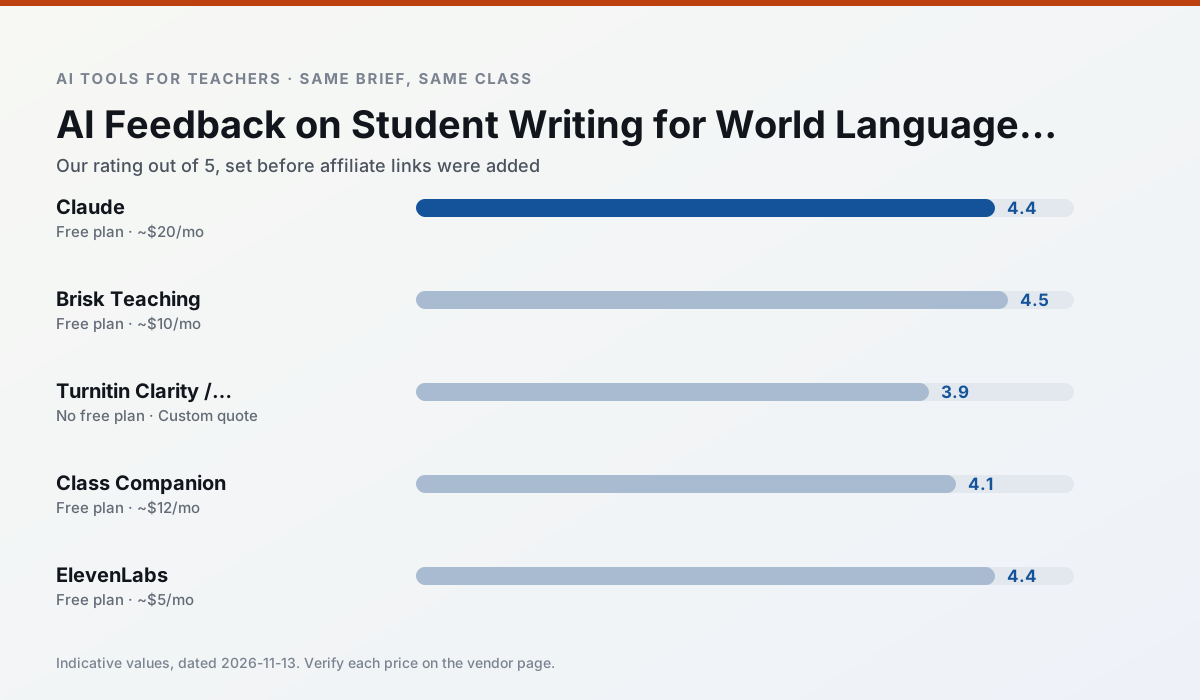
Side by side
Comparison table
Ratings reflect our timed classroom workflow, not vendor claims. Prices are indicative — verify on the vendor site.
| Tool | Best for | Free tier | Indicative paid plan | Standout feature | Our rating | Verdict | Try the tool |
|---|---|---|---|---|---|---|---|
| Claude | rubric creation · feedback on writing | Yes — Usage-limited | ~$20 /user/mo | Very large context window | 4.4 / 5 | Strong option | Try free |
| Brisk Teaching | feedback on writing · grading | Yes — Limited actions per month | ~$10 /user/mo | Works inside Google Docs | 4.5 / 5 | Top pick | Try free |
| Turnitin Clarity / Feedback Studio | feedback on writing · academic integrity | No ongoing free plan | Custom quote | Similarity reports | 3.9 / 5 | Situational | Try free |
| Class Companion | grading · feedback on writing | Yes — Limited assignments | ~$12 /user/mo | Handwriting recognition | 4.1 / 5 | Situational | Try free |
| ElevenLabs | accessibility · reading intervention | Yes — Monthly character quota | ~$5 /user/mo | Very natural voices | 4.4 / 5 | Strong option | Try free |
| Colossyan | PD materials · video lessons | No ongoing free plan | ~$27 /user/mo | PDF/PPT-to-video | 4.1 / 5 | Situational | Try free |
Match your situation
Best for X
Different jobs need different tools. Here is what we would open first in each case.
Family-facing drafts from Claude need the fewest rewrites for warmth without overpromising, which is the usual failure mode.
Brisk Teaching keeps the same task across levels, which is what makes a differentiated set defensible in moderation.
Turnitin Clarity / Feedback Studio is the student-facing option here with boundaries a teacher can actually set and supervise.
If there is no budget, start with Class Companion: free plan with clearest quota is the least punishing free tier here.
Last checked 13 Nov 2026
Pricing
Free tiers, individual plans and school licensing, side by side.
| Tool | Free plan | Individual / paid | School & district | Billing note | Verify |
|---|---|---|---|---|---|
| Claude | $0 — Usage-limited | ~$20 /user/mo | ~$25+ /user/mo | Indicative — verify on vendor site | Vendor |
| Brisk Teaching | $0 — Limited actions per month | ~$10 /user/mo | Custom quote | Indicative — verify on vendor site | Vendor |
| Turnitin Clarity / Feedback Studio | No ongoing free tier | Custom quote | Custom quote | LMS-wide deployment | Vendor |
| Class Companion | $0 — Limited assignments | ~$12 /user/mo | Custom quote | Indicative — verify on vendor site | Vendor |
| ElevenLabs | $0 — Monthly character quota | ~$5 /user/mo | ~$22 /user/mo | Indicative — verify on vendor site | Vendor |
| Colossyan | No ongoing free tier | ~$27 /user/mo | Custom quote | Indicative — verify on vendor site | Vendor |
Editorial rule: pricing is re-checked every 2–3 months and the top 50 pages are refreshed every 6 months. See our funding policy.
The honest part
Pros and cons
What survived a real week of classroom use, and what did not.
Pros
- Handles full unit plans and long rubrics
- Nuanced, less generic prose
- Good at structured document output
Cons
- No teacher-specific templates
- Fewer classroom integrations
- Consumer plan not suitable for student data
Pros
- No copy-paste between tools
- Fast inline feedback on student drafts
- Gentle learning curve
Cons
- Chrome-first workflow
- Extension permissions need IT approval
- Free quota is tight
Pros
- Already licensed at many schools
- Consistent institutional workflow
- Detailed revision history
Cons
- Individual teachers cannot buy it
- AI detection remains contested
- Heavy administrative setup
Pros
- Useful where work is done on paper
- Fast, specific comments
- Good math support
Cons
- Scan quality affects accuracy
- Narrow use case
- Feedback still needs teacher review
Pros
- Excellent for accessible audio versions
- Low entry price
- Fast generation
Cons
- Quota-based billing
- Voice cloning consent considerations
- Not a teaching platform
In the classroom
Use cases
Five concrete workflows, with the tool we would open for each one.
Regrouping students after an assessment
Summarise anonymised results into skill groups, then generate one activity per group. Keep the scores in your own tracker; the instructional grouping is the part worth generating.
Recommended: ClaudeA weekly family newsletter from bullet notes
Newsletters fail on length, not tone. Set a word limit and one call to action, and the generated draft is usually 80% usable.
Recommended: Brisk TeachingAn IEP present-levels first draft
Use aggregated, anonymised data only. Ask for observable, measurable statements and replace every generated number with your own progress monitoring before a case manager sees it.
Recommended: Turnitin Clarity / Feedback StudioA five-minute exit ticket set
Ask for one recall, one application and one reasoning item, then delete the second recall question every generator sneaks in.
Recommended: Class CompanionA question bank from a PDF or article
Feed a non-identifiable source and ask for items tagged by difficulty with the misconception behind each distractor. Spot-check every answer key; numerical items are least reliable.
Recommended: ElevenLabs
Questions teachers ask us
FAQ
Direct answers, also published as FAQPage structured data for search and AI assistants.
Can AI do feedback on student writing at mixed-grade level?
Which tool is best for feedback on student writing?
What is the biggest risk?
Sources & further reading
Our recommendation
Try ElevenLabs free for your next feedback on student writing task
Natural-sounding AI voiceover and text-to-speech for learning materials. Start on the free tier, run one real Foreign language lesson, and only consider upgrading if the quota is what stops you. Disclosure: we may earn a commission (22% recurring) at no extra cost to you.
Some links on this page are affiliate links. We may earn a commission at no extra cost to you. Our rankings are editorial and never pay-to-play. Never enter student PII into a free consumer account.
Keep reading
Related comparisons in this cluster.
Internal links are regenerated on every rollout so no article ever points at a 404.