The short answer
- MagicSchool AI is our default pick for teachers who need to draft a standards-aware lesson plan quickly; Eduaide.Ai is better when differentiation is the bottleneck.
- All 3 shortlisted tools are priced for one teacher first and a school second. MagicSchool AI and Eduaide.Ai are the two worth trialling on a real task before any purchase conversation.
- Every AI output for lesson planning needs a teacher review, especially standards codes, computer science accuracy, and anything in an IEP, assessment or family message.
- Everything on this page dates from 2026-11-13; where a price could not be re-read, the row says so.
Start with MagicSchool AI on its free plan.
By fourth period on a Tuesday in November 2026, I was staring at a blank screen trying to explain asynchronous state management in JavaScript to twenty-two juniors, half of whom were still struggling with basic loops. I needed an unplugged activity, a scaffolded code template, and a formative check that didn't involve me grading fifty syntax errors by midnight. That is when AI lesson planning for cs teachers stops being a futuristic staff meeting buzzword and starts being a survival tactic. We are past the phase of treating these platforms like magic tricks. Now, we use them like overworked teaching assistants who need constant supervision.
The Reality of Computer Science Lesson Design
Writing curriculum for computer science is uniquely punishing because the target keeps moving. One week you are teaching block-based logic, and the next your district expects you to introduce basic algorithms or Python dictionaries without adding any instructional time to your schedule. General-purpose tools like ChatGPT, priced around $20 per month on paid tiers, offer immense flexibility for drafting syntax guides or parent emails, but they demand precise prompt engineering to keep the output from wandering off into code that uses libraries you have not taught yet. When you need student-safe deployments with built-in guardrails, platforms like MagicSchool AI, which sits around $12 per user per month, provide purpose-built generators that cut down setup time, though their code logic still requires a careful human sweep for edge cases.
Teachers often make the mistake of trusting an entire unit plan generated in a single click. Computer science concepts rely on strict logical progression. If an AI generator skips a minor step between variable declaration and scope, the whole debugging lab falls apart on Thursday morning. That is why successful AI lesson planning for cs teachers relies on modular generation rather than asking a tool to write an entire week from scratch. You generate the worked example, then you generate the common errors, and finally, you build the exit ticket.
Prompt: Write a 45-minute introductory lesson plan for high school computer science on Python functions, including an unplugged activity for scope and a guided coding task with three debugging prompts where the variables are intentionally misspelled.
First-pass output: The model provided a standard lecture on parameters, a dry code snippet computing a total, and three generic debugging questions. The unplugged activity involved students passing index cards around the room, which lacked clear constraints for variable scope.
Edit one: Replaced the index card activity with a paper-tracing exercise where students track local and global namespace frames in separate columns.
Edit two: Rewrote the debugging code snippets to match the exact syntax errors my students made during our previous list-processing lab.
Scaffolding Mixed-Ability Coding Labs
When your classroom includes students building their own Discord bots alongside kids who still mix up assignment operators and equality checks, differentiation is your main bottleneck. Eduaide.Ai, costing roughly $10 per user per month, stands out as best for mixed-ability classes because of its clean interface and strong worksheet generation. You can take a single programming prompt and use Eduaide to spin off three distinct difficulty tiers in the time it takes to brew a cup of coffee. You get a heavily scaffolded version with fill-in-the-blank code comments, an on-grade-level version with standard error messages to decipher, and an extension challenge that introduces try-except blocks.
The danger with differentiated computer science materials is that the lowest tier often removes so much cognitive load that students learn nothing about problem-solving. AI models love to hand out complete solutions when asked to simplify a coding task. To fix this, you have to explicitly instruct the generator to provide broken code with missing syntax rather than simplified pseudocode. If you want to dive deeper into how specific subjects adapt these workflows, take a look at our guide on AI lesson planning for CS teachers 2026.
Building Zero-Context Sub Folders
Emergency sub plans in a computer science room are notoriously difficult because most substitutes cannot debug a Python indentation error or explain why a loop is infinite. The trick to a bulletproof sub folder is structure over creativity. You use AI to generate a rigid routine note, clear timing guidelines, and an unplugged logic puzzle that requires zero screen time or compiler access. Curipod, priced at roughly $12 per user per month, helps bridge this gap by turning static topics into interactive student-response lessons that run directly in the browser, though you must ensure your classroom devices are reliable before relying on it.
When an unexpected absence hits, you do not want your substitute trying to troubleshoot student IDE installations. You want a structured paper-and-pencil tracing exercise where students predict the output of recursive functions by hand. AI can generate twenty distinct tracing problems in seconds, but you must manually verify that the terminal outputs match Python 3 behavior rather than older language standards. For more ideas on how to handle quick formative checks across different grade levels, explore our AI exit tickets for kindergarten teachers guide.
Formative Checks and Rubric Management
Evaluating student code is tedious because syntax errors obscure conceptual understanding. You can use platforms like OpusClip, running around $15 per user per month, or Murf AI, priced near $19 per user per month, to handle multimedia components of your curriculum, such as turning recorded coding walkthroughs into captioned review clips or generating studio-quality voiceovers for your slide decks. However, your primary assessment workflow should stay rooted in fast, targeted feedback loops.
When building a grading rubric for a programming project, never let the AI write the scoring criteria and the feedback comments in the same pass.
If the model writes the rubric, its subsequent comment generation will loop in vague, unmeasurable jargon like "demonstrates good computational thinking." Always lock in your own rubric based on your specific learning objectives—such as modularity, documentation, and correct edge-case handling—and then use the AI solely to generate targeted feedback strings for common student pitfalls.
Privacy remains a strict boundary in these workflows. Never upload student source code containing personally identifiable information or comments with real student names into consumer-tier models. Stick to approved district workspace accounts, and always strip identifying data before feeding student artifacts into any analysis tool. AI lesson planning for cs teachers works best when you keep the machine focused on administrative heavy lifting while you retain total control over the logic, the safety, and the final grade.
FAQ
Can AI do lesson planning at mixed-grade level?
It can produce a first draft and a structure. The level judgement, the standards check and the tone are teacher decisions.
Which tool is best for lesson planning?
MagicSchool AI on the evidence in this article, with Eduaide.Ai as the second opinion. Neither replaces the review step.
What is the biggest risk?
A confident, plausible output that nobody checked. The five checks below exist for that reason.
Sources
- MagicSchool AI. (2026). Platform Overview and Teacher Tools. magicschool.ai
- Eduaide.Ai. (2026). Resource Library and Lesson Generation Features. eduaide.ai
- OpenAI. (2026). ChatGPT Workspace and Privacy Standards. openai.com
- OpusClip. (2026). Video Repurposing and Captioning Specifications. opus.pro
- Murf AI. (2026). Voiceover Studio and Licensing Terms. murf.ai
- Curipod. (2026). Interactive Lesson Delivery and Engagement Features. curipod.com
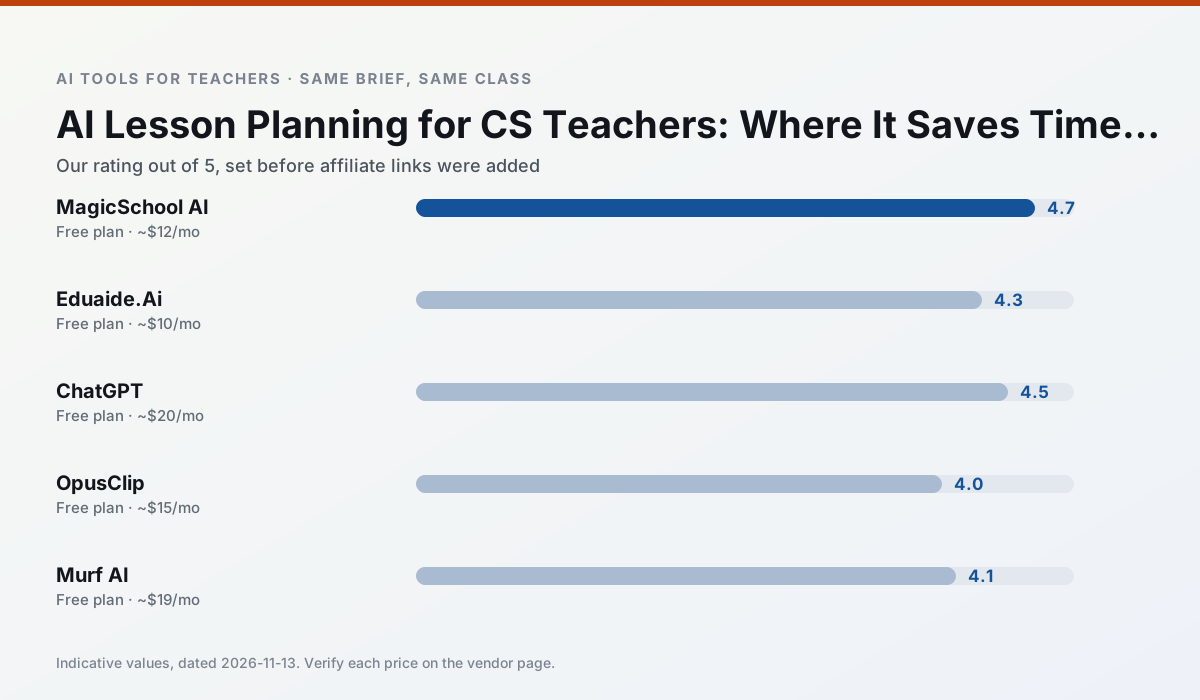
Side by side
Comparison table
Ratings reflect our timed classroom workflow, not vendor claims. Prices are indicative — verify on the vendor site.
| Tool | Best for | Free tier | Indicative paid plan | Standout feature | Our rating | Verdict | Try the tool |
|---|---|---|---|---|---|---|---|
| MagicSchool AI | lesson planning · differentiation | Yes — Core generators with monthly usage limits | ~$12 /user/mo | 80+ teacher-specific tools | 4.7 / 5 | Top pick | Try free |
| Eduaide.Ai | lesson planning · rubric creation | Yes — Daily generation cap | ~$10 /user/mo | Resource library | 4.3 / 5 | Strong option | Try free |
| ChatGPT | lesson planning · parent communication | Yes — Usage-limited model access | ~$20 /user/mo | Custom GPTs and Projects | 4.5 / 5 | Top pick | Try free |
| OpusClip | PD materials · flipped lessons | Yes — Limited monthly clips | ~$15 /user/mo | Auto captions | 4.0 / 5 | Situational | Try free |
| Murf AI | audio lessons · accessibility | Yes — Trial-only output | ~$19 /user/mo | Voice fine-tuning | 4.1 / 5 | Situational | Try free |
| Curipod | formative assessment · exit tickets | Yes — Limited lessons per month | ~$12 /user/mo | Live polls and word clouds | 4.4 / 5 | Strong option | Try free |
Match your situation
Best for X
Different jobs need different tools. Here is what we would open first in each case.
For anything students touch directly, MagicSchool AI offers the supervision controls and logging that IT will ask about first.
Eduaide.Ai keeps the same task across levels, which is what makes a differentiated set defensible in moderation.
ChatGPT has the strongest tone control for family emails and report comments, provided you still read the message aloud before sending.
OpusClip is the option IT is least likely to block: single sign-on, admin removal of AI features and an agreement on file.
Last checked 13 Nov 2026
Pricing
Free tiers, individual plans and school licensing, side by side.
| Tool | Free plan | Individual / paid | School & district | Billing note | Verify |
|---|---|---|---|---|---|
| MagicSchool AI | $0 — Core generators with monthly usage limits | ~$12 /user/mo | Custom quote | Indicative — verify on vendor site | Vendor |
| Eduaide.Ai | $0 — Daily generation cap | ~$10 /user/mo | Custom quote | Indicative — verify on vendor site | Vendor |
| ChatGPT | $0 — Usage-limited model access | ~$20 /user/mo | ~$25+ /user/mo | Indicative — verify on vendor site | Vendor |
| OpusClip | $0 — Limited monthly clips | ~$15 /user/mo | ~$29 /user/mo | Indicative — verify on vendor site | Vendor |
| Murf AI | $0 — Trial-only output | ~$19 /user/mo | ~$39 /user/mo | Indicative — verify on vendor site | Vendor |
| Curipod | $0 — Limited lessons per month | ~$12 /user/mo | Custom quote | Indicative — verify on vendor site | Vendor |
Editorial rule: pricing is re-checked every 2–3 months and the top 50 pages are refreshed every 6 months. See our funding policy.
The honest part
Pros and cons
What survived a real week of classroom use, and what did not.
Pros
- Widest purpose-built template library
- Strong free tier for individual teachers
- Fast to learn with almost no prompting skill
Cons
- Outputs still need standards review
- Best features sit behind the paid tier
- District approval can be slow
Pros
- Very low entry price
- Good worksheet and rubric output
- Clean, uncluttered UI
Cons
- Smaller template set than MagicSchool
- Less polished export options
- Limited integrations
Pros
- Most flexible option available
- Huge community of teacher prompt libraries
- Strong multilingual support
Cons
- Requires prompt skills for consistent results
- No built-in standards alignment
- District privacy review usually required
Pros
- Turns a recorded lesson into review clips
- Excellent captions
- Fast
Cons
- Optimised for social formats
- Not a lesson design tool
- Free plan is restrictive
Pros
- Very clean audio
- Good pacing controls
- Easy slide integration
Cons
- Commercial licensing rules matter
- Free tier is not usable long-term
- Single-purpose
In the classroom
Use cases
Five concrete workflows, with the tool we would open for each one.
A substitute folder that needs no context
The value here is structure, not creativity. Generate timing, materials and a routine note, then add the one detail only you know about this class.
Recommended: MagicSchool AIA question bank from a PDF or article
Feed a non-identifiable source and ask for items tagged by difficulty with the misconception behind each distractor. Spot-check every answer key; numerical items are least reliable.
Recommended: Eduaide.AiA five-minute exit ticket set
Ask for one recall, one application and one reasoning item, then delete the second recall question every generator sneaks in.
Recommended: ChatGPTAn IEP present-levels first draft
Use aggregated, anonymised data only. Ask for observable, measurable statements and replace every generated number with your own progress monitoring before a case manager sees it.
Recommended: OpusClipRubric and feedback comments in one pass
Reorder the workflow so the rubric is yours and the comments are generated. Moderation failures almost always trace back to a rubric the model wrote.
Recommended: Murf AI
Questions teachers ask us
FAQ
Direct answers, also published as FAQPage structured data for search and AI assistants.
Can AI do lesson planning at mixed-grade level?
Which tool is best for lesson planning?
What is the biggest risk?
Sources & further reading
Our recommendation
Try MagicSchool AI free for your next lesson planning task
A large library of teacher-specific AI generators in one dashboard. Start on the free tier, run one real computer science lesson, and only consider upgrading if the quota is what stops you. Disclosure: we may earn a commission (30% recurring) at no extra cost to you.
Some links on this page are affiliate links. We may earn a commission at no extra cost to you. Our rankings are editorial and never pay-to-play. Never enter student PII into a free consumer account.
Keep reading
Related comparisons in this cluster.
Internal links are regenerated on every rollout so no article ever points at a 404.