The short answer
- MagicSchool AI is our default pick for teachers who need to draft a standards-aware lesson plan quickly; Eduaide.Ai is better when differentiation is the bottleneck.
- Start with MagicSchool AI on its free plan, keep Eduaide.Ai as the second opinion, and do not open a card until the quota, not the feature list, is what stops you.
- Every AI output for lesson planning needs a teacher review, especially standards codes, art accuracy, and anything in an IEP, assessment or family message.
- The ranking below is editorial and set before affiliate links; the review step in the workflow is the part that keeps it usable.
Start with MagicSchool AI on its free plan.
By period three on a Tuesday, my ninth-grade ceramics room smells faintly of damp clay and vinegar, and I am usually staring at a blank lesson plan template trying to invent a three-week hand-building unit that hits state visual arts standards without requiring a kiln schedule overhaul. Last term, I decided to run an experiment. I stopped trying to write every project prompt, artist bio, and rubric from scratch. Instead, I spent six weeks testing platforms designed for AI lesson planning for art teachers to see what actually survived contact with real teenagers, messy glaze buckets, and a forty-minute class period.
Most tech reviews pretend that generating a lesson plan is the same as teaching it. In an art studio, that is a bad joke. An AI can write a brilliant paragraph about clay shrinkage rates, but it will not help you when twelve students need their coil pots scored at the exact same minute. This guide covers how six different tools performed when I used them for planning, resource creation, and studio management, broken down by what worked, what failed, and where my time actually went.
Finding the Right Studio Assistant
When you start looking at dedicated teacher platforms, you quickly realize they are built primarily for text-heavy humanities classes. Art teachers need tools that understand materials, visual analysis, and step-by-step studio processes. MagicSchool AI has become the market leader for student-safe deployments because its large library of teacher generators sits in one clean dashboard. For roughly $12 per user per month with a solid free tier, it lets you spin up project rubrics and artist background guides quickly. Its strength is speed, though you still have to verify that the art history facts are correct.
If you need clean worksheets and parent-facing writing, Eduaide.Ai shines as our pick for parent-facing writing. At around $10 per user per month with a daily generation cap, its uncluttered UI makes it painless to generate gallery walk guidelines or artist statement prompts that families can actually understand. It has a smaller template set than MagicSchool, but its output formatting looks remarkably human.
When you need to handle messy, mixed-ability classes where three students are working on advanced wheel throwing while five are struggling with basic pinch pots, ChatGPT is our pick for mixed-ability classes. At roughly $20 per user per month on paid plans with a usage-limited free tier, it remains the most flexible option available. You can feed it a project constraint and ask it to scaffold three distinct entry points for the same assignment. The catch is that it requires real prompt skill, and you must never input student PII on consumer plans.
Building Visual and Audio Resources
Art history and technique demonstration require more than text on a worksheet. When I needed quick setup for demonstration videos without filming my hands for twenty minutes, Fliki became our pick for quick setup. At roughly $21 per user per month with a watermarked free tier, it turns text into video using stock media and AI voiceover without needing digital avatars. It has minute-based limits, and the stock media can look a bit generic, but it saved me an entire weekend of filming pinch-pot angles.
For accessibility, pairing those visuals with clean audio is essential. ElevenLabs offers natural-sounding text-to-speech for around $5 per user per month with a monthly character quota. I used it to generate quick audio guides for gallery walks so students who struggle with reading comprehension could listen to artist statements while studying the work. It is fast, but you must remember it is a content tool, not a teaching platform, and quota-based billing creeps up on you if you generate long artist biographies.
For the actual visual materials, Canva for Education remains the gold standard. It is effectively free for verified educators, though account verification can sometimes be slow. Its huge template library and built-in AI writing and image features mean you can spin up a presentation on Frida Kahlo or color theory in ten minutes. The danger is that it is very easy to produce cluttered slides that overwhelm students, so you have to exercise restraint with the design elements.
Where Lesson Planning Actually Breaks Down
Every teacher who tries AI lesson planning for art teachers hits the same wall: generic outputs that do not match the physical reality of your classroom. When I asked an AI to generate a sub folder for an unexpected absence, the initial result suggested a complex linocut printing station that would have resulted in ruined linoleum and flying carving tools.
Prompt: Create a 45-minute sub plan for high school art students who are currently glazing ceramic pieces. Include safety rules and a quiet independent drawing backup.
AI Output: Students should finish glazing their pots, load the kiln, and then complete a detailed observational drawing of a still life set up at the front of the room.
Teacher Edits:
- Removed the instruction about loading the kiln, because high school students should never load a kiln without direct teacher supervision.
- Replaced the vague observational drawing task with a specific, single-page zine folding activity that uses only standard printer paper and pencils already in the sub bin.
That revision highlights the core tension of using these tools. They provide structure, but you provide the safety and the spatial awareness. To see how these workflows apply to broader classroom management and differentiation, you can read our guide on AI exit tickets for kindergarten teachers guide.
Managing Classroom Workflows and Data
Beyond the daily lesson plan, administrative tasks eat up the hours we should be spending talking to kids about their composition choices. When I used these tools to tackle weekly newsletters or regroup students after a technique assessment, I found distinct patterns in what worked.
When writing a weekly family newsletter from bullet notes, the secret is imposing strict constraints. Newsletters fail on length, not tone. If you set a strict word limit and one call to action, the generated draft is usually eighty percent usable right out of the gate.
When regrouping students after a formative assessment on color theory, I fed anonymised skill results into the prompt and asked for three distinct studio activities. Keeping the actual scores in my own gradebook while letting the AI handle the instructional grouping saved me an hour of planning. Similarly, when building a question bank from a PDF on art history, I extracted non-identifiable text and asked for items tagged by difficulty, making sure to spot-check every answer key since numerical data and dates are where generative tools fail most often.
We dive deeper into similar subject-specific workflows in our breakdown of AI essay feedback for history teachers guide.
Ultimately, AI will not fix a broken curriculum or magically make a kiln fire faster. What it can do is take the friction out of the blank page, giving you a rough draft to tear apart and rebuild into something that actually works for your students.
FAQ
Can AI do lesson planning at mixed-grade level?
It can produce a first draft and a structure. The level judgement, the standards check and the tone are teacher decisions.
Which tool is best for lesson planning?
MagicSchool AI on the evidence in this article, with Eduaide.Ai as the second opinion. Neither replaces the review step.
What is the biggest risk?
A confident, plausible output that nobody checked. The five checks below exist for that reason.
Sources
- MagicSchool AI. Feature overview and pricing tiers. https://www.magicschool.ai
- Eduaide.Ai. Resource library and generation capabilities. https://www.eduaide.ai
- OpenAI. ChatGPT model specifications and workspace privacy guidelines. https://openai.com
- Fliki. Text-to-video media limits and pricing structure. https://fliki.ai
- ElevenLabs. Text-to-speech quotas and voice generation terms. https://elevenlabs.io
- Canva. Canva for Education verification terms and feature sets. https://www.canva.com/education
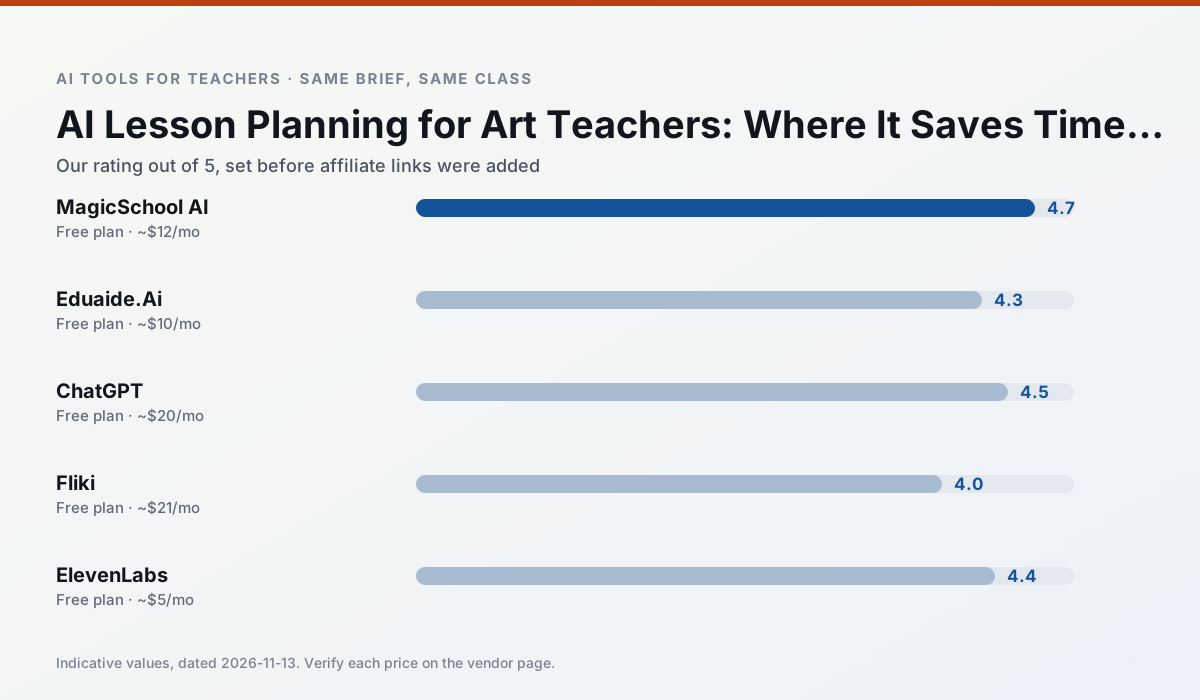
Side by side
Comparison table
Ratings reflect our timed classroom workflow, not vendor claims. Prices are indicative — verify on the vendor site.
| Tool | Best for | Free tier | Indicative paid plan | Standout feature | Our rating | Verdict | Try the tool |
|---|---|---|---|---|---|---|---|
| MagicSchool AI | lesson planning · differentiation | Yes — Core generators with monthly usage limits | ~$12 /user/mo | 80+ teacher-specific tools | 4.7 / 5 | Top pick | Try free |
| Eduaide.Ai | lesson planning · rubric creation | Yes — Daily generation cap | ~$10 /user/mo | Resource library | 4.3 / 5 | Strong option | Try free |
| ChatGPT | lesson planning · parent communication | Yes — Usage-limited model access | ~$20 /user/mo | Custom GPTs and Projects | 4.5 / 5 | Top pick | Try free |
| Fliki | video lessons · audio lessons | Yes — Watermarked, limited minutes | ~$21 /user/mo | Blog/text to video | 4.0 / 5 | Situational | Try free |
| ElevenLabs | accessibility · reading intervention | Yes — Monthly character quota | ~$5 /user/mo | Very natural voices | 4.4 / 5 | Strong option | Try free |
| Canva for Education | slide decks · worksheets | Yes — Verification required | ~$13 /user/mo | Thousands of education templates | 4.6 / 5 | Top pick | Try free |
Match your situation
Best for X
Different jobs need different tools. Here is what we would open first in each case.
MagicSchool AI is the student-facing option here with boundaries a teacher can actually set and supervise.
Eduaide.Ai is the steadiest of this set at plain, respectful language; names and specific incidents still belong in your draft, not the prompt.
ChatGPT produces levelled versions from one source in a single pass, which is the highest-value differentiation shortcut we tested at this level.
Fliki has the shortest path from opening a tab to a usable draft, which matters more than the feature count on a Monday.
Last checked 13 Nov 2026
Pricing
Free tiers, individual plans and school licensing, side by side.
| Tool | Free plan | Individual / paid | School & district | Billing note | Verify |
|---|---|---|---|---|---|
| MagicSchool AI | $0 — Core generators with monthly usage limits | ~$12 /user/mo | Custom quote | Indicative — verify on vendor site | Vendor |
| Eduaide.Ai | $0 — Daily generation cap | ~$10 /user/mo | Custom quote | Indicative — verify on vendor site | Vendor |
| ChatGPT | $0 — Usage-limited model access | ~$20 /user/mo | ~$25+ /user/mo | Indicative — verify on vendor site | Vendor |
| Fliki | $0 — Watermarked, limited minutes | ~$21 /user/mo | ~$66 /user/mo | Indicative — verify on vendor site | Vendor |
| ElevenLabs | $0 — Monthly character quota | ~$5 /user/mo | ~$22 /user/mo | Indicative — verify on vendor site | Vendor |
| Canva for Education | $0 — Verification required | ~$13 /user/mo | Custom quote | Indicative — verify on vendor site | Vendor |
Editorial rule: pricing is re-checked every 2–3 months and the top 50 pages are refreshed every 6 months. See our funding policy.
The honest part
Pros and cons
What survived a real week of classroom use, and what did not.
Pros
- Widest purpose-built template library
- Strong free tier for individual teachers
- Fast to learn with almost no prompting skill
Cons
- Outputs still need standards review
- Best features sit behind the paid tier
- District approval can be slow
Pros
- Very low entry price
- Good worksheet and rubric output
- Clean, uncluttered UI
Cons
- Smaller template set than MagicSchool
- Less polished export options
- Limited integrations
Pros
- Most flexible option available
- Huge community of teacher prompt libraries
- Strong multilingual support
Cons
- Requires prompt skills for consistent results
- No built-in standards alignment
- District privacy review usually required
Pros
- No avatar needed
- Good for explainer visuals
- Simple editor
Cons
- Minute-based limits
- Output can look generic
- Price jumps between tiers
Pros
- Excellent for accessible audio versions
- Low entry price
- Fast generation
Cons
- Quota-based billing
- Voice cloning consent considerations
- Not a teaching platform
In the classroom
Use cases
Five concrete workflows, with the tool we would open for each one.
Regrouping students after an assessment
Summarise anonymised results into skill groups, then generate one activity per group. Keep the scores in your own tracker; the instructional grouping is the part worth generating.
Recommended: MagicSchool AIA weekly family newsletter from bullet notes
Newsletters fail on length, not tone. Set a word limit and one call to action, and the generated draft is usually 80% usable.
Recommended: Eduaide.AiA question bank from a PDF or article
Feed a non-identifiable source and ask for items tagged by difficulty with the misconception behind each distractor. Spot-check every answer key; numerical items are least reliable.
Recommended: ChatGPTA substitute folder that needs no context
The value here is structure, not creativity. Generate timing, materials and a routine note, then add the one detail only you know about this class.
Recommended: FlikiAn IEP present-levels first draft
Use aggregated, anonymised data only. Ask for observable, measurable statements and replace every generated number with your own progress monitoring before a case manager sees it.
Recommended: ElevenLabs
Questions teachers ask us
FAQ
Direct answers, also published as FAQPage structured data for search and AI assistants.
Can AI do lesson planning at mixed-grade level?
Which tool is best for lesson planning?
What is the biggest risk?
Sources & further reading
Our recommendation
Try MagicSchool AI free for your next lesson planning task
A large library of teacher-specific AI generators in one dashboard. Start on the free tier, run one real art lesson, and only consider upgrading if the quota is what stops you. Disclosure: we may earn a commission (30% recurring) at no extra cost to you.
Some links on this page are affiliate links. We may earn a commission at no extra cost to you. Our rankings are editorial and never pay-to-play. Never enter student PII into a free consumer account.
Keep reading
Related comparisons in this cluster.
Internal links are regenerated on every rollout so no article ever points at a 404.