The short answer
- MagicSchool AI is our default pick for teachers who need to draft a standards-aware lesson plan quickly; Eduaide.Ai is better when differentiation is the bottleneck.
- Pricing is where these pages date fastest. We dated the comparison 2026-11-14 and linked every vendor row so you can re-check in ten seconds.
- Every AI output for lesson planning needs a teacher review, especially standards codes, music accuracy, and anything in an IEP, assessment or family message.
- Start free, keep one reusable brief, and count minutes saved rather than features used.
Start with MagicSchool AI on its free plan.
It was a Thursday afternoon in October when my eighth-grade band room smelled distinctively of valve oil and old wool, and I was staring at a blank scope and sequence for next week's rhythm units. My percussion section needed advanced syncopation, my woodwinds were still dragging on dotted quarters, and I had three different concert scales to introduce before the winter assembly. That is usually the moment music teachers look for shortcuts, which is how I started testing AI lesson planning for music teachers across a full term. I wanted to know if these platforms could handle the eccentricities of music education, or if they would just spit out generic lesson plans that assumed every kid sat at a desk with a textbook.
The landscape includes several options, ranging from education-specific toolkits to general models. When you look at platforms like MagicSchool AI, which offers a large library of teacher-specific generators in one dashboard for around $12 per user per month with a solid free tier, or Eduaide.Ai, which focuses on lesson, rubric, and worksheet generation starting around $10 per user per month with a daily generation cap, you find different workflows. General tools like ChatGPT, priced around $20 per user per month with usage limits on free plans, require more prompting skill but offer immense flexibility. Other tools like Jasper at roughly $39 per user per month, Writesonic at about $16 per user per month, and Originality.ai at around $12 per user per month are built for marketing, general writing, or plagiarism QA rather than the band room, making them poor fits for direct instructional design.
Building a Monday Morning Lesson Plan in Twelve Minutes
The twelve-minute mark is my threshold for a viable workflow. If I spend longer editing the AI output than it would take to write it from scratch, the tool has failed. Those twelve minutes only work if you stop rewriting the structural skeleton and just pick the best draft.
[Prompt]: Generate three different 45-minute lesson plan outlines for teaching 6th-grade string orchestra students how to play in 3/4 time, using pizzicato first and then bowing. Include a warm-up, a guided practice activity, and an informal check for understanding.

[AI Output]: A three-part lesson featuring a rhythm-clapping warm-up, a call-and-response pizzicato exercise on the D string, and a peer-assessment checklist for bowing direction.

[Teacher Edits]:
1. Replaced the generic rhythm-clapping exercise with a specific four-measure exercise from our actual method book so the kids recognized the notation.
2. Rewrote the informal check for understanding because the AI suggested having students hold up whiteboards while holding instruments, which is logistically impossible.
That experience maps cleanly onto how we use these platforms for curriculum design. MagicSchool AI shines here because its purpose-built template library is fast to learn and requires almost no prompting skill, making it best for parent-facing writing and quick structural drafts. Eduaide.Ai is our pick for mixed-ability classes because its clean UI and worksheet library handle differentiation without cluttering the screen. If you are looking for student-safe deployments with robust privacy controls, ChatGPT remains the most flexible option available, provided you avoid entering student personally identifiable information. For a deeper look at how other subjects handle similar workflows, check our guide on AI essay feedback for history teachers.
Managing Mixed-Ability Ensembles with Differentiated Resources
Every music teacher knows the pain of handing out a piece of music that is too hard for half the room and too boring for the other half. When you are trying to scaffold a listening analysis assignment or a theory worksheet, you need three distinct reading and difficulty levels from a single source text.
The most common failure point here is the comprehension questions. If you ask an AI to generate questions for a complex biography of Igor Stravinsky across three tiers, the machine will often invent historical details or create trivial recall questions that test memory rather than musical understanding. You have to check that vocabulary list by hand every single time. Take a vetted text, ask the model for supported, core, and extension versions, and then aggressively edit the output for musical accuracy.
Regrouping Instrumental Sections After a Sectional Assessment
After a spot-check on fingering charts or scale tests, you are often left with a messy spreadsheet of who can play what. Summarising anonymised results into skill groups and generating one targeted activity per group is one of the best administrative uses of these tools.
Keep the actual scores in your own gradebook. Do not feed student names into consumer-tier models. Just paste the anonymous error patterns, such as third-finger intonation drops in the key of F, and ask the model to generate four distinct station rotations. The instructional grouping is the part worth generating, and it saves you from trying to invent twenty minutes of differentiated seat-work while packing up your tuba case.
Drafting Parent Communications in Two Languages
Communicating with families in multilingual districts is a constant friction point for arts educators who rely on attendance at concerts and fundraisers. When you need a parent email in two languages, draft it in plain, warm language with no names attached. Translate it using the tool, and then back-translate the most important sentences to check that the tone remains encouraging rather than alarming.
Keep specific behavioural incidents out of the prompt entirely. Write the general reminder about concert dress code or rehearsal attendance, generate the translation, and then add the student names and specific context with your own pen before hitting send. MagicSchool AI handles this type of administrative translation work reliably well, keeping the formatting clean and ready for your school's communication portal.
Rubrics and Feedback Comments in One Pass
Moderation failures when using AI for grading almost always trace back to a rubric that the model wrote itself. If you let the AI invent the grading criteria for a student composition project, the feedback comments it generates will be vague and disconnected from your actual state standards.
Reorder the workflow so the rubric is strictly yours. Paste your own district-approved rubric into the prompt, and then ask the tool to generate diagnostic feedback comments based on those specific rows. You will get usable, targeted commentary that points directly back to dynamic markings or rhythm accuracy, rather than generic praise that tells a student their song was nice. To explore how similar workflows operate in other grade bands, take a look at our article on AI exit tickets for kindergarten teachers.
The tools are improving, but they remain assistants rather than replacements for professional ears and pedagogical judgment. Whether you rely on the broad template library of MagicSchool AI or the clean resource generation of Eduaide.Ai, the key is keeping your hands on the steering wheel of the musical content. For more insights on selecting platforms, review our overview of the best AI tools for teachers in 2026.
FAQ
Can AI do lesson planning at mixed-grade level?
It can produce a first draft and a structure. The level judgement, the standards check and the tone are teacher decisions.
Which tool is best for lesson planning?
MagicSchool AI on the evidence in this article, with Eduaide.Ai as the second opinion. Neither replaces the review step.
What is the biggest risk?
A confident, plausible output that nobody checked. The five checks below exist for that reason.
Sources
- MagicSchool AI. Vendor platform features and pricing data. https://www.magicschool.ai/
- Eduaide.Ai. Platform features and resource library documentation. https://www.eduaide.ai/
- OpenAI. ChatGPT model specifications and workspace privacy guidelines. https://openai.com/chatgpt/
- Jasper AI. Enterprise writing assistant feature overview. https://www.jasper.ai/
- Originality.ai. Plagiarism and content scanning documentation. https://originality.ai/
- Writesonic. Content generation tool specifications and tier structures. https://writesonic.com/
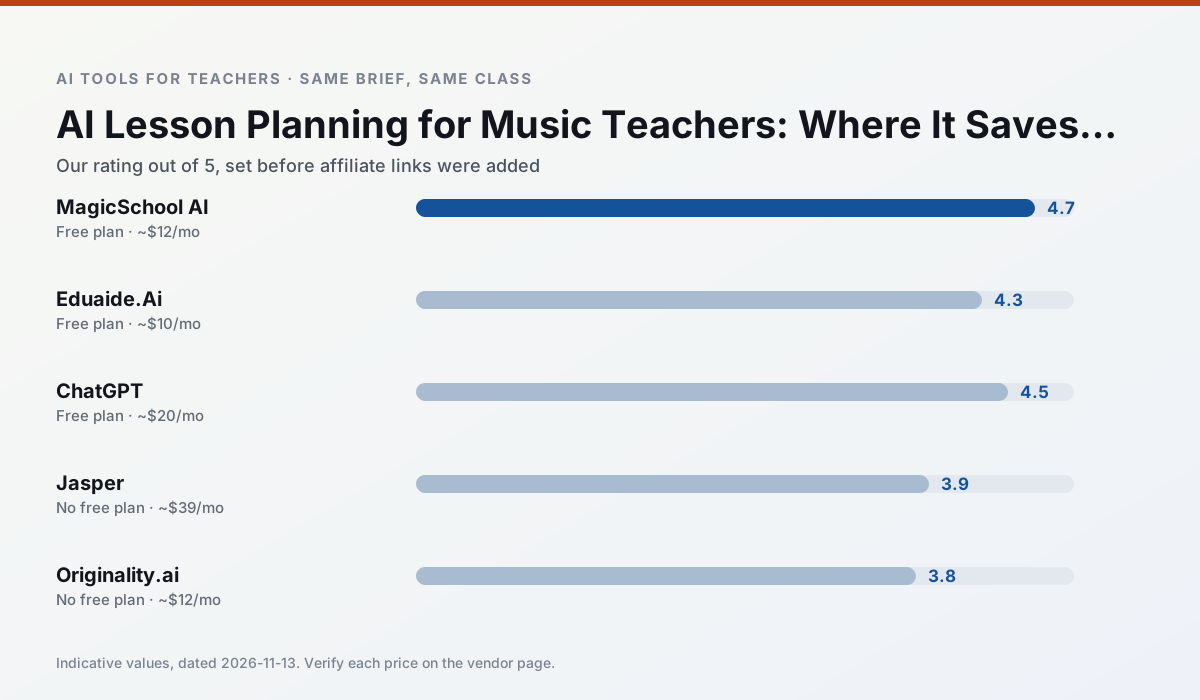
Side by side
Comparison table
Ratings reflect our timed classroom workflow, not vendor claims. Prices are indicative — verify on the vendor site.
| Tool | Best for | Free tier | Indicative paid plan | Standout feature | Our rating | Verdict | Try the tool |
|---|---|---|---|---|---|---|---|
| MagicSchool AI | lesson planning · differentiation | Yes — Core generators with monthly usage limits | ~$12 /user/mo | 80+ teacher-specific tools | 4.7 / 5 | Top pick | Try free |
| Eduaide.Ai | lesson planning · rubric creation | Yes — Daily generation cap | ~$10 /user/mo | Resource library | 4.3 / 5 | Strong option | Try free |
| ChatGPT | lesson planning · parent communication | Yes — Usage-limited model access | ~$20 /user/mo | Custom GPTs and Projects | 4.5 / 5 | Top pick | Try free |
| Jasper | newsletters · parent communication | No ongoing free plan | ~$39 /user/mo | Brand voice profiles | 3.9 / 5 | Situational | Try free |
| Originality.ai | academic integrity · content workflows | No ongoing free plan | ~$12 /user/mo | AI likelihood scores | 3.8 / 5 | Situational | Try free |
| Writesonic | newsletters · parent communication | Yes — Limited credits | ~$16 /user/mo | Article and email generators | 3.8 / 5 | Situational | Try free |
Match your situation
Best for X
Different jobs need different tools. Here is what we would open first in each case.
MagicSchool AI has the strongest tone control for family emails and report comments, provided you still read the message aloud before sending.
Eduaide.Ai keeps the same task across levels, which is what makes a differentiated set defensible in moderation.
ChatGPT is the student-facing option here with boundaries a teacher can actually set and supervise.
If there is no budget, start with Jasper: free plan with clearest quota is the least punishing free tier here.
Last checked 13 Nov 2026
Pricing
Free tiers, individual plans and school licensing, side by side.
| Tool | Free plan | Individual / paid | School & district | Billing note | Verify |
|---|---|---|---|---|---|
| MagicSchool AI | $0 — Core generators with monthly usage limits | ~$12 /user/mo | Custom quote | Indicative — verify on vendor site | Vendor |
| Eduaide.Ai | $0 — Daily generation cap | ~$10 /user/mo | Custom quote | Indicative — verify on vendor site | Vendor |
| ChatGPT | $0 — Usage-limited model access | ~$20 /user/mo | ~$25+ /user/mo | Indicative — verify on vendor site | Vendor |
| Jasper | No ongoing free tier | ~$39 /user/mo | ~$59+ /user/mo | Indicative — verify on vendor site | Vendor |
| Originality.ai | No ongoing free tier | ~$12 /user/mo | Custom quote | Indicative — verify on vendor site | Vendor |
| Writesonic | $0 — Limited credits | ~$16 /user/mo | ~$49 /user/mo | Indicative — verify on vendor site | Vendor |
Editorial rule: pricing is re-checked every 2–3 months and the top 50 pages are refreshed every 6 months. See our funding policy.
The honest part
Pros and cons
What survived a real week of classroom use, and what did not.
Pros
- Widest purpose-built template library
- Strong free tier for individual teachers
- Fast to learn with almost no prompting skill
Cons
- Outputs still need standards review
- Best features sit behind the paid tier
- District approval can be slow
Pros
- Very low entry price
- Good worksheet and rubric output
- Clean, uncluttered UI
Cons
- Smaller template set than MagicSchool
- Less polished export options
- Limited integrations
Pros
- Most flexible option available
- Huge community of teacher prompt libraries
- Strong multilingual support
Cons
- Requires prompt skills for consistent results
- No built-in standards alignment
- District privacy review usually required
Pros
- Consistent tone across communications
- Strong long-form editor
- Good for district comms teams
Cons
- Priced for marketing teams
- Overkill for one classroom
- No education-specific features
Pros
- Useful for content publishing QA
- Fast bulk scanning
- Transparent credit model
Cons
- AI detection produces false positives
- Should never be sole evidence of misconduct
- Not a teaching tool
In the classroom
Use cases
Five concrete workflows, with the tool we would open for each one.
Three reading levels from one source text
Paste a vetted text, ask for supported, core and extension versions, then check the vocabulary list by hand. Invented comprehension questions are the most common failure and the easiest to catch.
Recommended: MagicSchool AIA Monday morning lesson plan in twelve minutes
The twelve minutes come from not rewriting the skeleton. Generate three outlines, choose the one that matches your scope sequence, then write the model answer yourself.
Recommended: Eduaide.AiA parent email in two languages
Draft in plain, warm language with no names, translate, then back-translate the important sentences to check meaning. Keep specific incidents out of the prompt and add them yourself.
Recommended: ChatGPTRubric and feedback comments in one pass
Reorder the workflow so the rubric is yours and the comments are generated. Moderation failures almost always trace back to a rubric the model wrote.
Recommended: JasperRegrouping students after an assessment
Summarise anonymised results into skill groups, then generate one activity per group. Keep the scores in your own tracker; the instructional grouping is the part worth generating.
Recommended: Originality.ai
Questions teachers ask us
FAQ
Direct answers, also published as FAQPage structured data for search and AI assistants.
Can AI do lesson planning at mixed-grade level?
Which tool is best for lesson planning?
What is the biggest risk?
Sources & further reading
Our recommendation
Try MagicSchool AI free for your next lesson planning task
A large library of teacher-specific AI generators in one dashboard. Start on the free tier, run one real music lesson, and only consider upgrading if the quota is what stops you. Disclosure: we may earn a commission (30% recurring) at no extra cost to you.
Some links on this page are affiliate links. We may earn a commission at no extra cost to you. Our rankings are editorial and never pay-to-play. Never enter student PII into a free consumer account.
Keep reading
Related comparisons in this cluster.
Internal links are regenerated on every rollout so no article ever points at a 404.