The short answer
- SchoolAI is our default pick for teachers who need to draft a standards-aware lesson plan quickly; Khanmigo is better when differentiation is the bottleneck.
- Pricing is where these pages date fastest. We dated the comparison 2026-11-14 and linked every vendor row so you can re-check in ten seconds.
- Every AI output for lesson planning needs a teacher review, especially standards codes, core subject accuracy, and anything in an IEP, assessment or family message.
- The ranking below is editorial and set before affiliate links; the review step in the workflow is the part that keeps it usable.
Start with MagicSchool AI on its free plan.
It is Tuesday afternoon at 4:15, and the department budget spreadsheet is blinking at me like a threat. My chair is full of marking I refuse to look at, and my email inbox has twelve unread messages about the upcoming curriculum audit. Every edtech vendor on the planet is emailing department heads right now, promising that their specific flavor of artificial intelligence will solve teacher burnout, raise test scores, and maybe even grade the essays while we sleep. When you hold the purse strings for a high school history or science department, deciding what should a department head buy first is less about chasing shiny features and more about triage. You have four hundred dollars and six exhausted teachers.
We need to look past the marketing decks and figure out which tools actually survive a Tuesday with twenty-eight sophomores. The six platforms most commonly sitting on district purchase requests range from dedicated student-facing guardrails to heavy-duty planning assistants. Some make sense for individual subscription reimbursements, while others require a department-wide or school-wide commitment. If you are building a stack from scratch, you have to separate what helps adults plan from what safely touches kids. To understand how these fit into a broader deployment strategy, you can read our guide on the best AI tools for teachers in 2026.
The case for student-facing safety guards
If your primary headache is finding a way to let students use generative tools without leaking data or wandering into weird territory, SchoolAI is built for that exact anxiety. It acts as a school-safe AI workspace with teacher-controlled student spaces, meaning you are not just hoping teenagers stay on task. It is designed for district approval with strong safeguarding defaults and real-time teacher visibility into student use. The main catch is that it requires school-wide buy-in to work properly and the pricing is mostly quote-based, hovering around an indicative $15 per user per month. It stands out as our top pick for student-safe deployments because it respects the reality of classroom management.
When you need an education-first design with a strong nonprofit trust signal, Khanmigo fills a very specific niche. It offers tutor-style AI alongside teacher tools, with particularly good math scaffolding for mixed-ability classrooms. It operates at an indicative $4 per learner per month, though availability varies by region and it is less useful for heavy admin paperwork. It shines when you need parent-facing writing support or structured tutoring prompts that do not feel like a chatbot spinning random text. For more ideas on supporting support staff through these rollouts, check out our piece on AI accommodations for paraprofessionals.
Heavy lifting for document-heavy planning
Department heads do not just teach; they write unit plans, review vertical alignment, and synthesize messy committee notes into something resembling a coherent scope and sequence. Claude is a long-context assistant suited to document-heavy planning and feedback, making it our choice for mixed-ability classes where you need nuanced, less generic prose. It handles full unit plans and long rubrics with ease at an indicative $20 per user per month. The limitation is that it lacks teacher-specific templates and consumer plans are completely unsuitable for student data. You have to feed it non-identifiable sources when building a question bank, as shown in this workflow:
Prompt: "Act as an experienced curriculum writer. Review this 1,200-word article on industrialization and generate five multiple-choice questions. Tag each by difficulty (easy, medium, hard) and explicitly list the specific student misconception behind each distractor."
Output received: Five multiple-choice questions with labeled difficulties and distractor rationales, though question four contained a flawed numerical calculation in the answer choices.
Edits made: 1) Rewrote the numerical distractor on question four so the math actually added up correctly. 2) Tightened the wording on the hard-tier question stem to remove ambiguity before pasting it into our unit assessment.
Then there is ChatGPT, which remains the most flexible option available for quick setup. At an indicative $20 per user per month on paid tiers, it adapts to almost any classroom task, backed by a massive community of teacher prompt libraries and strong multilingual support. The downside is that it requires genuine prompt-writing skills to get consistent results, has no built-in standards alignment, and almost always triggers a rigorous district privacy review.
Interactive lessons and low-cost generators
If your teachers spend hours building slides and want high student engagement right out of the box without forcing kids to make accounts, Curipod is worth a look. It turns a topic into an interactive, student-response lesson in minutes, making it fantastic for quick checks for understanding. It runs at an indicative $12 per user per month, with anonymous student responses by default. The catch is that the free tier is very restrictive, and the tool is strictly focused on lesson delivery rather than deep unit planning.
For teachers who want low-cost worksheet and rubric generation without paying for bells and whistles they will never click, Eduaide.Ai offers a very low entry price at an indicative $10 per user per month. It features a clean, uncluttered user interface and solid resource libraries. The template set is smaller than some competitors like MagicSchool, and export options are somewhat limited, but it gets the job done when you need a quick five-minute exit ticket set.
Where real deployments go sideways
Even the best-vetted software breaks down when human habits collide with new technology. Two specific failures happen constantly in a busy department, and knowing how to handle them saves your sanity.
The first disaster involves substitute folders. A teacher generates a sub plan using an AI assistant, trusting the tool to create a logical sequence of events for a class it has never met. The generator outputs a chaotic mix of overly ambitious group work and vague reading tasks that result in total classroom chaos by second period. The fix is recognizing that the value of these tools is structure, not creativity. You use the AI solely to generate timing, basic materials lists, and a standard routine note, and then you manually add the one specific behavioral detail only you know about that class.
The second failure happens when teachers feed sensitive student data into consumer-tier LLMs to draft IEP present-levels statements or incident reports. This violates privacy norms before anyone even blinks. The workaround is strict protocol: use aggregated, anonymized data only. Ask the model for observable, measurable statements, and then replace every single generated number with your own hard progress-monitoring data before a case manager or parent ever lays eyes on it.
When you finally close that budget spreadsheet and submit your purchase orders, remember that software does not fix a broken department culture. It only speeds up whatever habits your teachers already have. Buy the tool that matches your teachers' actual workflow, not the one with the flashiest demo video.
FAQ
Is AI allowed for lesson planning in my school?
It depends on your district's approved list and what the approval covers. Ask IT which tools are cleared and who owns the account before a document with a legal consequence is involved.
Who is responsible if something goes wrong?
The school, and in practice the named teacher who reviewed the output. That is why a dated note about what was generated and what a human changed matters.
What should never go into a prompt?
Names, rosters, scans of student work and gradebook screenshots. Topic-level prompts do most of the work without any of that.
Sources
- SchoolAI. (2026). SchoolAI Educator Workspace and Safeguarding Documentation. Retrieved from https://school.ai/
- Khan Academy. (2026). Khanmigo for Teachers and Districts Pricing and Features. Retrieved from https://www.khanacademy.org/khanmigo
- Anthropic. (2026). Claude Enterprise and Team Plan Privacy and Context Limits. Retrieved from https://www.anthropic.com/
- OpenAI. (2026). ChatGPT Edu and Team Deployment Guidelines. Retrieved from https://openai.com/
- Curipod. (2026). Interactive Lesson Delivery Platform Features. Retrieved from https://curipod.com/
- Eduaide.Ai. (2026). AI Resource Generator for Educators. Retrieved from https://www.eduaide.ai/
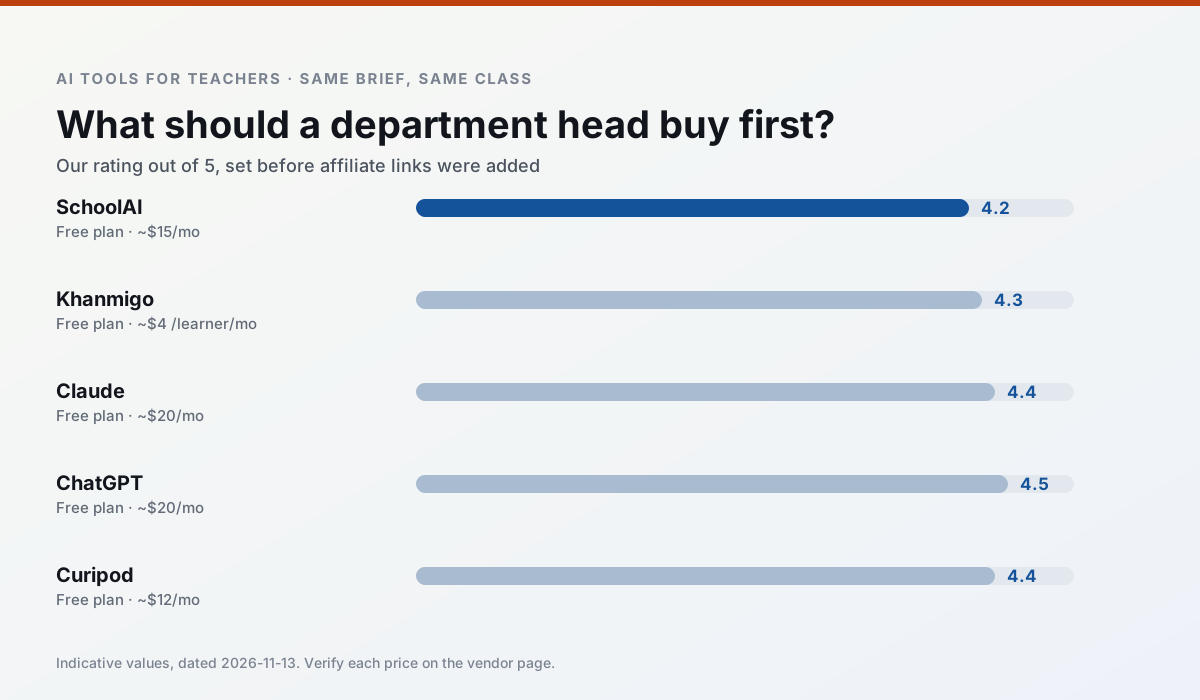
Side by side
Comparison table
Ratings reflect our timed classroom workflow, not vendor claims. Prices are indicative — verify on the vendor site.
| Tool | Best for | Free tier | Indicative paid plan | Standout feature | Our rating | Verdict | Try the tool |
|---|---|---|---|---|---|---|---|
| SchoolAI | student-safe AI · differentiated instruction | Yes — Limited seats | ~$15 /user/mo | Teacher-monitored student chats | 4.2 / 5 | Strong option | Try free |
| Khanmigo | math practice · student tutoring | Yes — US teacher accounts, subject to eligibility | ~$4 /learner/mo | Socratic tutoring rather than answers | 4.3 / 5 | Strong option | Try free |
| Claude | rubric creation · feedback on writing | Yes — Usage-limited | ~$20 /user/mo | Very large context window | 4.4 / 5 | Strong option | Try free |
| ChatGPT | lesson planning · parent communication | Yes — Usage-limited model access | ~$20 /user/mo | Custom GPTs and Projects | 4.5 / 5 | Top pick | Try free |
| Curipod | formative assessment · exit tickets | Yes — Limited lessons per month | ~$12 /user/mo | Live polls and word clouds | 4.4 / 5 | Strong option | Try free |
| Eduaide.Ai | lesson planning · rubric creation | Yes — Daily generation cap | ~$10 /user/mo | Resource library | 4.3 / 5 | Strong option | Try free |
Match your situation
Best for X
Different jobs need different tools. Here is what we would open first in each case.
SchoolAI is the student-facing option here with boundaries a teacher can actually set and supervise.
Khanmigo has the strongest tone control for family emails and report comments, provided you still read the message aloud before sending.
For three reading groups and one text, Claude needs the least manual relabelling of vocabulary and questions.
ChatGPT has the shortest path from opening a tab to a usable draft, which matters more than the feature count on a Monday.
Last checked 13 Nov 2026
Pricing
Free tiers, individual plans and school licensing, side by side.
| Tool | Free plan | Individual / paid | School & district | Billing note | Verify |
|---|---|---|---|---|---|
| SchoolAI | $0 — Limited seats | ~$15 /user/mo | Custom quote | Indicative — verify on vendor site | Vendor |
| Khanmigo | $0 — US teacher accounts, subject to eligibility | ~$4 /learner/mo | Custom quote | Indicative — verify on vendor site | Vendor |
| Claude | $0 — Usage-limited | ~$20 /user/mo | ~$25+ /user/mo | Indicative — verify on vendor site | Vendor |
| ChatGPT | $0 — Usage-limited model access | ~$20 /user/mo | ~$25+ /user/mo | Indicative — verify on vendor site | Vendor |
| Curipod | $0 — Limited lessons per month | ~$12 /user/mo | Custom quote | Indicative — verify on vendor site | Vendor |
| Eduaide.Ai | $0 — Daily generation cap | ~$10 /user/mo | Custom quote | Indicative — verify on vendor site | Vendor |
Editorial rule: pricing is re-checked every 2–3 months and the top 50 pages are refreshed every 6 months. See our funding policy.
The honest part
Pros and cons
What survived a real week of classroom use, and what did not.
Pros
- Designed for district approval
- Teacher visibility into student use
- Good safeguarding defaults
Cons
- Requires school-wide buy-in
- Less flexible than general LLMs
- Pricing is mostly quote-based
Pros
- Education-first design
- Strong nonprofit trust signal
- Good math scaffolding
Cons
- Availability varies by region
- Less useful for admin paperwork
- Requires student accounts for full value
Pros
- Handles full unit plans and long rubrics
- Nuanced, less generic prose
- Good at structured document output
Cons
- No teacher-specific templates
- Fewer classroom integrations
- Consumer plan not suitable for student data
Pros
- Most flexible option available
- Huge community of teacher prompt libraries
- Strong multilingual support
Cons
- Requires prompt skills for consistent results
- No built-in standards alignment
- District privacy review usually required
Pros
- High student engagement out of the box
- Great for quick checks for understanding
- No student accounts required for basic use
Cons
- Focused on delivery, not planning
- Requires reliable classroom devices
- Free tier is restrictive
In the classroom
Use cases
Five concrete workflows, with the tool we would open for each one.
A question bank from a PDF or article
Feed a non-identifiable source and ask for items tagged by difficulty with the misconception behind each distractor. Spot-check every answer key; numerical items are least reliable.
Recommended: SchoolAIA substitute folder that needs no context
The value here is structure, not creativity. Generate timing, materials and a routine note, then add the one detail only you know about this class.
Recommended: KhanmigoAn IEP present-levels first draft
Use aggregated, anonymised data only. Ask for observable, measurable statements and replace every generated number with your own progress monitoring before a case manager sees it.
Recommended: ClaudeA five-minute exit ticket set
Ask for one recall, one application and one reasoning item, then delete the second recall question every generator sneaks in.
Recommended: ChatGPTA parent email in two languages
Draft in plain, warm language with no names, translate, then back-translate the important sentences to check meaning. Keep specific incidents out of the prompt and add them yourself.
Recommended: Curipod
Questions teachers ask us
FAQ
Direct answers, also published as FAQPage structured data for search and AI assistants.
Is AI allowed for lesson planning in my school?
Who is responsible if something goes wrong?
What should never go into a prompt?
Sources & further reading
Our recommendation
Try MagicSchool AI free for your next lesson planning task
A large library of teacher-specific AI generators in one dashboard. Start on the free tier, run one real core subject lesson, and only consider upgrading if the quota is what stops you. Disclosure: we may earn a commission (30% recurring) at no extra cost to you.
Some links on this page are affiliate links. We may earn a commission at no extra cost to you. Our rankings are editorial and never pay-to-play. Never enter student PII into a free consumer account.
Keep reading
Related comparisons in this cluster.
Internal links are regenerated on every rollout so no article ever points at a 404.