The short answer
- Writesonic is our default pick for teachers who need to draft a standards-aware lesson plan quickly; Khanmigo is better when differentiation is the bottleneck.
- Free-tier reality for this shortlist: Writesonic: Yes — Limited credits; Khanmigo: Yes — US teacher accounts, subject to eligibility; Claude: Yes — Usage-limited. Treat every paid figure as indicative until you have read the vendor page; only the free quota is something you can test yourself this week.
- Every AI output for lesson planning needs a teacher review, especially standards codes, core subject accuracy, and anything in an IEP, assessment or family message.
- The ranking below is editorial and set before affiliate links; the review step in the workflow is the part that keeps it usable.
Start with Writesonic on its free plan.
It was 4:15 on a Friday afternoon, and my draft for the weekly family update was stuck at three bullet points about the upcoming bake sale and a half-finished sentence on fraction strips. I needed something readable, warm, and brief enough that parents would actually scroll to the bottom on their phones. Instead of staring at the blinking cursor, I pasted my rough notes into Writesonic, hoping its budget-friendly AI writing tools would turn my fragmented thoughts into a polished parent update before my parking lot emptied out.
Writing family communication is a distinct chore from planning lessons. You want to sound professional without reading like a district policy manual, and you need to get the tone right so parents actually open the email. When looking at the broader landscape of AI writing aids, including specialized options like MagicSchool AI and Claude, general tools often feel either too sterile or too expensive. If you are comparing options across our broader guide on the best AI tools for teachers 2026, it helps to see how a general copywriting platform holds up against dedicated education tools when you are just trying to get Friday's newsletter out the door.
Testing Writesonic for the Friday Family Update
Writesonic is positioned as a budget-friendly AI writing and content generation platform, costing roughly $16 per user per month on its paid tier, alongside a free tier with limited credits. For a classroom teacher, its primary appeal is speed and variety. It offers dozens of templates for general marketing, blogging, and short-form copy.
The trouble is that Writesonic was built for marketers selling software, not teachers explaining why spelling tests are moving to Thursdays. The output tends to use words like "synergy" and "significant" unless you explicitly forbid it. The credit system is also notoriously confusing, making it easy to burn through your monthly allotment while trying to find a prompt style that sounds like a real human being.
When I used it for my newsletter, I had to strip away a lot of corporate polish. It is not built for student data, which is fine for public newsletters, but means you cannot paste in anything sensitive. Even so, if you keep your prompts tight, it gets the job done faster than starting with a blank screen.
Prompt: Write a 150-word Friday classroom update for 4th-grade parents. Tone: warm, direct, professional. Include three items: 1) Math test next Tuesday on fractions, 2) Permission slips due for the science museum, 3) Reminder about early dismissal on Wednesday at 1:00 PM.
First Output: Hello Amazing Parents! As we race through another action-packed week in our educational journey, it is time for your weekly synergy update. First off, get ready for a mathematics extravaganza! Our fraction test lands next Tuesday. Next, do not forget to unleash your inner scientist by returning those museum permission slips. Finally, please note our upcoming schedule optimization: early dismissal on Wednesday at 1:00 PM. Let's make it a stellar week!
Teacher Edits: 1) Deleted "action-packed week," "educational journey," "synergy update," and "mathematics extravaganza." 2) Replaced the museum slip reminder with a direct sentence stating the consequence if it is missing: students without signed slips cannot board the bus.
Where Writesonic Fits Among Writing Assistants
If you want to understand how Writesonic stacks up against other mainstream writing aids, you have to look at the pricing and design intent. Grammarly costs around $12 per user per month on its paid tier and lives right inside your email client or browser, making it fantastic for catching typos in high-stakes parent emails. However, Grammarly is not built to generate an entire newsletter from scratch; it simply polishes what is already there. If you want to dive deeper into how communication strategies intersect with family outreach, our guide on AI parent consent letters offers a useful look at handling delicate administrative phrasing.
On the higher end, Jasper runs about $39 per user per month and is designed for district communications teams who need consistent brand voices across multiple schools. For a single classroom teacher, Jasper is massive overkill. Writesonic sits in the middle as a cheaper alternative to enterprise writing suites, though its lack of education context means you will spend more time editing the output than you would with a tool designed specifically for schools.
Education-First Alternatives Worth Considering
If you are tired of editing corporate fluff out of your newsletters, purpose-built education tools handle routine paperwork with much less friction. MagicSchool AI costs roughly $12 per user per month and features the widest library of teacher-specific generators in one dashboard, making it our top pick for quick setup. You do not need any prompting skill to get a decent result because the templates already understand terms like IEP, standard-aligned, and formative assessment.
For parent-facing writing specifically, Khanmigo offers a strong nonprofit trust signal and education-first design, pricing out at around $4 per learner per month for districts, with free tiers available for US teachers subject to eligibility. While Khanmigo is best known as a tutor-style AI for students, its teacher tools help scaffold explanations for families who might need concepts broken down into plain English.
For heavy-duty document planning, Claude costs around $20 per user per month and excels at long-context tasks like analyzing full unit plans or lengthy rubrics without losing the plot. It produces much more nuanced, less generic prose than Writesonic, though it lacks teacher-specific templates and requires you to handle your own prompt engineering.
What Went Wrong During Our Test
My first real failure with Writesonic happened when I tried to use a template for an educational summary. I wanted a quick breakdown of a science article for my struggling readers, but the platform generated text that read like a college-level textbook introduction. Writesonic has limited education context, meaning it does not automatically scale Lexile levels or embed reading comprehension strategies unless you spell them out word for word. I had to abandon the template entirely and write a custom prompt specifying a third-grade reading level with a glossary of key terms.
The second issue was the credit trap. Writesonic counts every iteration, slight tweak, and failed prompt against your monthly balance. When I was experimenting with subject lines for my newsletter, I burned through a week's worth of credits in ten minutes just trying to get five distinct options that did not sound like clickbait. To fix this, I learned to do my brainstorming on a free scratchpad first, only pasting my final, refined prompt into Writesonic once I knew what I wanted it to generate.
Final Verdict for Classroom Teachers
Writesonic is a budget-friendly option if you need a general-purpose copywriter to help draft emails, blog posts, or generic announcements. It handles volume well and costs less than enterprise marketing platforms. But for a K-12 classroom, the lack of education-specific guardrails means you will spend too much time stripping out inappropriate tone and verifying that the output fits a school environment. If your main goal is streamlining parent communication without wrestling with marketing jargon, you are better off using a dedicated education platform or sticking to a reliable grammar checker like Grammarly for your final polish.
FAQ
Is Writesonic worth paying for at mixed-grade level?
Only if lesson planning is a weekly job for you. At one use a month the free plan is enough; at weekly use the paid tier buys back more time than it costs, provided you keep the review step.
What does Writesonic get wrong most often?
Invented standards codes and assumed resources, in that order. Both survive a quick read, which is why the review checklist in this article starts with those two.
Can Writesonic replace a planning period?
It replaces the blank page, not the planning. Our edit time ranged from eleven minutes for an outline to most of an evening for a full differentiated set.
Is Writesonic safe to use with student data?
Not on a personal account. Use topic-level prompts, keep work samples out, and check what your district has approved before a student's work reaches any tool.
Sources
- Writesonic Pricing and Features: Writesonic Pricing Page
- MagicSchool AI Platform Overview: MagicSchool AI Educator Tools
- Khanmigo for Teachers: Khan Academy Educator Resources
- Claude Usage Tiers: Anthropic Claude Plans
- Grammarly Business and Education: Grammarly Plans
- Jasper AI Features: Jasper Pricing
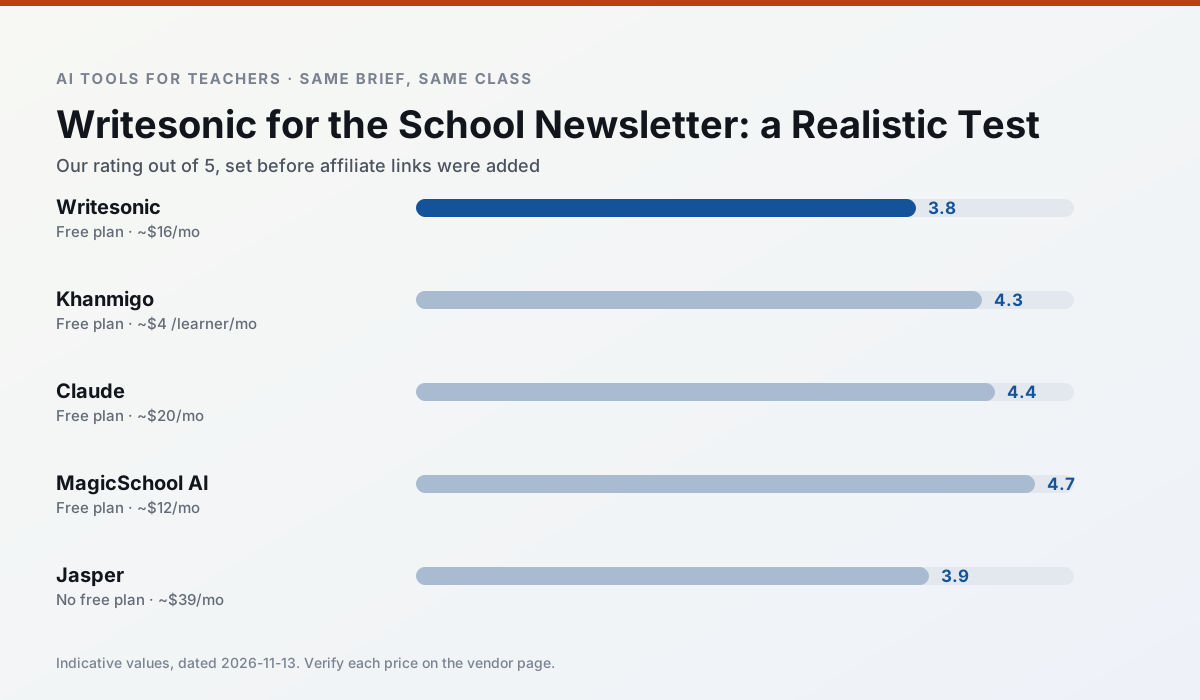
Side by side
Comparison table
Ratings reflect our timed classroom workflow, not vendor claims. Prices are indicative — verify on the vendor site.
| Tool | Best for | Free tier | Indicative paid plan | Standout feature | Our rating | Verdict | Try the tool |
|---|---|---|---|---|---|---|---|
| Writesonic | newsletters · parent communication | Yes — Limited credits | ~$16 /user/mo | Article and email generators | 3.8 / 5 | Situational | Try free |
| Khanmigo | math practice · student tutoring | Yes — US teacher accounts, subject to eligibility | ~$4 /learner/mo | Socratic tutoring rather than answers | 4.3 / 5 | Strong option | Try free |
| Claude | rubric creation · feedback on writing | Yes — Usage-limited | ~$20 /user/mo | Very large context window | 4.4 / 5 | Strong option | Try free |
| MagicSchool AI | lesson planning · differentiation | Yes — Core generators with monthly usage limits | ~$12 /user/mo | 80+ teacher-specific tools | 4.7 / 5 | Top pick | Try free |
| Jasper | newsletters · parent communication | No ongoing free plan | ~$39 /user/mo | Brand voice profiles | 3.9 / 5 | Situational | Try free |
| Grammarly | parent communication · report card comments | Yes — Core grammar and tone checks | ~$12 /user/mo | Tone adjustments | 4.3 / 5 | Strong option | Try free |
Match your situation
Best for X
Different jobs need different tools. Here is what we would open first in each case.
Writesonic is built around teacher-monitored student spaces and audit logs rather than a consumer chat account, which is a different approval conversation.
Family-facing drafts from Khanmigo need the fewest rewrites for warmth without overpromising, which is the usual failure mode.
For three reading groups and one text, Claude needs the least manual relabelling of vocabulary and questions.
Setup cost is one login for MagicSchool AI; everything else can wait until you know the tool is useful.
Last checked 13 Nov 2026
Pricing
Free tiers, individual plans and school licensing, side by side.
| Tool | Free plan | Individual / paid | School & district | Billing note | Verify |
|---|---|---|---|---|---|
| Writesonic | $0 — Limited credits | ~$16 /user/mo | ~$49 /user/mo | Indicative — verify on vendor site | Vendor |
| Khanmigo | $0 — US teacher accounts, subject to eligibility | ~$4 /learner/mo | Custom quote | Indicative — verify on vendor site | Vendor |
| Claude | $0 — Usage-limited | ~$20 /user/mo | ~$25+ /user/mo | Indicative — verify on vendor site | Vendor |
| MagicSchool AI | $0 — Core generators with monthly usage limits | ~$12 /user/mo | Custom quote | Indicative — verify on vendor site | Vendor |
| Jasper | No ongoing free tier | ~$39 /user/mo | ~$59+ /user/mo | Indicative — verify on vendor site | Vendor |
| Grammarly | $0 — Core grammar and tone checks | ~$12 /user/mo | ~$15 /user/mo | Indicative — billed annually | Vendor |
Editorial rule: pricing is re-checked every 2–3 months and the top 50 pages are refreshed every 6 months. See our funding policy.
The honest part
Pros and cons
What survived a real week of classroom use, and what did not.
Pros
- Cheaper than enterprise writing suites
- Many templates
- Reasonable free trial
Cons
- Generic classroom output
- Credit system is confusing
- Limited education context
Pros
- Education-first design
- Strong nonprofit trust signal
- Good math scaffolding
Cons
- Availability varies by region
- Less useful for admin paperwork
- Requires student accounts for full value
Pros
- Handles full unit plans and long rubrics
- Nuanced, less generic prose
- Good at structured document output
Cons
- No teacher-specific templates
- Fewer classroom integrations
- Consumer plan not suitable for student data
Pros
- Widest purpose-built template library
- Strong free tier for individual teachers
- Fast to learn with almost no prompting skill
Cons
- Outputs still need standards review
- Best features sit behind the paid tier
- District approval can be slow
Pros
- Consistent tone across communications
- Strong long-form editor
- Good for district comms teams
Cons
- Priced for marketing teams
- Overkill for one classroom
- No education-specific features
In the classroom
Use cases
Five concrete workflows, with the tool we would open for each one.
Regrouping students after an assessment
Summarise anonymised results into skill groups, then generate one activity per group. Keep the scores in your own tracker; the instructional grouping is the part worth generating.
Recommended: WritesonicA weekly family newsletter from bullet notes
Newsletters fail on length, not tone. Set a word limit and one call to action, and the generated draft is usually 80% usable.
Recommended: KhanmigoA question bank from a PDF or article
Feed a non-identifiable source and ask for items tagged by difficulty with the misconception behind each distractor. Spot-check every answer key; numerical items are least reliable.
Recommended: ClaudeA substitute folder that needs no context
The value here is structure, not creativity. Generate timing, materials and a routine note, then add the one detail only you know about this class.
Recommended: MagicSchool AIAn IEP present-levels first draft
Use aggregated, anonymised data only. Ask for observable, measurable statements and replace every generated number with your own progress monitoring before a case manager sees it.
Recommended: Jasper
Questions teachers ask us
FAQ
Direct answers, also published as FAQPage structured data for search and AI assistants.
Is Writesonic worth paying for at mixed-grade level?
What does Writesonic get wrong most often?
Can Writesonic replace a planning period?
Is Writesonic safe to use with student data?
Sources & further reading
Our recommendation
Try Writesonic free for your next lesson planning task
Budget-friendly AI writing and content generation. Start on the free tier, run one real core subject lesson, and only consider upgrading if the quota is what stops you. Disclosure: we may earn a commission (varies) at no extra cost to you.
Some links on this page are affiliate links. We may earn a commission at no extra cost to you. Our rankings are editorial and never pay-to-play. Never enter student PII into a free consumer account.
Keep reading
Related comparisons in this cluster.
Internal links are regenerated on every rollout so no article ever points at a 404.