The short answer
- Notion AI is our default pick for teachers who need to sequence a three-week unit quickly; Kahoot! is better when differentiation is the bottleneck.
- Pricing is where these pages date fastest. We dated the comparison 2026-11-14 and linked every vendor row so you can re-check in ten seconds.
- Every AI output for unit planning needs a teacher review, especially standards codes, core subject accuracy, and anything in an IEP, assessment or family message.
- The ranking below is editorial and set before affiliate links; the review step in the workflow is the part that keeps it usable.
Start with Notion AI on its free plan.
It was a Sunday evening in late October when I stared at a blank Google Doc, three weeks of upcoming seventh-grade civil rights history to design, and zero patience left. My district scope and sequence listed four standards, sixteen required vocabulary terms, and a formative assessment date that could not move. If I wrote fourteen distinct daily lesson plans by hand, my weekend was gone. I needed to know how to sequence a three-week unit with AI without ending up with a generic slide deck that ignored every actual need of my classroom.
Unit planning is where most teacher AI experiments crash. You type "write a three-week unit on the civil rights movement" into a general assistant, and you get a polite pile of mush that suggests roleplaying the March on Washington on a Tuesday morning with no prior context. To get usable results, you have to break the job down into distinct phases: the long-term skeleton, the source-backed question generation, and the daily delivery mechanics. This workflow uses a mix of tools to get the job done by eight o'clock without sacrificing instructional quality.
Building the Long-Term Skeleton
For the macro-level view of fifteen instructional days, you need a workspace that holds structure rather than just spitting out paragraphs. Notion AI, priced at roughly $10 per user per month with a limited free tier, is best for quick setup here because it handles databases and text side by side. You can paste your district standards at the top, create a table with columns for dates, essential questions, and formative checkpoints, and let the assistant suggest a pacing distribution across the three weeks.
When building your skeleton, you must explicitly tell the model how many days you have and what your state assessment looks like at the end of it. Do not let the AI invent the timeline. Give it the exact instructional calendar, accounting for half-days and pep rallies.
Once your Notion database is populated with the daily arc, you need to generate the actual practice materials and reading passages that fit inside those boxes without spending hours cutting and pasting between browser tabs.
Generating Differentiated Reading and Question Banks
A three-week unit requires a mountain of text and questions, and this is where single-purpose tools earn their keep. QuestionWell offers a clean export workflow and good objective tagging, making it the best free option for turning a source article into an aligned question bank. You feed it a non-identifiable chunk of text, select your grade band, and let it generate multiple-choice items tagged by difficulty.
When you need to turn a single source text into multiple reading levels for your classroom, a specific prompting sequence keeps the output grounded in reality rather than hallucinated history.
Prompt: "Act as a middle school reading specialist. Using the attached text about the Montgomery Bus Boycott [PASTE TEXT], generate three versions: a supported version with glossed vocabulary, a core version at grade level, and an extension version with primary source excerpts. Include four comprehension questions for each version, making sure the answer keys are explicitly supported by the text."
What came back: The three reading levels were well-calibrated, but the extension version contained a comprehension question about an event not mentioned in the source text, and the vocabulary gloss for the supported version missed the word "ordinance."
The two edits: First, I struck the ungrounded question from the extension tier and replaced it with a prompt asking students to compare the text to a known local ordinance. Second, I manually added "ordinance" and "segregation" to the vocabulary list with student-friendly definitions before printing.
If you are working inside Google Docs or Slides and want to avoid the copy-paste loop entirely, Brisk Teaching acts as a browser extension that brings AI feedback and text leveling directly into your workspace. At around $10 per user per month with a tight free quota, it lets you check student drafts inline, though you will need your IT department to approve the extension permissions first.
Crafting Daily Lessons in Twelve Minutes
The secret to a Monday morning lesson plan in twelve minutes is refusing to rewrite the structural skeleton the AI provides. You use ChatGPT, the best overall for daily use at roughly $20 per month on paid tiers or via usage-limited free accounts, to generate three distinct lesson outlines for a single day. Choose the one that matches your scope and sequence, and then write the model answer yourself so you actually know what you are teaching.
If you try to use ChatGPT for everything, you will quickly hit walls with standards alignment unless you feed it your district rubrics directly. For a deeper look at adapting materials for diverse learners, see our guide on AI differentiation for reading levels. When moderation failures happen, they almost always trace back to a rubric the model wrote instead of the one you actually use for grading.
Checking for Understanding and Review
Once your daily lessons are planned and your texts are leveled, you need a way to check whether students actually absorbed the content at the end of week one and week two. Curipod turns a topic into an interactive student-response lesson in minutes, costing around $12 per user per month with a restrictive free tier. It is great for quick checks for understanding because students do not need accounts to participate, keeping anonymous responses the default.
For end-of-unit review sessions, Kahoot! remains the industry standard for instant engagement at roughly $10 per user per month. Its AI-assisted question generation builds review games quickly, making it best for schools and districts where brand familiarity means zero training time for students. Just remember that the time pressure of a live quiz suits recall far better than deep reasoning, so use it as a temperature check rather than your primary summative assessment.
If you are building accommodations into these same units for specialized learners, you can adapt these exact prompts using our resource on 504 plans and prompt templates for teachers. Keep student data off consumer platforms, verify your school's data privacy agreements before installing extensions, and never let an algorithm dictate the final pacing of your classroom.
FAQ
How long does this workflow take?
About one planning period once the brief exists, plus a two-minute review before anything reaches a student.
Which tool should I start with?
Notion AI on its free plan, on a real task, before any purchase conversation.
What if the output is unusable?
Rewrite the brief, not the output. In our logs an unusable draft almost always traced back to a vague brief.
Sources
- Notion AI Pricing and Workspace Documentation (notion.so)
- Kahoot! AI Question Generation Features (kahoot.com)
- QuestionWell Standards-Aligned Question Generator (questionwell.com)
- OpenAI ChatGPT Educator Resources (openai.com)
- Brisk Teaching Chrome Extension Documentation (briskteaching.com)
- Curipod Interactive Lesson Platform (curipod.com)
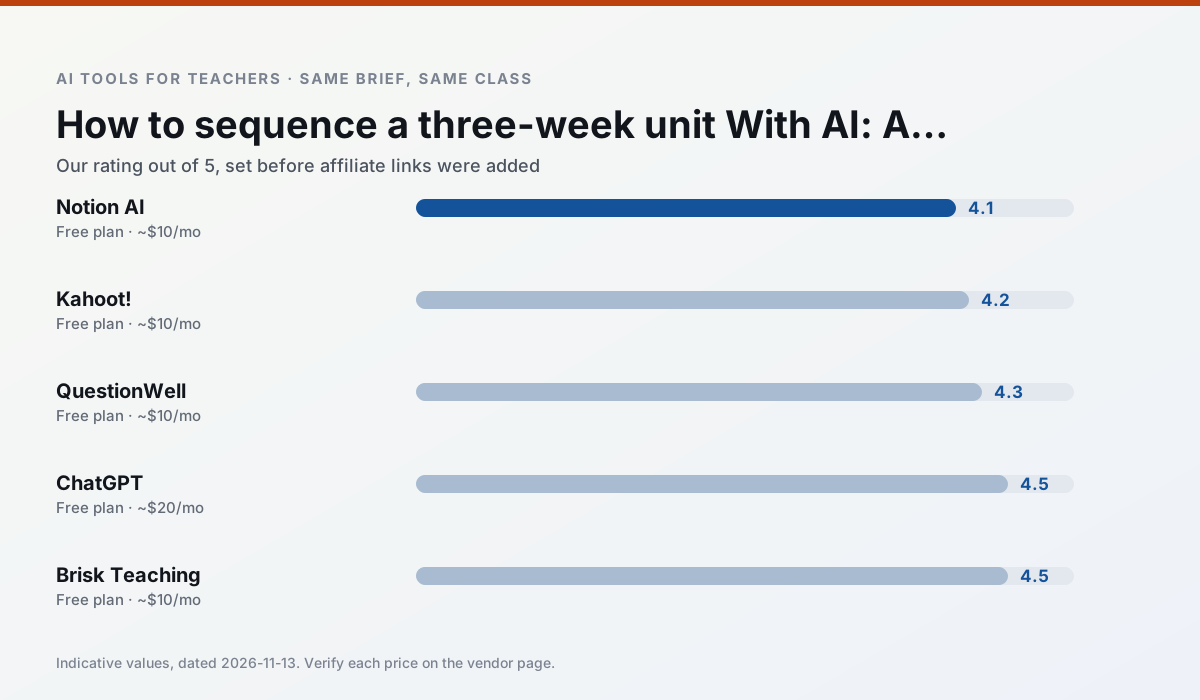
Side by side
Comparison table
Ratings reflect our timed classroom workflow, not vendor claims. Prices are indicative — verify on the vendor site.
| Tool | Best for | Free tier | Indicative paid plan | Standout feature | Our rating | Verdict | Try the tool |
|---|---|---|---|---|---|---|---|
| Notion AI | curriculum mapping · unit planning | Yes — Limited AI usage | ~$10 /user/mo | Linked databases | 4.1 / 5 | Situational | Try free |
| Kahoot! | quiz generation · review lessons | Yes — Limited player count | ~$10 /user/mo | AI question builder | 4.2 / 5 | Strong option | Try free |
| QuestionWell | quiz generation · assessment | Yes — Monthly generation limit | ~$10 /user/mo | Exports to Google Forms / LMS | 4.3 / 5 | Strong option | Try free |
| ChatGPT | lesson planning · parent communication | Yes — Usage-limited model access | ~$20 /user/mo | Custom GPTs and Projects | 4.5 / 5 | Top pick | Try free |
| Brisk Teaching | feedback on writing · grading | Yes — Limited actions per month | ~$10 /user/mo | Works inside Google Docs | 4.5 / 5 | Top pick | Try free |
| Curipod | formative assessment · exit tickets | Yes — Limited lessons per month | ~$12 /user/mo | Live polls and word clouds | 4.4 / 5 | Strong option | Try free |
Match your situation
Best for X
Different jobs need different tools. Here is what we would open first in each case.
Notion AI runs in a browser tab with no extension, no student accounts and no onboarding call, so you can test it in a free period.
Kahoot! is the option IT is least likely to block: single sign-on, admin removal of AI features and an agreement on file.
If there is no budget, start with QuestionWell: free plan with clearest quota is the least punishing free tier here.
ChatGPT is the one we would open on a normal planning day because the first output is editable rather than restructurable, and the free plan covers a single teacher's routine.
Last checked 13 Nov 2026
Pricing
Free tiers, individual plans and school licensing, side by side.
| Tool | Free plan | Individual / paid | School & district | Billing note | Verify |
|---|---|---|---|---|---|
| Notion AI | $0 — Limited AI usage | ~$10 /user/mo | ~$8 /user/mo | Indicative — verify on vendor site | Vendor |
| Kahoot! | $0 — Limited player count | ~$10 /user/mo | Custom quote | Indicative — verify on vendor site | Vendor |
| QuestionWell | $0 — Monthly generation limit | ~$10 /user/mo | Custom quote | Indicative — verify on vendor site | Vendor |
| ChatGPT | $0 — Usage-limited model access | ~$20 /user/mo | ~$25+ /user/mo | Indicative — verify on vendor site | Vendor |
| Brisk Teaching | $0 — Limited actions per month | ~$10 /user/mo | Custom quote | Indicative — verify on vendor site | Vendor |
| Curipod | $0 — Limited lessons per month | ~$12 /user/mo | Custom quote | Indicative — verify on vendor site | Vendor |
Editorial rule: pricing is re-checked every 2–3 months and the top 50 pages are refreshed every 6 months. See our funding policy.
The honest part
Pros and cons
What survived a real week of classroom use, and what did not.
Pros
- Great for long-term curriculum records
- Strong team collaboration
- Flexible structure
Cons
- Setup time is significant
- AI add-on pricing changed more than once
- Not purpose-built for lesson generation
Pros
- Instant engagement
- Very low training time
- Strong brand familiarity
Cons
- Less depth for higher-order assessment
- Paid tiers needed for larger classes
- Time pressure suits recall more than reasoning
Pros
- Saves the most time on question writing
- Clean export workflow
- Good objective tagging
Cons
- Single-purpose tool
- Question quality varies by source text
- Limited student-facing features
Pros
- Most flexible option available
- Huge community of teacher prompt libraries
- Strong multilingual support
Cons
- Requires prompt skills for consistent results
- No built-in standards alignment
- District privacy review usually required
Pros
- No copy-paste between tools
- Fast inline feedback on student drafts
- Gentle learning curve
Cons
- Chrome-first workflow
- Extension permissions need IT approval
- Free quota is tight
In the classroom
Use cases
Five concrete workflows, with the tool we would open for each one.
A parent email in two languages
Draft in plain, warm language with no names, translate, then back-translate the important sentences to check meaning. Keep specific incidents out of the prompt and add them yourself.
Recommended: Notion AIRubric and feedback comments in one pass
Reorder the workflow so the rubric is yours and the comments are generated. Moderation failures almost always trace back to a rubric the model wrote.
Recommended: Kahoot!Three reading levels from one source text
Paste a vetted text, ask for supported, core and extension versions, then check the vocabulary list by hand. Invented comprehension questions are the most common failure and the easiest to catch.
Recommended: QuestionWellA Monday morning lesson plan in twelve minutes
The twelve minutes come from not rewriting the skeleton. Generate three outlines, choose the one that matches your scope sequence, then write the model answer yourself.
Recommended: ChatGPTA question bank from a PDF or article
Feed a non-identifiable source and ask for items tagged by difficulty with the misconception behind each distractor. Spot-check every answer key; numerical items are least reliable.
Recommended: Brisk Teaching
Questions teachers ask us
FAQ
Direct answers, also published as FAQPage structured data for search and AI assistants.
How long does this workflow take?
Which tool should I start with?
What if the output is unusable?
Sources & further reading
Our recommendation
Try Notion AI free for your next unit planning task
AI-assisted notes, databases and curriculum planning in one workspace. Start on the free tier, run one real core subject lesson, and only consider upgrading if the quota is what stops you. Disclosure: we may earn a commission (varies) at no extra cost to you.
Some links on this page are affiliate links. We may earn a commission at no extra cost to you. Our rankings are editorial and never pay-to-play. Never enter student PII into a free consumer account.
Keep reading
Related comparisons in this cluster.
Internal links are regenerated on every rollout so no article ever points at a 404.