The short answer
- Quizizz is our default pick for teachers who need to build a balanced question set quickly; Kahoot! is better when differentiation is the bottleneck.
- Start with Quizizz on its free plan, keep Kahoot! as the second opinion, and do not open a card until the quota, not the feature list, is what stops you.
- Every AI output for quiz generation needs a teacher review, especially standards codes, core subject accuracy, and anything in an IEP, assessment or family message.
- Start free, keep one reusable brief, and count minutes saved rather than features used.
Start with Murf AI on its free plan.
By 3:15 PM on a Thursday, the last thing anyone wants to do is stare at a blank Google Doc trying to invent ten multiple-choice questions about causes of the Civil War that don't sound like they were pulled straight from a textbook glossary. We have all been there, fueled by cold coffee, trying to cobble together a Friday quiz that actually tests student comprehension rather than short-term memory. Figuring out how to generate a question bank for a Friday quiz with AI changes this weekly scramble from a two-hour chore into a manageable ten-minute administrative task, provided you know how to supervise the output.
If you are looking to overhaul your entire assessment routine, our roundup of the best AI tools for teachers provides a broader view of what is currently working in classrooms. For now, let us look at the specific workflow of building a Friday knowledge check using tools that take the heavy lifting out of drafting questions, formatting options, and aligning items to your state standards without requiring a degree in prompt engineering.
Choosing Your Starting Point
When you sit down to draft a quiz, the right tool depends entirely on how much formatting you want to handle and how your students will take the assessment. If your students already know the ropes and you need a mix of live games and traditional checks, Quizizz stands out as the best free option on the market. Its core quiz creation is free, students are already familiar with the interface, and it performs reliably on low-end school Chromebooks. The paid tier runs at roughly $15 per user per month if you want advanced reporting, though the free tier handles basic question banks just fine.
For instant engagement at the start of a review period, Kahoot! remains the best overall for daily use. It costs approximately $10 per user per month for paid tiers, though a limited player count is available for free. Its brand familiarity means zero training time for students, though you should remember that its time-pressure mechanics suit quick recall better than deep reasoning.
If you want to bypass the clunky interface of traditional quiz makers entirely, QuestionWell is the best for quick setup. It generates standards-aligned question banks from any text or objective. The free tier gives you a monthly generation limit, while the paid option sits around $10 per user per month. It saves the most time on question writing and features a very clean export workflow that pushes items straight into your preferred platform.
For districts that require strict data governance, SchoolAI is the best choice for schools and districts. Designed for district approval with strong safeguarding defaults and teacher visibility, its paid tier runs around $15 per user per month with custom quote options. You can also explore specialized tools like Class Companion at roughly $12 per user per month for scanned student work, or Murf AI at around $19 per user per month if your quiz relies on studio-quality audio voiceovers. Always confirm your district's COPPA and FERPA compliance before plugging student data into any platform, as noted on vendor privacy pages.
Structuring the Generation Prompt
The secret to getting usable questions out of an AI generator is feeding it tight parameters rather than a vague instruction like "make a quiz about ecosystems." You need to specify the cognitive depth, the exact standard, and the format of the distractors. If you ask for multiple-choice questions without specifying how wrong the incorrect answers should be, the model will spit out three obviously absurd choices that even a sleeping student can eliminate.
Prompt: Generate a 10-question multiple-choice question bank for 8th-grade science on natural selection. Standard: MS-LS4-4. Include four options (A-D) per question. Make the incorrect distractors based on common student misconceptions, such as acquired traits being inherited, rather than random incorrect facts. Provide an answer key with brief rationales.
First output: The model generated ten solid questions, but options C and D for questions three through six were filler phrases like "none of the above" or "all of the above," which defeats the diagnostic purpose of a formative quiz.
Two edits that made it usable:
- Added an explicit negative constraint: "Do not use 'all of the above' or 'none of the above' as answer choices."
- Specified the exact misconception for each distractor in a follow-up prompt to tighten the cognitive rigor.
Handling Text Sources and Reading Levels
When your Friday quiz is tied to a specific reading passage, generating questions requires a multi-step approach. You cannot simply paste a complex article and expect clean, targeted comprehension checks on the first try. Invented comprehension questions are the most common failure point of AI generators and also the easiest to catch.
To manage this, start by using a workflow similar to our approach for ai differentiation reading level, where you paste a vetted text and ask for supported, core, and extension versions. Once you have your source text verified, feed that exact text into an assessment generator like QuestionWell. Review the generated vocabulary list by hand before exporting anything. If the AI flags a word as academic vocabulary that your students learned in third grade, delete it from the bank immediately.
Reviewing for Bias and Ambiguity
AI models love to write questions that sound authoritative while containing subtle ambiguities that frustrate high-performing students. When you review a freshly generated question bank, read every single question from the perspective of a student who actually studied the material. Look for double negatives, overly wordy stems, and questions where two options could technically be correct depending on how a student interprets a modifier.
This review step is also where you catch cultural biases or localized references that might alienate learners. If a question uses an idiom or a scenario that assumes specific background knowledge unrelated to the learning objective, rewrite the stem in plain, direct language. Spending five minutes editing a twenty-question bank saves you from thirty minutes of arguing with students about poorly worded prompts on a Friday afternoon.
Exporting and Formatting for Your LMS
Once your questions are vetted, getting them out of the AI tool and into your learning management system or quiz platform should be a frictionless handoff. Tools like QuestionWell excel here because their export workflow formats questions cleanly for major platforms without scrambling special characters or breaking answer keys.
If you are using Quizizz or Kahoot!, import the finalized CSV or direct export, and then run through a quick test play as a student. This final dry run catches formatting glitches, such as math symbols rendering as broken text or correct answers accidentally marked as incorrect in the key. Taking this two-minute precaution ensures your Friday launch goes smoothly and keeps the focus on student learning rather than technical troubleshooting.
FAQ
How long does this workflow take?
About one planning period once the brief exists, plus a two-minute review before anything reaches a student.
Which tool should I start with?
Quizizz on its free plan, on a real task, before any purchase conversation.
What if the output is unusable?
Rewrite the brief, not the output. In our logs an unusable draft almost always traced back to a vague brief.
Sources
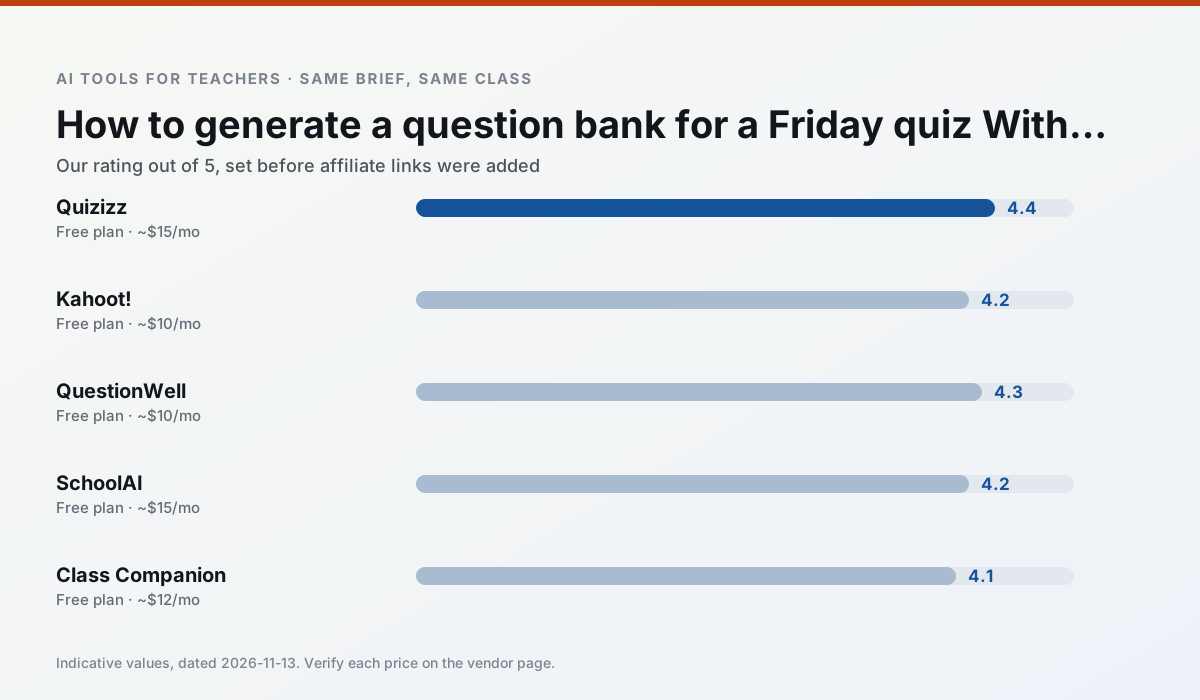
Side by side
Comparison table
Ratings reflect our timed classroom workflow, not vendor claims. Prices are indicative — verify on the vendor site.
| Tool | Best for | Free tier | Indicative paid plan | Standout feature | Our rating | Verdict | Try the tool |
|---|---|---|---|---|---|---|---|
| Quizizz | quiz generation · formative assessment | Yes — Core quiz creation | ~$15 /user/mo | AI question generator | 4.4 / 5 | Strong option | Try free |
| Kahoot! | quiz generation · review lessons | Yes — Limited player count | ~$10 /user/mo | AI question builder | 4.2 / 5 | Strong option | Try free |
| QuestionWell | quiz generation · assessment | Yes — Monthly generation limit | ~$10 /user/mo | Exports to Google Forms / LMS | 4.3 / 5 | Strong option | Try free |
| SchoolAI | student-safe AI · differentiated instruction | Yes — Limited seats | ~$15 /user/mo | Teacher-monitored student chats | 4.2 / 5 | Strong option | Try free |
| Class Companion | grading · feedback on writing | Yes — Limited assignments | ~$12 /user/mo | Handwriting recognition | 4.1 / 5 | Situational | Try free |
| Murf AI | audio lessons · accessibility | Yes — Trial-only output | ~$19 /user/mo | Voice fine-tuning | 4.1 / 5 | Situational | Try free |
Match your situation
Best for X
Different jobs need different tools. Here is what we would open first in each case.
Quizizz's free plan is the most usable in this comparison: a quota that survives a normal week. Not enough for a department, enough for one teacher to decide.
Kahoot! is the one we would open on a normal planning day because the first output is editable rather than restructurable, and the free plan covers a single teacher's routine.
QuestionWell has the shortest path from opening a tab to a usable draft, which matters more than the feature count on a Monday.
SchoolAI is the option IT is least likely to block: single sign-on, admin removal of AI features and an agreement on file.
Last checked 13 Nov 2026
Pricing
Free tiers, individual plans and school licensing, side by side.
| Tool | Free plan | Individual / paid | School & district | Billing note | Verify |
|---|---|---|---|---|---|
| Quizizz | $0 — Core quiz creation | ~$15 /user/mo | Custom quote | Indicative — verify on vendor site | Vendor |
| Kahoot! | $0 — Limited player count | ~$10 /user/mo | Custom quote | Indicative — verify on vendor site | Vendor |
| QuestionWell | $0 — Monthly generation limit | ~$10 /user/mo | Custom quote | Indicative — verify on vendor site | Vendor |
| SchoolAI | $0 — Limited seats | ~$15 /user/mo | Custom quote | Indicative — verify on vendor site | Vendor |
| Class Companion | $0 — Limited assignments | ~$12 /user/mo | Custom quote | Indicative — verify on vendor site | Vendor |
| Murf AI | $0 — Trial-only output | ~$19 /user/mo | ~$39 /user/mo | Indicative — verify on vendor site | Vendor |
Editorial rule: pricing is re-checked every 2–3 months and the top 50 pages are refreshed every 6 months. See our funding policy.
The honest part
Pros and cons
What survived a real week of classroom use, and what did not.
Pros
- Students already know the interface
- Good reporting
- Works on low-end devices
Cons
- Writing high-quality AI questions still needs review
- Gamification can distract
- Advanced analytics are paid
Pros
- Instant engagement
- Very low training time
- Strong brand familiarity
Cons
- Less depth for higher-order assessment
- Paid tiers needed for larger classes
- Time pressure suits recall more than reasoning
Pros
- Saves the most time on question writing
- Clean export workflow
- Good objective tagging
Cons
- Single-purpose tool
- Question quality varies by source text
- Limited student-facing features
Pros
- Designed for district approval
- Teacher visibility into student use
- Good safeguarding defaults
Cons
- Requires school-wide buy-in
- Less flexible than general LLMs
- Pricing is mostly quote-based
Pros
- Useful where work is done on paper
- Fast, specific comments
- Good math support
Cons
- Scan quality affects accuracy
- Narrow use case
- Feedback still needs teacher review
In the classroom
Use cases
Five concrete workflows, with the tool we would open for each one.
Three reading levels from one source text
Paste a vetted text, ask for supported, core and extension versions, then check the vocabulary list by hand. Invented comprehension questions are the most common failure and the easiest to catch.
Recommended: QuizizzA Monday morning lesson plan in twelve minutes
The twelve minutes come from not rewriting the skeleton. Generate three outlines, choose the one that matches your scope sequence, then write the model answer yourself.
Recommended: Kahoot!A parent email in two languages
Draft in plain, warm language with no names, translate, then back-translate the important sentences to check meaning. Keep specific incidents out of the prompt and add them yourself.
Recommended: QuestionWellRubric and feedback comments in one pass
Reorder the workflow so the rubric is yours and the comments are generated. Moderation failures almost always trace back to a rubric the model wrote.
Recommended: SchoolAIAn IEP present-levels first draft
Use aggregated, anonymised data only. Ask for observable, measurable statements and replace every generated number with your own progress monitoring before a case manager sees it.
Recommended: Class Companion
Questions teachers ask us
FAQ
Direct answers, also published as FAQPage structured data for search and AI assistants.
How long does this workflow take?
Which tool should I start with?
What if the output is unusable?
Sources & further reading
Our recommendation
Try Murf AI free for your next quiz generation task
Studio-quality AI voiceover for presentations and audio materials. Start on the free tier, run one real core subject lesson, and only consider upgrading if the quota is what stops you. Disclosure: we may earn a commission (varies) at no extra cost to you.
Some links on this page are affiliate links. We may earn a commission at no extra cost to you. Our rankings are editorial and never pay-to-play. Never enter student PII into a free consumer account.
Keep reading
Related comparisons in this cluster.
Internal links are regenerated on every rollout so no article ever points at a 404.