The short answer
- Brisk Teaching is our default pick for teachers who need to shorten the marking cycle quickly; Formative is better when differentiation is the bottleneck.
- Free-tier reality for this shortlist: Brisk Teaching: Yes — Limited actions per month; Formative: Yes — Core assessment tools; Gradescope: Yes — Limited courses. Treat every paid figure as indicative until you have read the vendor page; only the free quota is something you can test yourself this week.
- Every AI output for grading needs a teacher review, especially standards codes, core subject accuracy, and anything in an IEP, assessment or family message.
- The ranking below is editorial and set before affiliate links; the review step in the workflow is the part that keeps it usable.
Start with MagicSchool AI on its free plan.
It is 9:15 on a Tuesday night. I am staring at thirty-four middle school argument essays, a half-empty mug of cold tea, and a stack of red pens that mocks me from the edge of the desk. Every teacher knows this quiet misery. You want to give kids actionable feedback before the draft goes cold, but spending four minutes per paper means more than two hours of solid red ink before you even touch your lesson plan for tomorrow. This is why teachers go looking for shortcuts. Learning how to grade a full class without a full evening with AI is not about cutting corners on kids; it is about reclaiming the hours that used to vanish into repetitive margin comments.
When you start using AI for grading, the biggest trap is handing over the entire job to an unguided prompt. If you ask a general-purpose tool to grade essays, you get generic praise and vague suggestions that help nobody. The secret is keeping your own rubric while letting the technology handle the heavy lifting of matching student evidence to your criteria. For a deeper look at how other educators are structuring their workflows this year, take a look at our comprehensive guide on the best ai tools for teachers 2026. Different tools handle different types of assessments, and matching the software to your specific bottleneck is the only way to make the experiment stick.
Matching the Tool to Your Stack
If your workflow lives entirely inside Google Docs or Slides, Brisk Teaching acts as the best for quick setup. It is a browser extension that brings AI feedback directly into your active documents without requiring you to copy and paste student work into a separate chat window. The catch is that the free tier gives you a limited number of actions per month, and the paid version runs around $10 per user per month. Because it sits inside your browser as an extension, your school IT department will need to approve the permissions, and you must review the data privacy scope carefully since it reads document content.
For teachers who process stacks of paper or handwritten exit tickets, Class Companion serves as the best overall for daily use. It provides fast, specific comments on student work and has particularly good math support, coming in at about $12 per user per month. Scan quality dictates how well it reads student handwriting, so messy writers will still require a second look from you. If your school is looking at system-wide deployment, Formative stands out as best for schools and districts at around $15 per user per month, integrating well with existing LMS platforms and generating strong intervention data. Meanwhile, Gradescope is the best free option for limited courses, using AI-assisted rubric grading for scanned assessments, though it is massive overkill if you teach elementary school.
Rubrics First, Comments Second
The most common failure mode in AI-assisted grading is letting the model write the rubric and the feedback at the same time. Moderation failures almost always trace back to a rubric the model generated, because an AI-scoped rubric tends to miss the specific classroom context and state standards you actually taught that week. You must write your own rubric first. Once your specific expectations are locked in, you can feed both the student submission and your rubric into the system to generate targeted commentary.
Prompt: "Act as a middle school English teacher. Grade this student essay against the attached argumentative writing rubric. Do not rewrite the rubric. Provide two specific strengths citing text evidence and one actionable next step for revision in a friendly tone."
What came back: The tool praised the introduction and the first claim, but the suggested next step told the student to 'explore the nuances of socioeconomic policy,' which sounds like a graduate seminar and is entirely useless for an eighth grader.
Two edits that made it usable:
- Added a constraint to the prompt specifying a sixth-grade reading level for all feedback.
- Swapped out the jargon for a concrete sentence starter the student could actually use in their revision.
Taming the Parent Email Queue
Grading is only half the evening battle; the other half is the administrative tail that follows every assessment. When you need to communicate results home without spending hours typing individual explanations, structure your prompts carefully to protect student privacy. Drafting a parent email in two languages works best when you keep names out of the prompt entirely. Write the message in plain, warm language, translate it, and then back-translate the most important sentences to check that the meaning survived the trip. If you need to scaffold your workload across other administrative tasks, our resource on 504 plans prompt templates teachers offers tested structures for handling complex student documentation.
When weekly newsletters loom, they usually fail on length rather than tone. Setting a strict word limit and a single call to action turns a messy collection of bullet points into a draft that is eighty percent usable right out of the box. For heavier planning documents, Claude provides long-context support at about $20 per user per month, handling full unit plans and long rubrics without losing the thread. However, it lacks teacher-specific templates and classroom integrations, meaning you must ensure you are using an approved workspace tier if any school-related documents touch consumer data networks.
Managing the Reality Check
Things will go wrong when you first test these workflows. The two most common failures I encountered during my own trials were bloated feedback and misread handwriting. In my first week using Brisk for quick paragraph checks, the AI generated paragraphs of praise that were longer than the students' actual writing. The kids simply skimmed the wall of text and ignored it. To fix this, I instituted a hard ceiling in my prompt: no feedback comment may exceed two sentences. The quality of student revisions immediately improved because the advice was digestible.
The second issue happened with scanned paper assessments in Class Companion, where a smudge over a negative sign in an algebra worksheet caused the system to mark an entire multi-step problem incorrect. Relying blindly on the score would have penalized a student for poor printing rather than conceptual misunderstanding. The fix is treating AI grading as a first-pass sorting mechanism rather than an infallible judge. You spot-check the outliers, verify the borderline grades by hand, and accept that the tool's true value lies in cutting the routine scoring time in half. That saved hour is the difference between burnout and a sustainable teaching life.
FAQ
How long does this workflow take?
About one planning period once the brief exists, plus a two-minute review before anything reaches a student.
Which tool should I start with?
Brisk Teaching on its free plan, on a real task, before any purchase conversation.
What if the output is unusable?
Rewrite the brief, not the output. In our logs an unusable draft almost always traced back to a vague brief.
Sources
- Brisk Teaching. Vendor pricing and feature overview. briskteaching.com
- Formative. Product documentation and district tier details. smartico.com
- Gradescope. Platform capabilities and course limitations. gradescope.com
- Class Companion. Feature set and pricing guidelines. classcompanion.com
- Anthropic. Claude pricing and enterprise context windows. anthropic.com
- Khan Academy. Khanmigo educator tools and eligibility guidelines. khanacademy.org
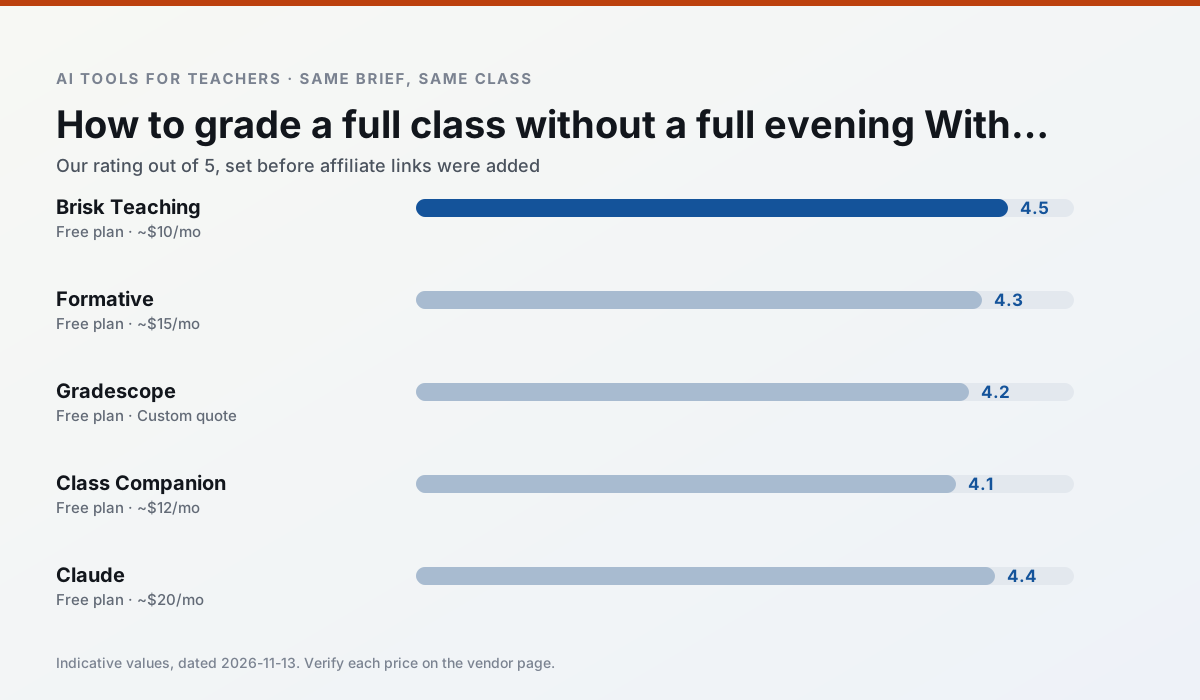
Side by side
Comparison table
Ratings reflect our timed classroom workflow, not vendor claims. Prices are indicative — verify on the vendor site.
| Tool | Best for | Free tier | Indicative paid plan | Standout feature | Our rating | Verdict | Try the tool |
|---|---|---|---|---|---|---|---|
| Brisk Teaching | feedback on writing · grading | Yes — Limited actions per month | ~$10 /user/mo | Works inside Google Docs | 4.5 / 5 | Top pick | Try free |
| Formative | formative assessment · grading | Yes — Core assessment tools | ~$15 /user/mo | Live student responses | 4.3 / 5 | Strong option | Try free |
| Gradescope | grading · rubric creation | Yes — Limited courses | Custom quote | Bubble sheet and handwriting capture | 4.2 / 5 | Strong option | Try free |
| Class Companion | grading · feedback on writing | Yes — Limited assignments | ~$12 /user/mo | Handwriting recognition | 4.1 / 5 | Situational | Try free |
| Claude | rubric creation · feedback on writing | Yes — Usage-limited | ~$20 /user/mo | Very large context window | 4.4 / 5 | Strong option | Try free |
| Khanmigo | math practice · student tutoring | Yes — US teacher accounts, subject to eligibility | ~$4 /learner/mo | Socratic tutoring rather than answers | 4.3 / 5 | Strong option | Try free |
Match your situation
Best for X
Different jobs need different tools. Here is what we would open first in each case.
Brisk Teaching runs in a browser tab with no extension, no student accounts and no onboarding call, so you can test it in a free period.
Formative is the option IT is least likely to block: single sign-on, admin removal of AI features and an agreement on file.
If there is no budget, start with Gradescope: free plan with clearest quota is the least punishing free tier here.
Class Companion wins on the default path: fewer clicks to a usable draft, and the interface does not get in the way at 7:40am.
Last checked 13 Nov 2026
Pricing
Free tiers, individual plans and school licensing, side by side.
| Tool | Free plan | Individual / paid | School & district | Billing note | Verify |
|---|---|---|---|---|---|
| Brisk Teaching | $0 — Limited actions per month | ~$10 /user/mo | Custom quote | Indicative — verify on vendor site | Vendor |
| Formative | $0 — Core assessment tools | ~$15 /user/mo | Custom quote | Indicative — verify on vendor site | Vendor |
| Gradescope | $0 — Limited courses | Custom quote | Custom quote | LMS integration and support | Vendor |
| Class Companion | $0 — Limited assignments | ~$12 /user/mo | Custom quote | Indicative — verify on vendor site | Vendor |
| Claude | $0 — Usage-limited | ~$20 /user/mo | ~$25+ /user/mo | Indicative — verify on vendor site | Vendor |
| Khanmigo | $0 — US teacher accounts, subject to eligibility | ~$4 /learner/mo | Custom quote | Indicative — verify on vendor site | Vendor |
Editorial rule: pricing is re-checked every 2–3 months and the top 50 pages are refreshed every 6 months. See our funding policy.
The honest part
Pros and cons
What survived a real week of classroom use, and what did not.
Pros
- No copy-paste between tools
- Fast inline feedback on student drafts
- Gentle learning curve
Cons
- Chrome-first workflow
- Extension permissions need IT approval
- Free quota is tight
Pros
- Strong data for intervention groups
- Works with existing PDFs and Docs
- Good LMS integrations
Cons
- Steeper setup than quiz games
- Best value requires school-wide rollout
- Price adds up per teacher
Pros
- Large time savings on paper assessments
- Consistent rubric application
- Detailed item analytics
Cons
- Overkill for elementary classrooms
- Institutional pricing is opaque
- Setup effort is real
Pros
- Useful where work is done on paper
- Fast, specific comments
- Good math support
Cons
- Scan quality affects accuracy
- Narrow use case
- Feedback still needs teacher review
Pros
- Handles full unit plans and long rubrics
- Nuanced, less generic prose
- Good at structured document output
Cons
- No teacher-specific templates
- Fewer classroom integrations
- Consumer plan not suitable for student data
In the classroom
Use cases
Five concrete workflows, with the tool we would open for each one.
Regrouping students after an assessment
Summarise anonymised results into skill groups, then generate one activity per group. Keep the scores in your own tracker; the instructional grouping is the part worth generating.
Recommended: Brisk TeachingA weekly family newsletter from bullet notes
Newsletters fail on length, not tone. Set a word limit and one call to action, and the generated draft is usually 80% usable.
Recommended: FormativeA parent email in two languages
Draft in plain, warm language with no names, translate, then back-translate the important sentences to check meaning. Keep specific incidents out of the prompt and add them yourself.
Recommended: GradescopeRubric and feedback comments in one pass
Reorder the workflow so the rubric is yours and the comments are generated. Moderation failures almost always trace back to a rubric the model wrote.
Recommended: Class CompanionThree reading levels from one source text
Paste a vetted text, ask for supported, core and extension versions, then check the vocabulary list by hand. Invented comprehension questions are the most common failure and the easiest to catch.
Recommended: Claude
Questions teachers ask us
FAQ
Direct answers, also published as FAQPage structured data for search and AI assistants.
How long does this workflow take?
Which tool should I start with?
What if the output is unusable?
Sources & further reading
Our recommendation
Try MagicSchool AI free for your next grading task
A large library of teacher-specific AI generators in one dashboard. Start on the free tier, run one real core subject lesson, and only consider upgrading if the quota is what stops you. Disclosure: we may earn a commission (30% recurring) at no extra cost to you.
Some links on this page are affiliate links. We may earn a commission at no extra cost to you. Our rankings are editorial and never pay-to-play. Never enter student PII into a free consumer account.
Keep reading
Related comparisons in this cluster.
Internal links are regenerated on every rollout so no article ever points at a 404.