The short answer
- Canva for Education is our default pick for teachers who need to draft a standards-aware lesson plan quickly; Gamma is better when differentiation is the bottleneck.
- Pricing is where these pages date fastest. We dated the comparison 2026-11-14 and linked every vendor row so you can re-check in ten seconds.
- Every AI output for Home language notes needs a teacher review, especially standards codes, core subject accuracy, and anything in an IEP, assessment or family message.
- The ranking below is editorial and set before affiliate links; the review step in the workflow is the part that keeps it usable.
Start with Gamma on its free plan.
Last October, I stared at twenty-eight progress reports on my desk and realized I hadn't eaten lunch. Six of those reports needed to go home to families whose primary language wasn't English. My district offers translation services, but the turnaround time is usually a week, and by then, the behavior or missing assignment being discussed is old news. Using AI to generate home-language notes with AI has quietly fixed this bottleneck, provided you treat the output as a rough draft rather than gospel.
When you are trying to build an inclusive classroom, bridging the gap with multilingual families is a daily chore. If you are looking at the broader landscape of what works, our guide on best AI tools for teachers 2026 covers the foundational software. But for communicating specifically with parents, you need tools that handle text generation and translation without leaking student data. Here is how I manage home-language notes without losing my sanity or violating student privacy.
The Parent Email Workflow
Drafting a parent email in two languages used to mean cobbling together phrases from online translation engines that routinely mangled tone. Now, I write the draft in plain, warm language with no names attached. Then I translate it, and finally, I back-translate the important sentences to check meaning. Keeping specific incidents out of the prompt is non-negotiable. I never paste student names or disciplinary specifics into an LLM. Instead, I use placeholders like [Student] and [Behavior].
For the translation and layout phase, Canva for Education is my go-to choice because it is free for verified teachers and has a massive template library. You can drop your translated text into a clean, visual layout that looks professional rather than like a hastily typed memo. If you are looking for a more structured workflow for administrative updates, our piece on AI classroom newsletters for administrators has some useful formatting tips that translate well to parent communication.
Prompt: "Draft a warm, professional teacher-to-parent update about a student's recent improvement in math class. Do not use names. Keep the tone encouraging and invite the parent to a brief phone call to discuss strategies we can use at home. Write the output in English first, followed by a Spanish translation."
What came back: The English version was a bit stiff, using corporate phrasing like "academic performance enhancement." The Spanish translation was grammatically correct but sounded too formal, using usted forms that can feel cold to families in our community.
Two edits that made it usable:
- Swapped out the corporate phrasing in English for conversational teacher-speak ("improving their math confidence").
- Adjusted the Spanish translation to a warmer, more community-friendly tone and inserted the student's actual name by hand after copying the text out of the tool.
Where the Workflow Breaks Down
The first major failure mode is tone deafness. Generative AI defaults to corporate cheerfulness or clinical detachment. If you ask a tool to write a note about a missing homework streak, it might output something that sounds like an automated debt collection agency in translation. You have to scrub the output for stiffness before it goes anywhere near a printer or an email client.
The second major failure is data leakage. Teachers are busy, and it is entirely too easy to paste a student's full name, grade, and specific learning disability into a prompt to save time. When I started using these workflows, I caught myself almost dropping real names into browser windows. I solved this by adopting a strict rule: anonymise first, type second. If a tool requires an account, check the privacy policy. Canva for Education has specific student-data terms you need to read, while content tools like Gamma are strictly for general material and should never touch student work.
Choosing the Right Tool for the Message
Not every home-language note needs to be a text email. Sometimes you need a quick video or an interactive element to get families engaged. While Canva is best for free, visual printouts and Gamma is great for rapid slide layouts, video tools serve a different purpose entirely. If you want to create a quick visual walkthrough of a classroom project for families, Synthesia offers a fast path from script to presenter-led video, though at roughly $29 a user per month, it is hard to justify for a single teacher's budget unless your department is footing the bill.
For translation specifically, HeyGen is another option with strong lip-sync translation features, priced around the same tier. However, voice and likeness cloning require documented consent, which makes it overkill for everyday classroom notes. Most of the time, text-based notes paired with a clean design template are all families actually want to read on their phones.
Keeping Notes Accessible and Quick
When I need to generate multiple notes across different subjects or prepare review materials that families can look over with their children, I lean on QuestionWell to pull together standards-aligned questions that I can translate and send home as study guides. It saves hours of manual typing, though you still have to verify the quality of the source text you feed into it. Pairing those translated study guides with a quick game of Kahoot! in class gives students a common language to talk about what they are learning at the dinner table.
We live in an era of endless edtech hype, but home-language communication is one area where AI genuinely reduces friction, provided you keep a human hand on the steering wheel. Do not trust the machine with names, do not trust the machine with final tone checks, and always verify your translations with a back-translation pass if you are unsure. Your families deserve clarity, not automated gibberish.
FAQ
Can AI do Home language notes at mixed-grade level?
It can produce a first draft and a structure. The level judgement, the standards check and the tone are teacher decisions.
Which tool is best for Home language notes?
Canva for Education on the evidence in this article, with Gamma as the second opinion. Neither replaces the review step.
What is the biggest risk?
A confident, plausible output that nobody checked. The five checks below exist for that reason.
Sources
- Canva for Education. Teacher verification and feature overview. Retrieved from canva.com/education.
- Gamma. Presentation and document generation limits. Retrieved from gamma.app.
- Synthesia. AI avatar and video pricing tiers. Retrieved from synthesia.io.
- HeyGen. Video translation and credit plans. Retrieved from heygen.com.
- Kahoot!. Question generation and classroom engagement features. Retrieved from kahoot.com.
- QuestionWell. Standards-aligned question bank generation. Retrieved from questionwell.org.
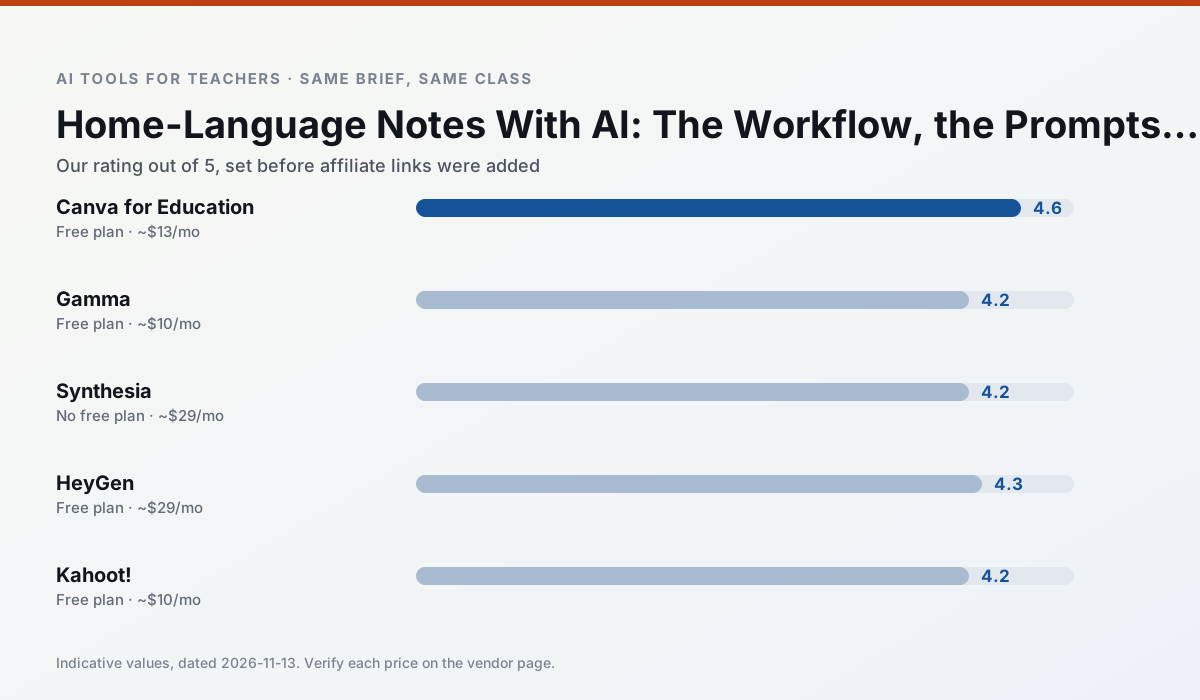
Side by side
Comparison table
Ratings reflect our timed classroom workflow, not vendor claims. Prices are indicative — verify on the vendor site.
| Tool | Best for | Free tier | Indicative paid plan | Standout feature | Our rating | Verdict | Try the tool |
|---|---|---|---|---|---|---|---|
| Canva for Education | slide decks · worksheets | Yes — Verification required | ~$13 /user/mo | Thousands of education templates | 4.6 / 5 | Top pick | Try free |
| Gamma | slide decks · parent communication | Yes — Credit-limited generation | ~$10 /user/mo | Prompt-to-deck | 4.2 / 5 | Strong option | Try free |
| Synthesia | flipped lessons · video lessons | No ongoing free plan | ~$29 /user/mo | 140+ languages | 4.2 / 5 | Strong option | Try free |
| HeyGen | video lessons · translation | Yes — Limited credit plan | ~$29 /user/mo | Video translation | 4.3 / 5 | Strong option | Try free |
| Kahoot! | quiz generation · review lessons | Yes — Limited player count | ~$10 /user/mo | AI question builder | 4.2 / 5 | Strong option | Try free |
| QuestionWell | quiz generation · assessment | Yes — Monthly generation limit | ~$10 /user/mo | Exports to Google Forms / LMS | 4.3 / 5 | Strong option | Try free |
Match your situation
Best for X
Different jobs need different tools. Here is what we would open first in each case.
If there is no budget, start with Canva for Education: free plan with clearest quota is the least punishing free tier here.
On the daily cycle, Gamma saves the most edit time per task; the paid tier mostly buys more runs rather than better ones.
Setup cost is one login for Synthesia; everything else can wait until you know the tool is useful.
HeyGen is the option IT is least likely to block: single sign-on, admin removal of AI features and an agreement on file.
Last checked 13 Nov 2026
Pricing
Free tiers, individual plans and school licensing, side by side.
| Tool | Free plan | Individual / paid | School & district | Billing note | Verify |
|---|---|---|---|---|---|
| Canva for Education | $0 — Verification required | ~$13 /user/mo | Custom quote | Indicative — verify on vendor site | Vendor |
| Gamma | $0 — Credit-limited generation | ~$10 /user/mo | ~$20 /user/mo | Indicative — verify on vendor site | Vendor |
| Synthesia | No ongoing free tier | ~$29 /user/mo | Custom quote | Indicative — verify on vendor site | Vendor |
| HeyGen | $0 — Limited credit plan | ~$29 /user/mo | Custom quote | Indicative — verify on vendor site | Vendor |
| Kahoot! | $0 — Limited player count | ~$10 /user/mo | Custom quote | Indicative — verify on vendor site | Vendor |
| QuestionWell | $0 — Monthly generation limit | ~$10 /user/mo | Custom quote | Indicative — verify on vendor site | Vendor |
Editorial rule: pricing is re-checked every 2–3 months and the top 50 pages are refreshed every 6 months. See our funding policy.
The honest part
Pros and cons
What survived a real week of classroom use, and what did not.
Pros
- Effectively free for verified teachers
- Huge template library
- No design skills needed
Cons
- AI features are capped
- Easy to produce cluttered slides
- Account verification can be slow
Pros
- Fastest path from outline to deck
- Modern-looking output by default
- Good export options
Cons
- Design control is limited
- Credits run out quickly
- Not built for student data
Pros
- No camera or editing skills required
- Excellent multilingual voice output
- Easy updates to existing videos
Cons
- Cost is hard to justify for a single teacher
- Avatar video can feel impersonal
- No free ongoing tier
Pros
- Best-in-class lip-sync translation
- Useful for multilingual families
- Generous trial credits
Cons
- Credit-based pricing is confusing
- Voice cloning raises consent questions
- Overkill for everyday lessons
Pros
- Instant engagement
- Very low training time
- Strong brand familiarity
Cons
- Less depth for higher-order assessment
- Paid tiers needed for larger classes
- Time pressure suits recall more than reasoning
In the classroom
Use cases
Five concrete workflows, with the tool we would open for each one.
Three reading levels from one source text
Paste a vetted text, ask for supported, core and extension versions, then check the vocabulary list by hand. Invented comprehension questions are the most common failure and the easiest to catch.
Recommended: Canva for EducationA Monday morning lesson plan in twelve minutes
The twelve minutes come from not rewriting the skeleton. Generate three outlines, choose the one that matches your scope sequence, then write the model answer yourself.
Recommended: GammaA parent email in two languages
Draft in plain, warm language with no names, translate, then back-translate the important sentences to check meaning. Keep specific incidents out of the prompt and add them yourself.
Recommended: SynthesiaRubric and feedback comments in one pass
Reorder the workflow so the rubric is yours and the comments are generated. Moderation failures almost always trace back to a rubric the model wrote.
Recommended: HeyGenAn IEP present-levels first draft
Use aggregated, anonymised data only. Ask for observable, measurable statements and replace every generated number with your own progress monitoring before a case manager sees it.
Recommended: Kahoot!
Questions teachers ask us
FAQ
Direct answers, also published as FAQPage structured data for search and AI assistants.
Can AI do Home language notes at mixed-grade level?
Which tool is best for Home language notes?
What is the biggest risk?
Sources & further reading
Our recommendation
Try Gamma free for your next Home language notes task
Generate presentation decks and documents from a single prompt. Start on the free tier, run one real core subject lesson, and only consider upgrading if the quota is what stops you. Disclosure: we may earn a commission (varies) at no extra cost to you.
Some links on this page are affiliate links. We may earn a commission at no extra cost to you. Our rankings are editorial and never pay-to-play. Never enter student PII into a free consumer account.
Keep reading
Related comparisons in this cluster.
Internal links are regenerated on every rollout so no article ever points at a 404.