The short answer
- Quizizz is our default pick for teachers who need to draft a standards-aware lesson plan quickly; Brisk Teaching is better when differentiation is the bottleneck.
- Start with Quizizz on its free plan, keep Brisk Teaching as the second opinion, and do not open a card until the quota, not the feature list, is what stops you.
- Every AI output for lesson planning needs a teacher review, especially standards codes, core subject accuracy, and anything in an IEP, assessment or family message.
- Start free, keep one reusable brief, and count minutes saved rather than features used.
Start with MagicSchool AI on its free plan.
It was a Tuesday afternoon when Tyler, an eighth-grader who finished his linear equations worksheet in six minutes, looked up with that specific, hollow stare that tells a teacher you are about to lose him to classroom disruption. I did not have a secondary enrichment packet ready. I had thirty-two other students trying to figure out what a slope-intercept form even meant, and I certainly did not have an extra forty minutes to design a parallel curriculum for one kid. That is the quiet trap of mixed-ability teaching. You spend so much time keeping the middle afloat that your advanced learners get a diet of busywork or, worse, silence.
Finding AI tools for gifted students without extra planning is not about handing them a generic chatbot and hoping they stay out of trouble. It is about using specific platforms to generate tiered extensions, scaffolded inquiry loops, and independent challenges while you handle the rest of the room. You can read our broader recommendations in the guide on best AI tools for teachers 2026, but supporting fast finishers and deep divers requires a distinct toolkit that respects both your prep time and district data boundaries.
Managing Mixed-Ability Pacing With SchoolAI
When you have a student who exhausts the core curriculum by the second period, you need a sandbox where they can safely go deeper without you writing a brand-new syllabus. SchoolAI stands out here as best for mixed-ability classes. It is built as a school-safe AI workspace with teacher-controlled student spaces, meaning you can spin up a guided chat agent that acts as a Socratic tutor on the topic your advanced students have just mastered.
The primary advantage is visibility. You can watch what the student is typing and how the AI is responding in real-time from your own dashboard, ensuring they are not just asking the model to write their essays. The system includes strong safeguarding defaults and district-level compliance features, though it does require school-wide buy-in and its pricing is mostly quote-based, hovering around $15 per user per month indicative for paid tiers. The main limitation is that it is less flexible than open-ended general models, but that constraint is precisely what makes it safe to hand directly to a kid.
Prompt: Act as a Socratic tutor in marine biology for an 8th-grade student who has mastered basic ecosystems. Do not give direct answers. Ask one probing question at a time about deep-sea hydrothermal vents and chemosynthesis.
First response: The model immediately launched into a four-paragraph lecture on vent bacteria before asking a question.
Edits:
- Added a strict negative constraint: "Keep all introductory text under ten words."
- Defined the exact turn-taking rule: "End every response with a single question and wait for the student reply."
Independent Inquiry and Math Scaffolding With Khanmigo
Gifted students often leap to the correct mathematical conclusion without understanding the underlying proof, which creates a ceiling later on. Khanmigo, developed by Khan Academy, provides a tutor-style AI designed specifically for education. It is best for quick setup because it integrates directly with existing curriculum pathways and carries a strong nonprofit trust signal.
For US teachers, accounts have free tier options subject to eligibility, while paid individual access runs around $4 per learner per month indicative. It excels at math scaffolding, refusing to just drop an answer into the chat window. Instead, it walks students through the conceptual logic, asking them to justify their steps. Availability can vary by region, and it requires student accounts for full value, which means getting past your tech coordinator first. If you need a tool that handles independent academic stretching without turning into a homework machine, this is where you start.
Turning Articles Into Tiered Question Banks
You do not need to rewrite the canon to challenge an advanced reader. You just need to change the cognitive demand of the questions you ask them. When dealing with a complex source text, feeding a non-identifiable article into an assistant helps generate multi-tier challenges.
Prompt: Read the following excerpt on the industrial revolution. Generate three discussion questions for an advanced 7th-grade reader. Tag each by cognitive depth using Webb's Depth of Knowledge, and list the specific misconception behind each expected distractor.
First response: The model generated standard multiple-choice items that tested vocabulary rather than systemic analysis.
Edits:
- Specified the output format to demand open-ended comparative tasks rather than multiple-choice.
- Required the prompt to anchor the questions in primary source causation rather than chronological recall.
You must spot-check every output, especially if you ask for numerical or historical correlations. AI models occasionally hallucinate obscure facts to fit a narrative arc, and a bright student will spot the error immediately, destroying the credibility of the task.
Rapid Gamification and Formative Stretch With Quizizz
Sometimes differentiation means letting students race ahead through a self-paced challenge that ramps up in difficulty. Quizizz remains a reliable anchor for this because students already know the interface and it works on low-end school devices without crashing. With AI-assisted quiz creation, you can take a standard assessment and instantly generate an advanced tier with higher-order items.
The platform sits around $15 per user per month indicative for paid features, though core quiz creation remains free. The interface handles low-bandwidth classrooms smoothly, but you have to watch out for the gamification trap. Advanced students can get so caught up in the point multipliers and meme animations that they rush through complex analytical questions just to top the leaderboard. Pair it with a requirement that they write out their reasoning on paper before clicking an answer.
Long-Form Planning and Document Synthesis With Claude and ChatGPT
When you are trying to map out an entire quarter of independent study projects for three different reading levels, general-purpose models step in. Claude, priced at around $20 per user per month indicative, handles full unit plans and long rubrics because of its massive context window. It produces nuanced, less generic prose than its competitors, making it useful for drafting project-based learning guidelines that do not sound like a corporate memo.
Meanwhile, ChatGPT offers unmatched flexibility and a massive community of teacher prompt libraries, also sitting near $20 per user per month indicative on paid tiers. The catch with both of these general-purpose tools is privacy and skill barrier. You cannot paste student names or identifying details into consumer plans, and you need to know how to prompt effectively to avoid getting a generic worksheet about ancient Rome. For more administrative workflows, see how we approach data handling in the review of AI data analysis for administrators.
Two distinct failures happened during my first month trying to automate gifted extensions. First, I relied on a free-tier browser extension to generate feedback on student research papers, only to run hard into the monthly quota limit right in the middle of a grading block. I had to pivot manually to a batch-prompting workflow in Claude. Second, I trusted a general model to generate a logic puzzle without verifying the answer key, and two of my sharpest math students spent twenty minutes proving the puzzle was mathematically impossible. Now, I solve the puzzle myself before printing anything. Differentiation without extra planning is entirely possible, provided you treat the AI as an overly eager intern whose work always lands on your desk for final sign-off.
FAQ
Is AI allowed for lesson planning in my school?
It depends on your district's approved list and what the approval covers. Ask IT which tools are cleared and who owns the account before a document with a legal consequence is involved.
Who is responsible if something goes wrong?
The school, and in practice the named teacher who reviewed the output. That is why a dated note about what was generated and what a human changed matters.
What should never go into a prompt?
Names, rosters, scans of student work and gradebook screenshots. Topic-level prompts do most of the work without any of that.
Sources
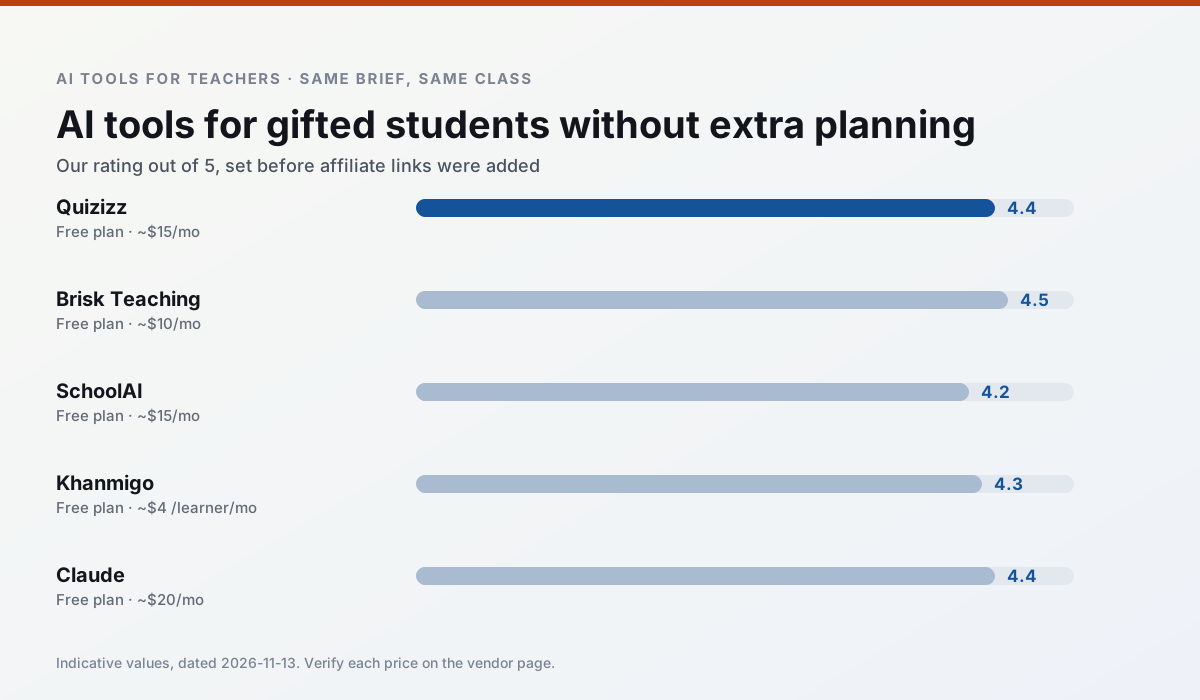
Side by side
Comparison table
Ratings reflect our timed classroom workflow, not vendor claims. Prices are indicative — verify on the vendor site.
| Tool | Best for | Free tier | Indicative paid plan | Standout feature | Our rating | Verdict | Try the tool |
|---|---|---|---|---|---|---|---|
| Quizizz | quiz generation · formative assessment | Yes — Core quiz creation | ~$15 /user/mo | AI question generator | 4.4 / 5 | Strong option | Try free |
| Brisk Teaching | feedback on writing · grading | Yes — Limited actions per month | ~$10 /user/mo | Works inside Google Docs | 4.5 / 5 | Top pick | Try free |
| SchoolAI | student-safe AI · differentiated instruction | Yes — Limited seats | ~$15 /user/mo | Teacher-monitored student chats | 4.2 / 5 | Strong option | Try free |
| Khanmigo | math practice · student tutoring | Yes — US teacher accounts, subject to eligibility | ~$4 /learner/mo | Socratic tutoring rather than answers | 4.3 / 5 | Strong option | Try free |
| Claude | rubric creation · feedback on writing | Yes — Usage-limited | ~$20 /user/mo | Very large context window | 4.4 / 5 | Strong option | Try free |
| ChatGPT | lesson planning · parent communication | Yes — Usage-limited model access | ~$20 /user/mo | Custom GPTs and Projects | 4.5 / 5 | Top pick | Try free |
Match your situation
Best for X
Different jobs need different tools. Here is what we would open first in each case.
Quizizz is the student-facing option here with boundaries a teacher can actually set and supervise.
Brisk Teaching is the steadiest of this set at plain, respectful language; names and specific incidents still belong in your draft, not the prompt.
SchoolAI produces levelled versions from one source in a single pass, which is the highest-value differentiation shortcut we tested at this level.
Khanmigo runs in a browser tab with no extension, no student accounts and no onboarding call, so you can test it in a free period.
Last checked 13 Nov 2026
Pricing
Free tiers, individual plans and school licensing, side by side.
| Tool | Free plan | Individual / paid | School & district | Billing note | Verify |
|---|---|---|---|---|---|
| Quizizz | $0 — Core quiz creation | ~$15 /user/mo | Custom quote | Indicative — verify on vendor site | Vendor |
| Brisk Teaching | $0 — Limited actions per month | ~$10 /user/mo | Custom quote | Indicative — verify on vendor site | Vendor |
| SchoolAI | $0 — Limited seats | ~$15 /user/mo | Custom quote | Indicative — verify on vendor site | Vendor |
| Khanmigo | $0 — US teacher accounts, subject to eligibility | ~$4 /learner/mo | Custom quote | Indicative — verify on vendor site | Vendor |
| Claude | $0 — Usage-limited | ~$20 /user/mo | ~$25+ /user/mo | Indicative — verify on vendor site | Vendor |
| ChatGPT | $0 — Usage-limited model access | ~$20 /user/mo | ~$25+ /user/mo | Indicative — verify on vendor site | Vendor |
Editorial rule: pricing is re-checked every 2–3 months and the top 50 pages are refreshed every 6 months. See our funding policy.
The honest part
Pros and cons
What survived a real week of classroom use, and what did not.
Pros
- Students already know the interface
- Good reporting
- Works on low-end devices
Cons
- Writing high-quality AI questions still needs review
- Gamification can distract
- Advanced analytics are paid
Pros
- No copy-paste between tools
- Fast inline feedback on student drafts
- Gentle learning curve
Cons
- Chrome-first workflow
- Extension permissions need IT approval
- Free quota is tight
Pros
- Designed for district approval
- Teacher visibility into student use
- Good safeguarding defaults
Cons
- Requires school-wide buy-in
- Less flexible than general LLMs
- Pricing is mostly quote-based
Pros
- Education-first design
- Strong nonprofit trust signal
- Good math scaffolding
Cons
- Availability varies by region
- Less useful for admin paperwork
- Requires student accounts for full value
Pros
- Handles full unit plans and long rubrics
- Nuanced, less generic prose
- Good at structured document output
Cons
- No teacher-specific templates
- Fewer classroom integrations
- Consumer plan not suitable for student data
In the classroom
Use cases
Five concrete workflows, with the tool we would open for each one.
Regrouping students after an assessment
Summarise anonymised results into skill groups, then generate one activity per group. Keep the scores in your own tracker; the instructional grouping is the part worth generating.
Recommended: QuizizzA weekly family newsletter from bullet notes
Newsletters fail on length, not tone. Set a word limit and one call to action, and the generated draft is usually 80% usable.
Recommended: Brisk TeachingA question bank from a PDF or article
Feed a non-identifiable source and ask for items tagged by difficulty with the misconception behind each distractor. Spot-check every answer key; numerical items are least reliable.
Recommended: SchoolAIA substitute folder that needs no context
The value here is structure, not creativity. Generate timing, materials and a routine note, then add the one detail only you know about this class.
Recommended: KhanmigoAn IEP present-levels first draft
Use aggregated, anonymised data only. Ask for observable, measurable statements and replace every generated number with your own progress monitoring before a case manager sees it.
Recommended: Claude
Questions teachers ask us
FAQ
Direct answers, also published as FAQPage structured data for search and AI assistants.
Is AI allowed for lesson planning in my school?
Who is responsible if something goes wrong?
What should never go into a prompt?
Sources & further reading
Our recommendation
Try MagicSchool AI free for your next lesson planning task
A large library of teacher-specific AI generators in one dashboard. Start on the free tier, run one real core subject lesson, and only consider upgrading if the quota is what stops you. Disclosure: we may earn a commission (30% recurring) at no extra cost to you.
Some links on this page are affiliate links. We may earn a commission at no extra cost to you. Our rankings are editorial and never pay-to-play. Never enter student PII into a free consumer account.
Keep reading
Related comparisons in this cluster.
Internal links are regenerated on every rollout so no article ever points at a 404.