The short answer
- Synthesia is our default pick for teachers who need to draft a standards-aware lesson plan quickly; HeyGen is better when differentiation is the bottleneck.
- Free-tier reality for this shortlist: Synthesia: No ongoing free plan; HeyGen: Yes — Limited credit plan; Kahoot!: Yes — Limited player count. Treat every paid figure as indicative until you have read the vendor page; only the free quota is something you can test yourself this week.
- Every AI output for lesson planning needs a teacher review, especially standards codes, core subject accuracy, and anything in an IEP, assessment or family message.
- Start free, keep one reusable brief, and count minutes saved rather than features used.
Start with Synthesia on its free plan.
At 4:15 on a Thursday afternoon, I sat at my desk trying to explain a complex bus route change to a parent whose primary language is Spanish. Google Translate gave me a sentence that sounded like a legal summons from the nineteenth century. I needed a tool that sounded like a real human being who cared about a child getting home safely, not a machine churning out literal vocabulary matches. That moment kicked off a term of testing AI translation features across our staple platforms, looking closely at how accurate AI translations of family messages really are when stakes are high and nuance matters.
The Reality of Machine Translation in Parent Communication
When you type a weekly newsletter or an urgent attendance note into an AI model, the output looks smooth on the surface. That smoothness hides dangerous errors, especially when dealing with idioms, disciplinary notices, or specific school procedures. If an AI translates a phrase about "behavior tracking" into something that implies severe punishment, panic ensues in the living room. Teachers cannot rely on raw output without a safety net.
To make AI translations work for family communication, you need a strict workflow. Draft the message in plain, warm English with no student names included. Translate it into the target language, and then take the crucial sentences and translate them back into English to check the meaning. Always keep specific disciplinary incidents out of the prompt entirely, adding those sensitive details yourself after the machine has handled the general updates.
The Translation Prompt: "Translate this weekly classroom update into intermediate Spanish for a family newsletter. Keep the tone warm, encouraging, and informal. Do not translate idioms literally. Source text: Next week we finish our fractions unit and take a short quiz on Thursday. Please remind your child to bring their math journal home on Wednesday night."
The Initial Output: "La próxima semana terminamos nuestra unidad de fracciones y tomamos un examen corto el jueves. Por favor recuerde a su hijo que traiga su diario de matemáticas a casa el miércoles por la noche."
The Two Edits That Made It Usable:
- Changed "tomamos un examen" to "tendremos una evaluación corta" because "tomamos" reads awkwardly in regional dialects for taking a test.
- Adjusted "su hijo" to "su estudiante" to ensure gender-inclusive phrasing that fits the broader family context.
Video Translation and the Avatar Dilemma
Sometimes text is not enough, and you need a spoken message to reach families who prefer audio or video updates. This is where video synthesis tools enter the picture. Synthesia and HeyGen both offer ways to reach multilingual communities, though they approach the problem from different angles.
Synthesia works best for quick setup when you need a presenter-led video without turning on your own camera. At roughly $29 per user per month with no ongoing free tier, the cost is tough to justify for a single classroom teacher, but it shines when you need to update existing video content rapidly.
HeyGen takes the crown for schools and districts, offering a limited credit plan alongside a paid tier around $29 per user per month. Its best-in-class lip-sync translation makes it invaluable for multilingual families who benefit from seeing a familiar face speak their home language. Both tools carry strict privacy reminders. You must never use student likenesses without consent, and voice or likeness cloning requires documented, written permission from everyone involved.
Quiz Tools and Question Banks for Diverse Learners
Translating parent messages is only half the battle; ensuring your daily materials are accessible takes up the rest of your planning time. When you are building review games or generating question banks, tools like Kahoot!, QuestionWell, Quizizz, and Brisk Teaching save hours of weekend work.
Kahoot! remains the best free option, offering a limited player-count tier and a paid option around $10 per user per month. It delivers instant engagement with virtually zero training time, though its time pressure favors quick recall over deep reasoning. For everyday lesson prep, QuestionWell is the best overall tool for daily use. At roughly $10 per user per month with a monthly generation generation limit on the free tier, it generates standards-aligned question banks and exports them cleanly to your favorite formats.
Quizizz costs around $15 per user per month with a core quiz creation free tier, leaning on a massive library of existing questions and low-end device compatibility. Brisk Teaching works as a browser extension priced around $10 per user per month with a tight free quota, bringing AI feedback directly into your Docs and Slides without the friction of copying and pasting between tabs.
Selecting the Right Tool for the Job
Choosing the right platform depends entirely on whether you are trying to reach parents at home or differentiate reading materials in the classroom. If you are building multi-level reading passages, you can paste a vetted text, ask for supported, core, and extension versions, and then check the vocabulary list manually. Invented comprehension questions remain the most common failure point in these outputs, making human review essential.
If you want a broader view of how these technologies fit into your daily workflow, read our guide on finding the best AI tools for teachers in 2026. For specific education laws regarding student data privacy, cross-reference our breakdown on AI detector evidence to ensure your district policies align with the extensions you install.
Keep your prompts simple, your human oversight rigorous, and your student data off external servers. AI can handle the heavy lifting of translation and drafting, but the final stamp of warmth and accuracy always belongs to you.
FAQ
Is AI allowed for lesson planning in my school?
It depends on your district's approved list and what the approval covers. Ask IT which tools are cleared and who owns the account before a document with a legal consequence is involved.
Who is responsible if something goes wrong?
The school, and in practice the named teacher who reviewed the output. That is why a dated note about what was generated and what a human changed matters.
What should never go into a prompt?
Names, rosters, scans of student work and gradebook screenshots. Topic-level prompts do most of the work without any of that.
Sources
- Synthesia Pricing and Features. https://www.synthesia.io/pricing
- HeyGen Feature Overview and Credit System. https://www.heygen.com/pricing
- Kahoot! Educator Plans. https://kahoot.com/pricing/teacher/
- QuestionWell Documentation. https://www.questionwell.ai/
- Brisk Teaching Extension Guide. https://briskteaching.com/
- Quizizz Plans and COPPA Compliance. https://quizizz.com/home/pricing
Side by side
Comparison table
Ratings reflect our timed classroom workflow, not vendor claims. Prices are indicative — verify on the vendor site.
| Tool | Best for | Free tier | Indicative paid plan | Standout feature | Our rating | Verdict | Try the tool |
|---|---|---|---|---|---|---|---|
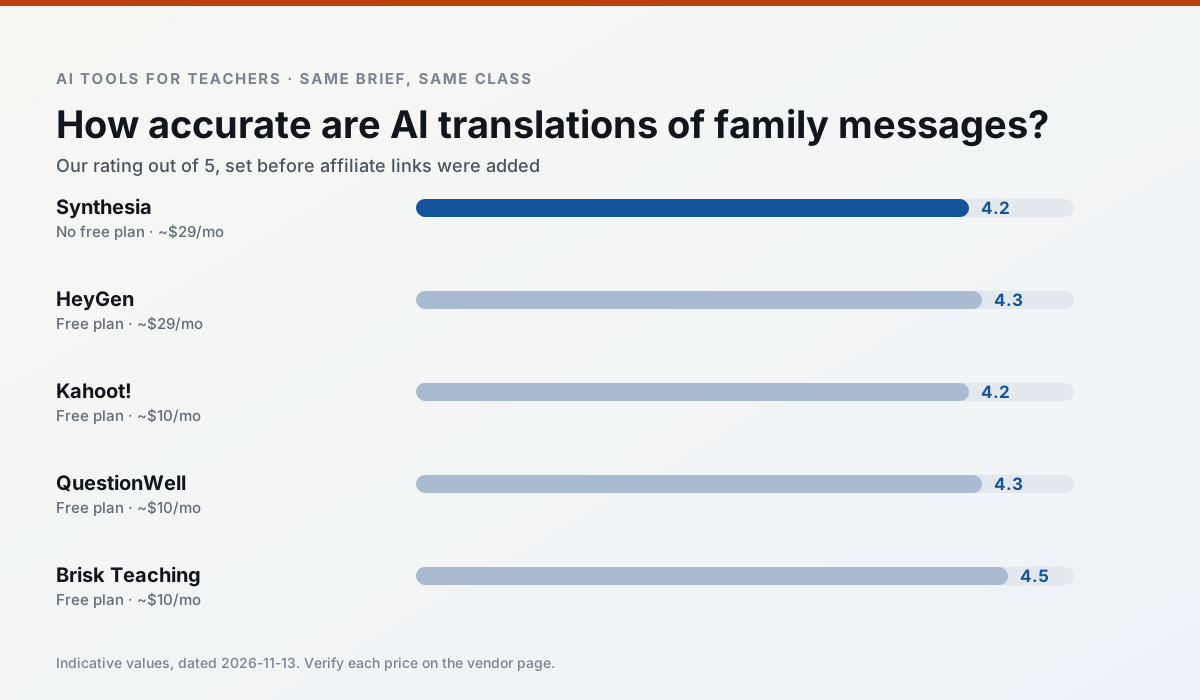
| Synthesia | flipped lessons · video lessons | No ongoing free plan | ~$29 /user/mo | 140+ languages | 4.2 / 5 | Strong option | Try free |
| HeyGen | video lessons · translation | Yes — Limited credit plan | ~$29 /user/mo | Video translation | 4.3 / 5 | Strong option | Try free |
| Kahoot! | quiz generation · review lessons | Yes — Limited player count | ~$10 /user/mo | AI question builder | 4.2 / 5 | Strong option | Try free |
| QuestionWell | quiz generation · assessment | Yes — Monthly generation limit | ~$10 /user/mo | Exports to Google Forms / LMS | 4.3 / 5 | Strong option | Try free |
| Brisk Teaching | feedback on writing · grading | Yes — Limited actions per month | ~$10 /user/mo | Works inside Google Docs | 4.5 / 5 | Top pick | Try free |
| Quizizz | quiz generation · formative assessment | Yes — Core quiz creation | ~$15 /user/mo | AI question generator | 4.4 / 5 | Strong option | Try free |
Match your situation
Best for X
Different jobs need different tools. Here is what we would open first in each case.
Synthesia has the shortest path from opening a tab to a usable draft, which matters more than the feature count on a Monday.
HeyGen is the option IT is least likely to block: single sign-on, admin removal of AI features and an agreement on file.
Kahoot!'s free plan is the most usable in this comparison: a quota that survives a normal week. Not enough for a department, enough for one teacher to decide.
QuestionWell is the one we would open on a normal planning day because the first output is editable rather than restructurable, and the free plan covers a single teacher's routine.
Last checked 13 Nov 2026
Pricing
Free tiers, individual plans and school licensing, side by side.
| Tool | Free plan | Individual / paid | School & district | Billing note | Verify |
|---|---|---|---|---|---|
| Synthesia | No ongoing free tier | ~$29 /user/mo | Custom quote | Indicative — verify on vendor site | Vendor |
| HeyGen | $0 — Limited credit plan | ~$29 /user/mo | Custom quote | Indicative — verify on vendor site | Vendor |
| Kahoot! | $0 — Limited player count | ~$10 /user/mo | Custom quote | Indicative — verify on vendor site | Vendor |
| QuestionWell | $0 — Monthly generation limit | ~$10 /user/mo | Custom quote | Indicative — verify on vendor site | Vendor |
| Brisk Teaching | $0 — Limited actions per month | ~$10 /user/mo | Custom quote | Indicative — verify on vendor site | Vendor |
| Quizizz | $0 — Core quiz creation | ~$15 /user/mo | Custom quote | Indicative — verify on vendor site | Vendor |
Editorial rule: pricing is re-checked every 2–3 months and the top 50 pages are refreshed every 6 months. See our funding policy.
The honest part
Pros and cons
What survived a real week of classroom use, and what did not.
Pros
- No camera or editing skills required
- Excellent multilingual voice output
- Easy updates to existing videos
Cons
- Cost is hard to justify for a single teacher
- Avatar video can feel impersonal
- No free ongoing tier
Pros
- Best-in-class lip-sync translation
- Useful for multilingual families
- Generous trial credits
Cons
- Credit-based pricing is confusing
- Voice cloning raises consent questions
- Overkill for everyday lessons
Pros
- Instant engagement
- Very low training time
- Strong brand familiarity
Cons
- Less depth for higher-order assessment
- Paid tiers needed for larger classes
- Time pressure suits recall more than reasoning
Pros
- Saves the most time on question writing
- Clean export workflow
- Good objective tagging
Cons
- Single-purpose tool
- Question quality varies by source text
- Limited student-facing features
Pros
- No copy-paste between tools
- Fast inline feedback on student drafts
- Gentle learning curve
Cons
- Chrome-first workflow
- Extension permissions need IT approval
- Free quota is tight
In the classroom
Use cases
Five concrete workflows, with the tool we would open for each one.
Regrouping students after an assessment
Summarise anonymised results into skill groups, then generate one activity per group. Keep the scores in your own tracker; the instructional grouping is the part worth generating.
Recommended: SynthesiaA weekly family newsletter from bullet notes
Newsletters fail on length, not tone. Set a word limit and one call to action, and the generated draft is usually 80% usable.
Recommended: HeyGenA parent email in two languages
Draft in plain, warm language with no names, translate, then back-translate the important sentences to check meaning. Keep specific incidents out of the prompt and add them yourself.
Recommended: Kahoot!Rubric and feedback comments in one pass
Reorder the workflow so the rubric is yours and the comments are generated. Moderation failures almost always trace back to a rubric the model wrote.
Recommended: QuestionWellThree reading levels from one source text
Paste a vetted text, ask for supported, core and extension versions, then check the vocabulary list by hand. Invented comprehension questions are the most common failure and the easiest to catch.
Recommended: Brisk Teaching
Questions teachers ask us
FAQ
Direct answers, also published as FAQPage structured data for search and AI assistants.
Is AI allowed for lesson planning in my school?
Who is responsible if something goes wrong?
What should never go into a prompt?
Sources & further reading
Our recommendation
Try Synthesia free for your next lesson planning task
Turn a script into a presenter-led video with AI avatars. Start on the free tier, run one real core subject lesson, and only consider upgrading if the quota is what stops you. Disclosure: we may earn a commission (25% recurring) at no extra cost to you.
Some links on this page are affiliate links. We may earn a commission at no extra cost to you. Our rankings are editorial and never pay-to-play. Never enter student PII into a free consumer account.
Keep reading
Related comparisons in this cluster.
Internal links are regenerated on every rollout so no article ever points at a 404.