The short answer
- Canva for Education is our default pick for teachers who need to draft a standards-aware lesson plan quickly; Gamma is better when differentiation is the bottleneck.
- Free-tier reality for this shortlist: Canva for Education: Yes — Verification required; Gamma: Yes — Credit-limited generation; Synthesia: No ongoing free plan. Treat every paid figure as indicative until you have read the vendor page; only the free quota is something you can test yourself this week.
- Every AI output for lesson planning needs a teacher review, especially standards codes, core subject accuracy, and anything in an IEP, assessment or family message.
- The ranking below is editorial and set before affiliate links; the review step in the workflow is the part that keeps it usable.
Start with Gamma on its free plan.
It is four in the afternoon on a Tuesday, and the professional development committee has just asked for a digital slide deck, a parent communication protocol, and an accessible quiz bank by Friday morning. Most districts treat staff training as an afterthought, dumping a link to a three-hour slide deck in your inbox and calling it a day. Real staff development happens in the five-minute corridor chats between periods or during our own late-night planning sessions. When we look at ai in staff development, we are not looking for more administrative jargon. We want tools that build actual materials without making us learn a new software suite.
The Problem With District-Wide AI Mandates
Administrators love buying software licenses that sit unused because they do not solve the gritty reality of lesson prep or department meetings. If a platform requires a three-hour training webinar just to make a twenty-slide presentation on restorative practices, it is already dead on arrival. Teachers need utilities that fit between grading papers and eating a cold sandwich. When testing these platforms for staff workshops and peer mentoring sessions, the metric was simple. Did it take less time to generate and fix the output than it would have taken to write it from scratch on a blank page?
Turning Raw Notes Into Clean Slide Decks
Gamma has quickly become the best overall tool for daily use when you need to spin up a presentation for a department meeting or a PLC session. You feed it a prompt, and it builds out an entire card-based deck with layouts and typography that do not look like a 2004 PowerPoint. The credits run out fast if you abuse the regeneration button, but the output gives you a polished skeleton before your coffee gets cold. It treats design as an afterthought so you can focus on the pedagogical message.
Prompt: Create a 10-slide professional development presentation for middle school teachers on formative assessment strategies, focusing on exit tickets and thumb checks. Use a clean, plain-English tone with practical examples.
First pass: Gamma generated a gorgeous deck with custom icons and clear headings. However, slide six used educational buzzwords about "synergistic paradigm shifts" that nobody actually says in a hallway.
Two edits:
- Replaced the corporate jargon on slide six with a concrete example of a three-minute math check-in.
- Swapped the generic stock image on the title slide for a neutral diagram of a classroom seating chart.
Best Free Option for Visual Layouts
Canva for Education remains the undisputed champion for teachers who need verified free access to robust design suites, provided your account approval goes through. The template library is massive, and the built-in AI writing features let you draft bullet points directly onto posters or infographics. The catch is that it is very easy to produce cluttered slides if you let the automated layouts run wild. Account verification can also drag on at the start of the term, so do not wait until the night before a staff meeting to sign up.
Generating Fast Assessment Banks
When building common formative assessments for a grade-level team, QuestionWell saves hours of manual typing. You paste your source text or curriculum objective, and it spits out standards-aligned question banks that you can export directly into various formats. You still have to check the reading level of the generated questions because the AI occasionally slips in vocabulary that is harder than the source text. It is a single-purpose utility, but it does that one job cleanly without trying to be an all-in-one learning management system.
For a broader look at how these applications fit into broader instructional workflows, check out the best AI tools for teachers.
Video Presenters and Multilingual Outreach
Synthesia and HeyGen bring synthetic media into the staff development conversation, though they serve very different niches in a school building. Synthesia is useful for quick setup when you need an avatar to deliver a standardized compliance training video without booking a recording studio. HeyGen is exceptional for multilingual family outreach and professional development translation, offering precise lip-syncing that helps bridge gaps with non-English-speaking parents. Both platforms cost around $29 per user monthly on their paid tiers, which makes them hard to justify for a single teacher's daily budget. They work best as centralized department purchases where one subscription serves the whole grade-level team or administrative office.
Quick Review Games for Staff and Students
Kahoot! rounds out the mix by turning standard review sessions into high-energy game shows through AI-assisted question generation. Teachers rely on it for instant engagement, and the training time is practically zero because students and staff already know the interface. The main constraint is that the paid tiers are practically mandatory if you want to host larger groups without player caps. Furthermore, the speeded-up nature of the game rewards quick recall over deep reasoning, which means you cannot rely on it as your sole assessment engine. For more ideas on supporting varied learners with automated systems, explore our guide on AI accommodations for paraprofessionals.
What Went Wrong in Real Use
No software works out of the box every single time, and testing these six platforms revealed two recurring failures. First, generating question banks from obscure PDF handouts in QuestionWell led to hallucinated answer keys that marked correct definitions as wrong. The fix was establishing a strict rule: never trust an automated answer key without cross-referencing the source text paragraph by paragraph. Second, asking Canva to auto-layout a twenty-person staff directory resulted in overlapping text boxes that corrupted when exported to PDF. The solution was sticking to structured grid templates rather than letting the generator place elements freely. AI in staff development only works when you treat the output as a rough draft from a tired colleague, not a final decree from on high.
FAQ
How long does this workflow take?
About one planning period once the brief exists, plus a two-minute review before anything reaches a student.
Which tool should I start with?
Canva for Education on its free plan, on a real task, before any purchase conversation.
What if the output is unusable?
Rewrite the brief, not the output. In our logs an unusable draft almost always traced back to a vague brief.
Sources
- Canva for Education. Teacher Verification and Pricing Tiers. canva.com/education
- Gamma. AI Deck Generation and Credit Limits. gamma.app
- Synthesia. AI Avatar Video Production. synthesia.io
- HeyGen. AI Translation and Video Generation. heygen.com
- Kahoot!. Quiz Games and AI Question Generation. kahoot.com
- QuestionWell. Standards-Aligned Question Generation. questionwell.org
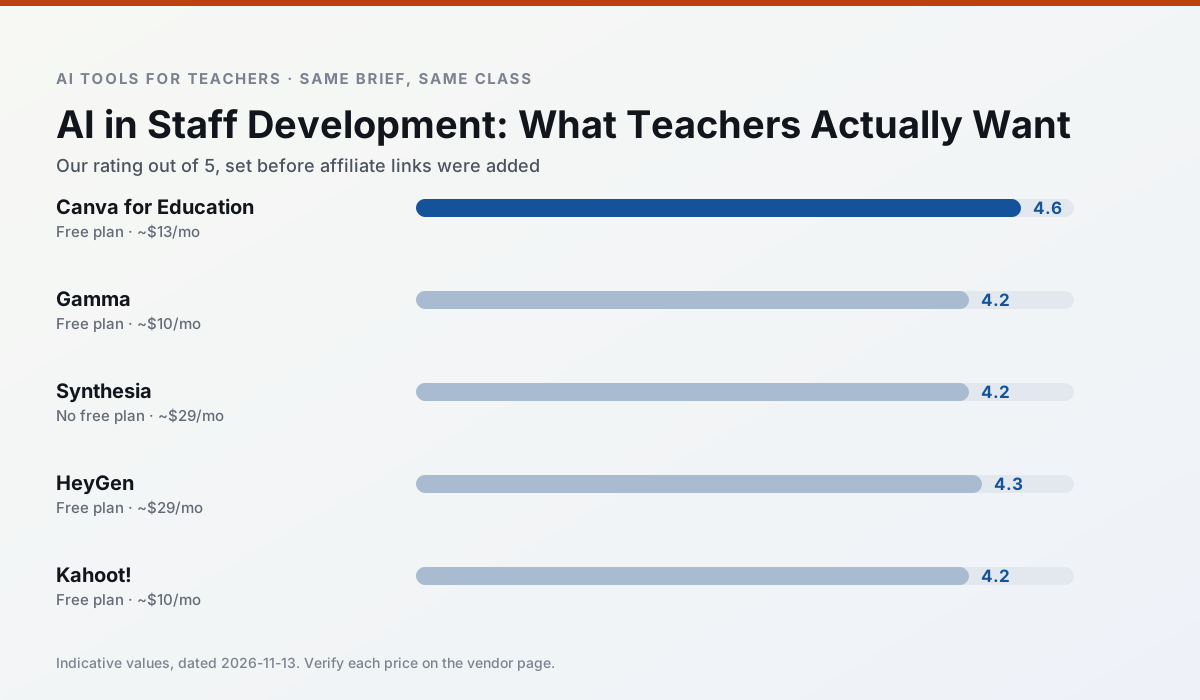
Side by side
Comparison table
Ratings reflect our timed classroom workflow, not vendor claims. Prices are indicative — verify on the vendor site.
| Tool | Best for | Free tier | Indicative paid plan | Standout feature | Our rating | Verdict | Try the tool |
|---|---|---|---|---|---|---|---|
| Canva for Education | slide decks · worksheets | Yes — Verification required | ~$13 /user/mo | Thousands of education templates | 4.6 / 5 | Top pick | Try free |
| Gamma | slide decks · parent communication | Yes — Credit-limited generation | ~$10 /user/mo | Prompt-to-deck | 4.2 / 5 | Strong option | Try free |
| Synthesia | flipped lessons · video lessons | No ongoing free plan | ~$29 /user/mo | 140+ languages | 4.2 / 5 | Strong option | Try free |
| HeyGen | video lessons · translation | Yes — Limited credit plan | ~$29 /user/mo | Video translation | 4.3 / 5 | Strong option | Try free |
| Kahoot! | quiz generation · review lessons | Yes — Limited player count | ~$10 /user/mo | AI question builder | 4.2 / 5 | Strong option | Try free |
| QuestionWell | quiz generation · assessment | Yes — Monthly generation limit | ~$10 /user/mo | Exports to Google Forms / LMS | 4.3 / 5 | Strong option | Try free |
Match your situation
Best for X
Different jobs need different tools. Here is what we would open first in each case.
Canva for Education's free plan is the most usable in this comparison: a quota that survives a normal week. Not enough for a department, enough for one teacher to decide.
Gamma wins on the default path: fewer clicks to a usable draft, and the interface does not get in the way at 7:40am.
Synthesia runs in a browser tab with no extension, no student accounts and no onboarding call, so you can test it in a free period.
For a school rollout, HeyGen offers the paperwork and the admin console; the classroom features are standard by comparison.
Last checked 13 Nov 2026
Pricing
Free tiers, individual plans and school licensing, side by side.
| Tool | Free plan | Individual / paid | School & district | Billing note | Verify |
|---|---|---|---|---|---|
| Canva for Education | $0 — Verification required | ~$13 /user/mo | Custom quote | Indicative — verify on vendor site | Vendor |
| Gamma | $0 — Credit-limited generation | ~$10 /user/mo | ~$20 /user/mo | Indicative — verify on vendor site | Vendor |
| Synthesia | No ongoing free tier | ~$29 /user/mo | Custom quote | Indicative — verify on vendor site | Vendor |
| HeyGen | $0 — Limited credit plan | ~$29 /user/mo | Custom quote | Indicative — verify on vendor site | Vendor |
| Kahoot! | $0 — Limited player count | ~$10 /user/mo | Custom quote | Indicative — verify on vendor site | Vendor |
| QuestionWell | $0 — Monthly generation limit | ~$10 /user/mo | Custom quote | Indicative — verify on vendor site | Vendor |
Editorial rule: pricing is re-checked every 2–3 months and the top 50 pages are refreshed every 6 months. See our funding policy.
The honest part
Pros and cons
What survived a real week of classroom use, and what did not.
Pros
- Effectively free for verified teachers
- Huge template library
- No design skills needed
Cons
- AI features are capped
- Easy to produce cluttered slides
- Account verification can be slow
Pros
- Fastest path from outline to deck
- Modern-looking output by default
- Good export options
Cons
- Design control is limited
- Credits run out quickly
- Not built for student data
Pros
- No camera or editing skills required
- Excellent multilingual voice output
- Easy updates to existing videos
Cons
- Cost is hard to justify for a single teacher
- Avatar video can feel impersonal
- No free ongoing tier
Pros
- Best-in-class lip-sync translation
- Useful for multilingual families
- Generous trial credits
Cons
- Credit-based pricing is confusing
- Voice cloning raises consent questions
- Overkill for everyday lessons
Pros
- Instant engagement
- Very low training time
- Strong brand familiarity
Cons
- Less depth for higher-order assessment
- Paid tiers needed for larger classes
- Time pressure suits recall more than reasoning
In the classroom
Use cases
Five concrete workflows, with the tool we would open for each one.
Regrouping students after an assessment
Summarise anonymised results into skill groups, then generate one activity per group. Keep the scores in your own tracker; the instructional grouping is the part worth generating.
Recommended: Canva for EducationA weekly family newsletter from bullet notes
Newsletters fail on length, not tone. Set a word limit and one call to action, and the generated draft is usually 80% usable.
Recommended: GammaThree reading levels from one source text
Paste a vetted text, ask for supported, core and extension versions, then check the vocabulary list by hand. Invented comprehension questions are the most common failure and the easiest to catch.
Recommended: SynthesiaA Monday morning lesson plan in twelve minutes
The twelve minutes come from not rewriting the skeleton. Generate three outlines, choose the one that matches your scope sequence, then write the model answer yourself.
Recommended: HeyGenA parent email in two languages
Draft in plain, warm language with no names, translate, then back-translate the important sentences to check meaning. Keep specific incidents out of the prompt and add them yourself.
Recommended: Kahoot!
Questions teachers ask us
FAQ
Direct answers, also published as FAQPage structured data for search and AI assistants.
How long does this workflow take?
Which tool should I start with?
What if the output is unusable?
Sources & further reading
Our recommendation
Try Gamma free for your next lesson planning task
Generate presentation decks and documents from a single prompt. Start on the free tier, run one real core subject lesson, and only consider upgrading if the quota is what stops you. Disclosure: we may earn a commission (varies) at no extra cost to you.
Some links on this page are affiliate links. We may earn a commission at no extra cost to you. Our rankings are editorial and never pay-to-play. Never enter student PII into a free consumer account.
Keep reading
Related comparisons in this cluster.
Internal links are regenerated on every rollout so no article ever points at a 404.