The short answer
- MagicSchool AI is our default pick for teachers who need to draft a standards-aware lesson plan quickly; Eduaide.Ai is better when differentiation is the bottleneck.
- The cheapest honest test is a week of real work on the free plans: MagicSchool AI: Yes — Core generators with monthly usage limits; Eduaide.Ai: Yes — Daily generation cap; ChatGPT: Yes — Usage-limited model access. If a tool is still open on Friday, it has earned a paid conversation.
- Every AI output for lesson planning needs a teacher review, especially standards codes, Kindergarten accuracy, and anything in an IEP, assessment or family message.
- Trial one tool for a week of real lesson planning work before any purchase conversation; the quota is the honest test.
Start with MagicSchool AI on its free plan.
By 8:02 AM on any given Monday, I have usually answered four emails, wiped a puddle of mysterious origin off the kidney table, and realized I left my magnetic letters in the other wing of the building. Trying to build a coherent week of early literacy stations on top of that reality is a fool's errand. We have all stared at a blank template while a five-year-old tugs on a cardigan asking when it is time to paint. That panic is precisely why AI lesson planning for kindergarten teachers has moved from a neat trick to a survival strategy across primary wings.
When you look into the landscape, you realize not all platforms fit the chaotic pace of an early childhood classroom. If you want a deep dive into what is working across grade bands right now, check out our guide on the best AI tools for teachers in 2026. But if your day is measured in shoe-tying incidents and counting blocks, you need tools that understand the difference between a phonics drill and a three-step independent station rotation.
The Monday morning skeleton in twelve minutes
The secret to saving time with AI is never letting the model write the whole day from scratch. If you ask an engine to generate five full hours of kindergarten instruction, you get generic waffle about cooperative learning that completely ignores how a room of twenty-six six-year-olds behaves when transitioning to the rug. The twelve-minute win comes from generating three distinct structural outlines, grabbing the one that matches your scope and sequence, and then writing the actual instructional language yourself.
MagicSchool AI takes our top spot as best overall for daily use here because its purpose-built template library lets you pull a station rotation skeleton without wrestling with complicated prompts. You pick the standard, set the duration, and let the dashboard build the bones. Eduaide.Ai acts as the best free option when your monthly district budget is zero, offering a clean, uncluttered interface that pumps out solid worksheets and rubrics before your coffee goes cold, though it hits a daily generation cap if you abuse it.
Prompt: Create a 30-minute literacy station rotation for kindergarten focusing on short /a/ CVC words, including one teacher-led table, one hands-on word work station, and one independent iPad or writing station.
First pass: The model returned a lovely collaborative drama exercise and a digital worksheet that required reading skills my kids simply do not have yet.
Two edits that made it usable: I replaced the drama activity with tactile play-dough stamping, and swapped the digital worksheet for physical letter tiles. Once those adjustments were locked in, the transition timing it suggested was surprisingly accurate.
Juggling three reading levels from one source text
Differentiation in kindergarten is brutal. You have children decoding complex sight-word readers sitting three feet away from kids who are still figuring out which way the letter 'b' faces. Using a general-purpose assistant like ChatGPT gives you the flexibility to handle this, which is why it remains popular for schools and districts trying to unify their planning workflows. You can paste a vetted trade book text, ask for supported, core, and extension versions, and have leveled material ready for small group time.
The trap: The AI will almost always invent comprehension questions that require inferential reasoning way beyond early childhood developmental stages.
The fix: Always check the vocabulary list by hand and throw out any question that asks a kindergartener to predict a character's internal emotional state before they can even decode the word "the."
For quick content creation without a steep learning curve, Writesonic serves as a budget-friendly option for quick setup, though its credit system can feel confusing if you are bouncing between tasks. Brisk Teaching works nicely if you live inside Google Docs, letting you pull inline feedback without constantly copy-pasting between separate windows, provided your IT department approves the browser extension permissions.
Rubrics and feedback in one pass
When you are assessing fine motor skills, letter formation, or oral counting fluency, grading piles of paper takes hours we do not have. The golden rule of AI assessment is to reorder the workflow so that the rubric is entirely yours, while the repetitive feedback comments are generated by the machine. Moderation failures almost always trace back to a rubric that the model wrote itself, which tends to include vague phrases like "demonstrates creative engagement."
If you want to gamify the check for understanding without spending prep time drafting questions, Quizizz lets you pull AI-assisted questions into a format students already recognize. Just be prepared to delete the second recall question that every generator sneaks into the quiz set, and watch out for gamification features that send high-energy five-year-olds bouncing off the classroom walls.
Parent communication in two languages
Building bridges with families who speak Spanish, Mandarin, or Vietnamese shouldn't require staying after contract hours. You can draft an update in plain, warm language—keeping specific behavioral incidents out of the prompt entirely—and then translate the message.
The safety check: Always run a back-translation on the most important sentences to ensure the tone didn't shift from encouraging to authoritarian.
AI lesson planning for kindergarten teachers is not about pressing a button and walking away. It is about trading thirty minutes of blank-page paralysis for three minutes of targeted editing, leaving you with actual energy left over for the kids who need a shoe tied or a hug.
FAQ
Can AI do lesson planning at mixed-grade level?
It can produce a first draft and a structure. The level judgement, the standards check and the tone are teacher decisions.
Which tool is best for lesson planning?
MagicSchool AI on the evidence in this article, with Eduaide.Ai as the second opinion. Neither replaces the review step.
What is the biggest risk?
A confident, plausible output that nobody checked. The five checks below exist for that reason.
Sources
- MagicSchool AI. Vendor platform features and pricing model overview. https://www.magicschool.ai
- Eduaide.Ai. Platform documentation and generation tier details. https://www.eduaide.ai
- OpenAI. ChatGPT enterprise and consumer workspace privacy guidelines. https://openai.com
- Writesonic. Content generation tooling and credit tier specifications. https://writesonic.com
- Quizizz. AI quiz generation and COPPA compliance documentation. https://quizizz.com
- Brisk Teaching. Browser extension architecture and classroom integration guides. https://briskteach.com
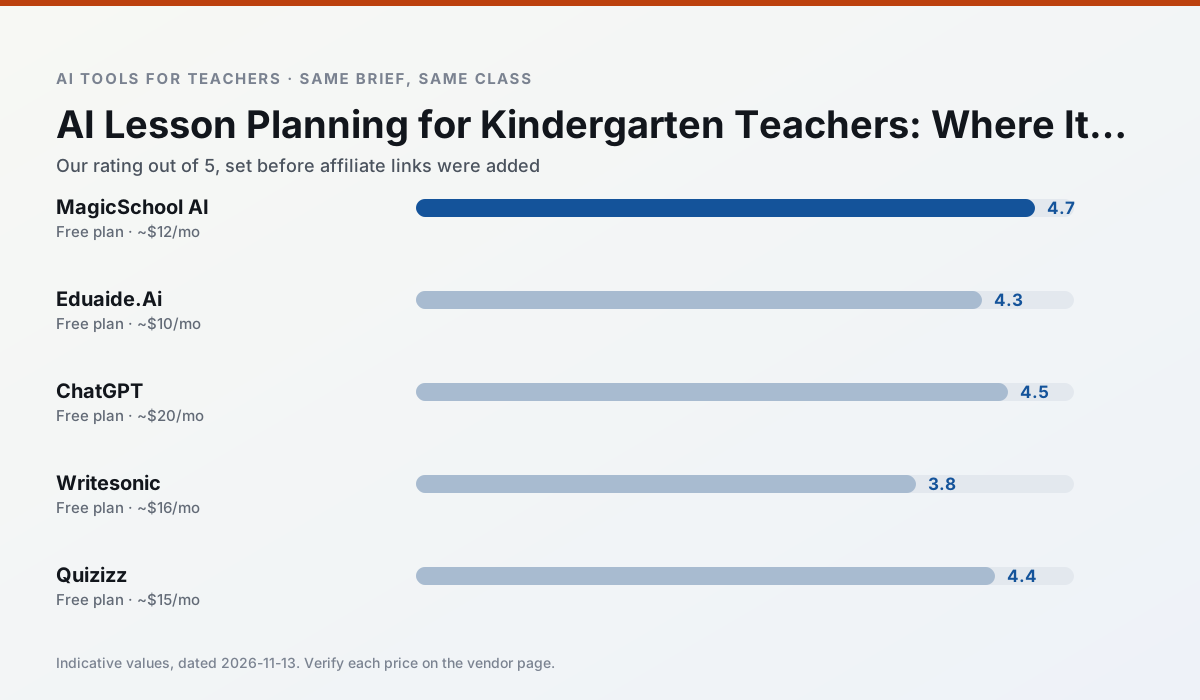
Side by side
Comparison table
Ratings reflect our timed classroom workflow, not vendor claims. Prices are indicative — verify on the vendor site.
| Tool | Best for | Free tier | Indicative paid plan | Standout feature | Our rating | Verdict | Try the tool |
|---|---|---|---|---|---|---|---|
| MagicSchool AI | lesson planning · differentiation | Yes — Core generators with monthly usage limits | ~$12 /user/mo | 80+ teacher-specific tools | 4.7 / 5 | Top pick | Try free |
| Eduaide.Ai | lesson planning · rubric creation | Yes — Daily generation cap | ~$10 /user/mo | Resource library | 4.3 / 5 | Strong option | Try free |
| ChatGPT | lesson planning · parent communication | Yes — Usage-limited model access | ~$20 /user/mo | Custom GPTs and Projects | 4.5 / 5 | Top pick | Try free |
| Writesonic | newsletters · parent communication | Yes — Limited credits | ~$16 /user/mo | Article and email generators | 3.8 / 5 | Situational | Try free |
| Quizizz | quiz generation · formative assessment | Yes — Core quiz creation | ~$15 /user/mo | AI question generator | 4.4 / 5 | Strong option | Try free |
| Brisk Teaching | feedback on writing · grading | Yes — Limited actions per month | ~$10 /user/mo | Works inside Google Docs | 4.5 / 5 | Top pick | Try free |
Match your situation
Best for X
Different jobs need different tools. Here is what we would open first in each case.
MagicSchool AI is the one we would open on a normal planning day because the first output is editable rather than restructurable, and the free plan covers a single teacher's routine.
If there is no budget, start with Eduaide.Ai: free plan with clearest quota is the least punishing free tier here.
ChatGPT is the option IT is least likely to block: single sign-on, admin removal of AI features and an agreement on file.
Setup cost is one login for Writesonic; everything else can wait until you know the tool is useful.
Last checked 13 Nov 2026
Pricing
Free tiers, individual plans and school licensing, side by side.
| Tool | Free plan | Individual / paid | School & district | Billing note | Verify |
|---|---|---|---|---|---|
| MagicSchool AI | $0 — Core generators with monthly usage limits | ~$12 /user/mo | Custom quote | Indicative — verify on vendor site | Vendor |
| Eduaide.Ai | $0 — Daily generation cap | ~$10 /user/mo | Custom quote | Indicative — verify on vendor site | Vendor |
| ChatGPT | $0 — Usage-limited model access | ~$20 /user/mo | ~$25+ /user/mo | Indicative — verify on vendor site | Vendor |
| Writesonic | $0 — Limited credits | ~$16 /user/mo | ~$49 /user/mo | Indicative — verify on vendor site | Vendor |
| Quizizz | $0 — Core quiz creation | ~$15 /user/mo | Custom quote | Indicative — verify on vendor site | Vendor |
| Brisk Teaching | $0 — Limited actions per month | ~$10 /user/mo | Custom quote | Indicative — verify on vendor site | Vendor |
Editorial rule: pricing is re-checked every 2–3 months and the top 50 pages are refreshed every 6 months. See our funding policy.
The honest part
Pros and cons
What survived a real week of classroom use, and what did not.
Pros
- Widest purpose-built template library
- Strong free tier for individual teachers
- Fast to learn with almost no prompting skill
Cons
- Outputs still need standards review
- Best features sit behind the paid tier
- District approval can be slow
Pros
- Very low entry price
- Good worksheet and rubric output
- Clean, uncluttered UI
Cons
- Smaller template set than MagicSchool
- Less polished export options
- Limited integrations
Pros
- Most flexible option available
- Huge community of teacher prompt libraries
- Strong multilingual support
Cons
- Requires prompt skills for consistent results
- No built-in standards alignment
- District privacy review usually required
Pros
- Cheaper than enterprise writing suites
- Many templates
- Reasonable free trial
Cons
- Generic classroom output
- Credit system is confusing
- Limited education context
Pros
- Students already know the interface
- Good reporting
- Works on low-end devices
Cons
- Writing high-quality AI questions still needs review
- Gamification can distract
- Advanced analytics are paid
In the classroom
Use cases
Five concrete workflows, with the tool we would open for each one.
A Monday morning lesson plan in twelve minutes
The twelve minutes come from not rewriting the skeleton. Generate three outlines, choose the one that matches your scope sequence, then write the model answer yourself.
Recommended: MagicSchool AIThree reading levels from one source text
Paste a vetted text, ask for supported, core and extension versions, then check the vocabulary list by hand. Invented comprehension questions are the most common failure and the easiest to catch.
Recommended: Eduaide.AiRubric and feedback comments in one pass
Reorder the workflow so the rubric is yours and the comments are generated. Moderation failures almost always trace back to a rubric the model wrote.
Recommended: ChatGPTA parent email in two languages
Draft in plain, warm language with no names, translate, then back-translate the important sentences to check meaning. Keep specific incidents out of the prompt and add them yourself.
Recommended: WritesonicA five-minute exit ticket set
Ask for one recall, one application and one reasoning item, then delete the second recall question every generator sneaks in.
Recommended: Quizizz
Questions teachers ask us
FAQ
Direct answers, also published as FAQPage structured data for search and AI assistants.
Can AI do lesson planning at mixed-grade level?
Which tool is best for lesson planning?
What is the biggest risk?
Sources & further reading
Our recommendation
Try MagicSchool AI free for your next lesson planning task
A large library of teacher-specific AI generators in one dashboard. Start on the free tier, run one real Kindergarten lesson, and only consider upgrading if the quota is what stops you. Disclosure: we may earn a commission (30% recurring) at no extra cost to you.
Some links on this page are affiliate links. We may earn a commission at no extra cost to you. Our rankings are editorial and never pay-to-play. Never enter student PII into a free consumer account.
Keep reading
Related comparisons in this cluster.
Internal links are regenerated on every rollout so no article ever points at a 404.