The short answer
- Quizizz is our default pick for teachers who need to build a balanced question set quickly; Kahoot! is better when differentiation is the bottleneck.
- Free-tier reality for this shortlist: Quizizz: Yes — Core quiz creation; Kahoot!: Yes — Limited player count; QuestionWell: Yes — Monthly generation limit. Treat every paid figure as indicative until you have read the vendor page; only the free quota is something you can test yourself this week.
- Every AI output for quiz generation needs a teacher review, especially standards codes, Foreign language accuracy, and anything in an IEP, assessment or family message.
- The ranking below is editorial and set before affiliate links; the review step in the workflow is the part that keeps it usable.
Start with Fliki on its free plan.
It was 3:40 PM on a Tuesday, and I was staring at a pile of incomplete proficiency checks for my Spanish II classes. I had twenty-four irregular preterite verbs to test, three reading passages to adapt, and a planning period that had evaporated into an impromptu parent meeting. That is usually when desperation sets in and you start pulling random exercises from fifteen-year-old textbooks. This year, language teachers have a different set of options. AI quiz generation for world language teachers has moved past generic grammar drills, but it still requires a heavy editorial hand if you want items that actually assess communicative competence rather than just mechanical recall.
Building a solid interpretive or interpersonal task by hand takes hours. You have to find a culturally authentic text, trim it to the right Lexile or CEFR level, write comprehension questions that go beyond simple word-matching, and format the whole thing for a classroom where half the kids are on phones and the other half are on district Chromebooks that crash if a page has too many images. Let us look at what works, what breaks, and which tools are worth your limited prep time in 2026.
The Best Free Option: Quizizz
If your department has zero budget and your principal looks nervous whenever someone mentions software subscriptions, Quizizz is the default starting point. Core quiz creation remains free, and the platform has a massive advantage in modern classrooms: students already know the interface. You do not spend the first ten minutes of a review session explaining how to log in or how the power-ups work.
The AI-assisted quiz creation feature lets you paste text or input a topic to generate questions quickly. For world language teachers, the reporting is the real selling point. It breaks down data by standard and by individual student, which makes planning your small-group rotations much less painful. On the downside, writing high-quality AI questions in target languages still needs heavy review. The generator often defaults to direct translation items rather than contextualized usage. Gamification can also distract from the actual language acquisition goal if students start racing through just to hit the leaderboard. It works reliably on low-end devices, and COPPA and FERPA documentation are available for district approval.
Best Overall for Daily Use: Kahoot!
For sheer, instantaneous engagement at the start of a block, Kahoot! remains the heavyweight champion. At roughly $10 a user per month on its paid tier, it gives you quick AI-assisted question generation specifically designed for review lessons. The training time is effectively zero. You type in a topic, let the AI generate a set of vocabulary or conjugation checks, and launch the game.
Prompt: "Generate 10 multiple-choice questions in intermediate French about weekend routines, focusing on reflexive verbs in the passé composé, with one correct answer and three plausible distractors."
First output: The AI gave standard textbook questions with obvious distractor verbs that did not match the tense, plus a weirdly literal translation for "faire la grasse matinée."
Two edits that made it usable: I replaced two of the weak distractors with common error patterns my students actually make (like mixing up être and avoir auxiliaries), and I added context sentences from our current unit reading to make the questions truly communicative rather than isolated grammar checks.
The catch with Kahoot! is depth. The time pressure of the interface suits rapid recall far better than it suits higher-order interpretive reasoning. If you are trying to test students on how well they understand an authentic article about public transit in Bogotá, a fast-paced click-fest is the wrong tool. Furthermore, free player counts are limited, so you will need a paid plan if you teach large sections. For younger learners, remember to use nicknames rather than real names to keep data privacy clean.
Best for Quick Setup: QuestionWell
If your main bottleneck is writing standards-aligned question banks from scratch, QuestionWell is the specialist tool you need. Coming in at around $10 a user per month with a monthly generation limit on the free tier, it strips away the flashy game elements and focuses purely on text generation and objective tagging.
You paste an authentic reading text or a specific grammar objective, and the tool builds a clean, structured question bank. The export workflow is seamless; you can push the output straight into Quizizz, Canvas, or Google Forms without formatting headaches. The main limitation is that it is a single-purpose tool. It will not host your live games or generate your videos. Question quality still varies depending on the source text you feed it, and you must only paste non-identifiable source text to keep student data out of the loop. If you want to dive deeper into how automated assessment is changing different subject areas, take a look at our roundup of the best AI tools for teachers.
Media, Audio, and Video Tools: Fliki, ElevenLabs, and Synthesia
Generating quizzes is only half the battle in a language classroom. You also need listening comprehension materials, authentic listening practice, and instructional explainers. This is where media generators come into play, though their pricing models require careful consideration.
Fliki sits around $21 a user per month and acts as a text-to-video generator with stock media and AI voiceover. It is best for schools and districts wanting to spin up quick cultural explainer visuals without needing a film crew. The free tier is watermarked and limited on minutes, and prices jump significantly between tiers. It is strictly a content creation tool, so keep student PII entirely out of your prompts.
ElevenLabs focuses purely on natural-sounding audio and text-to-speech, priced at roughly $5 a user per month with a monthly character quota. For world language teachers, this is a minor revelation. If you need clean listening tracks spoken with native cadence at a modified speed, you can generate them quickly. Quota-based billing means you have to watch your usage, and you must never clone a student or colleague's voice without explicit written consent.
Synthesia is the heavy enterprise option at about $29 a user per month with no ongoing free tier. It turns scripts into presenter-led videos using AI avatars. While the multilingual voice output is remarkably smooth and updates to existing scripts are easy, the cost is extremely hard for an individual classroom teacher to justify out of pocket. For related workflows on managing student work without burning out, check out this guide on AI essay feedback for history teachers.
Managing the Workflow Without Drowning
The secret to surviving AI tool usage in a world language department is treating the output as a rough first draft rather than a finished product. When creating three reading levels from one source text, paste your vetted article, ask the AI for supported, core, and extension versions, but check the vocabulary list manually every single time. Invented comprehension questions are the most common failure point and the easiest to catch if you read through them once.
When you sit down on a Monday morning to map out your week, do not let the AI write your entire scope and sequence. Generate three lesson outlines in twelve minutes, choose the one that matches your pacing guide, and then write the model answer yourself. The time savings come from not rewriting the skeleton, not from outsourcing your professional judgment. Keep your workflow simple, protect student privacy by anonymizing all prompts, and let these platforms handle the heavy lifting of initial formatting while you focus on student interaction.
FAQ
Can AI do quiz generation at mixed-grade level?
It can produce a first draft and a structure. The level judgement, the standards check and the tone are teacher decisions.
Which tool is best for quiz generation?
Quizizz on the evidence in this article, with Kahoot! as the second opinion. Neither replaces the review step.
What is the biggest risk?
A confident, plausible output that nobody checked. The five checks below exist for that reason.
Sources
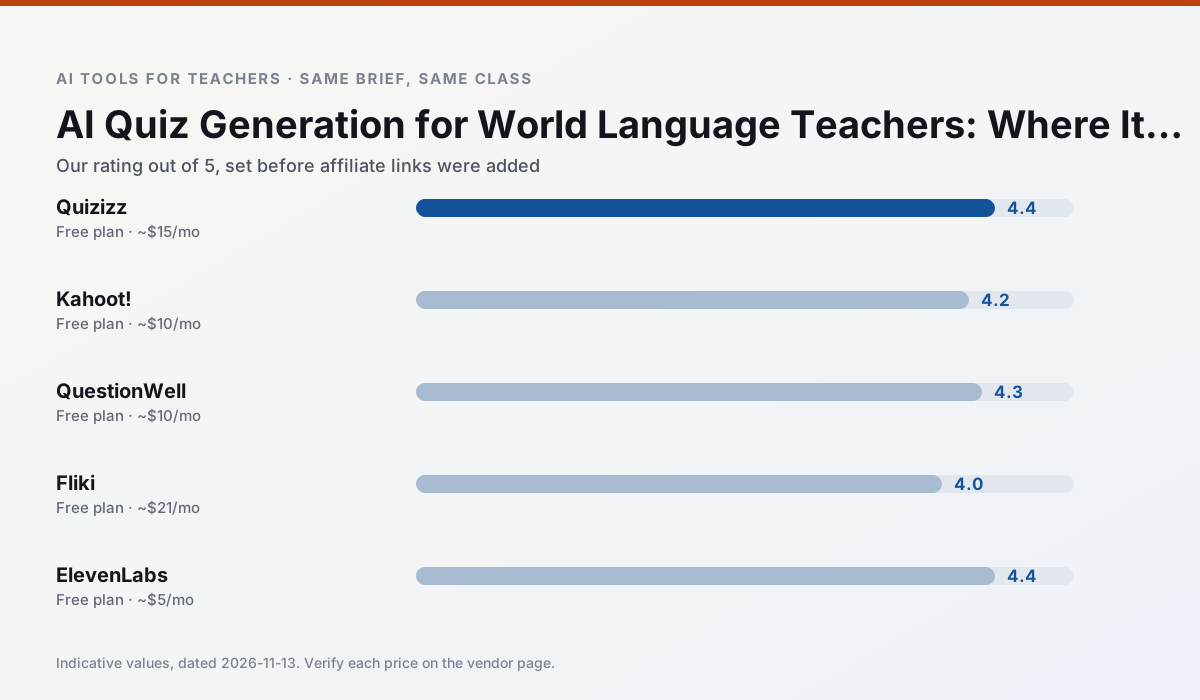
Side by side
Comparison table
Ratings reflect our timed classroom workflow, not vendor claims. Prices are indicative — verify on the vendor site.
| Tool | Best for | Free tier | Indicative paid plan | Standout feature | Our rating | Verdict | Try the tool |
|---|---|---|---|---|---|---|---|
| Quizizz | quiz generation · formative assessment | Yes — Core quiz creation | ~$15 /user/mo | AI question generator | 4.4 / 5 | Strong option | Try free |
| Kahoot! | quiz generation · review lessons | Yes — Limited player count | ~$10 /user/mo | AI question builder | 4.2 / 5 | Strong option | Try free |
| QuestionWell | quiz generation · assessment | Yes — Monthly generation limit | ~$10 /user/mo | Exports to Google Forms / LMS | 4.3 / 5 | Strong option | Try free |
| Fliki | video lessons · audio lessons | Yes — Watermarked, limited minutes | ~$21 /user/mo | Blog/text to video | 4.0 / 5 | Situational | Try free |
| ElevenLabs | accessibility · reading intervention | Yes — Monthly character quota | ~$5 /user/mo | Very natural voices | 4.4 / 5 | Strong option | Try free |
| Synthesia | flipped lessons · video lessons | No ongoing free plan | ~$29 /user/mo | 140+ languages | 4.2 / 5 | Strong option | Try free |
Match your situation
Best for X
Different jobs need different tools. Here is what we would open first in each case.
If there is no budget, start with Quizizz: free plan with clearest quota is the least punishing free tier here.
Kahoot! is the one we would open on a normal planning day because the first output is editable rather than restructurable, and the free plan covers a single teacher's routine.
QuestionWell runs in a browser tab with no extension, no student accounts and no onboarding call, so you can test it in a free period.
Fliki answers the three questions a district actually asks: rostering, admin controls and a data-processing agreement. That is usually what decides a school purchase.
Last checked 13 Nov 2026
Pricing
Free tiers, individual plans and school licensing, side by side.
| Tool | Free plan | Individual / paid | School & district | Billing note | Verify |
|---|---|---|---|---|---|
| Quizizz | $0 — Core quiz creation | ~$15 /user/mo | Custom quote | Indicative — verify on vendor site | Vendor |
| Kahoot! | $0 — Limited player count | ~$10 /user/mo | Custom quote | Indicative — verify on vendor site | Vendor |
| QuestionWell | $0 — Monthly generation limit | ~$10 /user/mo | Custom quote | Indicative — verify on vendor site | Vendor |
| Fliki | $0 — Watermarked, limited minutes | ~$21 /user/mo | ~$66 /user/mo | Indicative — verify on vendor site | Vendor |
| ElevenLabs | $0 — Monthly character quota | ~$5 /user/mo | ~$22 /user/mo | Indicative — verify on vendor site | Vendor |
| Synthesia | No ongoing free tier | ~$29 /user/mo | Custom quote | Indicative — verify on vendor site | Vendor |
Editorial rule: pricing is re-checked every 2–3 months and the top 50 pages are refreshed every 6 months. See our funding policy.
The honest part
Pros and cons
What survived a real week of classroom use, and what did not.
Pros
- Students already know the interface
- Good reporting
- Works on low-end devices
Cons
- Writing high-quality AI questions still needs review
- Gamification can distract
- Advanced analytics are paid
Pros
- Instant engagement
- Very low training time
- Strong brand familiarity
Cons
- Less depth for higher-order assessment
- Paid tiers needed for larger classes
- Time pressure suits recall more than reasoning
Pros
- Saves the most time on question writing
- Clean export workflow
- Good objective tagging
Cons
- Single-purpose tool
- Question quality varies by source text
- Limited student-facing features
Pros
- No avatar needed
- Good for explainer visuals
- Simple editor
Cons
- Minute-based limits
- Output can look generic
- Price jumps between tiers
Pros
- Excellent for accessible audio versions
- Low entry price
- Fast generation
Cons
- Quota-based billing
- Voice cloning consent considerations
- Not a teaching platform
In the classroom
Use cases
Five concrete workflows, with the tool we would open for each one.
Regrouping students after an assessment
Summarise anonymised results into skill groups, then generate one activity per group. Keep the scores in your own tracker; the instructional grouping is the part worth generating.
Recommended: QuizizzA weekly family newsletter from bullet notes
Newsletters fail on length, not tone. Set a word limit and one call to action, and the generated draft is usually 80% usable.
Recommended: Kahoot!Three reading levels from one source text
Paste a vetted text, ask for supported, core and extension versions, then check the vocabulary list by hand. Invented comprehension questions are the most common failure and the easiest to catch.
Recommended: QuestionWellA Monday morning lesson plan in twelve minutes
The twelve minutes come from not rewriting the skeleton. Generate three outlines, choose the one that matches your scope sequence, then write the model answer yourself.
Recommended: FlikiA parent email in two languages
Draft in plain, warm language with no names, translate, then back-translate the important sentences to check meaning. Keep specific incidents out of the prompt and add them yourself.
Recommended: ElevenLabs
Questions teachers ask us
FAQ
Direct answers, also published as FAQPage structured data for search and AI assistants.
Can AI do quiz generation at mixed-grade level?
Which tool is best for quiz generation?
What is the biggest risk?
Sources & further reading
Our recommendation
Try Fliki free for your next quiz generation task
Text-to-video with stock media and AI voiceover. Start on the free tier, run one real Foreign language lesson, and only consider upgrading if the quota is what stops you. Disclosure: we may earn a commission (varies) at no extra cost to you.
Some links on this page are affiliate links. We may earn a commission at no extra cost to you. Our rankings are editorial and never pay-to-play. Never enter student PII into a free consumer account.
Keep reading
Related comparisons in this cluster.
Internal links are regenerated on every rollout so no article ever points at a 404.