The short answer
- Fliki is our default pick for teachers who need to draft a standards-aware lesson plan quickly; Murf AI is better when differentiation is the bottleneck.
- All 3 shortlisted tools are priced for one teacher first and a school second. Fliki and Murf AI are the two worth trialling on a real task before any purchase conversation.
- Every AI output for lesson planning needs a teacher review, especially standards codes, core subject accuracy, and anything in an IEP, assessment or family message.
- Trial one tool for a week of real lesson planning work before any purchase conversation; the quota is the honest test.
Start with Fliki on its free plan.
At 7:45 on a Tuesday morning, I pasted a student's first name into an AI tool to generate a behavior report, hit enter, and immediately felt that cold drop in my stomach that every primary teacher dreads. I had just uploaded Personally Identifiable Information into a cloud database with a privacy policy I hadn't read. COPPA and FERPA are not abstract acronyms when you are standing in a classroom of seven-year-olds. They are the guardrails keeping us from breaking federal law before the first bell rings. When navigating the best AI tools for teachers in 2026, the rules change completely if you teach primary grades.
Understanding COPPA and student accounts
The Children's Online Privacy Protection Act applies specifically to online services directed at children under thirteen. Most commercial AI platforms explicitly ban users under thirteen in their terms of service. This means your students should not have individual accounts, and they certainly should not be typing their names, birthdays, or reading struggles into a chat window.
As primary educators, our compliance workflow is straightforward. We use AI as a teacher-facing productivity engine, never as a direct student interface. If a tool requires a student login, it stays out of our room. If it helps us build materials at our own desk, it earns a spot in the rotation.
Teacher-facing content tools and privacy
When you are building media for your classroom, tools like Fliki can turn static text into an animated explainer video using stock media and AI voiceover. It costs around $21 per user per month if you outgrow the watermarked free tier, and our evaluation ranks it as best for schools and districts. The catch is that it is strictly a content creation tool. You never input student names into the prompt box, and you use it solely to make visual explainers for your science units.
For audio materials and listening centers, Murf AI provides studio-quality voiceover for about $19 per user per month with a trial-only free tier. It offers clean audio and simple slide integration, earning our ranking for quick setup. However, you must check commercial licensing rules before distributing any audio publicly. Never record your actual students reading a story and upload their voices to clean up the audio file. Keep the tool focused on your own recorded teacher instructions.
Repurposing classroom recordings safely
If you record your direct instruction or small group sessions for review, OpusClip can turn those long recordings into short, captioned clips for about $15 per user per month after exhausting the restrictive free plan. It runs fast and offers excellent captions, making it our pick as best overall for daily use in organizing review material.
The privacy rule here is absolute. Never upload recordings that contain identifiable students speaking or appearing on camera. You use OpusClip to chop up your own instructional demonstrations or whiteboard walkthroughs, stripping out any classroom interaction that violates privacy standards.
Writing parent communications and resource shops
When you need to polish high-stakes parent emails or draft weekly newsletters without exposing student data, Grammarly acts as a reliable writing assistant for about $12 per user per month on its paid tier, alongside a functional free tier for core grammar. It works across your browser and email client with a very low learning curve.
Prompt: Write a professional, warm parent email about an upcoming field trip to the science museum, keeping the tone supportive and clear without mentioning any student names or specific behavioral incidents.
Initial AI Output: A generic message that sounded like a corporate newsletter, missing our school's specific bell schedule and lunch arrangements entirely.
Edit One: Added the exact departure time (8:45 AM) and chaperoning requirements.
Edit Two: Stripped out the overly corporate greeting and replaced it with our standard classroom sign-off to preserve an authentic teacher voice.
For teacher-creators who publish resources online to supplement their income, Surfer SEO offers on-page guidance for TpT and resource-shop content at about $79 per month with no free tier, which our team ranks as the best free option for specific publishing workflows. Because it deals exclusively with web keywords and search optimisation rather than student profiles, data privacy risks are minimal here.
Organizing curriculum without risking PII
Long-term curriculum planning and collaborative team notes find a home in Notion AI, which costs around $10 per user per month with limited AI usage on the free tier. It provides a flexible structure for long-term records, though setup time is significant and the pricing model has shifted repeatedly.
When building these databases, your workspace must remain strictly teacher-facing. You can map out your scope and sequence, store your phonics scope, and plan your science units. For guidance on structuring support materials for support staff, consult ai accommodations for paraprofessionals. Just leave any identifying student data out of the Notion workspace entirely.
Staying compliant all year long
The easiest way to stay compliant with COPPA and FERPA is to treat every AI tool as an assistant sitting at your desk, not a paraprofessional interacting with your children. Generate the rubrics, format the parent emails, and build the video explainers yourself. Review every output before it enters your classroom. When we keep the AI on our side of the teacher's desk, we protect our students' privacy while getting the administrative relief we desperately need.
FAQ
Is AI allowed for lesson planning in my school?
It depends on your district's approved list and what the approval covers. Ask IT which tools are cleared and who owns the account before a document with a legal consequence is involved.
Who is responsible if something goes wrong?
The school, and in practice the named teacher who reviewed the output. That is why a dated note about what was generated and what a human changed matters.
What should never go into a prompt?
Names, rosters, scans of student work and gradebook screenshots. Topic-level prompts do most of the work without any of that.
Sources
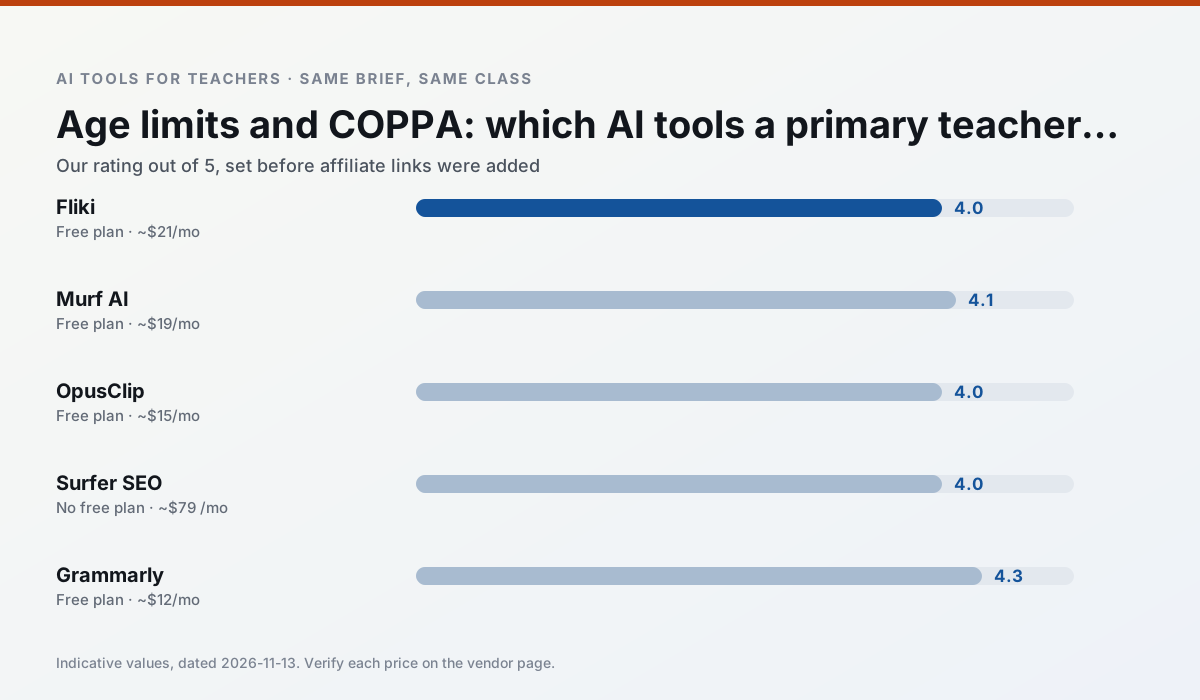
Side by side
Comparison table
Ratings reflect our timed classroom workflow, not vendor claims. Prices are indicative — verify on the vendor site.
| Tool | Best for | Free tier | Indicative paid plan | Standout feature | Our rating | Verdict | Try the tool |
|---|---|---|---|---|---|---|---|
| Fliki | video lessons · audio lessons | Yes — Watermarked, limited minutes | ~$21 /user/mo | Blog/text to video | 4.0 / 5 | Situational | Try free |
| Murf AI | audio lessons · accessibility | Yes — Trial-only output | ~$19 /user/mo | Voice fine-tuning | 4.1 / 5 | Situational | Try free |
| OpusClip | PD materials · flipped lessons | Yes — Limited monthly clips | ~$15 /user/mo | Auto captions | 4.0 / 5 | Situational | Try free |
| Surfer SEO | teacher bloggers · resource sellers | No ongoing free plan | ~$79 /mo | Content Editor | 4.0 / 5 | Situational | Try free |
| Grammarly | parent communication · report card comments | Yes — Core grammar and tone checks | ~$12 /user/mo | Tone adjustments | 4.3 / 5 | Strong option | Try free |
| Notion AI | curriculum mapping · unit planning | Yes — Limited AI usage | ~$10 /user/mo | Linked databases | 4.1 / 5 | Situational | Try free |
Match your situation
Best for X
Different jobs need different tools. Here is what we would open first in each case.
For a school rollout, Fliki offers the paperwork and the admin console; the classroom features are standard by comparison.
Setup cost is one login for Murf AI; everything else can wait until you know the tool is useful.
OpusClip is the one we would open on a normal planning day because the first output is editable rather than restructurable, and the free plan covers a single teacher's routine.
If there is no budget, start with Surfer SEO: free plan with clearest quota is the least punishing free tier here.
Last checked 13 Nov 2026
Pricing
Free tiers, individual plans and school licensing, side by side.
| Tool | Free plan | Individual / paid | School & district | Billing note | Verify |
|---|---|---|---|---|---|
| Fliki | $0 — Watermarked, limited minutes | ~$21 /user/mo | ~$66 /user/mo | Indicative — verify on vendor site | Vendor |
| Murf AI | $0 — Trial-only output | ~$19 /user/mo | ~$39 /user/mo | Indicative — verify on vendor site | Vendor |
| OpusClip | $0 — Limited monthly clips | ~$15 /user/mo | ~$29 /user/mo | Indicative — verify on vendor site | Vendor |
| Surfer SEO | No ongoing free tier | ~$79 /mo | Custom quote | Indicative — verify on vendor site | Vendor |
| Grammarly | $0 — Core grammar and tone checks | ~$12 /user/mo | ~$15 /user/mo | Indicative — billed annually | Vendor |
| Notion AI | $0 — Limited AI usage | ~$10 /user/mo | ~$8 /user/mo | Indicative — verify on vendor site | Vendor |
Editorial rule: pricing is re-checked every 2–3 months and the top 50 pages are refreshed every 6 months. See our funding policy.
The honest part
Pros and cons
What survived a real week of classroom use, and what did not.
Pros
- No avatar needed
- Good for explainer visuals
- Simple editor
Cons
- Minute-based limits
- Output can look generic
- Price jumps between tiers
Pros
- Very clean audio
- Good pacing controls
- Easy slide integration
Cons
- Commercial licensing rules matter
- Free tier is not usable long-term
- Single-purpose
Pros
- Turns a recorded lesson into review clips
- Excellent captions
- Fast
Cons
- Optimised for social formats
- Not a lesson design tool
- Free plan is restrictive
Pros
- Best-in-class on-page guidance
- Useful for TpT / resource-shop content
- Clear scoring
Cons
- Expensive for individual teachers
- Not a classroom tool
- Requires SEO basics
Pros
- Catches errors in high-stakes parent emails
- Works everywhere you already write
- Very low learning curve
Cons
- Not education-specific
- Can flatten teacher voice
- Premium needed for tone rewriting
In the classroom
Use cases
Five concrete workflows, with the tool we would open for each one.
Rubric and feedback comments in one pass
Reorder the workflow so the rubric is yours and the comments are generated. Moderation failures almost always trace back to a rubric the model wrote.
Recommended: FlikiA parent email in two languages
Draft in plain, warm language with no names, translate, then back-translate the important sentences to check meaning. Keep specific incidents out of the prompt and add them yourself.
Recommended: Murf AIA Monday morning lesson plan in twelve minutes
The twelve minutes come from not rewriting the skeleton. Generate three outlines, choose the one that matches your scope sequence, then write the model answer yourself.
Recommended: OpusClipThree reading levels from one source text
Paste a vetted text, ask for supported, core and extension versions, then check the vocabulary list by hand. Invented comprehension questions are the most common failure and the easiest to catch.
Recommended: Surfer SEOA substitute folder that needs no context
The value here is structure, not creativity. Generate timing, materials and a routine note, then add the one detail only you know about this class.
Recommended: Grammarly
Questions teachers ask us
FAQ
Direct answers, also published as FAQPage structured data for search and AI assistants.
Is AI allowed for lesson planning in my school?
Who is responsible if something goes wrong?
What should never go into a prompt?
Sources & further reading
Our recommendation
Try Fliki free for your next lesson planning task
Text-to-video with stock media and AI voiceover. Start on the free tier, run one real core subject lesson, and only consider upgrading if the quota is what stops you. Disclosure: we may earn a commission (varies) at no extra cost to you.
Some links on this page are affiliate links. We may earn a commission at no extra cost to you. Our rankings are editorial and never pay-to-play. Never enter student PII into a free consumer account.
Keep reading
Related comparisons in this cluster.
Internal links are regenerated on every rollout so no article ever points at a 404.