The short answer
- SchoolAI is our default pick for teachers who need to draft a standards-aware lesson plan quickly; Diffit is better when differentiation is the bottleneck.
- Pricing is where these pages date fastest. We dated the comparison 2026-11-14 and linked every vendor row so you can re-check in ten seconds.
- Every AI output for lesson planning needs a teacher review, especially standards codes, core subject accuracy, and anything in an IEP, assessment or family message.
- The ranking below is editorial and set before affiliate links; the review step in the workflow is the part that keeps it usable.
Start with MagicSchool AI on its free plan.
You have twenty-eight minutes left in your planning period, and your browser tab has three different pricing pages open, none of which quite match what your department chair told you in the hallway. When you are looking into schoolai pricing for teachers, the answers tend to vanish behind "Request a Quote" buttons and enterprise sales forms. That friction matters when you just want to know if you can use the tool tomorrow or if you have to beg your building administrator for a line item in the budget. AI tools for teachers have split into two distinct markets by 2026: consumer tiers meant for solo planning and district contracts designed for student-facing safety walls.
The Reality of the Free Tier
Every platform starts with a hook, but the limits on free teacher accounts hit differently depending on what the tool actually does. If you are using Diffit to level a dense article on cellular respiration for your co-taught biology class, you will burn through the free monthly generation quota by Wednesday of the second week. That is because full-page text transformations take computational heavy lifting. On the other hand, MagicSchool AI gives you a broader free tier of core generators because its templates are lighter text strings, though the best features still sit behind a paywall. Curipod restricts you by monthly lesson counts, which means you have to choose carefully which units get the interactive student-response treatment. Eduaide.Ai operates on a daily generation cap rather than monthly, which can save you if you plan day-to-day, but locks you out right when you hit a late-night grading frenzy. Claude offers a usage-limited free tier that handles massive amounts of text, but it requires careful prompt engineering because it lacks a purpose-built education library. When your free quota resets, you are left staring at a paywall or scrambling for an alternative.
What Individual Paid Plans Cost
If your school or district refuses to buy licenses and you decide to pay out of pocket, the numbers land in a predictable range. MagicSchool AI and Curipod sit around $12 per user per month on an indicative individual plan. Eduaide.Ai comes in slightly lower at roughly $10 per user per month, making it an accessible entry point if you are funding your own classroom tech stack. Diffit and SchoolAI hover around $15 per user per month. Meanwhile, general-purpose heavy hitters like Claude run closer to $20 per user per month for individual pro access.
Paying out of pocket changes how you view a tool. You stop using it for casual curiosity and start demanding that it save you at least two hours of planning time per week to justify the subscription. If you are comparing options for your own workflow, it helps to look at broader cost breakdowns like those in the guide to brisk teaching pricing teachers cost to see how different subscription models stack up against standard teacher budgets.
Prompt: Write a weekly parent newsletter using these bullet points: soccer game rescheduled to Thursday, permission slips due by Friday morning, and the library book fair starts next week. Keep it under 200 words and make the tone warm and direct.
First response: Welcome families! We are so thrilled to welcome you to another wonderful week of learning. Please note that the soccer game has been moved to Thursday afternoon, so adjust your carpools accordingly. Also, a quick reminder that field trip permission slips must be handed in by Friday morning without fail. Lastly, get ready to read because the library book fair starts next week!
First edit: Cut the generic opening fluff about wonderful weeks of learning. Parents scan these on their phones in the parking lot.
Second edit: Bold the two action items (permission slips and game day) so they stand out from the book fair reminder.
What Districts Actually Pay
SchoolAI and similar platforms are built from the ground up for district-wide deployment, which means individual credit card checkouts are often secondary to school-site contracts. When a district steps in to purchase SchoolAI, the pricing is almost entirely quote-based, scaling by student population or active teacher seats. District administrators are not just paying for a glorified text generator; they are paying for district approval, safeguarding defaults, and strict student data privacy compliance.
+--------------------+-------------------------+---------------------------------+
| Tool               | Indicative Individual   | District / School Deployment    |
+--------------------+-------------------------+---------------------------------+
| SchoolAI           | ~$15 /user/mo           | Quote-based (District buy-in)   |
| MagicSchool AI     | ~$12 /user/mo           | Site licenses available         |
| Diffit             | ~$15 /user/mo           | School-wide plans available     |
| Curipod            | ~$12 /user/mo           | Institutional pricing           |
| Eduaide.Ai         | ~$10 /user/mo           | Team and school packs           |
| Claude             | ~$20 /user/mo           | Workspace tiers (No PII focus)  |
+--------------------+-------------------------+---------------------------------+
The hidden cost of district adoption is time. Getting IT security to clear a new platform can take months of review. School-safe AI workspace tools require rigorous vetting because students interact with them directly, unlike back-office planning tools that teachers use away from minor eyes. If you want to explore tools that bypass the account creation hurdle entirely for students, look at the strategies in the roundup of ai tools without accounts.
Choosing Based on Your Classroom Bottleneck
The best tool depends entirely on where you lose the most time during your contracted hours. If your main headache is mixed-ability reading groups, Diffit stands out as the best for mixed-ability classes because it instantly spits out multiple Lexile levels of the same text. When you need parent-facing writing that sounds human and avoids administrative jargon, SchoolAI handles conversational safety and tone wonderfully.
+------------------------------------+--------------------------------+
| Use Case                           | Recommended Tool               |
+------------------------------------+--------------------------------+
| Parent-facing writing & safety     | SchoolAI                       |
| Mixed-ability reading & leveling   | Diffit                         |
| Student-safe deployment & templates| MagicSchool AI                 |
| Quick interactive check-ins        | Curipod (Best free option)     |
+------------------------------------+--------------------------------+
If you want a massive library of ready-to-go templates that require almost zero prompting skill, MagicSchool AI is the best for student-safe deployments because it keeps student PII out of core generators. If you have no budget at all and need high student engagement out of the box, Curipod stands out as the best free option for quick checks for understanding without requiring student accounts for basic delivery.
Two Things That Went Wrong in Real Use
The marketing materials never show what happens when the software hits a messy classroom reality. Here is what went wrong when I tried using these tools under real conditions, and how I fixed it.
First, I used a popular lesson generator to create a five-minute exit ticket set for my eighth-grade math class, asking for one recall item, one application item, and one reasoning item. The generator predictably snuck in a second recall question and completely missed the conceptual nuance of the standard I had pasted in. I had to stop trusting the AI-generated answer keys blindly, especially for numerical items where the math occasionally broke down. Now, I use the prompt to get a rough outline, but I always delete the redundant recall question and solve the math problems myself before hitting print.
Second, I tried feeding a dense PDF article into a prompt-heavy assistant to build a differentiated question bank with distractor rationales. The tool generated plausible-sounding misconceptions for every multiple-choice option, but two of the distractors were mathematically identical to the correct answer. That kind of error will destroy student trust instantly if you hand it out unedited. I learned to spot-check every single distractor rationale against actual student misconceptions from past years rather than taking the AI's word for it.
When you are planning your tech budget or filling out a requisition form, remember to check out the comprehensive evaluations in best ai tools for teachers 2026 to see how these pricing models fit into the broader software landscape.
FAQ
What does SchoolAI cost per teacher?
The individual plan is the public number; the school plan is a quote. Both are shown with the date read, and neither is a live price.
Is there a free plan?
No ongoing free tier, only a trial. Check the free-tier column in the table for the current limits.
What does a district pay for?
Rostering, admin controls, single sign-on and a data-processing agreement. None of those can be trialled by an individual teacher.
Sources
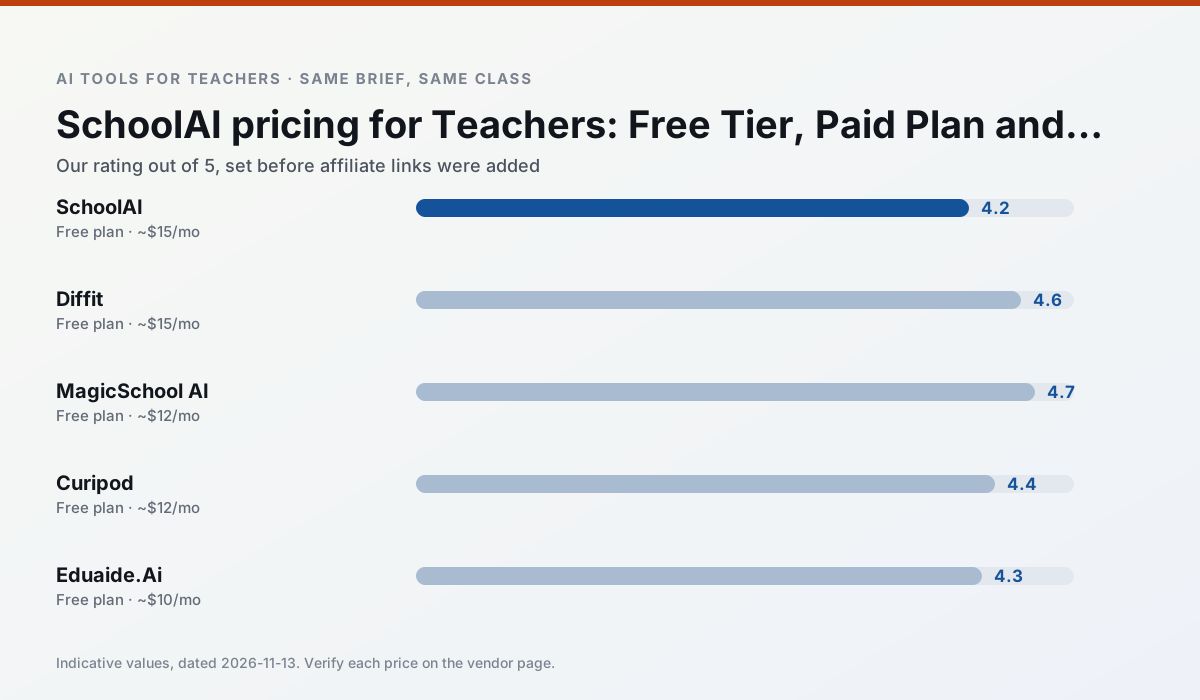
Side by side
Comparison table
Ratings reflect our timed classroom workflow, not vendor claims. Prices are indicative — verify on the vendor site.
| Tool | Best for | Free tier | Indicative paid plan | Standout feature | Our rating | Verdict | Try the tool |
|---|---|---|---|---|---|---|---|
| SchoolAI | student-safe AI · differentiated instruction | Yes — Limited seats | ~$15 /user/mo | Teacher-monitored student chats | 4.2 / 5 | Strong option | Try free |
| Diffit | differentiated instruction · reading intervention | Yes — Limited generations per month | ~$15 /user/mo | Lexile-style leveling | 4.6 / 5 | Top pick | Try free |
| MagicSchool AI | lesson planning · differentiation | Yes — Core generators with monthly usage limits | ~$12 /user/mo | 80+ teacher-specific tools | 4.7 / 5 | Top pick | Try free |
| Curipod | formative assessment · exit tickets | Yes — Limited lessons per month | ~$12 /user/mo | Live polls and word clouds | 4.4 / 5 | Strong option | Try free |
| Eduaide.Ai | lesson planning · rubric creation | Yes — Daily generation cap | ~$10 /user/mo | Resource library | 4.3 / 5 | Strong option | Try free |
| Claude | rubric creation · feedback on writing | Yes — Usage-limited | ~$20 /user/mo | Very large context window | 4.4 / 5 | Strong option | Try free |
Match your situation
Best for X
Different jobs need different tools. Here is what we would open first in each case.
SchoolAI is the steadiest of this set at plain, respectful language; names and specific incidents still belong in your draft, not the prompt.
Diffit keeps the same task across levels, which is what makes a differentiated set defensible in moderation.
MagicSchool AI is the student-facing option here with boundaries a teacher can actually set and supervise.
Curipod's free plan is the most usable in this comparison: a quota that survives a normal week. Not enough for a department, enough for one teacher to decide.
Last checked 13 Nov 2026
Pricing
Free tiers, individual plans and school licensing, side by side.
| Tool | Free plan | Individual / paid | School & district | Billing note | Verify |
|---|---|---|---|---|---|
| SchoolAI | $0 — Limited seats | ~$15 /user/mo | Custom quote | Indicative — verify on vendor site | Vendor |
| Diffit | $0 — Limited generations per month | ~$15 /user/mo | Custom quote | Indicative — verify on vendor site | Vendor |
| MagicSchool AI | $0 — Core generators with monthly usage limits | ~$12 /user/mo | Custom quote | Indicative — verify on vendor site | Vendor |
| Curipod | $0 — Limited lessons per month | ~$12 /user/mo | Custom quote | Indicative — verify on vendor site | Vendor |
| Eduaide.Ai | $0 — Daily generation cap | ~$10 /user/mo | Custom quote | Indicative — verify on vendor site | Vendor |
| Claude | $0 — Usage-limited | ~$20 /user/mo | ~$25+ /user/mo | Indicative — verify on vendor site | Vendor |
Editorial rule: pricing is re-checked every 2–3 months and the top 50 pages are refreshed every 6 months. See our funding policy.
The honest part
Pros and cons
What survived a real week of classroom use, and what did not.
Pros
- Designed for district approval
- Teacher visibility into student use
- Good safeguarding defaults
Cons
- Requires school-wide buy-in
- Less flexible than general LLMs
- Pricing is mostly quote-based
Pros
- Excellent for mixed-ability classes
- Produces printable and digital versions
- Minimal setup
Cons
- Narrower scope than all-in-one suites
- Leveling is approximate, not a formal assessment
- Heavy use burns through the free quota
Pros
- Widest purpose-built template library
- Strong free tier for individual teachers
- Fast to learn with almost no prompting skill
Cons
- Outputs still need standards review
- Best features sit behind the paid tier
- District approval can be slow
Pros
- High student engagement out of the box
- Great for quick checks for understanding
- No student accounts required for basic use
Cons
- Focused on delivery, not planning
- Requires reliable classroom devices
- Free tier is restrictive
Pros
- Very low entry price
- Good worksheet and rubric output
- Clean, uncluttered UI
Cons
- Smaller template set than MagicSchool
- Less polished export options
- Limited integrations
In the classroom
Use cases
Five concrete workflows, with the tool we would open for each one.
Regrouping students after an assessment
Summarise anonymised results into skill groups, then generate one activity per group. Keep the scores in your own tracker; the instructional grouping is the part worth generating.
Recommended: SchoolAIA weekly family newsletter from bullet notes
Newsletters fail on length, not tone. Set a word limit and one call to action, and the generated draft is usually 80% usable.
Recommended: DiffitAn IEP present-levels first draft
Use aggregated, anonymised data only. Ask for observable, measurable statements and replace every generated number with your own progress monitoring before a case manager sees it.
Recommended: MagicSchool AIA five-minute exit ticket set
Ask for one recall, one application and one reasoning item, then delete the second recall question every generator sneaks in.
Recommended: CuripodA question bank from a PDF or article
Feed a non-identifiable source and ask for items tagged by difficulty with the misconception behind each distractor. Spot-check every answer key; numerical items are least reliable.
Recommended: Eduaide.Ai
Questions teachers ask us
FAQ
Direct answers, also published as FAQPage structured data for search and AI assistants.
What does SchoolAI cost per teacher?
Is there a free plan?
What does a district pay for?
Sources & further reading
Our recommendation
Try MagicSchool AI free for your next lesson planning task
A large library of teacher-specific AI generators in one dashboard. Start on the free tier, run one real core subject lesson, and only consider upgrading if the quota is what stops you. Disclosure: we may earn a commission (30% recurring) at no extra cost to you.
Some links on this page are affiliate links. We may earn a commission at no extra cost to you. Our rankings are editorial and never pay-to-play. Never enter student PII into a free consumer account.
Keep reading
Related comparisons in this cluster.
Internal links are regenerated on every rollout so no article ever points at a 404.