The short answer
- MagicSchool AI is our default pick for teachers who need to draft a standards-aware lesson plan quickly; Writesonic is better when differentiation is the bottleneck.
- The cheapest honest test is a week of real work on the free plans: MagicSchool AI: Yes — Core generators with monthly usage limits; Writesonic: Yes — Limited credits; Grammarly: Yes — Core grammar and tone checks. If a tool is still open on Friday, it has earned a paid conversation.
- Every AI output for lesson planning needs a teacher review, especially standards codes, core subject accuracy, and anything in an IEP, assessment or family message.
- Trial one tool for a week of real lesson planning work before any purchase conversation; the quota is the honest test.
Start with MagicSchool AI on its free plan.
By third period on a Tuesday, my desk looked like a paper shredder had exploded over it: thirty unfinished lab safety posters, four crumpled parent notes, and a sub folder I wrote half-asleep in August that simply said "Read pages 42-45." I needed a clean set of exit tickets, three differentiated tiers for the reading passage, and an email to a parent who thinks their kid's failing grade is a personal vendetta. That is the exact moment you start looking at tools that promise to hand your prep period back to you. When you search for magicschool ai pricing for teachers for teachers, you are not looking for marketing fluff about unleashing creativity. You want to know if the free version will keep you afloat or if you have to squeeze twelve bucks a month out of your own pocket.
The MagicSchool AI Free Tier Reality
MagicSchool AI built its reputation on having the widest purpose-built template library in the education space. The free tier gives you access to core generators, but those monthly usage limits will sneak up on you if you try to build a whole unit in one sitting. You do not need to spend hours learning prompt engineering here because the interface is built around specific teaching tasks like lesson planning, IEP drafting, and rubric generation.
The catch is that the best features sit behind the paid tier, which runs at an indicative rate of around $12 per user per month. District approval can also be painfully slow, leaving individual teachers to decide whether to pay out of pocket. Vendor privacy notes state that no student personally identifiable information is required for core generators, but you still need to check your district data privacy agreement before putting anything sensitive into the system. If you are comparing options, it sits alongside broader category overviews like best-ai-tools-for-teachers-2026 when you are trying to map out a tech stack that won't break your personal budget.
Prompt: Generate three exit ticket questions for 7th grade life science on cellular respiration: one recall, one application, and one reasoning item. Result: It spat out two recall questions, one application question, and a wordy reasoning item that read like a college entrance exam. Edit 1: Deleted the second recall question because testing the same definition twice wastes time. Edit 2: Rewrote the reasoning prompt to reference our specific class lab from yesterday instead of a generic textbook plant.
Navigating Writesonic and QuestionWell Costs
When you need content generation that handles mixed-ability classes without needing a dozen different prompts, Writesonic offers a budget-friendly alternative at roughly $16 per user per month. It runs on a credit system, which can get confusing when you burn through them on drafts that turn out too generic for actual classroom use. It lacks the deep education context of a dedicated platform, meaning you will spend more time editing tone and vocabulary for your specific grade level.
QuestionWell tackles a very specific headache by generating standards-aligned question banks from any text or objective for about $10 per user per month. It saves the most time on question writing, especially when you feed it a non-identifiable article and need items tagged by difficulty. You still have to spot-check every answer key because numerical items are notoriously unreliable, and the district-level procurement process mirrors what you encounter with other standalone apps like those detailed in our guide on brisk-teaching-pricing-teachers-cost.
Grammarly and ElevenLabs for Administration and Audio
Parent communication and administrative writing require a different kind of polish, which is where Grammarly comes in at around $12 per user per month. It catches errors in high-stakes emails and newsletters while working right inside your browser where you already type. The primary limit is that it is not education-specific, meaning it can occasionally flatten your authentic teacher voice if you rely too heavily on its tone-rewriting features. Make sure to disable text collection on school devices and check your local policies, just as you would with any writing assistant.
For accessibility materials, ElevenLabs provides natural-sounding voiceovers and text-to-speech starting at roughly $5 per user per month. It is fantastic for creating audio versions of reading materials quickly, though you are limited by a monthly character quota. Never clone a student or colleague voice without explicit written consent, and remember this is a media tool rather than a comprehensive teaching platform.
Formative Assessments and District Rollouts
Assessment platforms like Formative operate on a different financial scale, sitting at around $15 per user per month for individual tiers. It gives you strong data for intervention groups and works seamlessly with your existing PDFs and documents, but the setup is steeper than a quick quiz game. The best value requires a school-wide rollout because individual teacher costs add up fast when you are paying out of pocket.
Two things always go wrong when teachers first adopt these platforms without a plan. First, teachers try to let the AI write both the rubric and the feedback comments in one pass, which leads to moderation failures because the model-generated rubric rarely matches actual grading standards. Always write your own rubric first, then use the AI solely for the feedback comments. Second, teachers attempt to use AI for an IEP present-levels first draft without anonymising the data first, risking privacy compliance. Always use aggregated, anonymised data and replace every generated number with your own hard monitoring data before a case manager lays eyes on it.
FAQ
What does MagicSchool AI cost per teacher?
The individual plan is the public number; the school plan is a quote. Both are shown with the date read, and neither is a live price.
Is there a free plan?
No ongoing free tier, only a trial. Check the free-tier column in the table for the current limits.
What does a district pay for?
Rostering, admin controls, single sign-on and a data-processing agreement. None of those can be trialled by an individual teacher.
Sources
- MagicSchool AI Vendor Pricing and Feature Documentation (2026)
- Writesonic Plan Specifications and Credit Structures
- Grammarly Education and Privacy Standards
- ElevenLabs Creator Tier Guidelines
- Formative Assessment Integration and Pricing Sheets
- QuestionWell Standards Alignment Documentation
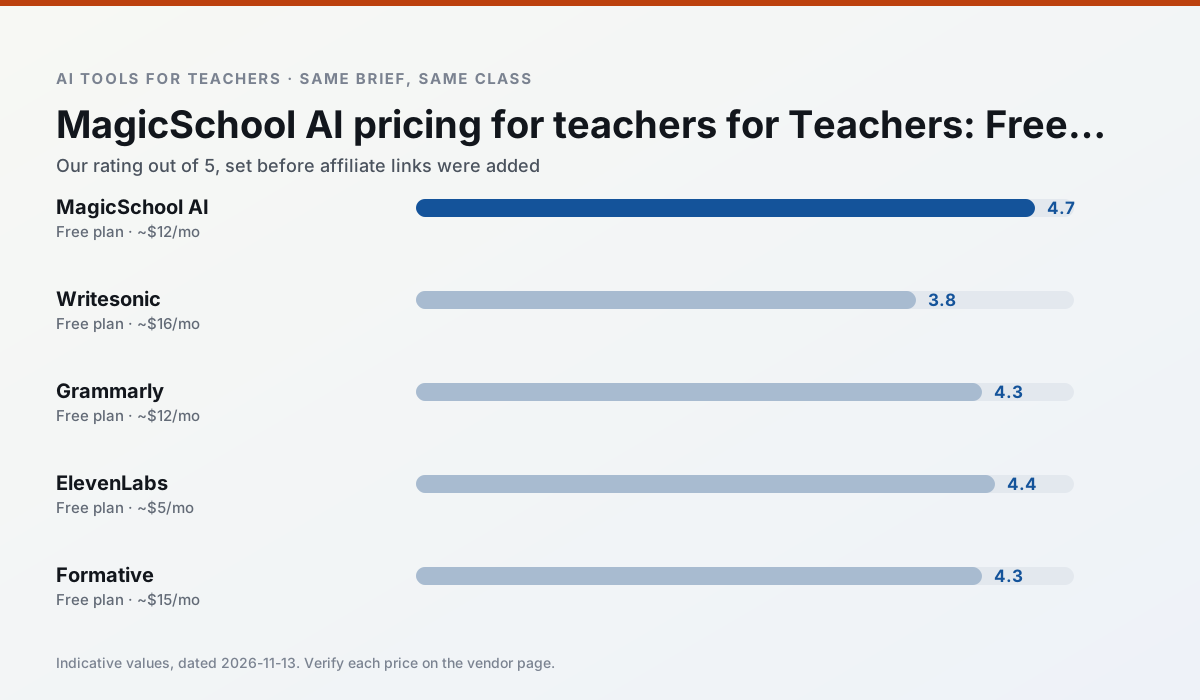
Side by side
Comparison table
Ratings reflect our timed classroom workflow, not vendor claims. Prices are indicative — verify on the vendor site.
| Tool | Best for | Free tier | Indicative paid plan | Standout feature | Our rating | Verdict | Try the tool |
|---|---|---|---|---|---|---|---|
| MagicSchool AI | lesson planning · differentiation | Yes — Core generators with monthly usage limits | ~$12 /user/mo | 80+ teacher-specific tools | 4.7 / 5 | Top pick | Try free |
| Writesonic | newsletters · parent communication | Yes — Limited credits | ~$16 /user/mo | Article and email generators | 3.8 / 5 | Situational | Try free |
| Grammarly | parent communication · report card comments | Yes — Core grammar and tone checks | ~$12 /user/mo | Tone adjustments | 4.3 / 5 | Strong option | Try free |
| ElevenLabs | accessibility · reading intervention | Yes — Monthly character quota | ~$5 /user/mo | Very natural voices | 4.4 / 5 | Strong option | Try free |
| Formative | formative assessment · grading | Yes — Core assessment tools | ~$15 /user/mo | Live student responses | 4.3 / 5 | Strong option | Try free |
| QuestionWell | quiz generation · assessment | Yes — Monthly generation limit | ~$10 /user/mo | Exports to Google Forms / LMS | 4.3 / 5 | Strong option | Try free |
Match your situation
Best for X
Different jobs need different tools. Here is what we would open first in each case.
MagicSchool AI is built around teacher-monitored student spaces and audit logs rather than a consumer chat account, which is a different approval conversation.
For three reading groups and one text, Writesonic needs the least manual relabelling of vocabulary and questions.
Family-facing drafts from Grammarly need the fewest rewrites for warmth without overpromising, which is the usual failure mode.
ElevenLabs is the option IT is least likely to block: single sign-on, admin removal of AI features and an agreement on file.
Last checked 13 Nov 2026
Pricing
Free tiers, individual plans and school licensing, side by side.
| Tool | Free plan | Individual / paid | School & district | Billing note | Verify |
|---|---|---|---|---|---|
| MagicSchool AI | $0 — Core generators with monthly usage limits | ~$12 /user/mo | Custom quote | Indicative — verify on vendor site | Vendor |
| Writesonic | $0 — Limited credits | ~$16 /user/mo | ~$49 /user/mo | Indicative — verify on vendor site | Vendor |
| Grammarly | $0 — Core grammar and tone checks | ~$12 /user/mo | ~$15 /user/mo | Indicative — billed annually | Vendor |
| ElevenLabs | $0 — Monthly character quota | ~$5 /user/mo | ~$22 /user/mo | Indicative — verify on vendor site | Vendor |
| Formative | $0 — Core assessment tools | ~$15 /user/mo | Custom quote | Indicative — verify on vendor site | Vendor |
| QuestionWell | $0 — Monthly generation limit | ~$10 /user/mo | Custom quote | Indicative — verify on vendor site | Vendor |
Editorial rule: pricing is re-checked every 2–3 months and the top 50 pages are refreshed every 6 months. See our funding policy.
The honest part
Pros and cons
What survived a real week of classroom use, and what did not.
Pros
- Widest purpose-built template library
- Strong free tier for individual teachers
- Fast to learn with almost no prompting skill
Cons
- Outputs still need standards review
- Best features sit behind the paid tier
- District approval can be slow
Pros
- Cheaper than enterprise writing suites
- Many templates
- Reasonable free trial
Cons
- Generic classroom output
- Credit system is confusing
- Limited education context
Pros
- Catches errors in high-stakes parent emails
- Works everywhere you already write
- Very low learning curve
Cons
- Not education-specific
- Can flatten teacher voice
- Premium needed for tone rewriting
Pros
- Excellent for accessible audio versions
- Low entry price
- Fast generation
Cons
- Quota-based billing
- Voice cloning consent considerations
- Not a teaching platform
Pros
- Strong data for intervention groups
- Works with existing PDFs and Docs
- Good LMS integrations
Cons
- Steeper setup than quiz games
- Best value requires school-wide rollout
- Price adds up per teacher
In the classroom
Use cases
Five concrete workflows, with the tool we would open for each one.
A substitute folder that needs no context
The value here is structure, not creativity. Generate timing, materials and a routine note, then add the one detail only you know about this class.
Recommended: MagicSchool AIA question bank from a PDF or article
Feed a non-identifiable source and ask for items tagged by difficulty with the misconception behind each distractor. Spot-check every answer key; numerical items are least reliable.
Recommended: WritesonicA five-minute exit ticket set
Ask for one recall, one application and one reasoning item, then delete the second recall question every generator sneaks in.
Recommended: GrammarlyAn IEP present-levels first draft
Use aggregated, anonymised data only. Ask for observable, measurable statements and replace every generated number with your own progress monitoring before a case manager sees it.
Recommended: ElevenLabsRubric and feedback comments in one pass
Reorder the workflow so the rubric is yours and the comments are generated. Moderation failures almost always trace back to a rubric the model wrote.
Recommended: Formative
Questions teachers ask us
FAQ
Direct answers, also published as FAQPage structured data for search and AI assistants.
What does MagicSchool AI cost per teacher?
Is there a free plan?
What does a district pay for?
Sources & further reading
Our recommendation
Try MagicSchool AI free for your next lesson planning task
A large library of teacher-specific AI generators in one dashboard. Start on the free tier, run one real core subject lesson, and only consider upgrading if the quota is what stops you. Disclosure: we may earn a commission (30% recurring) at no extra cost to you.
Some links on this page are affiliate links. We may earn a commission at no extra cost to you. Our rankings are editorial and never pay-to-play. Never enter student PII into a free consumer account.
Keep reading
Related comparisons in this cluster.
Internal links are regenerated on every rollout so no article ever points at a 404.