The short answer
- MagicSchool AI is the first tool to open for ai tools for teachers free.
- Free tiers are quota-limited; check the comparison table before assuming a tool is free forever.
- Every AI output needs a teacher review before it reaches a student.
- Prices are indicative and dated; verify on the vendor page before buying.
Start with MagicSchool AI on its free plan.
By October 2026, my browser bookmarks looked like a graveyard of abandoned edtech trials. I had twenty tabs open, three expired trial accounts, and a pile of uncopied lesson plans because a free tier had quietly locked me out at 4:30 PM on a Thursday. Teachers do not need more hype about what artificial intelligence can do in theory. We need to know what stays free, when the prompt limit hits, and whether we can actually print the result before the bell rings. If you are trying to build a reliable toolkit without pulling out your credit card, you have to look closely at the fine print of the platforms we rely on. For a broader look at the landscape, take a moment to review our guide on the best ai tools for teachers-2026.
MagicSchool AI: Best overall for daily use
MagicSchool AI has become the default starter tab for many educators because it gathers a massive library of teacher-specific generators in one dashboard. The free tier gives you access to core generators with monthly usage limits, which is enough to draft quizzes, accommodation lists, and parent emails during a planning period. The main strength here is the template library. You do not need to spend ten minutes writing a complex prompt to get a decent rubric because the interface walks you through the inputs.
The catch is that your best features sit behind a paid tier that costs around $12 per user per month. Furthermore, your outputs still need a careful standards review. The AI does not know your state's specific benchmarks unless you paste them in. District approval can also be slow if your IT department is backlogged. For core generators, the vendor states no student personally identifiable information is required, but you should still confirm your district data privacy agreement before uploading anything sensitive.
Diffit: Best free option for mixed-ability classes
If your main battle is mixed-ability reading levels, Diffit is the standout choice for a sustainable zero-dollar setup. The platform lets you level any text or YouTube video into differentiated reading materials with minimal setup, which saves hours of manual rewriting. You get a limited number of generations per month on the free plan, before nudging you toward the paid tier at roughly $15 per user per month.
The strength of Diffit is its speed and output cleanliness, generating printable and digital versions of leveled texts complete with vocabulary and check-for-understanding questions. The limitation is that heavy classroom use burns through the free quota faster than you might expect. The leveling is also approximate rather than a formal Lexile assessment, meaning you still need to use your professional judgment. Avoid pasting identifiable student work into the tool, and check your district policy before loading up new external platforms.
ChatGPT: Best for schools and districts
ChatGPT remains the general-purpose assistant that adapts to almost any classroom task, provided you know how to talk to it. The free tier offers usage-limited model access to powerful language models. Its strength lies in its sheer flexibility and a massive community of teacher prompt libraries. If you need a roleplay scenario for a history class or a complex set of math word problems, it handles the job.
However, the free consumer plan requires genuine prompt-writing skills to get consistent results, and it has no built-in standards alignment. District privacy review is usually required for school use, and you must never enter student PII on consumer plans. If your school has not provisioned an approved workspace tier, you are walking a fine line. It is a brilliant tool, but it demands more scaffolding from the user than purpose-built education platforms.
Claude: Best for quick setup with long documents
Claude handles document-heavy planning and feedback better than almost any other consumer assistant. The free tier is usage-limited, while the paid tier sits around $20 per user per month. Claude shines when you drop an entire novel excerpt, a sprawling curriculum guide, or a thirty-item rubric into the chat window. The prose it generates tends to be nuanced and less generic than what you get from standard templates.
The trade-off is that Claude has zero teacher-specific templates and fewer built-in classroom integrations. You have to write your own prompts from scratch every time. Just like ChatGPT, the consumer plan is not suitable for student data, and you need an approved workspace tier for any school-related documents that mention real children. For a deeper dive into managing subscriptions without spending district funds, see our article on AI tools without accounts.
Canva for Education: The design engine that stays free
Canva for Education operates on a different model entirely because it is effectively free for verified teachers. You get a huge template library and a suite of AI writing and image features without paying a cent out of pocket. You do not need design skills to make your slides look like they were built by a professional media team.
The limitations show up in the caps placed on its AI features. It is also remarkably easy to produce cluttered, visually overwhelming slides if you lean too heavily on the template suggestions. Account verification can occasionally be slow at the start of a term, requiring you to upload proof of employment. The education tier comes with specific student-data terms, so read them before letting students build collaborative boards on the platform.
Quizizz: AI assistance for low-end devices
Quizizz rounds out the practical classroom stack by offering AI-assisted quiz creation alongside a massive legacy question bank and live game modes. The free tier covers core quiz creation, which is enough to build review sessions that students already know how to navigate. The interface works reliably on low-end school Chromebooks and phones.
Writing high-quality AI questions still requires teacher review because the generator occasionally produces distractor options that make no sense. The gamification can also easily distract easily excitable classes if you use it too frequently. Advanced analytics and deeper reporting are locked behind the paid tier, which runs about $15 per user per month. COPPA and FERPA documentation are available, but you should still confirm your district's compliance stance.
Where the free tiers stop
Prompt: "Generate a 10-question multiple-choice quiz on cellular respiration aligned to 9th-grade biology standards, with an answer key."
First output: A generic set of questions that focused mostly on plant cells, completely missing cellular respiration mechanics, with no standard tags attached.
Two edits that made it usable:
- Added a strict prompt constraint: "Focus exclusively on ATP production and mitochondria, and include the exact state standard code NGSS HS-LS1-7."
- Swapped the generic distractors for common student misconceptions about energy release to make the incorrect answers pedagogically useful.
Building a stack that lasts a term means understanding where the walls are. Generations run out first, and exports run out second. A plan that only allows you to share a link rather than download a PDF or export text is not a true archive, and it will not survive a sudden licence change or platform pivot. The trick is pairing one generator like MagicSchool AI for quick template scaffolding, one assistant like Claude or ChatGPT for deep text editing, and one design tool like Canva to package the final product. That combination spreads out your quotas so you never hit a brick wall during third period.
FAQ
Are free AI tools for teachers actually free?
Usually with a quota rather than unlimited use. The free plan is enough to decide whether to pay, not always enough for a full term.
Which free plan is most generous?
Among teacher-specific tools, MagicSchool AI's free tier covers a normal planning week. General assistants have broader limits but less classroom structure.
Sources and further reading
- U.S. Department of Education, Student Privacy (PTAC): FERPA and edtech vendor guidance, the reference we check privacy claims against
- Common Sense Education privacy ratings: independent vendor evaluations
- CAST UDL Guidelines: accessibility and learner variability, used when judging accommodation tools
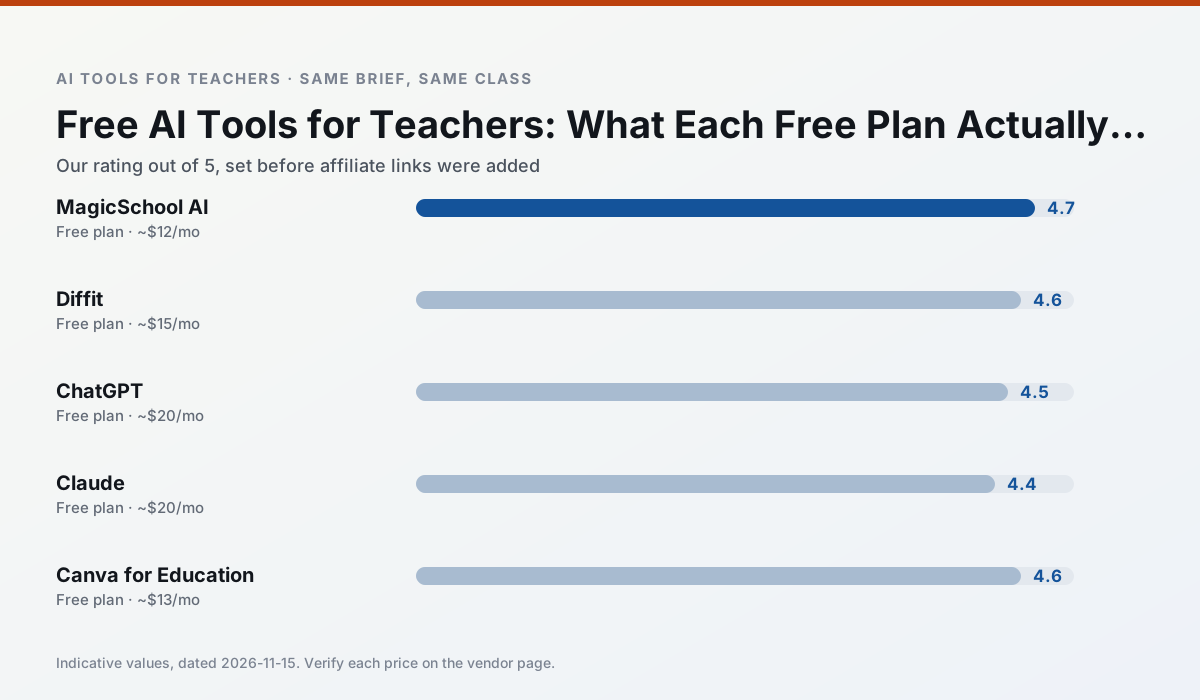
Side by side
Comparison table
Ratings reflect our classroom workflow, not vendor claims. Prices are indicative; verify on the vendor site.
| Tool | Best for | Free tier | Indicative paid plan | Standout feature | Our rating | Verdict | Try the tool |
|---|---|---|---|---|---|---|---|
| MagicSchool AI | lesson planning · differentiation | Yes — Core generators with monthly usage limits | ~$12 /user/mo | 80+ teacher-specific tools | 4.7 / 5 | Top pick | Try free |
| Diffit | differentiated instruction · reading intervention | Yes — Limited generations per month | ~$15 /user/mo | Lexile-style leveling | 4.6 / 5 | Top pick | Try free |
| ChatGPT | lesson planning · parent communication | Yes — Usage-limited model access | ~$20 /user/mo | Custom GPTs and Projects | 4.5 / 5 | Top pick | Try free |
| Claude | rubric creation · feedback on writing | Yes — Usage-limited | ~$20 /user/mo | Very large context window | 4.4 / 5 | Strong option | Try free |
| Canva for Education | slide decks · worksheets | Yes — Verification required | ~$13 /user/mo | Thousands of education templates | 4.6 / 5 | Top pick | Try free |
| Quizizz | quiz generation · formative assessment | Yes — Core quiz creation | ~$15 /user/mo | AI question generator | 4.4 / 5 | Strong option | Try free |
Match your situation
Best for X
Different jobs need different tools. Here is what we would open first in each case.
A large library of teacher-specific AI generators in one dashboard.
Level any text or video into differentiated reading materials.
General-purpose assistant that adapts to almost any classroom task.
Long-context assistant suited to document-heavy planning and feedback.
Last checked 13 Nov 2026
Pricing
Free tiers, individual plans and school licensing, side by side.
| Tool | Free plan | Individual / paid | School & district | Billing note | Verify |
|---|---|---|---|---|---|
| MagicSchool AI | $0 — Core generators with monthly usage limits | ~$12 /user/mo | Custom quote | Indicative — verify on vendor site | Vendor |
| Diffit | $0 — Limited generations per month | ~$15 /user/mo | Custom quote | Indicative — verify on vendor site | Vendor |
| ChatGPT | $0 — Usage-limited model access | ~$20 /user/mo | ~$25+ /user/mo | Indicative — verify on vendor site | Vendor |
| Claude | $0 — Usage-limited | ~$20 /user/mo | ~$25+ /user/mo | Indicative — verify on vendor site | Vendor |
| Canva for Education | $0 — Verification required | ~$13 /user/mo | Custom quote | Indicative — verify on vendor site | Vendor |
| Quizizz | $0 — Core quiz creation | ~$15 /user/mo | Custom quote | Indicative — verify on vendor site | Vendor |
Editorial rule: pricing is re-checked every 2–3 months and the top 50 pages are refreshed every 6 months. See our funding policy.
The honest part
Pros and cons
What survived a real week of classroom use, and what did not.
Pros
- Widest purpose-built template library
- Strong free tier for individual teachers
- Fast to learn with almost no prompting skill
Cons
- Outputs still need standards review
- Best features sit behind the paid tier
- District approval can be slow
Pros
- Excellent for mixed-ability classes
- Produces printable and digital versions
- Minimal setup
Cons
- Narrower scope than all-in-one suites
- Leveling is approximate, not a formal assessment
- Heavy use burns through the free quota
Pros
- Most flexible option available
- Huge community of teacher prompt libraries
- Strong multilingual support
Cons
- Requires prompt skills for consistent results
- No built-in standards alignment
- District privacy review usually required
Pros
- Handles full unit plans and long rubrics
- Nuanced, less generic prose
- Good at structured document output
Cons
- No teacher-specific templates
- Fewer classroom integrations
- Consumer plan not suitable for student data
Pros
- Effectively free for verified teachers
- Huge template library
- No design skills needed
Cons
- AI features are capped
- Easy to produce cluttered slides
- Account verification can be slow
In the classroom
Use cases
Five concrete workflows, with the tool we would open for each one.
The free stack that lasts a term
One generator, one assistant, one design tool. Chosen so their quotas do not compete and none of them needs a card.
Recommended: MagicSchool AIWhere the free tiers stop
Generations first, exports second. A plan that only allows share links is not an archive and will not survive a licence change.
Recommended: Diffit
Questions teachers ask us
FAQ
Direct answers, also published as FAQPage structured data for search and AI assistants.
Are free AI tools for teachers actually free?
Which free plan is most generous?
Sources & further reading
Our recommendation
Try MagicSchool AI free for ai tools for teachers free
A large library of teacher-specific AI generators in one dashboard.
Some links on this page are affiliate links. We may earn a commission at no extra cost to you. Never enter student PII into a free consumer account.
Keep reading
Related comparisons in this cluster.
Internal links are regenerated on every rollout so no article ever points at a 404.