The short answer
- MagicSchool AI is the first tool to open for ai tool box.
- Free tiers are quota-limited; check the comparison table before assuming a tool is free forever.
- Every AI output needs a teacher review before it reaches a student.
- Prices are indicative and dated; verify on the vendor page before buying.
Start with MagicSchool AI on its free plan.
By the second week of November, my desk looks like a recycling bin exploded. There are thirty-two copies of a primary source document about the Homestead Act that I spent an hour cutting down with scissors because half my room reads at a third-grade level and the other half is ready for high school history. I did not have an instructional coach swoop in to save me. I had a lukewarm coffee and a broken laminator. Building an ai tool box is not about collecting every shiny app that hits Twitter. It is about stopping the bleed on your Sunday nights.
When you look at the landscape of educational technology, it is easy to accumulate twenty different bookmarks and use none of them. I learned to limit myself to a strict four-slot framework. You need one dedicated generator, one general assistant, one design tool, and one quiz tool. Any new platform has to fight for a slot by physically replacing one of the four. If it just adds another tab to your browser without giving you back twenty minutes of your planning period, it goes in the trash.
The All-In-One Generator Slot
For daily survival, MagicSchool AI takes the primary spot as best overall for daily use. It provides a massive library of teacher-specific generators in a single dashboard, meaning you do not have to invent a complex prompt every time you need a rubric or a parent email translated. The free tier gives you core generators with monthly usage limits, while the paid tier sits around $12 per user per month. Its superpower is that it requires almost no prompting skill. You click "Math Word Problem Generator," fill in three boxes, and get something usable.
The catch is that the output still needs a rigorous standards review. The AI does not know your specific state's idiosyncrasies, and the best features are locked behind that paid tier. Furthermore, district approval can move at the speed of a glacier. As long as you remember that vendor policy states no student PII is required for core generators, it is the closest thing to a reliable assistant you can keep in your browser.
Prompt: Write a 6th-grade science passage about ecosystems with five multiple-choice questions. Result: The AI generated a clean, three-paragraph text about food webs, but the questions relied heavily on recall rather than analysis. Edits: 1) I swapped two questions to focus on energy transfer in the arctic tundra specifically. 2) I added a short-response prompt asking students to predict what happens if a secondary consumer is removed.
The Differentiation Slot
Every teacher knows the dread of handing a reading passage to a room where the Lexile spread spans five grade levels. Diffit takes the best free option crown here by letting you paste any text or URL and level it instantly into differentiated reading materials. It also builds digital and printable versions with minimal setup. The free tier handles a limited number of generations per month, while the paid version runs around $15 per user per month.
Working with Differentiated Text
Heavy use will burn through your free quota faster than you expect, and the leveling is an automated approximation rather than a formal clinical assessment. Never paste identifiable student work into it, and always double-check the readability yourself. It remains, however, the fastest way to get three versions of a news article onto your clipboard before the morning bell.
The General Assistant Slot
If you want absolute flexibility, you need a general-purpose model in your lineup. ChatGPT is our pick for best for schools and districts in terms of raw capability, adapting to almost any classroom task from writing IEP goals to drafting historical roleplay scenarios. The free tier gives you usage-limited model access, and the paid plan costs about $20 per user per month. It boasts a huge community of teacher prompt libraries and unmatched multilingual support.
The downside is that it requires genuine prompt engineering skills to get consistent results, and it lacks built-in standards alignment. You have to feed it your state standards manually. If you are exploring broader workflows, you can check out the comprehensive guide on AI tools for teachers to see how general models compare to specialized apps. You also must avoid entering student PII on consumer plans. Use approved workspace tiers or keep student names entirely out of the prompt box.
The Design and Quick Setup Slot
Posters, anchor charts, and slide decks used to eat entire planning periods. Canva for Education wins best for quick setup because it is entirely free for verified educators, offering a massive template library that requires virtually no design skills. The paid tier is around $13 per user per month if you want advanced team features, but the free education tier is remarkably robust.
The trap here is that the AI writing and image features are capped, and it is entirely too easy to produce cluttered, visually overwhelming slides if you lean too hard on the templates. Account verification can occasionally take a few days, so do not try to sign up five minutes before an observation. Read their specific student-data terms before letting kids log in directly.
What Not to Add to Your Toolbox
We also need to talk about what stays out of the box. AI detectors do not work reliably, and trusting them to police student writing is a fast track to false accusations and ruined trust. Avoid separate dashboards that require a student login for a task that does not actually need one. Every new student login is another password for them to forget and another privacy review for your tech department to stall on.
Quiz tools like Quizizz earn their keep because students already know the interface, it works on low-end devices, and the reporting is clean. It costs about $15 per user per month for the full suite, though core quiz creation has a free tier. Just remember that writing AI-generated questions still requires a human eye to catch weird phrasing, and gamification can easily distract kids from the actual content. Meanwhile, platforms like SchoolAI provide school-safe workspaces with heavy teacher visibility, though they require school-wide buy-in and quote-based pricing.
For more ideas on streamlining administrative tasks without adding software bloat, see how AI classroom newsletters for administrators can handle parent communication outside your planning block. Keep your tool box small. If an app does not save you physical time on a Tuesday afternoon, delete it.
FAQ
What should a teacher's AI toolbox contain?
A teacher-specific generator, a general assistant, a design tool and a quiz tool. That covers planning, one-off jobs, materials and assessment.
How often should I review it?
Once a term. Anything you did not open in ten weeks is not in your toolbox, whatever you paid for it.
Sources and further reading
- U.S. Department of Education, Student Privacy (PTAC): FERPA and edtech vendor guidance, the reference we check privacy claims against
- Common Sense Education privacy ratings: independent vendor evaluations
- CAST UDL Guidelines: accessibility and learner variability, used when judging accommodation tools
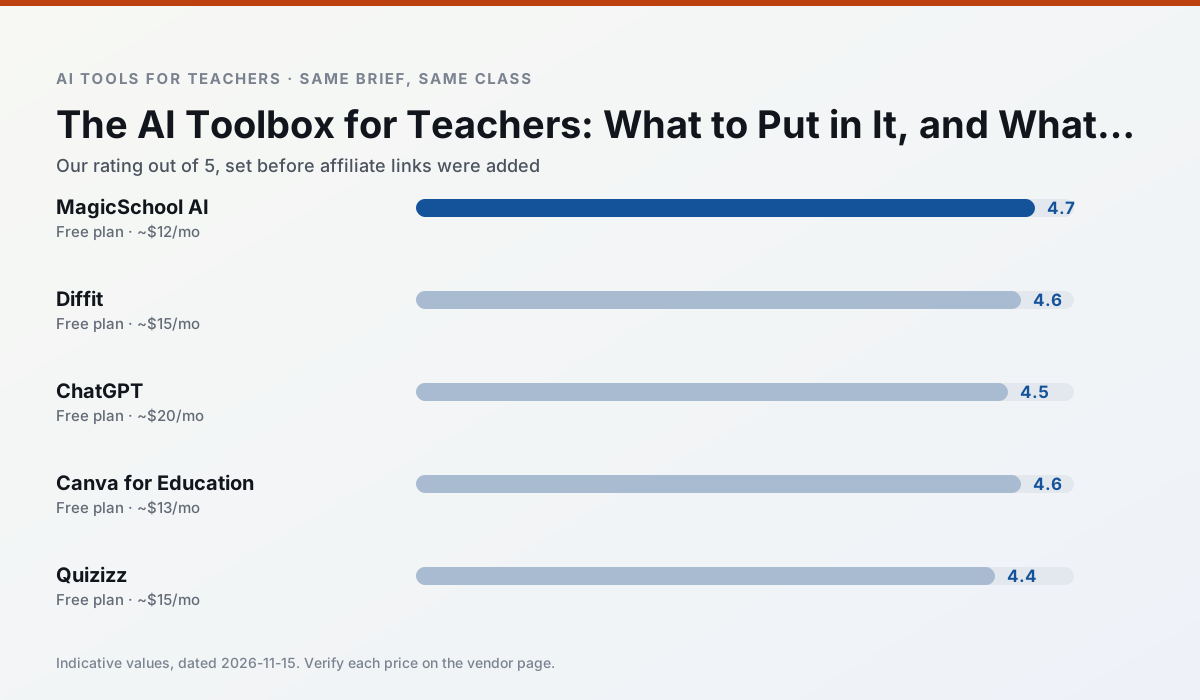
Side by side
Comparison table
Ratings reflect our classroom workflow, not vendor claims. Prices are indicative; verify on the vendor site.
| Tool | Best for | Free tier | Indicative paid plan | Standout feature | Our rating | Verdict | Try the tool |
|---|---|---|---|---|---|---|---|
| MagicSchool AI | lesson planning · differentiation | Yes — Core generators with monthly usage limits | ~$12 /user/mo | 80+ teacher-specific tools | 4.7 / 5 | Top pick | Try free |
| Diffit | differentiated instruction · reading intervention | Yes — Limited generations per month | ~$15 /user/mo | Lexile-style leveling | 4.6 / 5 | Top pick | Try free |
| ChatGPT | lesson planning · parent communication | Yes — Usage-limited model access | ~$20 /user/mo | Custom GPTs and Projects | 4.5 / 5 | Top pick | Try free |
| Canva for Education | slide decks · worksheets | Yes — Verification required | ~$13 /user/mo | Thousands of education templates | 4.6 / 5 | Top pick | Try free |
| Quizizz | quiz generation · formative assessment | Yes — Core quiz creation | ~$15 /user/mo | AI question generator | 4.4 / 5 | Strong option | Try free |
| SchoolAI | student-safe AI · differentiated instruction | Yes — Limited seats | ~$15 /user/mo | Teacher-monitored student chats | 4.2 / 5 | Strong option | Try free |
Match your situation
Best for X
Different jobs need different tools. Here is what we would open first in each case.
A large library of teacher-specific AI generators in one dashboard.
Level any text or video into differentiated reading materials.
General-purpose assistant that adapts to almost any classroom task.
Free design suite for educators with AI writing and image features.
Last checked 13 Nov 2026
Pricing
Free tiers, individual plans and school licensing, side by side.
| Tool | Free plan | Individual / paid | School & district | Billing note | Verify |
|---|---|---|---|---|---|
| MagicSchool AI | $0 — Core generators with monthly usage limits | ~$12 /user/mo | Custom quote | Indicative — verify on vendor site | Vendor |
| Diffit | $0 — Limited generations per month | ~$15 /user/mo | Custom quote | Indicative — verify on vendor site | Vendor |
| ChatGPT | $0 — Usage-limited model access | ~$20 /user/mo | ~$25+ /user/mo | Indicative — verify on vendor site | Vendor |
| Canva for Education | $0 — Verification required | ~$13 /user/mo | Custom quote | Indicative — verify on vendor site | Vendor |
| Quizizz | $0 — Core quiz creation | ~$15 /user/mo | Custom quote | Indicative — verify on vendor site | Vendor |
| SchoolAI | $0 — Limited seats | ~$15 /user/mo | Custom quote | Indicative — verify on vendor site | Vendor |
Editorial rule: pricing is re-checked every 2–3 months and the top 50 pages are refreshed every 6 months. See our funding policy.
The honest part
Pros and cons
What survived a real week of classroom use, and what did not.
Pros
- Widest purpose-built template library
- Strong free tier for individual teachers
- Fast to learn with almost no prompting skill
Cons
- Outputs still need standards review
- Best features sit behind the paid tier
- District approval can be slow
Pros
- Excellent for mixed-ability classes
- Produces printable and digital versions
- Minimal setup
Cons
- Narrower scope than all-in-one suites
- Leveling is approximate, not a formal assessment
- Heavy use burns through the free quota
Pros
- Most flexible option available
- Huge community of teacher prompt libraries
- Strong multilingual support
Cons
- Requires prompt skills for consistent results
- No built-in standards alignment
- District privacy review usually required
Pros
- Effectively free for verified teachers
- Huge template library
- No design skills needed
Cons
- AI features are capped
- Easy to produce cluttered slides
- Account verification can be slow
Pros
- Students already know the interface
- Good reporting
- Works on low-end devices
Cons
- Writing high-quality AI questions still needs review
- Gamification can distract
- Advanced analytics are paid
In the classroom
Use cases
Five concrete workflows, with the tool we would open for each one.
The four-slot toolbox
One generator, one general assistant, one design tool, one quiz tool. Every other product has to earn a fifth slot by replacing one of those.
Recommended: MagicSchool AIWhat not to add
Detectors, dashboards and anything that needs a student login for a task that does not. They add approval work without removing any.
Recommended: Diffit
Questions teachers ask us
FAQ
Direct answers, also published as FAQPage structured data for search and AI assistants.
What should a teacher's AI toolbox contain?
How often should I review it?
Sources & further reading
Our recommendation
Try MagicSchool AI free for ai tool box
A large library of teacher-specific AI generators in one dashboard.
Some links on this page are affiliate links. We may earn a commission at no extra cost to you. Never enter student PII into a free consumer account.
Keep reading
Related comparisons in this cluster.
Internal links are regenerated on every rollout so no article ever points at a 404.