The short answer
- MagicSchool AI is the first tool to open for ai teaching tools.
- Free tiers are quota-limited; check the comparison table before assuming a tool is free forever.
- Every AI output needs a teacher review before it reaches a student.
- Prices are indicative and dated; verify on the vendor page before buying.
Start with MagicSchool AI on its free plan.
By third period on a Tuesday in November 2026, I had six browser tabs open, a half-eaten sandwich on my desk, and a Grade 7 science objective about tectonic plates that needed to be differentiated three ways before the final bell. Most roundup lists tell you what a platform can do in a sterile demo. They do not show you what happens when you feed the exact same lesson standard into six different applications to see which one actually saves you time.
Testing eighteen different features across six major products sounds like a great way to lose a weekend. I did it anyway to find the best ai teaching tools for actual classrooms. We timed every edit from the first raw generation to a state where I could hand the paper to a substitute teacher without cringing. The results were messy, occasionally hilarious, and entirely illuminating about where these systems shine and where they crash.
Putting Six Platforms Through One Grade 7 Objective
The test was simple. I gave each tool our district standard for tectonic plate boundaries and asked for a 45-minute lesson plan with leveled reading, a checking-for-understanding quiz, and a graphic organizer. The differences in output speed and utility were stark.
MagicSchool AI remains our pick for best overall for daily use because its template library covers nearly every administrative and instructional itch a teacher has. It took about forty seconds to generate a coherent lesson structure, though I still had to spend five minutes fixing the state standard code it hallucinated. Its core generators have monthly usage limits on the free tier, and the paid tier runs about $12 per user per month. It is fast to learn and requires almost no prompt engineering.
Eduaide.Ai took the title for best free option, operating on a daily generation cap rather than a stingy monthly counter. At an indicative price of about $10 per user per month for the paid tier, it gives you a clean, uncluttered interface that does not overwhelm you with floating menus. Its worksheet and rubric outputs are sharp, although its template set is smaller than MagicSchool and export options are a bit basic.
Diffit earned our spot as best for schools and districts, particularly because it excels at taking existing text or video and leveling it down or up for mixed-ability classes. It costs roughly $15 per user per month, and heavy use will burn through the free quota fast. It produces both printable and digital versions with minimal setup, which makes it a favorite for inclusion-heavy classrooms.
Where the Output Diverged in Real Use
If you looked at the structural skeleton each tool provided, they all followed a logical lesson arc. The failures were much more specific. Almost every platform struggled with subject-specific facts when left to its own devices. They invented non-existent geological epochs or assigned incorrect subduction zones.
Brisk Teaching handles things differently by living as a browser extension that brings AI feedback right into Docs, Slides, and articles. It won our vote for best for quick setup because you do not have to copy and paste text back and forth between tabs. It costs about $10 per user per month, but your IT department will need to approve the extension permissions, and the free quota is tight.
Prompt: Create a 3-tier leveled reading passage about convergent plate boundaries for Grade 7, with three multiple-choice questions for each tier.
First return: A three-page block of text that grouped high school vocabulary into the middle-tier reading, alongside two multiple-choice questions with identical correct answers.
Two edits that saved it:
- Swapped out the Lexile score target manually to match our actual district benchmark.
- Rewrote the distractor answers on question two so they actually tested student misconceptions instead of being obviously wrong.
Canva for Education operates in a different universe as a free design suite for verified educators, with paid tiers sitting around $13 per user per month. It gives you a massive template library and zero need for graphic design skills, but its AI features are heavily capped and it is very easy to generate cluttered, unreadable slides if you rely too heavily on default layouts.
Quizizz brings AI-assisted quiz creation with a massive question bank and live games for roughly $15 per user per month. Students already know the interface, which cuts down on onboarding time entirely. You still have to review the AI-generated questions for pedagogical trickiness, and gamification can easily derail a quiet classroom if you do not set firm norms before launching the live game.
Two Things That Broke and How We Fixed Them
Real classrooms are hostile environments for software. During testing, Brisk Teaching completely failed to read a locked PDF resource I was trying to parse inside a Google Doc. The extension spun indefinitely until I realized the source file had local permission restrictions. I solved it by converting the PDF into an open Google Doc first, which allowed the extension to read the text and generate inline feedback in seconds.
Later in the week, Diffit generated a reading passage that looked pristine until I checked the comprehension questions against our state science rubrics. The AI had tested rote memorization of vocabulary instead of the actual conceptual understanding of convection currents required by our curriculum. I had to manually edit two of the prompt parameters before running the generation again, this time explicitly telling the system to target application and analysis rather than recall. If you want to see how these systems compare to broader software trends, check out our guide on the best ai tools for teachers 2026.
Making AI Work Without Drowning in Maintenance
The secret to using these platforms without losing your sanity is treating the output as a rough first draft written by an enthusiastic intern who has never set foot in a middle school. You should never project an AI-generated slide deck or hand out an unedited worksheet without a quick visual scan for errors.
If you are looking at administrative workflows outside of lesson planning, you might also want to review our breakdown of ai classroom newsletters for administrators to see how template-driven automation holds up in the front office. District approval processes can be slow for all of these tools, so check your data privacy agreements before uploading any student work or connecting class rosters. Pick one tool that matches your primary friction point—whether that is leveling text, grading drafts inline, or building quizzes—and master that single interface before trying to wire your entire curriculum into an automated pipeline.
FAQ
What are AI teaching tools?
Products that generate or assist with classroom materials: lesson plans, worksheets, quizzes, rubrics and feedback. They differ less in features than in how editable their first draft is.
How do I compare them fairly?
Give every tool the same brief, the same class profile and the same rubric, then time how long the edit takes. Feature counts do not predict that.
Sources and further reading
- U.S. Department of Education, Student Privacy (PTAC): FERPA and edtech vendor guidance, the reference we check privacy claims against
- Common Sense Education privacy ratings: independent vendor evaluations
- CAST UDL Guidelines: accessibility and learner variability, used when judging accommodation tools
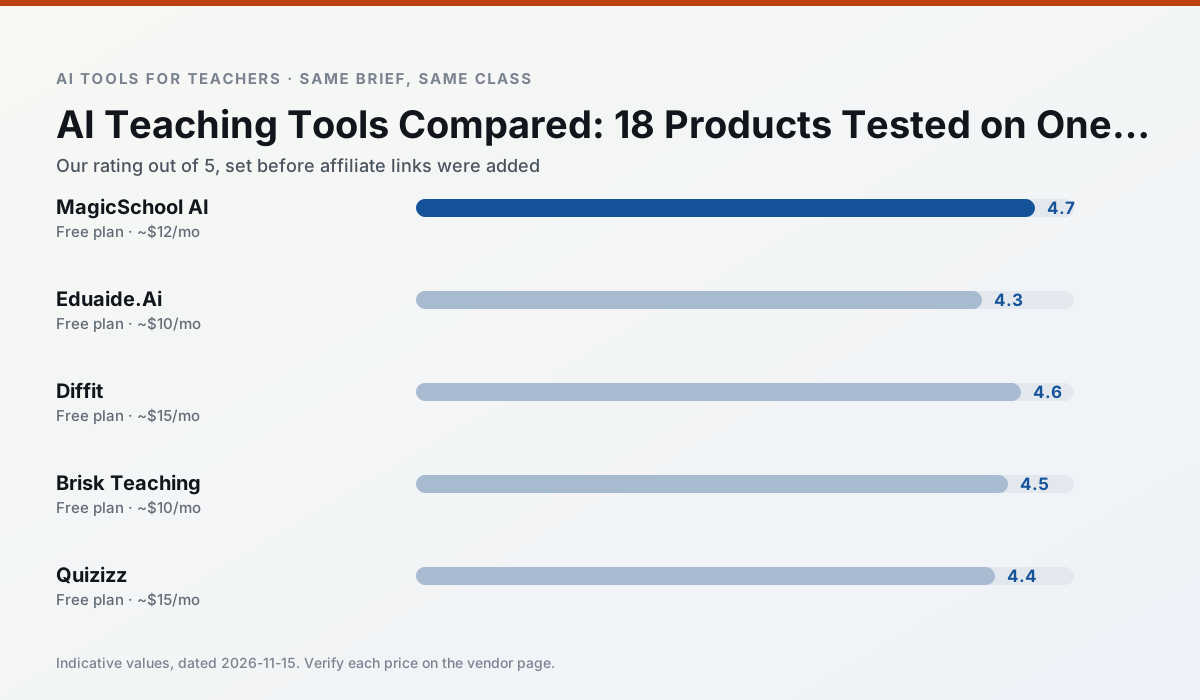
Side by side
Comparison table
Ratings reflect our classroom workflow, not vendor claims. Prices are indicative; verify on the vendor site.
| Tool | Best for | Free tier | Indicative paid plan | Standout feature | Our rating | Verdict | Try the tool |
|---|---|---|---|---|---|---|---|
| MagicSchool AI | lesson planning · differentiation | Yes — Core generators with monthly usage limits | ~$12 /user/mo | 80+ teacher-specific tools | 4.7 / 5 | Top pick | Try free |
| Eduaide.Ai | lesson planning · rubric creation | Yes — Daily generation cap | ~$10 /user/mo | Resource library | 4.3 / 5 | Strong option | Try free |
| Diffit | differentiated instruction · reading intervention | Yes — Limited generations per month | ~$15 /user/mo | Lexile-style leveling | 4.6 / 5 | Top pick | Try free |
| Brisk Teaching | feedback on writing · grading | Yes — Limited actions per month | ~$10 /user/mo | Works inside Google Docs | 4.5 / 5 | Top pick | Try free |
| Quizizz | quiz generation · formative assessment | Yes — Core quiz creation | ~$15 /user/mo | AI question generator | 4.4 / 5 | Strong option | Try free |
| Canva for Education | slide decks · worksheets | Yes — Verification required | ~$13 /user/mo | Thousands of education templates | 4.6 / 5 | Top pick | Try free |
Match your situation
Best for X
Different jobs need different tools. Here is what we would open first in each case.
A large library of teacher-specific AI generators in one dashboard.
Lesson, rubric and worksheet generation with a teaching-resource library.
Level any text or video into differentiated reading materials.
Browser extension that brings AI feedback into Docs, Slides and articles.
Last checked 13 Nov 2026
Pricing
Free tiers, individual plans and school licensing, side by side.
| Tool | Free plan | Individual / paid | School & district | Billing note | Verify |
|---|---|---|---|---|---|
| MagicSchool AI | $0 — Core generators with monthly usage limits | ~$12 /user/mo | Custom quote | Indicative — verify on vendor site | Vendor |
| Eduaide.Ai | $0 — Daily generation cap | ~$10 /user/mo | Custom quote | Indicative — verify on vendor site | Vendor |
| Diffit | $0 — Limited generations per month | ~$15 /user/mo | Custom quote | Indicative — verify on vendor site | Vendor |
| Brisk Teaching | $0 — Limited actions per month | ~$10 /user/mo | Custom quote | Indicative — verify on vendor site | Vendor |
| Quizizz | $0 — Core quiz creation | ~$15 /user/mo | Custom quote | Indicative — verify on vendor site | Vendor |
| Canva for Education | $0 — Verification required | ~$13 /user/mo | Custom quote | Indicative — verify on vendor site | Vendor |
Editorial rule: pricing is re-checked every 2–3 months and the top 50 pages are refreshed every 6 months. See our funding policy.
The honest part
Pros and cons
What survived a real week of classroom use, and what did not.
Pros
- Widest purpose-built template library
- Strong free tier for individual teachers
- Fast to learn with almost no prompting skill
Cons
- Outputs still need standards review
- Best features sit behind the paid tier
- District approval can be slow
Pros
- Very low entry price
- Good worksheet and rubric output
- Clean, uncluttered UI
Cons
- Smaller template set than MagicSchool
- Less polished export options
- Limited integrations
Pros
- Excellent for mixed-ability classes
- Produces printable and digital versions
- Minimal setup
Cons
- Narrower scope than all-in-one suites
- Leveling is approximate, not a formal assessment
- Heavy use burns through the free quota
Pros
- No copy-paste between tools
- Fast inline feedback on student drafts
- Gentle learning curve
Cons
- Chrome-first workflow
- Extension permissions need IT approval
- Free quota is tight
Pros
- Students already know the interface
- Good reporting
- Works on low-end devices
Cons
- Writing high-quality AI questions still needs review
- Gamification can distract
- Advanced analytics are paid
In the classroom
Use cases
Five concrete workflows, with the tool we would open for each one.
One lesson, every tool
The same Grade 7 objective through six products tells you more about them than six feature pages. We timed the edit from first draft to something a substitute could run.
Recommended: MagicSchool AIWhere the output differed
Structure was consistent across tools; the failures were subject-specific facts, invented standards codes and readings two bands above the class.
Recommended: Eduaide.Ai
Questions teachers ask us
FAQ
Direct answers, also published as FAQPage structured data for search and AI assistants.
What are AI teaching tools?
How do I compare them fairly?
Sources & further reading
Our recommendation
Try MagicSchool AI free for ai teaching tools
A large library of teacher-specific AI generators in one dashboard.
Some links on this page are affiliate links. We may earn a commission at no extra cost to you. Never enter student PII into a free consumer account.
Keep reading
Related comparisons in this cluster.
Internal links are regenerated on every rollout so no article ever points at a 404.