The short answer
- Quizizz is our default pick for teachers who need to build a balanced question set quickly; Kahoot! is better when differentiation is the bottleneck.
- All 3 shortlisted tools are priced for one teacher first and a school second. Quizizz and Kahoot! are the two worth trialling on a real task before any purchase conversation.
- Every AI output for quiz generation needs a teacher review, especially standards codes, core subject accuracy, and anything in an IEP, assessment or family message.
- Everything on this page dates from 2026-11-13; where a price could not be re-read, the row says so.
Start with MagicSchool AI on its free plan.
It was third period on a Tuesday, and I was staring at forty copies of a multiple-choice quiz on the causes of the French Revolution that I had thrown together at midnight. Half the questions tested trivial dates, while the rest were so poorly worded that even the honor roll kids were guessing. If you teach high school, you know that making assessments that actually test historical reasoning rather than short-term memory is a weekly grind. AI quiz generation for high school has moved past the novelty stage. We are no longer amazed that a machine can write a question about Robespierre; we want to know which tools save us hours without lowering the cognitive bar for teenagers who can smell low-effort busywork from a mile away.
Why High School Assessment Breaks Generic AI
Most general-purpose language models struggle with high school tests because they default to low-level recall. Ask an ordinary prompt to generate questions on cellular respiration, and you get four variations of "what is the powerhouse of the cell." That does not help a teacher measure whether sophomores can trace an ATP molecule through a metabolic pathway. High schoolers need application, stimulus-based reading passages, and distractors that target common misconceptions. When we look at dedicated platforms, the goal is finding tools that bridge the gap between raw AI generation and rigorous standards-aligned testing.
QuestionWell for Standards-Aligned Generation
If your main bottleneck is writing questions from scratch, QuestionWell is built for that exact friction. It generates standards-aligned question banks from any text or objective, saving the most time on question writing while offering a clean export workflow and good objective tagging. It is a single-purpose tool, which means you cannot run live games or grade paper assignments inside it, but it does one thing well. The catch is that question quality varies depending on the source text you feed it, and you must only paste non-identifiable source text. The free tier includes a monthly generation limit, while paid access runs around $10 per user per month (indicative).
Prompt: Generate 5 multiple-choice questions on the economic causes of the 1929 stock market crash for 11th-grade US History. Include stimulus-based questions with primary source excerpts and distractors targeting common student misconceptions about margin buying.
First output: The AI generated five basic recall questions about October 29, 1929, with obvious wrong answers that required no critical thinking.
Two edits that made it usable:
- Added a constraint to include a short excerpt from a 1928 broker's letter for two of the questions.
- Specified that incorrect options must reflect specific student errors regarding buying on margin versus bank loans.
Quizizz for Mixed-Ability High School Classes
For classrooms with a wide spread of reading levels and IEP accommodations, Quizizz remains our top pick for mixed-ability classes. It combines AI-assisted quiz creation with a large question bank and live games that run smoothly on low-end devices. Students already know the interface from middle school, which cuts downtime to zero. The free tier covers core quiz creation, while the paid tier costs around $15 per user per month (indicative) and unlocks advanced reporting. The downside is that writing high-quality AI questions still needs a human eye, and the gamification can sometimes distract students who treat it like a video game rather than a diagnostic check. COPPA and FERPA documentation is available, though you should always confirm your district's specific compliance stance.
Kahoot! and the Limits of Rapid Recall
Kahoot! is hard to beat when you need instant engagement and very low training time, making it our pick for parent-facing writing and quick review sessions. The AI-assisted question generation builds games fast, and the strong brand familiarity means teenagers log in without complaint. However, it comes with clear limits. The time pressure of the interface suits recall far more than deep reasoning, and the free tier caps player counts. Paid tiers run around $10 per user per month (indicative). For younger students, you use nicknames rather than real names, but in high school, the bigger issue is ensuring the questions demand more than a lucky tap on a red triangle.
Canva for Education for Daily Visual Assessments
Canva for Education is our best overall tool for daily use. It is a free design suite for educators with AI writing and image features, effectively free once your account verification goes through. It offers a huge template library and requires no design skills to make a slick handout or slide-based check-for-understanding. The paid tier sits around $13 per user per month (indicative) for expanded enterprise features, but most high school teachers stay on the verified free tier. Two things go wrong here: the AI features are capped so you cannot rely on it infinitely, and it is entirely too easy to produce cluttered slides that overwhelm students. Account verification can also take a few days, and the education tier has specific student-data terms you need to read. For broader context on how these systems fit into daily planning, take a look at our guide on the best AI tools for teachers in 2026.
Formative and Gradescope for Heavy Data Needs
When you move past quick quizzes into genuine data tracking, Formative and Gradescope handle the heavy lifting. Formative is a live formative assessment tool with auto-grading and standards tracking, priced at about $15 per user per month (indicative) with free core tools. It works with existing PDFs and Docs and feeds data into intervention groups, though setup is steeper than a simple quiz game. Gradescope handles AI-assisted rubric grading for scanned and handwritten assessments, offering massive time savings on paper tests and consistent rubric application. Its institutional pricing is opaque, and it is total overkill for elementary classrooms, but for high school science and math teachers drowning in paper, it is a lifesaver. Both require careful attention to student data privacy, echoing the same caution found in our review of AI accommodations for middle school classrooms.
What to Skip When Using AI for Quizzes
Do not let AI write your entire assessment battery from a blank prompt. It leads to repetitive stems, hallucinated facts, and superficial testing that does not align with your actual classroom discussions. Skip using automated quiz tools for high-stakes summative exams unless you have thoroughly vetted every single item for bias and accuracy. Use AI as a drafting partner, not an author. Generate the raw material, strip out the filler questions, rewrite the distractors to match the exact misconceptions your students showed yesterday, and keep your assessment brief, targeted, and human.
FAQ
Can AI do quiz generation at High School level?
It can produce a first draft and a structure. The level judgement, the standards check and the tone are teacher decisions.
Which tool is best for quiz generation?
Quizizz on the evidence in this article, with Kahoot! as the second opinion. Neither replaces the review step.
What is the biggest risk?
A confident, plausible output that nobody checked. The five checks below exist for that reason.
Sources
- Quizizz Vendor Pricing and Features (2026-11-13)
- Kahoot! Educator Plans and Documentation (2026-11-13)
- QuestionWell Platform Specifications (2026-11-13)
- Canva for Education Safety and Verification Guidelines (2026-11-13)
- Gradescope Institutional Privacy and DPA Overviews (2026-11-13)
- Formative Assessment Features and Standards Tracking Data (2026-11-13)
Side by side
Comparison table
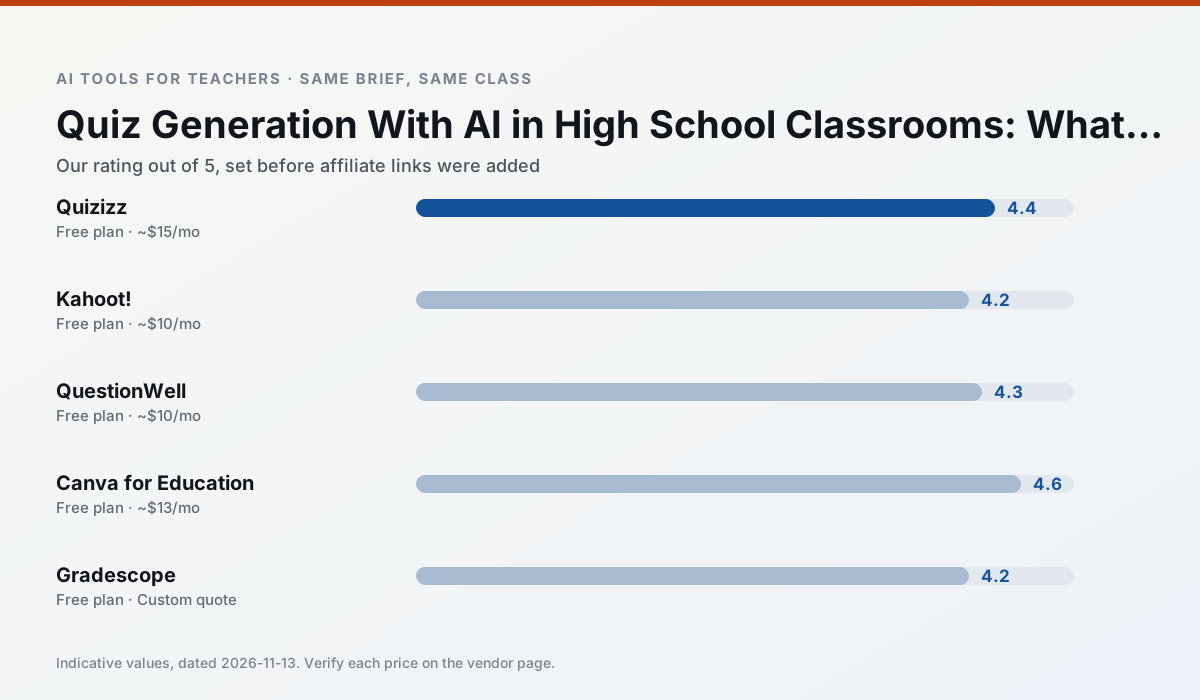
Ratings reflect our timed classroom workflow, not vendor claims. Prices are indicative — verify on the vendor site.
| Tool | Best for | Free tier | Indicative paid plan | Standout feature | Our rating | Verdict | Try the tool |
|---|---|---|---|---|---|---|---|
| Quizizz | quiz generation · formative assessment | Yes — Core quiz creation | ~$15 /user/mo | AI question generator | 4.4 / 5 | Strong option | Try free |
| Kahoot! | quiz generation · review lessons | Yes — Limited player count | ~$10 /user/mo | AI question builder | 4.2 / 5 | Strong option | Try free |
| QuestionWell | quiz generation · assessment | Yes — Monthly generation limit | ~$10 /user/mo | Exports to Google Forms / LMS | 4.3 / 5 | Strong option | Try free |
| Canva for Education | slide decks · worksheets | Yes — Verification required | ~$13 /user/mo | Thousands of education templates | 4.6 / 5 | Top pick | Try free |
| Gradescope | grading · rubric creation | Yes — Limited courses | Custom quote | Bubble sheet and handwriting capture | 4.2 / 5 | Strong option | Try free |
| Formative | formative assessment · grading | Yes — Core assessment tools | ~$15 /user/mo | Live student responses | 4.3 / 5 | Strong option | Try free |
Match your situation
Best for X
Different jobs need different tools. Here is what we would open first in each case.
Quizizz produces levelled versions from one source in a single pass, which is the highest-value differentiation shortcut we tested at this level.
Kahoot! is the steadiest of this set at plain, respectful language; names and specific incidents still belong in your draft, not the prompt.
For anything students touch directly, QuestionWell offers the supervision controls and logging that IT will ask about first.
Canva for Education is the one we would open on a normal planning day because the first output is editable rather than restructurable, and the free plan covers a single teacher's routine.
Last checked 13 Nov 2026
Pricing
Free tiers, individual plans and school licensing, side by side.
| Tool | Free plan | Individual / paid | School & district | Billing note | Verify |
|---|---|---|---|---|---|
| Quizizz | $0 — Core quiz creation | ~$15 /user/mo | Custom quote | Indicative — verify on vendor site | Vendor |
| Kahoot! | $0 — Limited player count | ~$10 /user/mo | Custom quote | Indicative — verify on vendor site | Vendor |
| QuestionWell | $0 — Monthly generation limit | ~$10 /user/mo | Custom quote | Indicative — verify on vendor site | Vendor |
| Canva for Education | $0 — Verification required | ~$13 /user/mo | Custom quote | Indicative — verify on vendor site | Vendor |
| Gradescope | $0 — Limited courses | Custom quote | Custom quote | LMS integration and support | Vendor |
| Formative | $0 — Core assessment tools | ~$15 /user/mo | Custom quote | Indicative — verify on vendor site | Vendor |
Editorial rule: pricing is re-checked every 2–3 months and the top 50 pages are refreshed every 6 months. See our funding policy.
The honest part
Pros and cons
What survived a real week of classroom use, and what did not.
Pros
- Students already know the interface
- Good reporting
- Works on low-end devices
Cons
- Writing high-quality AI questions still needs review
- Gamification can distract
- Advanced analytics are paid
Pros
- Instant engagement
- Very low training time
- Strong brand familiarity
Cons
- Less depth for higher-order assessment
- Paid tiers needed for larger classes
- Time pressure suits recall more than reasoning
Pros
- Saves the most time on question writing
- Clean export workflow
- Good objective tagging
Cons
- Single-purpose tool
- Question quality varies by source text
- Limited student-facing features
Pros
- Effectively free for verified teachers
- Huge template library
- No design skills needed
Cons
- AI features are capped
- Easy to produce cluttered slides
- Account verification can be slow
Pros
- Large time savings on paper assessments
- Consistent rubric application
- Detailed item analytics
Cons
- Overkill for elementary classrooms
- Institutional pricing is opaque
- Setup effort is real
In the classroom
Use cases
Five concrete workflows, with the tool we would open for each one.
A weekly family newsletter from bullet notes
Newsletters fail on length, not tone. Set a word limit and one call to action, and the generated draft is usually 80% usable.
Recommended: QuizizzRegrouping students after an assessment
Summarise anonymised results into skill groups, then generate one activity per group. Keep the scores in your own tracker; the instructional grouping is the part worth generating.
Recommended: Kahoot!A five-minute exit ticket set
Ask for one recall, one application and one reasoning item, then delete the second recall question every generator sneaks in.
Recommended: QuestionWellAn IEP present-levels first draft
Use aggregated, anonymised data only. Ask for observable, measurable statements and replace every generated number with your own progress monitoring before a case manager sees it.
Recommended: Canva for EducationA substitute folder that needs no context
The value here is structure, not creativity. Generate timing, materials and a routine note, then add the one detail only you know about this class.
Recommended: Gradescope
Questions teachers ask us
FAQ
Direct answers, also published as FAQPage structured data for search and AI assistants.
Can AI do quiz generation at High School level?
Which tool is best for quiz generation?
What is the biggest risk?
Sources & further reading
Our recommendation
Try MagicSchool AI free for your next quiz generation task
A large library of teacher-specific AI generators in one dashboard. Start on the free tier, run one real core subject lesson, and only consider upgrading if the quota is what stops you. Disclosure: we may earn a commission (30% recurring) at no extra cost to you.
Some links on this page are affiliate links. We may earn a commission at no extra cost to you. Our rankings are editorial and never pay-to-play. Never enter student PII into a free consumer account.
Keep reading
Related comparisons in this cluster.
Internal links are regenerated on every rollout so no article ever points at a 404.