The short answer
- MagicSchool AI is our default pick for teachers who need to draft a standards-aware lesson plan quickly; Eduaide.Ai is better when differentiation is the bottleneck.
- The cheapest honest test is a week of real work on the free plans: MagicSchool AI: Yes — Core generators with monthly usage limits; Eduaide.Ai: Yes — Daily generation cap; ChatGPT: Yes — Usage-limited model access. If a tool is still open on Friday, it has earned a paid conversation.
- Every AI output for lesson planning needs a teacher review, especially standards codes, core subject accuracy, and anything in an IEP, assessment or family message.
- Everything on this page dates from 2026-11-13; where a price could not be re-read, the row says so.
Start with MagicSchool AI on its free plan.
Forty-two minutes. That was how long I stared at a blank Google Doc trying to break a fraction unit into three distinct reading levels for my fourth graders before the bell rang. I had twenty-five students, four reading groups ranging from mid-first to fifth grade, and an administrator evaluation on Tuesday. When people talk about AI lesson planning for 3-5 classrooms as some sort of magic wand, they usually picture an immaculate, standards-aligned unit plan dropping from the cloud fully formed.
In reality, using these tools is more like managing an over-enthusiastic student intern. They generate a mountain of output, much of it slightly off-target, but when you know how to direct them, they claw back hours of your Sunday. If you are looking for a broader overview of classroom technology, our guide to the best AI tools for teachers in 2026 covers the wider landscape. Right now, let us look at what actually works for upper elementary planning, what fails, and which platforms deserve a spot on your bookmarks bar.
The All-In-One Workhorses
MagicSchool AI sits comfortably as the best for mixed-ability classes because of its massive library of purpose-built generators. You do not need to spend twenty minutes crafting a prompt about Common Core standards or Bloom's taxonomy. You click the generator, type in your topic, and select a grade band. The free tier gives you core generators with monthly usage limits, while the paid version runs around $12 per user per month. The catch is that its outputs still need a sharp standards review, and the best features sit behind that paywall.
Eduaide.Ai is another structured option, pricing in at about $10 per user per month with a daily generation cap. It excels at parent-facing writing, making it our pick for drafting weekly family newsletters from rough bullet notes. Newsletters usually fail on length, not tone. If you do not set a strict word limit and a single call to action, the generated draft bloats into a novel parents will never finish reading. When constrained properly, Eduaide produces a clean, uncluttered layout that needs only minor tweaking before hitting print.
Prompt: Write a 150-word weekly classroom update for 4th-grade parents about our upcoming fraction unit. Include one call to action: sign up for the math night on Thursday.
First Response: The AI returned a warm, slightly breathless paragraph about fraction strips, mixed numbers, and pizza slices, ending with three separate bullet points for different events, completely ignoring the word count and the single call to action.
The Edges We Fixed:
- Trimmed the fluff about pizza slices and focused strictly on what parents need to reinforce at the kitchen table.
- Removed the extra event bullets so the math night link was the only thing standing at the bottom.
Differentiating Text and Data
Diffit earns our spot as best overall for daily use in grades 3-5 because it takes any text or video URL and levels it for mixed reading abilities in seconds. If you are trying to cover a social studies topic where half your class is reading below grade level, Diffit generates printable and digital versions at targeted lexile ranges. The free tier offers limited generations per month, while the paid tier sits around $15 per user per month. Heavy use burns through your quota fast, and the leveling is an approximation rather than a formal reading diagnostic.
When an assessment finishes, regrouping students is where things get tedious. You can feed anonymised scores into tools like Claude or ChatGPT to cluster kids by skill gaps rather than raw percentages. Claude handles long-context document analysis brilliantly, making it useful for parsing rubrics and full unit plans. Just remember the data privacy rules. Never enter student PII on consumer plans. Use approved district workspace tiers, and keep your local gradebook safely offline.
Keeping Students Engaged and Safe
Curipod turns a standard topic into an interactive, student-response lesson in minutes. It is built for delivery rather than deep offline planning, working well for quick checks for understanding without requiring student accounts for basic use. The free tier is restrictive, and paid plans run around $12 per user per month. You need reliable classroom devices for this to sing; if your school cart has dead batteries, Curipod becomes an exercise in frustration.
ChatGPT remains the best for student-safe deployments when configured correctly, largely because of its massive community of teacher prompt libraries and strong multilingual support. A standard five-minute exit ticket set generated via ChatGPT usually requires a specific edit: ask for one recall, one application, and one reasoning item, then immediately delete the second recall question every generator sneaks in by default. If you need more ideas on adapting materials for younger learners, our piece on AI accommodations for K-2 classrooms offers a helpful look at scaling these strategies down.
Building the Emergency Sub Folder
When you are genuinely sick and need to throw together a substitute folder that requires no outside context, AI shines at structural organization. The value here is not creativity; it is timing, materials lists, and routine notes.
Prompt: Create a 45-minute math sub plan for 3rd-grade multiplication review. Include a warm-up, a guided practice routine, independent worksheet timing, and a clear transition note for the teacher.
The generator will likely give you a standard three-part lesson. You must add the one detail only you know about this class: that Johnny needs to sit near the pencil sharpener, or that lining up requires a quiet-hand check. AI gives you the skeleton, but you must supply the connective tissue.
FAQ
Can AI do lesson planning at 3-5 level?
It can produce a first draft and a structure. The level judgement, the standards check and the tone are teacher decisions.
Which tool is best for lesson planning?
MagicSchool AI on the evidence in this article, with Eduaide.Ai as the second opinion. Neither replaces the review step.
What is the biggest risk?
A confident, plausible output that nobody checked. The five checks below exist for that reason.
Sources
- MagicSchool AI: magicschool.ai
- Eduaide.Ai: eduaide.ai
- OpenAI ChatGPT: openai.com/chatgpt
- Diffit: diffit.me
- Curipod: curipod.com
- Anthropic Claude: claude.ai
Side by side
Comparison table
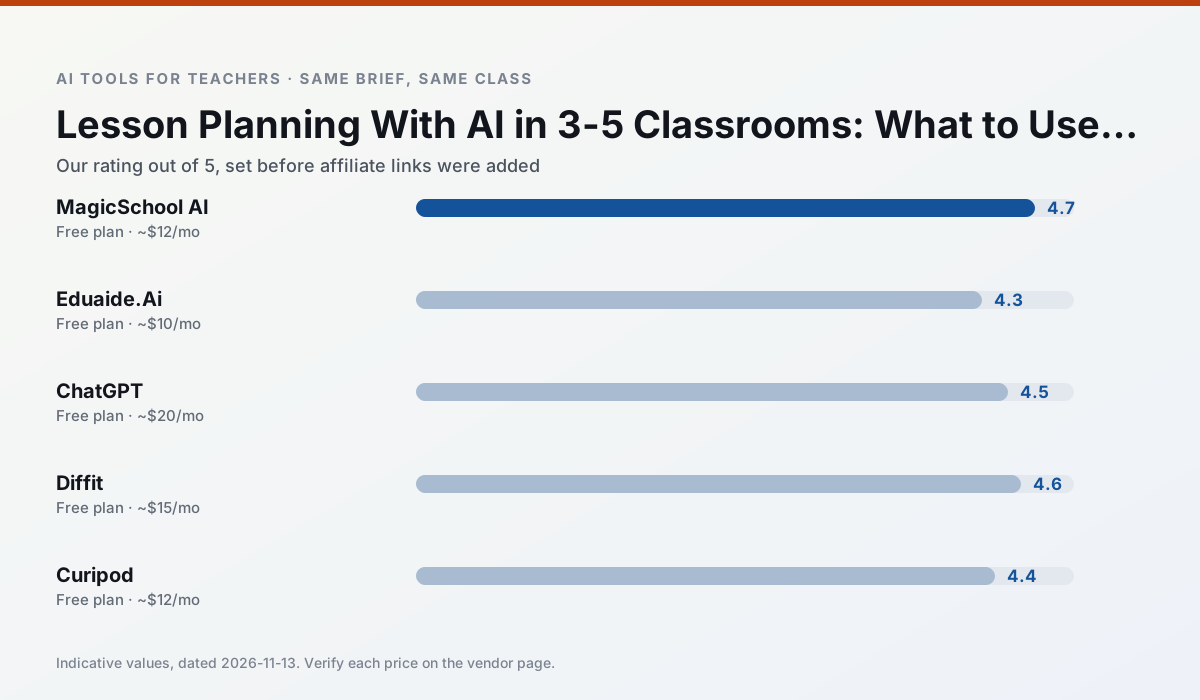
Ratings reflect our timed classroom workflow, not vendor claims. Prices are indicative — verify on the vendor site.
| Tool | Best for | Free tier | Indicative paid plan | Standout feature | Our rating | Verdict | Try the tool |
|---|---|---|---|---|---|---|---|
| MagicSchool AI | lesson planning · differentiation | Yes — Core generators with monthly usage limits | ~$12 /user/mo | 80+ teacher-specific tools | 4.7 / 5 | Top pick | Try free |
| Eduaide.Ai | lesson planning · rubric creation | Yes — Daily generation cap | ~$10 /user/mo | Resource library | 4.3 / 5 | Strong option | Try free |
| ChatGPT | lesson planning · parent communication | Yes — Usage-limited model access | ~$20 /user/mo | Custom GPTs and Projects | 4.5 / 5 | Top pick | Try free |
| Diffit | differentiated instruction · reading intervention | Yes — Limited generations per month | ~$15 /user/mo | Lexile-style leveling | 4.6 / 5 | Top pick | Try free |
| Curipod | formative assessment · exit tickets | Yes — Limited lessons per month | ~$12 /user/mo | Live polls and word clouds | 4.4 / 5 | Strong option | Try free |
| Claude | rubric creation · feedback on writing | Yes — Usage-limited | ~$20 /user/mo | Very large context window | 4.4 / 5 | Strong option | Try free |
Match your situation
Best for X
Different jobs need different tools. Here is what we would open first in each case.
For three reading groups and one text, MagicSchool AI needs the least manual relabelling of vocabulary and questions.
Eduaide.Ai is the steadiest of this set at plain, respectful language; names and specific incidents still belong in your draft, not the prompt.
ChatGPT is the student-facing option here with boundaries a teacher can actually set and supervise.
Diffit is the one we would open on a normal planning day because the first output is editable rather than restructurable, and the free plan covers a single teacher's routine.
Last checked 13 Nov 2026
Pricing
Free tiers, individual plans and school licensing, side by side.
| Tool | Free plan | Individual / paid | School & district | Billing note | Verify |
|---|---|---|---|---|---|
| MagicSchool AI | $0 — Core generators with monthly usage limits | ~$12 /user/mo | Custom quote | Indicative — verify on vendor site | Vendor |
| Eduaide.Ai | $0 — Daily generation cap | ~$10 /user/mo | Custom quote | Indicative — verify on vendor site | Vendor |
| ChatGPT | $0 — Usage-limited model access | ~$20 /user/mo | ~$25+ /user/mo | Indicative — verify on vendor site | Vendor |
| Diffit | $0 — Limited generations per month | ~$15 /user/mo | Custom quote | Indicative — verify on vendor site | Vendor |
| Curipod | $0 — Limited lessons per month | ~$12 /user/mo | Custom quote | Indicative — verify on vendor site | Vendor |
| Claude | $0 — Usage-limited | ~$20 /user/mo | ~$25+ /user/mo | Indicative — verify on vendor site | Vendor |
Editorial rule: pricing is re-checked every 2–3 months and the top 50 pages are refreshed every 6 months. See our funding policy.
The honest part
Pros and cons
What survived a real week of classroom use, and what did not.
Pros
- Widest purpose-built template library
- Strong free tier for individual teachers
- Fast to learn with almost no prompting skill
Cons
- Outputs still need standards review
- Best features sit behind the paid tier
- District approval can be slow
Pros
- Very low entry price
- Good worksheet and rubric output
- Clean, uncluttered UI
Cons
- Smaller template set than MagicSchool
- Less polished export options
- Limited integrations
Pros
- Most flexible option available
- Huge community of teacher prompt libraries
- Strong multilingual support
Cons
- Requires prompt skills for consistent results
- No built-in standards alignment
- District privacy review usually required
Pros
- Excellent for mixed-ability classes
- Produces printable and digital versions
- Minimal setup
Cons
- Narrower scope than all-in-one suites
- Leveling is approximate, not a formal assessment
- Heavy use burns through the free quota
Pros
- High student engagement out of the box
- Great for quick checks for understanding
- No student accounts required for basic use
Cons
- Focused on delivery, not planning
- Requires reliable classroom devices
- Free tier is restrictive
In the classroom
Use cases
Five concrete workflows, with the tool we would open for each one.
A weekly family newsletter from bullet notes
Newsletters fail on length, not tone. Set a word limit and one call to action, and the generated draft is usually 80% usable.
Recommended: MagicSchool AIRegrouping students after an assessment
Summarise anonymised results into skill groups, then generate one activity per group. Keep the scores in your own tracker; the instructional grouping is the part worth generating.
Recommended: Eduaide.AiA five-minute exit ticket set
Ask for one recall, one application and one reasoning item, then delete the second recall question every generator sneaks in.
Recommended: ChatGPTAn IEP present-levels first draft
Use aggregated, anonymised data only. Ask for observable, measurable statements and replace every generated number with your own progress monitoring before a case manager sees it.
Recommended: DiffitA substitute folder that needs no context
The value here is structure, not creativity. Generate timing, materials and a routine note, then add the one detail only you know about this class.
Recommended: Curipod
Questions teachers ask us
FAQ
Direct answers, also published as FAQPage structured data for search and AI assistants.
Can AI do lesson planning at 3-5 level?
Which tool is best for lesson planning?
What is the biggest risk?
Sources & further reading
Our recommendation
Try MagicSchool AI free for your next lesson planning task
A large library of teacher-specific AI generators in one dashboard. Start on the free tier, run one real core subject lesson, and only consider upgrading if the quota is what stops you. Disclosure: we may earn a commission (30% recurring) at no extra cost to you.
Some links on this page are affiliate links. We may earn a commission at no extra cost to you. Our rankings are editorial and never pay-to-play. Never enter student PII into a free consumer account.
Keep reading
Related comparisons in this cluster.
Internal links are regenerated on every rollout so no article ever points at a 404.