The short answer
- MagicSchool AI is the first tool to open for teacher tools.
- Free tiers are quota-limited; check the comparison table before assuming a tool is free forever.
- Every AI output needs a teacher review before it reaches a student.
- Prices are indicative and dated; verify on the vendor page before buying.
Start with MagicSchool AI on its free plan.
It was 4:15 on a Tuesday afternoon. I was staring at a stack of thirty seventh-grade geography paragraphs on crumpled notebook paper, wondering why I ever thought asking them to summarize the Punic Wars in writing was a good idea. My coffee was cold, my planning period had been eaten by an impromptu parent phone call, and I still had to differentiate a reading passage for my dyslexia cluster before the morning bell.
Every edtech blog in 2026 promises the moon, but when you are drowning in lesson planning, you do not need another buzzword. You need tools that actually work without making you sit through a thirty-minute tutorial video. If you are looking for the best teacher tools to get your Sunday nights back, let us look at what is actually worth using in the classroom right now, and what you can safely ignore.
One tool that covers most of a planning week
When teachers search for teacher tools, they usually want one dashboard that handles the heavy lifting without making them jump across five browser tabs. For daily use, MagicSchool AI takes the top spot. It features the widest purpose-built template library of any platform currently on the market, meaning you do not have to spend twenty minutes crafting the perfect prompt to get a decent worksheet. You click, you fill in your topic and grade level, and you get an output.
The free tier gives you access to core generators with monthly usage limits, which is enough to test it out during a unit. If you upgrade to the paid tier at roughly $12 per user per month, you unlock the deeper suite of features. The biggest trap with MagicSchool is trusting the AI blindly. You still have to run its lesson plans past your state standards and your actual students' reading levels. But as a starting point that saves you from staring at a blank Google Doc, it beats building everything from scratch.
Prompt: Create a 5th-grade science lesson on ecosystems with three differentiated reading levels and five multiple-choice questions.
Output: A standard three-tier text on food webs, followed by five generic questions about apex predators.
Edits:
- Swapped out the third tier text because the Lexile jump was too steep for my lowest readers.
- Rewrote question four to match the specific vocabulary we used in class on Monday.
The free stack that survives a term
You do not need a paid subscription to every app under the sun to run a modern classroom. In fact, the most sustainable approach is a lean stack where free tiers do not collide. Pair Diffit as your free generator, Canva for Education for your visuals, and Quizizz for your formative checks.
Diffit is arguably the best free option for mixed-ability classes because it takes any text or URL and levels it down or up in seconds. You get a limited number of generations per month on the free tier, which forces you to use it strategically rather than wasting quotas on minor worksheets. Canva for Education is effectively free once your school email is verified, giving you millions of templates without needing a graphic design degree. Quizizz rounds out the stack with its massive question bank and low-device compatibility, letting you check for understanding without buying premium hardware.
The tool nobody needs
Let us talk about the purchases that sit in your browser bookmarks and never get touched. Dashboards and analytics products are by far the most common wasted purchase in K-12 education. If a platform requires you to manually input data that your primary Learning Management System already tracks, or if it does not directly remove a task you perform every single week, it will not survive September.
I fell for an expensive dashboard tool two years ago, thinking it would magically diagnose my students' reading gaps. Instead, it added an extra twenty minutes of data entry to every Friday afternoon. If an AI tool does not immediately hand you back time during your planning period, delete the bookmark and move on.
Specialized helpers for specific pain points
Not all tasks require an all-in-one suite. Sometimes you need a tool designed for one specific bottleneck. Eduaide.Ai shines as the best option for schools and districts wanting a clean, uncluttered interface for generating rubrics and worksheets at a low entry price of around $10 per user per month. It has a smaller template set than MagicSchool, but its worksheet outputs are remarkably neat.
If your students still do their heavy thinking on actual paper, Class Companion is worth a look. It provides AI feedback on handwritten and scanned student work, which is a lifesaver for math teachers drowning in equations. You upload the student pages, and the system delivers fast, specific comments. You still have to review the feedback before handing papers back, because scan quality occasionally messes up the AI's reading comprehension, but it cuts grading time in half.
For a broader look at how these platforms fit into daily workflows, check out the guide on best AI tools for teachers, or dive into more specific options in this breakdown of edtech tools for the classroom.
What went wrong in real use
Even the best tools fail when real classroom variables collide with software limitations.
First, I tried using Diffit to level a complex historical document for my inclusion class, but I hammered the free tier quota within the first two weeks of a heavy research unit. I hit a hard wall right in the middle of a Thursday planning session. To fix it, I had to triage my usage, reserving Diffit strictly for major anchor texts and using simpler human editing for daily exit tickets.
Second, I tested Class Companion with a batch of handwritten stoichiometry worksheets. Because half my students write like medieval monks scribbling in candlelight, the scanner misread several minus signs as hyphens, leading the AI to give completely incorrect feedback on a dozen papers. I had to pull those specific assignments, grade them by hand anyway, and remind myself that AI cannot magically fix illegible handwriting.
Technology in the classroom is an assistant, not a replacement for teacher judgment. Pick one tool that solves your biggest headache, build it into your weekly routine, and leave the rest of the hype behind.
FAQ
What are the best teacher tools in 2026?
For daily planning work, a teacher-specific generator such as MagicSchool AI saves the most time. For design and worksheets, Canva for Education is free for eligible teachers. For quizzes, Quizizz or Kahoot on their free tiers cover most classrooms.
Are teacher tools free?
Many are, with quotas. Free tiers are real but usually capped at a few generations a week, which is enough for one teacher deciding and not enough for a department.
Do I need a school licence?
Only once more than one teacher in a department depends on the tool. A licence buys rostering, admin controls and a data-processing agreement, not more features.
Sources and further reading
- U.S. Department of Education, Student Privacy (PTAC): FERPA and edtech vendor guidance, the reference we check privacy claims against
- Common Sense Education privacy ratings: independent vendor evaluations
- CAST UDL Guidelines: accessibility and learner variability, used when judging accommodation tools
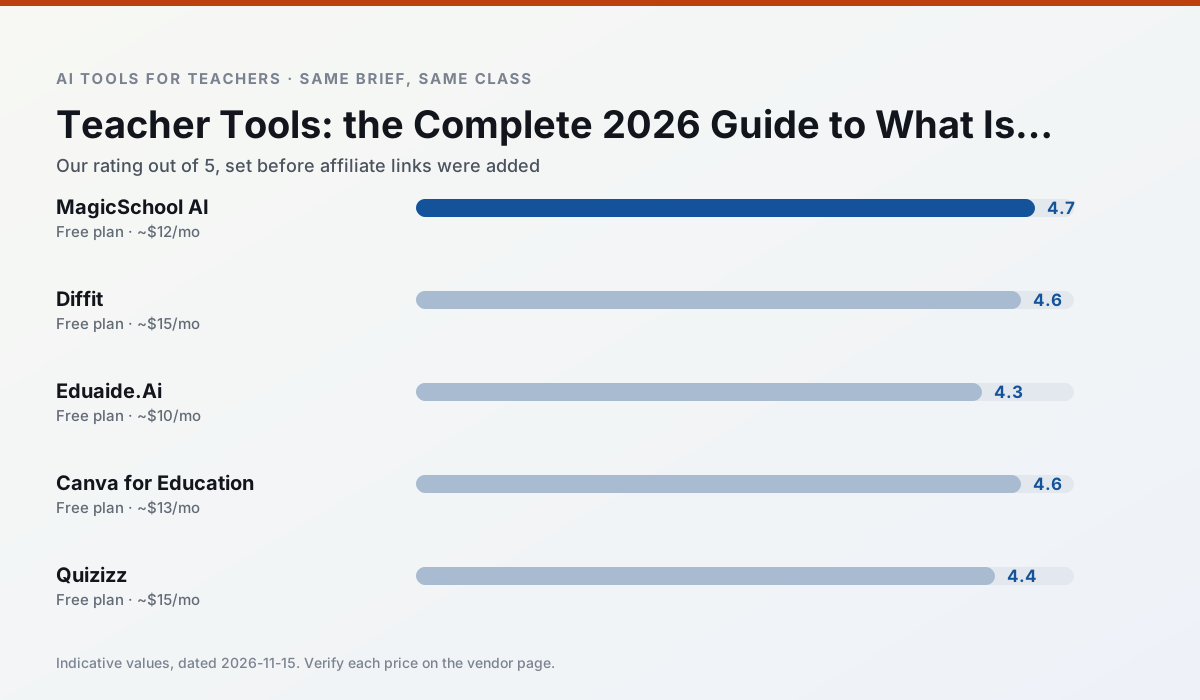
Side by side
Comparison table
Ratings reflect our classroom workflow, not vendor claims. Prices are indicative; verify on the vendor site.
| Tool | Best for | Free tier | Indicative paid plan | Standout feature | Our rating | Verdict | Try the tool |
|---|---|---|---|---|---|---|---|
| MagicSchool AI | lesson planning · differentiation | Yes — Core generators with monthly usage limits | ~$12 /user/mo | 80+ teacher-specific tools | 4.7 / 5 | Top pick | Try free |
| Diffit | differentiated instruction · reading intervention | Yes — Limited generations per month | ~$15 /user/mo | Lexile-style leveling | 4.6 / 5 | Top pick | Try free |
| Eduaide.Ai | lesson planning · rubric creation | Yes — Daily generation cap | ~$10 /user/mo | Resource library | 4.3 / 5 | Strong option | Try free |
| Canva for Education | slide decks · worksheets | Yes — Verification required | ~$13 /user/mo | Thousands of education templates | 4.6 / 5 | Top pick | Try free |
| Quizizz | quiz generation · formative assessment | Yes — Core quiz creation | ~$15 /user/mo | AI question generator | 4.4 / 5 | Strong option | Try free |
| Class Companion | grading · feedback on writing | Yes — Limited assignments | ~$12 /user/mo | Handwriting recognition | 4.1 / 5 | Situational | Try free |
Match your situation
Best for X
Different jobs need different tools. Here is what we would open first in each case.
A large library of teacher-specific AI generators in one dashboard.
Level any text or video into differentiated reading materials.
Lesson, rubric and worksheet generation with a teaching-resource library.
Free design suite for educators with AI writing and image features.
Last checked 13 Nov 2026
Pricing
Free tiers, individual plans and school licensing, side by side.
| Tool | Free plan | Individual / paid | School & district | Billing note | Verify |
|---|---|---|---|---|---|
| MagicSchool AI | $0 — Core generators with monthly usage limits | ~$12 /user/mo | Custom quote | Indicative — verify on vendor site | Vendor |
| Diffit | $0 — Limited generations per month | ~$15 /user/mo | Custom quote | Indicative — verify on vendor site | Vendor |
| Eduaide.Ai | $0 — Daily generation cap | ~$10 /user/mo | Custom quote | Indicative — verify on vendor site | Vendor |
| Canva for Education | $0 — Verification required | ~$13 /user/mo | Custom quote | Indicative — verify on vendor site | Vendor |
| Quizizz | $0 — Core quiz creation | ~$15 /user/mo | Custom quote | Indicative — verify on vendor site | Vendor |
| Class Companion | $0 — Limited assignments | ~$12 /user/mo | Custom quote | Indicative — verify on vendor site | Vendor |
Editorial rule: pricing is re-checked every 2–3 months and the top 50 pages are refreshed every 6 months. See our funding policy.
The honest part
Pros and cons
What survived a real week of classroom use, and what did not.
Pros
- Widest purpose-built template library
- Strong free tier for individual teachers
- Fast to learn with almost no prompting skill
Cons
- Outputs still need standards review
- Best features sit behind the paid tier
- District approval can be slow
Pros
- Excellent for mixed-ability classes
- Produces printable and digital versions
- Minimal setup
Cons
- Narrower scope than all-in-one suites
- Leveling is approximate, not a formal assessment
- Heavy use burns through the free quota
Pros
- Very low entry price
- Good worksheet and rubric output
- Clean, uncluttered UI
Cons
- Smaller template set than MagicSchool
- Less polished export options
- Limited integrations
Pros
- Effectively free for verified teachers
- Huge template library
- No design skills needed
Cons
- AI features are capped
- Easy to produce cluttered slides
- Account verification can be slow
Pros
- Students already know the interface
- Good reporting
- Works on low-end devices
Cons
- Writing high-quality AI questions still needs review
- Gamification can distract
- Advanced analytics are paid
In the classroom
Use cases
Five concrete workflows, with the tool we would open for each one.
One tool that covers most of a planning week
A single generator with a library of teacher-specific templates covers planning, differentiation and family email in one place, which is what most searches for teacher tools are actually after.
Recommended: MagicSchool AIThe free stack that survives a term
Three free tools, chosen so their quotas do not collide: one generator, one design tool, one quiz tool. Anything else waits until one of those stops being enough.
Recommended: DiffitThe tool nobody needs
Dashboards and analytics products are the most common wasted purchase. If a tool does not remove a task you do weekly, it will not survive September.
Recommended: Eduaide.Ai
Questions teachers ask us
FAQ
Direct answers, also published as FAQPage structured data for search and AI assistants.
What are the best teacher tools in 2026?
Are teacher tools free?
Do I need a school licence?
Sources & further reading
Our recommendation
Try MagicSchool AI free for teacher tools
A large library of teacher-specific AI generators in one dashboard.
Some links on this page are affiliate links. We may earn a commission at no extra cost to you. Never enter student PII into a free consumer account.
Keep reading
Related comparisons in this cluster.
Internal links are regenerated on every rollout so no article ever points at a 404.