The short answer
- Canva for Education is the first tool to open for ed tech tools for the classroom.
- Free tiers are quota-limited; check the comparison table before assuming a tool is free forever.
- Every AI output needs a teacher review before it reaches a student.
- Prices are indicative and dated; verify on the vendor page before buying.
Start with Canva for Education on its free plan.
Last Tuesday, my third period dumped thirty-two crumpled quizzes on my desk before heading to lunch. I had three prep periods that week, all eaten up by IEP meetings and a sudden budget audit. That is when I stopped adding new software to my browser bar and started looking at ed tech tools for the classroom through a much stricter lens. If a tool does not save me twenty minutes of actual labor or catch a misconception before the Friday test, it gets uninstalled.
Evaluating software in 2026 is less about finding cool features and more about surviving district IT hurdles, data privacy checks, and subscription creep. I have spent the last term testing everything from paper-grading scanners to AI lesson generators. Here is what actually works when the bell rings and twenty-eight teenagers are waiting for instructions.
The Three-Question Test Before You Install
Before you click sign-up or hand a link to your department chair, run every platform through a simple filter. Does it remove a weekly task that currently steals your lunch break? Does it run smoothly on a five-year-old managed Chromebook that drops Wi-Fi twice an hour? Can IT easily turn off the student-facing AI parts if a parent complains? If you answer no to any of those questions, close the tab and wait.
Too many teachers burn out trying to force flashy applications into workflows where a clipboard and a red pen work better. You need utilities that respect your cognitive load. If you are exploring broader categories, check our roundup of best AI tools for teachers-2026.
Best Overall for Daily Use: Canva for Education
Canva for Education takes our top spot because it has quietly replaced three different apps on my desktop. It is effectively free for verified educators, though verification can occasionally take a week if your school email domain is non-standard. You get a massive template library paired with AI writing and image tools that require almost zero design skill.
The danger here is clutter. It is remarkably easy to produce visually loud slides that overwhelm students with cognitive load. Keep your text large and your layouts simple.
Prompt: Create a visually clean 5-slide introductory deck on cell organelles for 7th grade science, keeping text minimal and dyslexia-friendly.
Returned: A gorgeous, highly decorated template with five different serif fonts, tiny text boxes, and watercolor chloroplast backgrounds that failed contrast checks.
Edit 1: Swapped every font for standard sans-serif and forced a solid white background with dark gray text. Edit 2: Deleted three decorative vector graphics per slide to keep the focus entirely on the mitochondria and nucleus diagrams.
Best Free Option and Quick Setups: Quizizz and SchoolAI
If your budget is zero dollars, Quizizz remains a classroom staple. Students already know the interface from elementary school, meaning you waste zero instructional time teaching navigation. The core quiz creation is free, and it handles low-end devices without crashing. The gamification can distract easily, so I use paper mode or turn off live leaderboards when we need serious focus.
For quick setup on managed devices, SchoolAI stands out as our pick for speed. It acts as a school-safe AI workspace with tight teacher visibility and strong safeguarding defaults. It requires school-wide buy-in to unlock its best features, but its teacher-controlled student spaces let you run targeted stations without worrying about unfiltered web access.
Dedicated Workflow Savers: MagicSchool AI, Formative, and Gradescope
When your planning period is cut short, MagicSchool AI offers the widest purpose-built template library for teachers in one dashboard. It is our top pick for schools and districts because the free tier is generous for individual planning, though the best administrative features sit behind a paid tier hovering around $12 per user per month. You still have to review outputs against your state standards, but it cuts down first-draft creation from forty minutes to four.
For live intervention data, Formative lets you upload existing PDFs and turn them into auto-grading checkpoints. It builds clean data groups for struggling learners, though setting up rubrics takes upfront patience. Meanwhile, Gradescope handles paper assessments by scanning handwritten work and applying AI-assisted rubric grading. It is a massive time-saver for high school essay scoring, though it is absolute overkill for elementary classrooms and institutional pricing remains opaque. For more ways to streamline your workflow, browse through our guide on classroom apps for teachers.
What Districts Actually Pay For
When software reps talk about enterprise licenses, they usually gloss over the plumbing that keeps your school out of the local news. Districts pay for rostering, single sign-on, admin controls, and a signed data-processing agreement. None of that administrative safety net is visible in a free trial.
Canva, Quizizz, MagicSchool, SchoolAI, Formative, and Gradescope all maintain varying levels of FERPA and COPPA compliance documentation, but you still need to confirm your local district DPA before uploading class rosters. If an app asks you to paste student email lists into an unvetted free tier, pause immediately. Protect your students' data first, and let the fancy AI features wait for IT approval.
FAQ
What makes an edtech tool worth adopting?
It removes a task a teacher repeats weekly, works on the devices the school owns, and clears the district's data review.
How do I evaluate a tool without buying it?
Run one real task on the free tier, time the review, and ask IT whether the student-facing features can be disabled.
Sources and further reading
- U.S. Department of Education, Student Privacy (PTAC): FERPA and edtech vendor guidance, the reference we check privacy claims against
- Common Sense Education privacy ratings: independent vendor evaluations
- CAST UDL Guidelines: accessibility and learner variability, used when judging accommodation tools
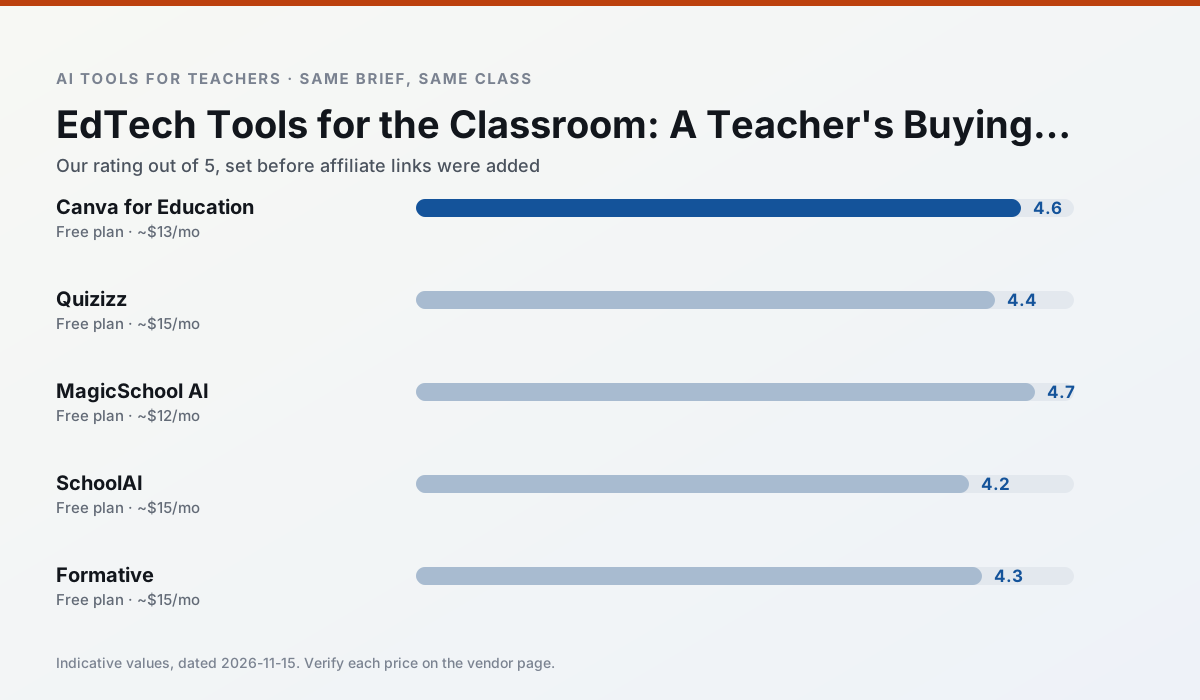
Side by side
Comparison table
Ratings reflect our classroom workflow, not vendor claims. Prices are indicative; verify on the vendor site.
| Tool | Best for | Free tier | Indicative paid plan | Standout feature | Our rating | Verdict | Try the tool |
|---|---|---|---|---|---|---|---|
| Canva for Education | slide decks · worksheets | Yes — Verification required | ~$13 /user/mo | Thousands of education templates | 4.6 / 5 | Top pick | Try free |
| Quizizz | quiz generation · formative assessment | Yes — Core quiz creation | ~$15 /user/mo | AI question generator | 4.4 / 5 | Strong option | Try free |
| MagicSchool AI | lesson planning · differentiation | Yes — Core generators with monthly usage limits | ~$12 /user/mo | 80+ teacher-specific tools | 4.7 / 5 | Top pick | Try free |
| SchoolAI | student-safe AI · differentiated instruction | Yes — Limited seats | ~$15 /user/mo | Teacher-monitored student chats | 4.2 / 5 | Strong option | Try free |
| Formative | formative assessment · grading | Yes — Core assessment tools | ~$15 /user/mo | Live student responses | 4.3 / 5 | Strong option | Try free |
| Gradescope | grading · rubric creation | Yes — Limited courses | Custom quote | Bubble sheet and handwriting capture | 4.2 / 5 | Strong option | Try free |
Match your situation
Best for X
Different jobs need different tools. Here is what we would open first in each case.
Free design suite for educators with AI writing and image features.
AI-assisted quiz creation with a large question bank and live games.
A large library of teacher-specific AI generators in one dashboard.
School-safe AI workspace with teacher-controlled student spaces.
Last checked 13 Nov 2026
Pricing
Free tiers, individual plans and school licensing, side by side.
| Tool | Free plan | Individual / paid | School & district | Billing note | Verify |
|---|---|---|---|---|---|
| Canva for Education | $0 — Verification required | ~$13 /user/mo | Custom quote | Indicative — verify on vendor site | Vendor |
| Quizizz | $0 — Core quiz creation | ~$15 /user/mo | Custom quote | Indicative — verify on vendor site | Vendor |
| MagicSchool AI | $0 — Core generators with monthly usage limits | ~$12 /user/mo | Custom quote | Indicative — verify on vendor site | Vendor |
| SchoolAI | $0 — Limited seats | ~$15 /user/mo | Custom quote | Indicative — verify on vendor site | Vendor |
| Formative | $0 — Core assessment tools | ~$15 /user/mo | Custom quote | Indicative — verify on vendor site | Vendor |
| Gradescope | $0 — Limited courses | Custom quote | Custom quote | LMS integration and support | Vendor |
Editorial rule: pricing is re-checked every 2–3 months and the top 50 pages are refreshed every 6 months. See our funding policy.
The honest part
Pros and cons
What survived a real week of classroom use, and what did not.
Pros
- Effectively free for verified teachers
- Huge template library
- No design skills needed
Cons
- AI features are capped
- Easy to produce cluttered slides
- Account verification can be slow
Pros
- Students already know the interface
- Good reporting
- Works on low-end devices
Cons
- Writing high-quality AI questions still needs review
- Gamification can distract
- Advanced analytics are paid
Pros
- Widest purpose-built template library
- Strong free tier for individual teachers
- Fast to learn with almost no prompting skill
Cons
- Outputs still need standards review
- Best features sit behind the paid tier
- District approval can be slow
Pros
- Designed for district approval
- Teacher visibility into student use
- Good safeguarding defaults
Cons
- Requires school-wide buy-in
- Less flexible than general LLMs
- Pricing is mostly quote-based
Pros
- Strong data for intervention groups
- Works with existing PDFs and Docs
- Good LMS integrations
Cons
- Steeper setup than quiz games
- Best value requires school-wide rollout
- Price adds up per teacher
In the classroom
Use cases
Five concrete workflows, with the tool we would open for each one.
The three-question test
Does it remove a weekly task? Does it work on a managed device? Can IT turn the student-facing parts off? A no anywhere means wait.
Recommended: Canva for EducationWhat districts pay for
Rostering, admin controls, single sign-on and a data-processing agreement. None of that is visible in a free trial.
Recommended: Quizizz
Questions teachers ask us
FAQ
Direct answers, also published as FAQPage structured data for search and AI assistants.
What makes an edtech tool worth adopting?
How do I evaluate a tool without buying it?
Sources & further reading
Our recommendation
Try Canva for Education free for ed tech tools for the classroom
Free design suite for educators with AI writing and image features.
Some links on this page are affiliate links. We may earn a commission at no extra cost to you. Never enter student PII into a free consumer account.
Keep reading
Related comparisons in this cluster.
Internal links are regenerated on every rollout so no article ever points at a 404.