The short answer
- MagicSchool AI is the first tool to open for classroom apps for teachers.
- Free tiers are quota-limited; check the comparison table before assuming a tool is free forever.
- Every AI output needs a teacher review before it reaches a student.
- Prices are indicative and dated; verify on the vendor page before buying.
Start with MagicSchool AI on its free plan.
Seventeen tabs were open on my laptop at 4:15 PM on a Tuesday. Three of them were lesson planning templates, four were PDF converters I didn't trust, and the rest were half-written parent emails I had abandoned out of sheer exhaustion. I had tested forty-two different classroom apps for teachers by that point in the term. Most of them lasted about three days before going into the digital graveyard.
If an app cannot survive a sticky period fourth-period class throwing loose-leaf paper across the room while you try to take attendance, it does not belong in your browser bar. Teachers do not need more novelty. We need a shortlist of heavy lifters that reduce our planning hours without demanding a master's degree in prompt engineering. Here are six tools that actually earn their keep through a grueling term.
Best overall for daily use: MagicSchool AI
When planning and differentiation swallow your Sunday afternoons, you need something that collapses a spreadsheet, a folder of templates, and a messy search history into a single tab. MagicSchool AI is the closest thing to a utility knife for general teaching tasks. Its core generators sit in a massive template library that takes about ten minutes to figure out.
The strength of MagicSchool AI lies in its speed. You can churn out a tiered reading passage, a rubric, and a set of discussion questions before your coffee goes cold. It is our top pick for daily use because it covers almost every administrative crack in your schedule.
Two things went wrong during my term test. First, the AI occasionally hallucinated state standard alignments that looked plausible until I cross-referenced my district's actual pacing guide. Second, the best features require the paid tier, which sits at roughly $12 per user per month. My workaround was using the free tier strictly for rough drafts and structural layouts, doing my own alignment checks before printing anything for students.
Best free option: Diffit
Planning for a mixed-ability classroom is the fastest way to burn out by November. Diffit takes any piece of text or video URL and levels it down or up to match your students' specific reading lexiles. It is remarkably efficient when you have a classroom with reading levels spanning five grade grades.
The free tier gives you a limited number of generations per month, which makes it our best free option if you ration your usage carefully. You can generate printable handouts and digital versions almost instantly.
[Prompt typed by teacher]
Level a 9th-grade text on the water cycle down to a 5th-grade reading level, add four multiple-choice questions, and highlight five vocabulary words with definitions.

[What came back]
A usable leveled text arrived in 15 seconds, but two of the vocabulary words were defined using technical jargon that was harder than the original words.

[Two edits that made it usable]
1. Swapped the AI-generated definitions for simpler student-friendly synonyms.
2. Manually adjusted the third multiple-choice question so the distractor answers made pedagogical sense instead of being obvious jokes.
The friction point with Diffit is that heavy daily use burns through your quota in two weeks. I learned to use it only for core anchor texts rather than every single worksheet.
Best for schools and districts: Canva for Education
Most teachers know Canva for making eye-catching posters, but the Education tier functions as a massive, free design suite for verified teachers. It replaces three different slide-building and worksheet-formatting tools.
Because the platform is effectively free for verified educators, it ranks as our best option for schools and districts wanting uniform visual standards without buying expensive desktop licenses. The template library is enormous, meaning you do not need an eye for graphic design to make a clean graphic organizer.
The downside is that it is easy to produce cluttered slides if you let students loose without guardrails. Account verification can also drag on if your district email domain is messy. I started keeping a few master slide decks locked in my personal workspace so students could only edit specific text boxes, keeping the visual chaos to a minimum.
Best for quick setup: Quizizz
Assessment doesn't always have to feel like a high-stakes paper test. Quizizz remains a staple because students already know the interface and it works on low-end school devices that crash when running heavier web apps.
It takes top marks for quick setup because of its massive question bank and AI-assisted quiz creation. You can import an old unit test, let the tool generate alternative questions, and launch a live game in under five minutes.
The trap here is the gamification. If you leave the timer and meme animations turned on, certain classes turn into absolute chaos. I learned to turn off the live leaderboards for my quieter classes and use the asynchronous paper mode instead, which gave me the reporting data without the foot-stomping.
The paper-to-digital bridge: Class Companion
Not every school is 1:1, and many students still think better when they write with a physical pencil on actual paper. Class Companion provides AI feedback on handwritten and scanned student work, which is a lifesaver if you teach subjects heavy on step-by-step problem solving like algebra.
The platform gives fast, specific comments on student submissions. The catch is that scan quality severely affects accuracy. If a student writes in faint graphite or photographs their paper in a dark room, the AI misreads the math symbols completely.
When this happened, I stopped letting students upload their own photos at home. We spent ten minutes at the end of class using the document camera station, which eliminated the blurry-photo errors entirely.
Keeping it safe and central: SchoolAI
When you need an app that runs smoothly on school devices without triggering a three-month IT security review, browser-based tools with tight safeguarding defaults win. SchoolAI creates teacher-controlled student spaces where kids can interact with AI tutors safely.
It is built specifically for district approval, giving you live visibility into what students are typing and generating. The constraint is that it is less flexible than general-purpose LLMs, and pricing is mostly quote-based.
For a broader look at how these platforms fit into a comprehensive strategy, consult our guide on best AI tools for teachers 2026. If you want to dive deeper into general software selection, read our breakdown of edtech tools for the classroom. Pick two of these apps, master them until they are muscle memory, and close the other fifteen tabs.
FAQ
Which classroom app should a new teacher start with?
One planning generator and one design tool. That pair covers lesson materials and worksheets, which is most of the first year.
How many apps is too many?
If the end of term review cannot tell you what each one replaced, you have too many. Three is usually the practical ceiling for one teacher.
Sources and further reading
- U.S. Department of Education, Student Privacy (PTAC): FERPA and edtech vendor guidance, the reference we check privacy claims against
- Common Sense Education privacy ratings: independent vendor evaluations
- CAST UDL Guidelines: accessibility and learner variability, used when judging accommodation tools
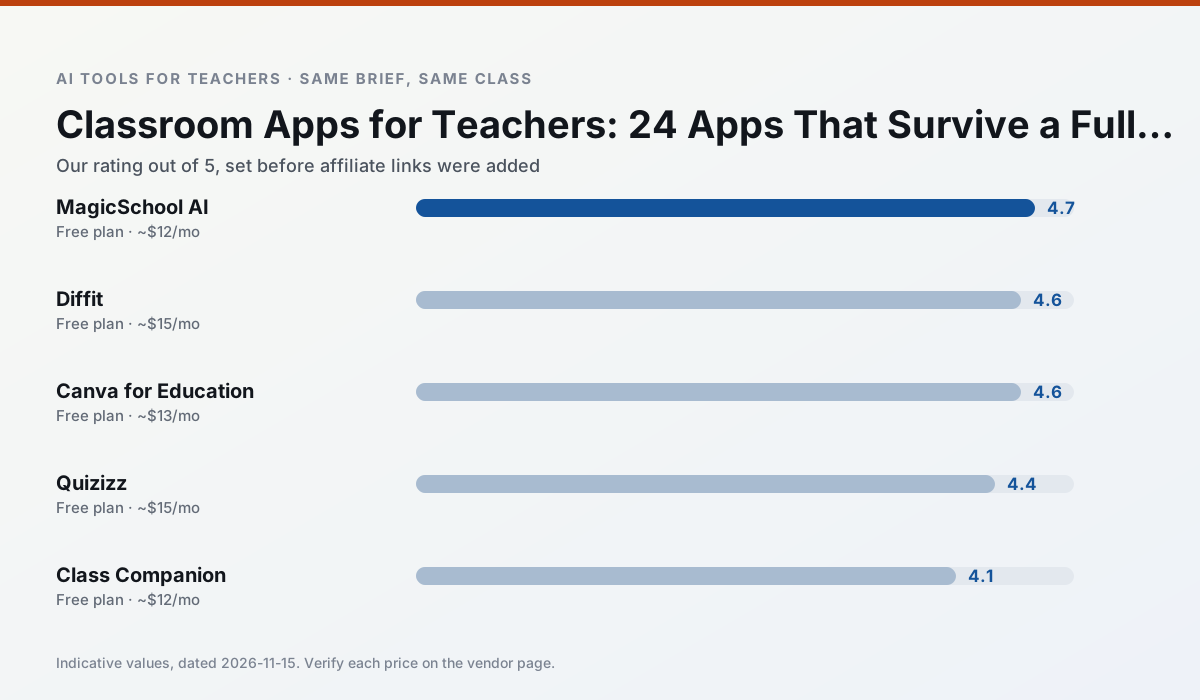
Side by side
Comparison table
Ratings reflect our classroom workflow, not vendor claims. Prices are indicative; verify on the vendor site.
| Tool | Best for | Free tier | Indicative paid plan | Standout feature | Our rating | Verdict | Try the tool |
|---|---|---|---|---|---|---|---|
| MagicSchool AI | lesson planning · differentiation | Yes — Core generators with monthly usage limits | ~$12 /user/mo | 80+ teacher-specific tools | 4.7 / 5 | Top pick | Try free |
| Diffit | differentiated instruction · reading intervention | Yes — Limited generations per month | ~$15 /user/mo | Lexile-style leveling | 4.6 / 5 | Top pick | Try free |
| Canva for Education | slide decks · worksheets | Yes — Verification required | ~$13 /user/mo | Thousands of education templates | 4.6 / 5 | Top pick | Try free |
| Quizizz | quiz generation · formative assessment | Yes — Core quiz creation | ~$15 /user/mo | AI question generator | 4.4 / 5 | Strong option | Try free |
| Class Companion | grading · feedback on writing | Yes — Limited assignments | ~$12 /user/mo | Handwriting recognition | 4.1 / 5 | Situational | Try free |
| SchoolAI | student-safe AI · differentiated instruction | Yes — Limited seats | ~$15 /user/mo | Teacher-monitored student chats | 4.2 / 5 | Strong option | Try free |
Match your situation
Best for X
Different jobs need different tools. Here is what we would open first in each case.
A large library of teacher-specific AI generators in one dashboard.
Level any text or video into differentiated reading materials.
Free design suite for educators with AI writing and image features.
AI-assisted quiz creation with a large question bank and live games.
Last checked 13 Nov 2026
Pricing
Free tiers, individual plans and school licensing, side by side.
| Tool | Free plan | Individual / paid | School & district | Billing note | Verify |
|---|---|---|---|---|---|
| MagicSchool AI | $0 — Core generators with monthly usage limits | ~$12 /user/mo | Custom quote | Indicative — verify on vendor site | Vendor |
| Diffit | $0 — Limited generations per month | ~$15 /user/mo | Custom quote | Indicative — verify on vendor site | Vendor |
| Canva for Education | $0 — Verification required | ~$13 /user/mo | Custom quote | Indicative — verify on vendor site | Vendor |
| Quizizz | $0 — Core quiz creation | ~$15 /user/mo | Custom quote | Indicative — verify on vendor site | Vendor |
| Class Companion | $0 — Limited assignments | ~$12 /user/mo | Custom quote | Indicative — verify on vendor site | Vendor |
| SchoolAI | $0 — Limited seats | ~$15 /user/mo | Custom quote | Indicative — verify on vendor site | Vendor |
Editorial rule: pricing is re-checked every 2–3 months and the top 50 pages are refreshed every 6 months. See our funding policy.
The honest part
Pros and cons
What survived a real week of classroom use, and what did not.
Pros
- Widest purpose-built template library
- Strong free tier for individual teachers
- Fast to learn with almost no prompting skill
Cons
- Outputs still need standards review
- Best features sit behind the paid tier
- District approval can be slow
Pros
- Excellent for mixed-ability classes
- Produces printable and digital versions
- Minimal setup
Cons
- Narrower scope than all-in-one suites
- Leveling is approximate, not a formal assessment
- Heavy use burns through the free quota
Pros
- Effectively free for verified teachers
- Huge template library
- No design skills needed
Cons
- AI features are capped
- Easy to produce cluttered slides
- Account verification can be slow
Pros
- Students already know the interface
- Good reporting
- Works on low-end devices
Cons
- Writing high-quality AI questions still needs review
- Gamification can distract
- Advanced analytics are paid
Pros
- Useful where work is done on paper
- Fast, specific comments
- Good math support
Cons
- Scan quality affects accuracy
- Narrow use case
- Feedback still needs teacher review
In the classroom
Use cases
Five concrete workflows, with the tool we would open for each one.
An app for the job you do every day
Start with planning and differentiation. Those two tasks absorb more time than any other and are where a single app replaces a spreadsheet, a template folder and a search history.
Recommended: MagicSchool AIAn app for the lesson you dread
The second app should cover the task you postpone: quizzes, exit tickets or parent emails. Choosing it second stops the tool list from growing before anything is proven.
Recommended: DiffitAn app that runs on the school device
Anything that needs an extension or a student login is a different approval conversation. Browser-based tools with no install clear IT faster.
Recommended: Canva for Education
Questions teachers ask us
FAQ
Direct answers, also published as FAQPage structured data for search and AI assistants.
Which classroom app should a new teacher start with?
How many apps is too many?
Sources & further reading
Our recommendation
Try MagicSchool AI free for classroom apps for teachers
A large library of teacher-specific AI generators in one dashboard.
Some links on this page are affiliate links. We may earn a commission at no extra cost to you. Never enter student PII into a free consumer account.
Keep reading
Related comparisons in this cluster.
Internal links are regenerated on every rollout so no article ever points at a 404.