The short answer
- Eduaide.Ai is our default pick for teachers who need to write criterion-referenced rubrics quickly; Claude is better when differentiation is the bottleneck.
- Pricing is where these pages date fastest. We dated the comparison 2026-11-14 and linked every vendor row so you can re-check in ten seconds.
- Every AI output for rubric creation needs a teacher review, especially standards codes, core subject accuracy, and anything in an IEP, assessment or family message.
- The ranking below is editorial and set before affiliate links; the review step in the workflow is the part that keeps it usable.
Start with MagicSchool AI on its free plan.
By Thursday night, staring at twenty-eight eighth-grade argument essays while my tea went cold, I did not want a brainstorming partner. I wanted a grid that told me whether a thesis statement actually existed or just occupied space. Most free AI rubric creation tools for teachers promise to save your weekend, but half of them hand you a wall of generic education jargon that takes longer to edit than writing the thing from scratch. Let's look at what actually survives a real week in the classroom without demanding a credit card or a computer science degree.
The Reality of Free Tiers in Rubric Work
Every platform with an education label claims to be free, but you usually hit a wall right around midterms when your generation cap runs out. MagicSchool AI handles this better than most, offering a generous set of core generators with monthly usage limits that rarely trip you up if you are just building rubrics and short check-ins. It is easily the best free option for individual teachers who need a purpose-built template library without learning how to prompt. You plug in your standards or your essay prompt, click generate, and you get a four-tier table. The catch is that the output tends to lean heavily on phrases like "demonstrates a profound understanding," which means you still have to spend five minutes anchoring those tiers to actual student work.
If you are looking at parent-facing writing where the tone needs to be direct and accessible rather than academic, Eduaide.Ai shines. Its free tier relies on a daily generation cap rather than a monthly bank, which suits teachers who like to tinker in short bursts. The interface is clean and uncluttered, making it simple to spin up a quick rubric and a matching worksheet at the same time. While it has a smaller template set than MagicSchool and its export options are a bit basic, it stays out of your way and produces clean tables that parents can actually parse during conferences.
When Free Tiers Fall Short: Handling Complex Tasks
Sometimes a standard template generator just cannot parse the nuances of a messy unit plan or a multi-part rubric. That is when teachers pivot to more general platforms, keeping in mind that you should never paste identifiable student work into consumer models. For document-heavy planning and nuanced output, Claude offers a long-context assistant that handles detailed prompt requirements without breaking a sweat. It does not have teacher-specific templates or classroom integrations on its free tier, but it excels at structured document output that looks like it was written by an actual human department chair.
Prompt:
Create a 4-point analytical writing rubric for an 8th-grade argumentative essay.
Focus on claim, evidence, reasoning, and counterargument.
Keep the descriptions under 20 words per cell and avoid generic phrases like 'deeply insightful.'

First-pass output:
A 4-column table appeared with cells like "Student consistently deploys robust evidence that seamlessly integrates with sophisticated reasoning."

Two edits to make it usable:
1. Replaced every instance of "robust" and "seamlessly" with observable actions like "cites at least two direct quotes per body paragraph."
2. Added a hard point deduction note for essays lacking an explicit counterargument in the third paragraph.
When you are trying to manage mixed-ability classes across the room, you often need more than just a rubric. You need the leveled materials that match the expectations of that rubric. Diffit lets you take any text or video and level it into differentiated reading materials, though heavy use burns through the free quota quickly. It is narrower in scope than an all-in-one suite, and the leveling is an approximate guide rather than a formal diagnostic assessment, but it saves hours when you are trying to scaffold a source text for three different reading groups.
Grading Paper Assessments at Scale
Building the rubric is only half the battle; applying it consistently across one hundred and fifty papers is where the real burnout happens. Gradescope brings AI-assisted rubric grading to scanned and handwritten assessments, though its institutional pricing is opaque and setup effort is real. It is completely overkill for elementary classrooms, but for high school or middle school teachers swimming in paper lab reports, it saves massive amounts of time. It groups similar student answers together so you can apply a point deduction or a rubric comment to twenty papers at once instead of writing the same note over and over. Because it handles actual student work, it requires full DPA and FERPA review through your district before you scan a single page.
If your rubric is meant to drive live interaction rather than a static grade at the end of a unit, Curipod turns a topic into an interactive student-response lesson in minutes. It is great for quick checks for understanding without requiring student accounts for basic use, though the free tier is quite restrictive. It focuses entirely on delivery and student engagement rather than administrative planning, which makes it a nice companion to more traditional planning tools like those found in best AI tools for teachers 2026.
What to Watch Out For Before Monday Morning
Every single one of these platforms will hallucinate something if you let it run unattended. AI generators love to invent comprehension questions with two correct answers or rubric tiers that contradict the actual prompt you fed them. Always spot-check the output before you print or upload. If you are exploring broader workflows beyond rubrics, take a look at how other educators manage platform costs and restrictions over at our guide on brisk teaching pricing. Treat these tools as fast rough-draft machines, not final authorities, and your classroom will run just fine.
FAQ
Which free plan lasts a full week?
The ones that survive a normal rubric creation week without a card are listed first in the table; the rest are demos with better marketing.
What breaks first on a free plan?
Generation limits, then export options. Export matters more than it sounds: a link that expires is not an archive.
Is a free plan enough for a department?
No. Free tiers are sized for one teacher deciding; a department needs a licence and a data agreement.
Sources
- Eduaide.Ai Features and Pricing Overview, eduaide.ai
- Anthropic Claude Pricing and Usage Guidelines, anthropic.com
- Gradescope Workflow and Assessment Documentation, gradescope.com
- MagicSchool AI Tool Directory, magicschool.ai
- Curipod Interactive Lesson Platform, curipod.com
- Diffit Differentiated Learning Resources, diffit.me
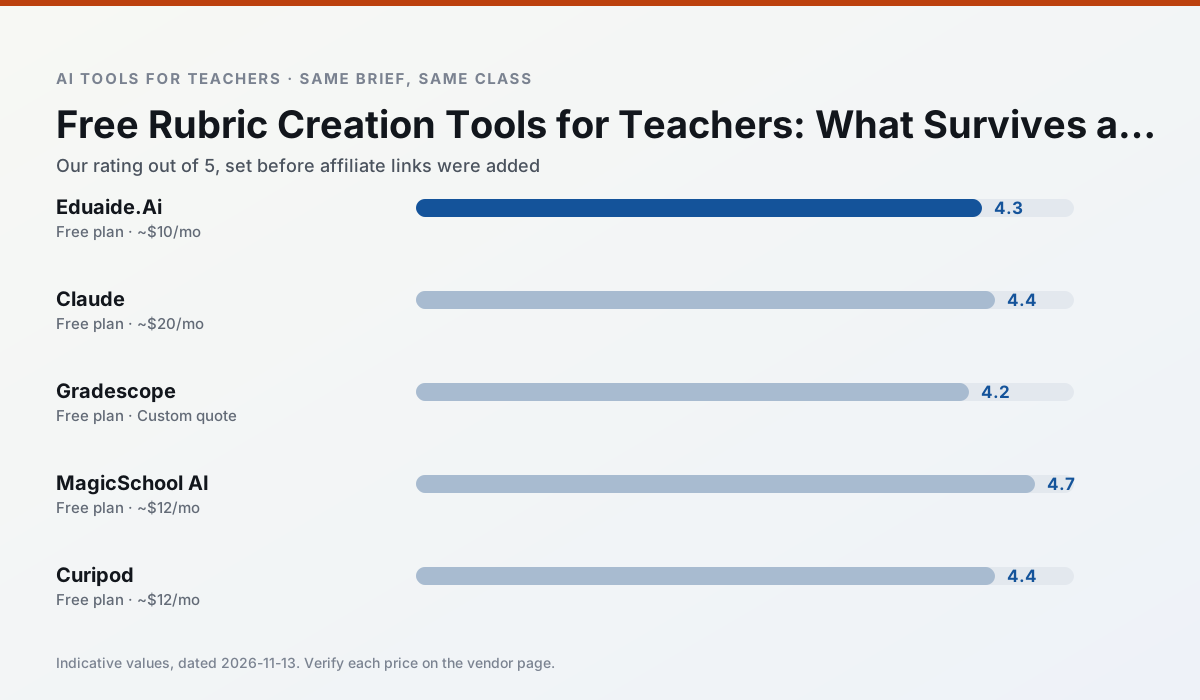
Side by side
Comparison table
Ratings reflect our timed classroom workflow, not vendor claims. Prices are indicative — verify on the vendor site.
| Tool | Best for | Free tier | Indicative paid plan | Standout feature | Our rating | Verdict | Try the tool |
|---|---|---|---|---|---|---|---|
| Eduaide.Ai | lesson planning · rubric creation | Yes — Daily generation cap | ~$10 /user/mo | Resource library | 4.3 / 5 | Strong option | Try free |
| Claude | rubric creation · feedback on writing | Yes — Usage-limited | ~$20 /user/mo | Very large context window | 4.4 / 5 | Strong option | Try free |
| Gradescope | grading · rubric creation | Yes — Limited courses | Custom quote | Bubble sheet and handwriting capture | 4.2 / 5 | Strong option | Try free |
| MagicSchool AI | lesson planning · differentiation | Yes — Core generators with monthly usage limits | ~$12 /user/mo | 80+ teacher-specific tools | 4.7 / 5 | Top pick | Try free |
| Curipod | formative assessment · exit tickets | Yes — Limited lessons per month | ~$12 /user/mo | Live polls and word clouds | 4.4 / 5 | Strong option | Try free |
| Diffit | differentiated instruction · reading intervention | Yes — Limited generations per month | ~$15 /user/mo | Lexile-style leveling | 4.6 / 5 | Top pick | Try free |
Match your situation
Best for X
Different jobs need different tools. Here is what we would open first in each case.
Eduaide.Ai has the strongest tone control for family emails and report comments, provided you still read the message aloud before sending.
For three reading groups and one text, Claude needs the least manual relabelling of vocabulary and questions.
Gradescope is built around teacher-monitored student spaces and audit logs rather than a consumer chat account, which is a different approval conversation.
MagicSchool AI's free plan is the most usable in this comparison: a quota that survives a normal week. Not enough for a department, enough for one teacher to decide.
Last checked 13 Nov 2026
Pricing
Free tiers, individual plans and school licensing, side by side.
| Tool | Free plan | Individual / paid | School & district | Billing note | Verify |
|---|---|---|---|---|---|
| Eduaide.Ai | $0 — Daily generation cap | ~$10 /user/mo | Custom quote | Indicative — verify on vendor site | Vendor |
| Claude | $0 — Usage-limited | ~$20 /user/mo | ~$25+ /user/mo | Indicative — verify on vendor site | Vendor |
| Gradescope | $0 — Limited courses | Custom quote | Custom quote | LMS integration and support | Vendor |
| MagicSchool AI | $0 — Core generators with monthly usage limits | ~$12 /user/mo | Custom quote | Indicative — verify on vendor site | Vendor |
| Curipod | $0 — Limited lessons per month | ~$12 /user/mo | Custom quote | Indicative — verify on vendor site | Vendor |
| Diffit | $0 — Limited generations per month | ~$15 /user/mo | Custom quote | Indicative — verify on vendor site | Vendor |
Editorial rule: pricing is re-checked every 2–3 months and the top 50 pages are refreshed every 6 months. See our funding policy.
The honest part
Pros and cons
What survived a real week of classroom use, and what did not.
Pros
- Very low entry price
- Good worksheet and rubric output
- Clean, uncluttered UI
Cons
- Smaller template set than MagicSchool
- Less polished export options
- Limited integrations
Pros
- Handles full unit plans and long rubrics
- Nuanced, less generic prose
- Good at structured document output
Cons
- No teacher-specific templates
- Fewer classroom integrations
- Consumer plan not suitable for student data
Pros
- Large time savings on paper assessments
- Consistent rubric application
- Detailed item analytics
Cons
- Overkill for elementary classrooms
- Institutional pricing is opaque
- Setup effort is real
Pros
- Widest purpose-built template library
- Strong free tier for individual teachers
- Fast to learn with almost no prompting skill
Cons
- Outputs still need standards review
- Best features sit behind the paid tier
- District approval can be slow
Pros
- High student engagement out of the box
- Great for quick checks for understanding
- No student accounts required for basic use
Cons
- Focused on delivery, not planning
- Requires reliable classroom devices
- Free tier is restrictive
In the classroom
Use cases
Five concrete workflows, with the tool we would open for each one.
An IEP present-levels first draft
Use aggregated, anonymised data only. Ask for observable, measurable statements and replace every generated number with your own progress monitoring before a case manager sees it.
Recommended: Eduaide.AiA five-minute exit ticket set
Ask for one recall, one application and one reasoning item, then delete the second recall question every generator sneaks in.
Recommended: ClaudeA question bank from a PDF or article
Feed a non-identifiable source and ask for items tagged by difficulty with the misconception behind each distractor. Spot-check every answer key; numerical items are least reliable.
Recommended: GradescopeA substitute folder that needs no context
The value here is structure, not creativity. Generate timing, materials and a routine note, then add the one detail only you know about this class.
Recommended: MagicSchool AIThree reading levels from one source text
Paste a vetted text, ask for supported, core and extension versions, then check the vocabulary list by hand. Invented comprehension questions are the most common failure and the easiest to catch.
Recommended: Curipod
Questions teachers ask us
FAQ
Direct answers, also published as FAQPage structured data for search and AI assistants.
Which free plan lasts a full week?
What breaks first on a free plan?
Is a free plan enough for a department?
Sources & further reading
Our recommendation
Try MagicSchool AI free for your next rubric creation task
A large library of teacher-specific AI generators in one dashboard. Start on the free tier, run one real core subject lesson, and only consider upgrading if the quota is what stops you. Disclosure: we may earn a commission (30% recurring) at no extra cost to you.
Some links on this page are affiliate links. We may earn a commission at no extra cost to you. Our rankings are editorial and never pay-to-play. Never enter student PII into a free consumer account.
Keep reading
Related comparisons in this cluster.
Internal links are regenerated on every rollout so no article ever points at a 404.