
The short answer
- Khanmigo is the first tool to open for ai in classrooms.
- Free tiers are quota-limited; check the comparison table before assuming a tool is free forever.
- Every AI output needs a teacher review before it reaches a student.
- Prices are indicative and dated; verify on the vendor page before buying.
Start with Khanmigo on its free plan.
At 8:14 last Tuesday, I stared at a student Chromebook showing a chat log where an algorithm cheerfully explained to an eighth grader that the square root of negative one was a cartoon character. That is the reality of bringing artificial intelligence into a working school building. We get sold utopian demos of automated brilliance, but the reality involves patchy Wi-Fi, students trying to make the bot write dissertations on Minecraft, and administrators asking about data privacy laws before third period.
If you are trying to figure out what actually holds up under fluorescent lights, you need to look past the hype. Not all platforms are built for the same job, and using the wrong tool in a live room guarantees a headache. For a broader look at how these systems fit into daily routines, read our guide on best AI tools for teachers 2026. Here is how the major options shake out when you stop testing them in empty labs and start using them with thirty teenagers.
Understanding the Teacher-Side Versus Student-Side Divide
The first rule of using technology in a school is knowing who is holding the device. Most working classrooms use AI on the teacher side only. That means you are using tools for lesson planning, text leveling, and drafting feedback while students do the human work of talking, writing, and arguing with each other. This setup is also the easiest version to defend to a skeptical parent or an administrator worried about data exposure.
When you keep the software on your own laptop, you control the output and check the facts before a child ever sees them. But sometimes districts want students interacting directly with an interface. That requires a completely different class of software. You cannot drop adolescents into an open consumer chat window without guardrails, unless your definition of a good morning involves fielding five different distraction reports.
Tutoring Tools That Supervise the Conversation
Student-facing tools only work when a teacher can see the conversation thread and step in before things go sideways. Khanmigo, priced at roughly $4 per learner monthly with subject-to-eligibility free tiers for US teachers, serves as our pick for best overall for daily use because of its education-first design. It acts as a guide rather than an answer key, prompting students to show their work in math and writing.
SchoolAI, which runs around $15 per user monthly with limited seats on its free tier, takes the crown as our best free option due to its strong safeguarding defaults. It gives teachers a live dashboard to watch multiple student chat sessions at once.
Prompt: "Act as a patient middle school science tutor helping a student who thinks plants eat dirt."
First Output: The AI told the student they were completely wrong and launched into a three-paragraph lecture on photosynthesis and cellular respiration, using vocabulary way above grade level.
Edits that made it usable:
- Added a constraint to ask only one guiding question at a time instead of lecturing.
- Restricted vocabulary to a sixth-grade Lexile level and required the bot to ask the student what they observed when a houseplant loses its leaves.
Even with good prompts, student tools fail when accounts are not set up properly or when regional availability lets you down. Always check your district data privacy agreements before uploading rosters.
General Assistants for Heavy Planning and Documents
When you need to build a four-week unit plan or parse a thirty-page state standards document, consumer-grade general assistants step up. ChatGPT, sitting around $20 per user monthly with a usage-limited free tier, acts as our pick for best for schools and districts because its massive prompt library helps teachers adapt it to almost any task.
Claude, also around $20 per user monthly with a limited free tier, stands out as best for quick setup when handling long-context document analysis. It reads entire curriculum guides without choking and produces nuanced, less robotic prose than its competitors.
[Teacher Dashboard] -> [Select Tool: Claude] -> [Upload 40-page district rubric] -> [Generate tiered writing prompts]
Neither of these platforms should be used with student personal identifiable information on consumer tiers. If you input student names or specific behavioral notes, you violate basic privacy standards. Keep these systems strictly for adult planning tasks unless your district provisions a secure enterprise workspace.
Interactive Lesson Delivery in Real Time
Live tools such as Curipod, which costs about $12 per user monthly with a restrictive free tier capping monthly lessons, turn a standard topic into an interactive student-response slide deck in minutes. They excel as warm-up exercises where the whole class watches aggregated responses populate on the main board anonymously.
"Can you summarize the causes of the American Revolution in three sentences for an 8th-grade history class, and include a multiple-choice check for understanding?"
The catch is that Curipod focuses entirely on delivery rather than long-term planning, and it falls apart the moment your school internet drops. It works wonderfully for engagement, but it fails for anything a student is graded on because the anonymous formats make individual assessment difficult. For more classroom management strategies involving these platforms, see our piece on AI in the classroom examples.
Centralized Generator Libraries for Busy Teachers
If you want a wide selection of templates without learning advanced prompt engineering, MagicSchool AI provides a massive library of generators for roughly $12 per user monthly, alongside a robust free tier for individual educators. It speeds up the creation of IEP goal trackers, lab safety quizzes, and parent-teacher communication emails.
The limitation here is that outputs still require rigorous standards review. An AI-generated rubric looks pristine on screen, but it frequently misses local curriculum nuances. Use these libraries to beat the blank-page panic, but never trust an automatically generated quiz without reading every single question first.
FAQ
Is AI allowed in the classroom?
It depends on the district's acceptable-use policy. Teacher-side use is usually accepted; student-facing use needs supervision, an approved tool and a data-processing agreement.
Should students use ChatGPT?
Only through an institutional account with teacher visibility, or not at all. A personal consumer account cannot be supervised and should not receive student work.
What is the safest way to start?
Start with teacher-side planning for one term. Then pilot one supervised student tool in a single class before anything school-wide.
Sources and further reading
- U.S. Department of Education, Student Privacy (PTAC): FERPA and edtech vendor guidance, the reference we check privacy claims against
- Common Sense Education privacy ratings: independent vendor evaluations
- CAST UDL Guidelines: accessibility and learner variability, used when judging accommodation tools
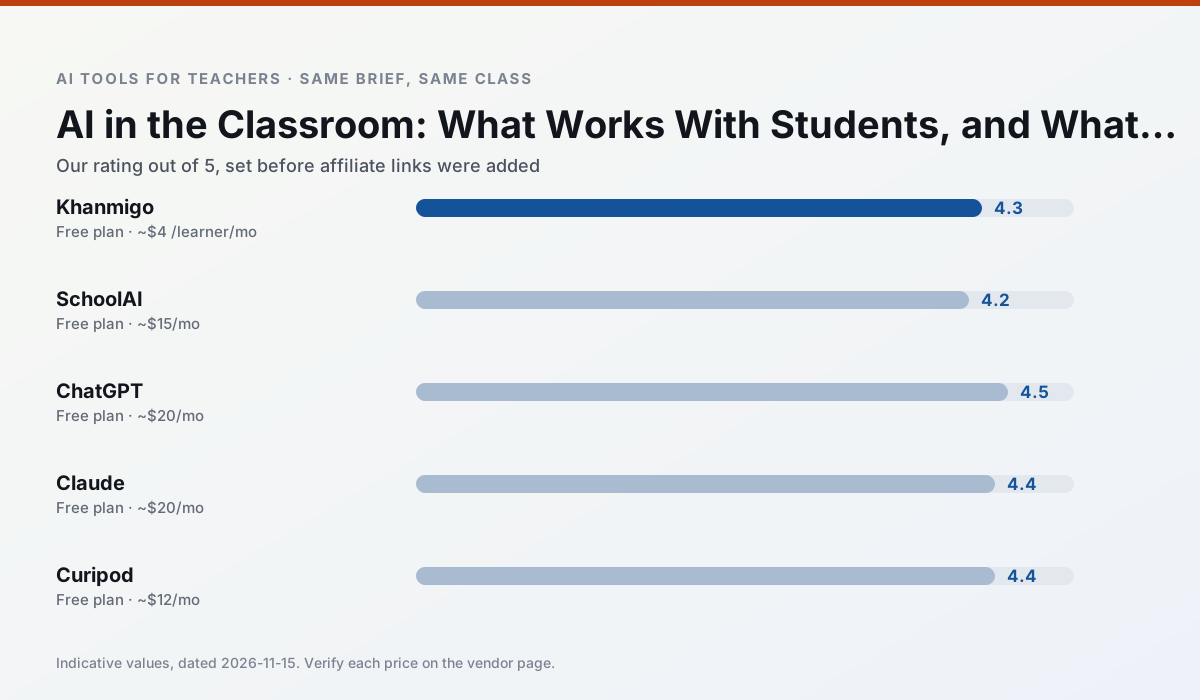
Side by side
Comparison table
Ratings reflect our classroom workflow, not vendor claims. Prices are indicative; verify on the vendor site.
| Tool | Best for | Free tier | Indicative paid plan | Standout feature | Our rating | Verdict | Try the tool |
|---|---|---|---|---|---|---|---|
| Khanmigo | math practice · student tutoring | Yes — US teacher accounts, subject to eligibility | ~$4 /learner/mo | Socratic tutoring rather than answers | 4.3 / 5 | Strong option | Try free |
| SchoolAI | student-safe AI · differentiated instruction | Yes — Limited seats | ~$15 /user/mo | Teacher-monitored student chats | 4.2 / 5 | Strong option | Try free |
| ChatGPT | lesson planning · parent communication | Yes — Usage-limited model access | ~$20 /user/mo | Custom GPTs and Projects | 4.5 / 5 | Top pick | Try free |
| Claude | rubric creation · feedback on writing | Yes — Usage-limited | ~$20 /user/mo | Very large context window | 4.4 / 5 | Strong option | Try free |
| Curipod | formative assessment · exit tickets | Yes — Limited lessons per month | ~$12 /user/mo | Live polls and word clouds | 4.4 / 5 | Strong option | Try free |
| MagicSchool AI | lesson planning · differentiation | Yes — Core generators with monthly usage limits | ~$12 /user/mo | 80+ teacher-specific tools | 4.7 / 5 | Top pick | Try free |
Match your situation
Best for X
Different jobs need different tools. Here is what we would open first in each case.
Tutor-style AI from a nonprofit education platform, with teacher tools.
School-safe AI workspace with teacher-controlled student spaces.
General-purpose assistant that adapts to almost any classroom task.
Long-context assistant suited to document-heavy planning and feedback.
Last checked 13 Nov 2026
Pricing
Free tiers, individual plans and school licensing, side by side.
| Tool | Free plan | Individual / paid | School & district | Billing note | Verify |
|---|---|---|---|---|---|
| Khanmigo | $0 — US teacher accounts, subject to eligibility | ~$4 /learner/mo | Custom quote | Indicative — verify on vendor site | Vendor |
| SchoolAI | $0 — Limited seats | ~$15 /user/mo | Custom quote | Indicative — verify on vendor site | Vendor |
| ChatGPT | $0 — Usage-limited model access | ~$20 /user/mo | ~$25+ /user/mo | Indicative — verify on vendor site | Vendor |
| Claude | $0 — Usage-limited | ~$20 /user/mo | ~$25+ /user/mo | Indicative — verify on vendor site | Vendor |
| Curipod | $0 — Limited lessons per month | ~$12 /user/mo | Custom quote | Indicative — verify on vendor site | Vendor |
| MagicSchool AI | $0 — Core generators with monthly usage limits | ~$12 /user/mo | Custom quote | Indicative — verify on vendor site | Vendor |
Editorial rule: pricing is re-checked every 2–3 months and the top 50 pages are refreshed every 6 months. See our funding policy.
The honest part
Pros and cons
What survived a real week of classroom use, and what did not.
Pros
- Education-first design
- Strong nonprofit trust signal
- Good math scaffolding
Cons
- Availability varies by region
- Less useful for admin paperwork
- Requires student accounts for full value
Pros
- Designed for district approval
- Teacher visibility into student use
- Good safeguarding defaults
Cons
- Requires school-wide buy-in
- Less flexible than general LLMs
- Pricing is mostly quote-based
Pros
- Most flexible option available
- Huge community of teacher prompt libraries
- Strong multilingual support
Cons
- Requires prompt skills for consistent results
- No built-in standards alignment
- District privacy review usually required
Pros
- Handles full unit plans and long rubrics
- Nuanced, less generic prose
- Good at structured document output
Cons
- No teacher-specific templates
- Fewer classroom integrations
- Consumer plan not suitable for student data
Pros
- High student engagement out of the box
- Great for quick checks for understanding
- No student accounts required for basic use
Cons
- Focused on delivery, not planning
- Requires reliable classroom devices
- Free tier is restrictive
In the classroom
Use cases
Five concrete workflows, with the tool we would open for each one.
AI as a tutor the teacher supervises
Student-facing tools work when a teacher can see the conversation and step in. Khanmigo and SchoolAI are built for that; a consumer chatbot is not.
Recommended: KhanmigoAI inside a live lesson
Live tools such as Curipod work for a warm-up where the whole class watches the output. They fail for anything a student is graded on.
Recommended: SchoolAIAI for the teacher, with students in the room
Most working classrooms use AI on the teacher side only: planning, differentiation, feedback drafts. That is also the easiest version to defend to a parent.
Recommended: ChatGPT
Questions teachers ask us
FAQ
Direct answers, also published as FAQPage structured data for search and AI assistants.
Is AI allowed in the classroom?
Should students use ChatGPT?
What is the safest way to start?
Sources & further reading
Our recommendation
Try Khanmigo free for ai in classrooms
Tutor-style AI from a nonprofit education platform, with teacher tools.
Some links on this page are affiliate links. We may earn a commission at no extra cost to you. Never enter student PII into a free consumer account.
Keep reading
Related comparisons in this cluster.
Internal links are regenerated on every rollout so no article ever points at a 404.