The short answer
- MagicSchool AI is the first tool to open for using ai in the classroom.
- Free tiers are quota-limited; check the comparison table before assuming a tool is free forever.
- Every AI output needs a teacher review before it reaches a student.
- Prices are indicative and dated; verify on the vendor page before buying.
Start with MagicSchool AI on its free plan.
The bell rang thirty seconds ago, twenty-eight eighth graders are talking over each other about a football game, and I am standing at my desk trying to figure out how to stretch a single article on westward expansion into something three different reading levels can digest before third period. That is the exact moment when using ai in the classroom stops being a conference keynote topic and starts being a frantic search for anything that works. We have all been sold plenty of software by people who haven't smelled a middle school hallway since the Clinton administration. But after a full term of running these platforms through actual classes, the noise has cleared. Some tools are genuinely useful. Others are just expensive word processors with better PR.
The Morning Warm-Up That Runs Itself
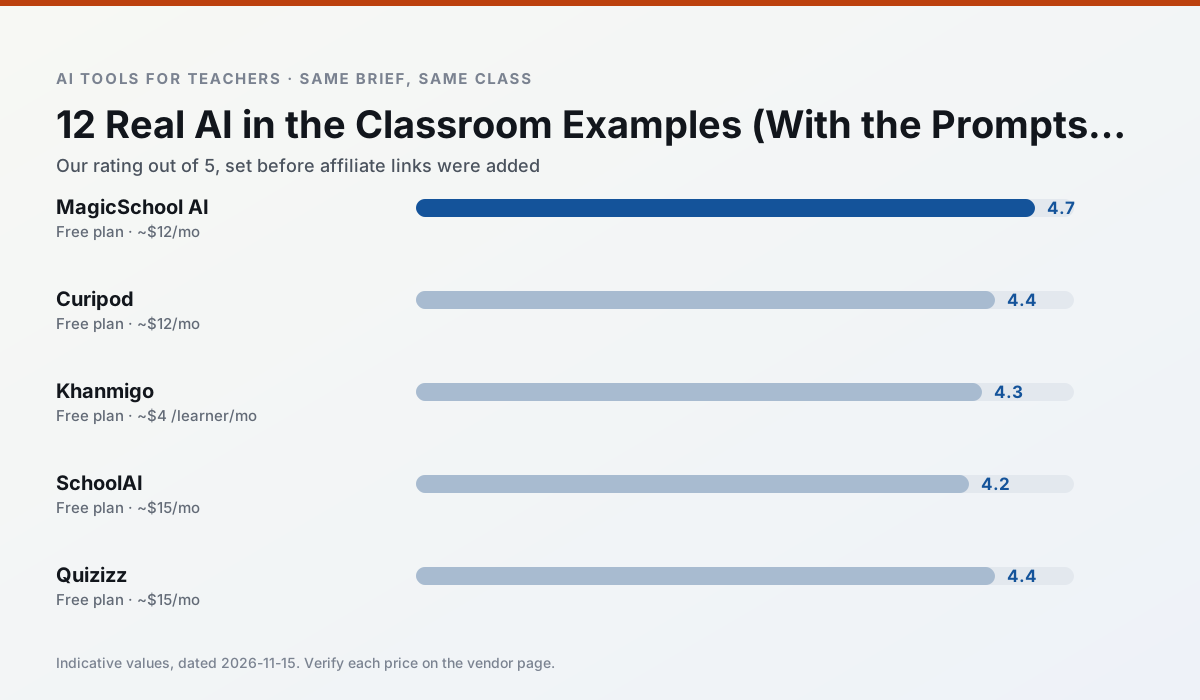
When first period drags its feet, getting them into the room with a quick retrieval task is half the battle. Curipod handles this by turning a standard topic into an interactive slide deck in about two minutes. You type in a concept, the AI generates a few poll questions and drawing prompts, and students log in without needing an account. The engagement is immediate because kids like seeing their anonymous guesses pop up on the smartboard. Our ranking puts Curipod as the best free option, though the free tier restricts how many lessons you can build per month.
The first time I used it, I made the mistake of leaving the open-text response box unfiltered and unmoderated on the main screen. A student decided to test the bounds of anonymity with a remark about my grading habits that I certainly would not repeat in front of a parent. Now, I stick to multiple-choice retrieval checks or word clouds for the live screen, and save the open-ended prompts for tools where student identities are tied to a proper account like SchoolAI.
Three Reading Levels from One Source Text
If you want to convince a cynical department chair that AI isn't just a glorified cheating machine, you don't show them a lesson plan. You show them a text set. Diffit takes any URL, PDF, or block of copied text and spits out three distinct reading levels while keeping the core concepts intact. It also generates vocabulary lists and comprehension questions that actually match the adjusted text.
Prompt (Diffit):
"Take this excerpt on the Louisiana Purchase from our textbook,
level it for 6th grade, 8th grade, and 10th grade, and generate
three open-ended reading comprehension questions for each level."

First pass from tool:
The tool returned three cleanly formatted text blocks with matching questions.
However, the 6th-grade version stripped out the word "acquisition" entirely,
and one of the questions on the 10th-grade tier asked about an event
that was not actually in the source text.

Two edits that made it usable:
1. Added a constraint to the prompt asking the AI to keep key domain-specific
vocabulary while glossing them in context.
2. Deleted the hallucinated question and swapped it for one that forced
students to cite evidence from the newly leveled paragraph.
That workflow takes about five minutes. It saves an hour of scrambling at the copy machine and gives every kid in a mixed-ability room a fighting chance at the same primary source. It is the core reason our overall pick for daily use, MagicSchool AI, sits in every teacher's bookmark bar alongside Diffit. MagicSchool offers the widest library of purpose-built template generators for everything from IEP goal generation to math word problems, making it our top choice for daily tasks.
Feedback That Students Can Actually Read
Writing marginalia on thirty essays at midnight is a fast track to burnout. SchoolAI and Khanmigo both attempt to bridge this gap, but they do it differently. Khanmigo acts as an education-first tutor designed by a nonprofit, leaning heavily on Socratic questioning rather than just giving away the answer. It is brilliant for math scaffolding, though your school will need to check regional availability and student account setups. SchoolAI, on the other hand, gives teachers a live dashboard to monitor what students are typing to the AI workspace in real time. It is built for district-level safety and quick setup, making it our preferred choice for schools and districts that need heavy audit logs and safeguarding defaults.
When using these platforms to draft feedback, you have to watch out for the cheerleading trap. AI loves to tell students their writing is wonderful even when their thesis statement has completely collapsed. You have to prompt the tool to provide two specific strengths, one concrete next step, and tie every single comment directly to your posted rubric. The tool drafts the raw material, but you are still the one who decides what is fair and what needs rewriting.
Turning Low-Stakes Practice Into Data
Quizizz remains a staple because kids already know the interface and it runs smoothly on older Chromebooks that choke on heavy video streaming. The AI quiz generator lets you paste in an article and instantly spin up a twenty-question review game. The trap here is question quality. Left to its own devices, the AI will pull trivial proper nouns from the text rather than conceptual understanding, asking questions like "What year did the general cross the river?" instead of "Why was the river crossing a turning point?" You have to curate the question bank before you hit play, stripping out the fluff so the live game actually measures learning instead of short-term memory scanning.
If you are trying to figure out where to start without blowing your budget or your prep period, read our full breakdown of the best AI tools for teachers in 2026. The key is picking one workflow to automate this week, whether that is leveling a text with Diffit or building a warm-up with MagicSchool. Do not try to overhaul your entire curriculum on a Tuesday afternoon. Master one tool, fix its blind spots, and save your energy for the twenty-eight kids currently trying to see if a paper airplane can reach the ceiling.
FAQ
What is a simple AI example a teacher can try tomorrow?
Take one article you already teach and ask for three levelled versions with identical questions. It takes four minutes and does not touch student data.
Do these examples need a subscription?
No. All of them work on free tiers, though the levelling task uses more quota than a single planning prompt.
Sources and further reading
- U.S. Department of Education, Student Privacy (PTAC): FERPA and edtech vendor guidance, the reference we check privacy claims against
- Common Sense Education privacy ratings: independent vendor evaluations
- CAST UDL Guidelines: accessibility and learner variability, used when judging accommodation tools
Side by side
Comparison table
Ratings reflect our classroom workflow, not vendor claims. Prices are indicative; verify on the vendor site.
| Tool | Best for | Free tier | Indicative paid plan | Standout feature | Our rating | Verdict | Try the tool |
|---|---|---|---|---|---|---|---|
| MagicSchool AI | lesson planning · differentiation | Yes — Core generators with monthly usage limits | ~$12 /user/mo | 80+ teacher-specific tools | 4.7 / 5 | Top pick | Try free |
| Curipod | formative assessment · exit tickets | Yes — Limited lessons per month | ~$12 /user/mo | Live polls and word clouds | 4.4 / 5 | Strong option | Try free |
| Khanmigo | math practice · student tutoring | Yes — US teacher accounts, subject to eligibility | ~$4 /learner/mo | Socratic tutoring rather than answers | 4.3 / 5 | Strong option | Try free |
| SchoolAI | student-safe AI · differentiated instruction | Yes — Limited seats | ~$15 /user/mo | Teacher-monitored student chats | 4.2 / 5 | Strong option | Try free |
| Quizizz | quiz generation · formative assessment | Yes — Core quiz creation | ~$15 /user/mo | AI question generator | 4.4 / 5 | Strong option | Try free |
| Diffit | differentiated instruction · reading intervention | Yes — Limited generations per month | ~$15 /user/mo | Lexile-style leveling | 4.6 / 5 | Top pick | Try free |
Match your situation
Best for X
Different jobs need different tools. Here is what we would open first in each case.
A large library of teacher-specific AI generators in one dashboard.
Turn a topic into an interactive, student-response lesson in minutes.
Tutor-style AI from a nonprofit education platform, with teacher tools.
School-safe AI workspace with teacher-controlled student spaces.
Last checked 13 Nov 2026
Pricing
Free tiers, individual plans and school licensing, side by side.
| Tool | Free plan | Individual / paid | School & district | Billing note | Verify |
|---|---|---|---|---|---|
| MagicSchool AI | $0 — Core generators with monthly usage limits | ~$12 /user/mo | Custom quote | Indicative — verify on vendor site | Vendor |
| Curipod | $0 — Limited lessons per month | ~$12 /user/mo | Custom quote | Indicative — verify on vendor site | Vendor |
| Khanmigo | $0 — US teacher accounts, subject to eligibility | ~$4 /learner/mo | Custom quote | Indicative — verify on vendor site | Vendor |
| SchoolAI | $0 — Limited seats | ~$15 /user/mo | Custom quote | Indicative — verify on vendor site | Vendor |
| Quizizz | $0 — Core quiz creation | ~$15 /user/mo | Custom quote | Indicative — verify on vendor site | Vendor |
| Diffit | $0 — Limited generations per month | ~$15 /user/mo | Custom quote | Indicative — verify on vendor site | Vendor |
Editorial rule: pricing is re-checked every 2–3 months and the top 50 pages are refreshed every 6 months. See our funding policy.
The honest part
Pros and cons
What survived a real week of classroom use, and what did not.
Pros
- Widest purpose-built template library
- Strong free tier for individual teachers
- Fast to learn with almost no prompting skill
Cons
- Outputs still need standards review
- Best features sit behind the paid tier
- District approval can be slow
Pros
- High student engagement out of the box
- Great for quick checks for understanding
- No student accounts required for basic use
Cons
- Focused on delivery, not planning
- Requires reliable classroom devices
- Free tier is restrictive
Pros
- Education-first design
- Strong nonprofit trust signal
- Good math scaffolding
Cons
- Availability varies by region
- Less useful for admin paperwork
- Requires student accounts for full value
Pros
- Designed for district approval
- Teacher visibility into student use
- Good safeguarding defaults
Cons
- Requires school-wide buy-in
- Less flexible than general LLMs
- Pricing is mostly quote-based
Pros
- Students already know the interface
- Good reporting
- Works on low-end devices
Cons
- Writing high-quality AI questions still needs review
- Gamification can distract
- Advanced analytics are paid
In the classroom
Use cases
Five concrete workflows, with the tool we would open for each one.
A warm-up that runs itself
One prompt, one live slide deck, four minutes of retrieval practice. The failure to watch for is a student typing something you would not say in front of a parent.
Recommended: MagicSchool AIThree reading levels of tonight's article
One vetted text, three versions, the same three questions. This is the example that converts sceptical colleagues fastest.
Recommended: CuripodA feedback pass a student can act on
Two strengths, one next step, tied to a rubric criterion. The tool drafts, the teacher decides what is fair.
Recommended: Khanmigo
Questions teachers ask us
FAQ
Direct answers, also published as FAQPage structured data for search and AI assistants.
What is a simple AI example a teacher can try tomorrow?
Do these examples need a subscription?
Sources & further reading
Our recommendation
Try MagicSchool AI free for using ai in the classroom
A large library of teacher-specific AI generators in one dashboard.
Some links on this page are affiliate links. We may earn a commission at no extra cost to you. Never enter student PII into a free consumer account.
Keep reading
Related comparisons in this cluster.
Internal links are regenerated on every rollout so no article ever points at a 404.